Solved New Graphics Card Has Shared system Memory available.

Teridot

New member
Local time
9:58 AM
Messages
3
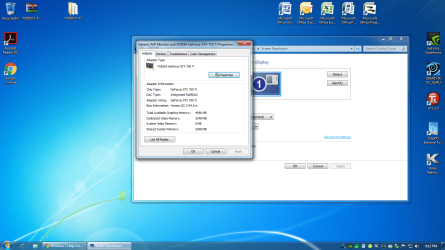
I Just installed a new graphics Card (GIGABYTE GeForce GTX 750 Ti 2GB WINDFORCE 2X OC EDITION) on windows 7 64 bit with 16 GB system memory. I installed the 4 GB Video card to free up system ram from integrated graphics. Why does it show under advanced display setting shared system memory 2048?
I attached picture as well.
 

Attachments
  • memory.png
    memory.png
    1 MB · Views: 13

My Computer

Computer type
PC/Desktop
OS
64 bit
CPU
I7 4770K
Motherboard
Gigabyte G1 sniper M5
Memory
Corsoir 16GB
Graphics Card(s)
Intel Onboard
Hard Drives
Intel solid state disk 250 GB
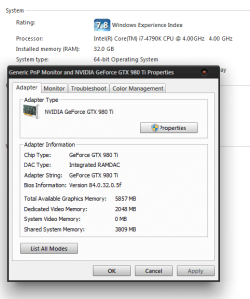
That is normal and is not your RAM but your card's VRAM, unless you see "Shared" in the location where mine says 32GB (system RAM) then you have no issues.

Hope this clears it up for you, you might want to also check in your device manager to make sure you have also disabled the on-board GPU in the BIOS.
 

Attachments

  • shared ram.PNG
    shared ram.PNG
    37.9 KB · Views: 22

My Computer

Computer type
PC/Desktop
Computer Manufacturer/Model Number
Custom
OS
10 Pro x64
CPU
Ryzen 9 3900X
Motherboard
Asrock x370 Tachi
Memory
64GB(4x16GB) DDR4
Graphics Card(s)
EVGA 1080ti FTW3
Sound Card
ASUS Xonar Essence STX (V4 Bursons), ODAC rev B, NFB-11, O2
Monitor(s) Displays
3xASUS PB278Q/R, Optoma HD142X
Screen Resolution
3x1440p, 1080p
Hard Drives
512GB 850 EVO(OS, Programs)
4TB (Movies)
3TB (Downloads)
3TB (Programs)
1TB HDD (Games)
2x6TB R1 (videos)
PSU
AX760
Case
Fractal Define R5
Cooling
NH-D15S
Keyboard
Massdrop Ctrl with Box Navy's
Mouse
G903, Alioth XXL Mat
Internet Speed
280/40
Antivirus
MBAM, ESET
Browser
Canary 64 Bit
Other Info
I also own a Thinkpad P50 Xeon 4K, X220T, X1C5
I did Disable onboard graphics in bios. Sounds like everything is good. Thank you for the reply.
 

My Computer

Computer type
PC/Desktop
OS
64 bit
CPU
I7 4770K
Motherboard
Gigabyte G1 sniper M5
Memory
Corsoir 16GB
Graphics Card(s)
Intel Onboard
Hard Drives
Intel solid state disk 250 GB
Look here too, and I don`t know what to trust in Windows 7, it`s always said DX10 when we know we are using DX11 :)

That snip you guys have posted does not even show the correct amount of dedicated video memory, and mine shows the same. (strange)

It all comes down to your particular motherboard, they all use memory differently.
 

Attachments

  • Capture.JPG
    Capture.JPG
    24.1 KB · Views: 11

My Computer

Computer type
PC/Desktop
Computer Manufacturer/Model Number
Skylake Special #666
OS
Windows 10 Pro x64
CPU
Intel Core i7 6700K
Motherboard
Asus Sabertooth Z170 Mark 1
Memory
GSkill TridentZ RGB 16GB 3600 16-16-16-36
Graphics Card(s)
EVGA GTX 980 Ti SC x2
Sound Card
Realtek High Definition
Monitor(s) Displays
AOC G2460PG
Screen Resolution
1920 x 1080 144Hz
Hard Drives
Samsung 860 Pro 256GB, Seagate Barracuda 4TB x2
PSU
EVGA 1000 P2, EVGA White Custom Braided Cables
Case
Corsair Vengeance C70 Gunmetal Black
Cooling
Corsair H100i v2, Corsair ML120 x2, Thermal Grizzly Kryonaut
Keyboard
Logitech G910 Orion Spectrum
Mouse
Logitech G700s
Internet Speed
Verizon Fios Quantum Gateway 75/75
Antivirus
Windows Defender, Malwarebytes Free 3.8.3
Browser
Chrome
Other Info
Corsair SP120 x4, LG Blu-ray Drive, Durabrand HT-395 100 Watt Dolby Digital Amp, Corsair H2100 Wireless 7.1 Headset
Back
Top