
New increased background CPU activity

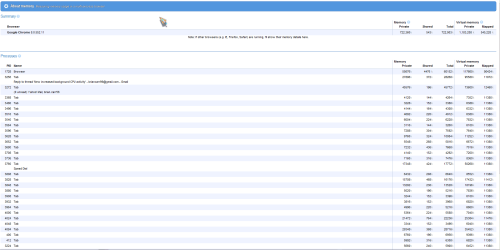
thats why i suggested looking with the process monitor because it will show every process what you are using, in your screen shot is a summary, the system idle process does not use power it is telling you how much is available what is free not being used. here are some of my processors

Holy Balls, all those Chrome processes can't be good.

well there is a reason for that chrome uses individual processors so if there is a crash the culprit processor crashes only. so not crashing the whole browser instead.
It's an operating system. I say this because Chrome has a feature that's extremely desirable for a cloud computing user environment: multiprocessing, which is designed to shut off troublesome browser bugs without shutting down the browser itself.

Multiprocessing or multitasking explains how modern computer operating systems -- especially Linux -- handle so much data without constantly crashing. Tasks are handled simultaneously, parsed into chunks that can be crunched in parallel. And when data can't be crunched? Quit the process instead of the OS. On a Mac, this is called "Force Quit." (Not sure what to call the Windows equivalent.)

Here's my point: Cloud computing depends on transforming the Web into a giant operating system that possesses the security and stability we demand from Windows, the Mac, Linux, and so on. No one expects this will happen soon; it's a process of gradual improvement. Chrome, with multiprocessing, appears to be a gradual improvement.
 

Attachments
  • chrome.PNG
    chrome.PNG
    99.5 KB · Views: 4
Last edited:

My Computer

Computer Manufacturer/Model Number
packard bell IXTREME M5722
OS
Operating System : Windows 7 Home Premium Edition 6.01.7600 SP1 (x64)
CPU
Processor : Intel Core 2 Quad Q8300 @ 2500 MHz
Motherboard
Mainboard : Packard Bell (Acer EG43M )
Memory
Physical Memory :8GB Corsair4x 2GB 800MHz C5 DDR2
Graphics Card(s)
Video Card : XFX 6700 AMD
Monitor(s) Displays
Maestro 234DL - BenQ V2220 - BenQ VW2420H
Screen Resolution
Current Display :1920x1080p pixels at 60 Hz in HD LED
Hard Drives
Hard Disks : WDC (1000 GB)
Drive C: (Hard Disk) : 428 GB available on 491 GB
Drive D: (Hard Disk) : 426 GB available on 492 GB
SAMSUNG spinpoint HD103SJ 1000.2 GB
(X 2) KINGSTON SSD NOW V 30GB
PSU
XFX ProSeries 550W PSU
Case
PACKARD BELL IXTREME
Cooling
System Blower Current: 150mA Air Flow16CFM ;Akasa 90mm rear
Keyboard
Gigabyte Aivia K8100
Mouse
TRUST-Wireless Laser Mouse - Carbon edition MI-7770C
Internet Speed
TP-LINK > TL-WN951N / AV500 Gigabit Powerline Adapters
Browser
chrome dev
Other Info
EXTRA COOLING>(FAN CONTROLLER) PC Bay Cooler 3 x 40mm fans; Akasa AK-HD-BL Blue hard drive cooler 2 x 40 mm fan 4500 rpm 29.7 dBA
Bios> American Megatrends Inc.
Version : P01-A1
Date : 08/31/2009

ha ha thats good;) (the system idle process does not use anything like memory etc its there to tell you what you have in reserve of cpu in one term look at the Microsoft link i gave in a earlier post)

Hi Brian, the link I gave is a bit tongue in cheek :geek: . The article author's final comment sums it up:
"In other words, if the idle task is "chewing up 95 percent of the processor's cycles", that's normal: it simply means your CPU isn't working very hard on anything at the moment."

James
 

My Computer

OS
Win7U 64 RTM
CPU
Q9550
Motherboard
GA-EP45-UD3R
Memory
8GB Gskill
Graphics Card(s)
ASUS|EAH4850/HTDI/1GD3/A
Sound Card
xfi Plat
Monitor(s) Displays
Dell 2405fpw
Screen Resolution
1920x1200
Hard Drives
Seagate & WD sata Drives
PSU
Antec
Case
Antec
Keyboard
MS Natural Ergonomic 4000
Mouse
Logitech MX610 USB Cordless

ha ha thats good;) (the system idle process does not use anything like memory etc its there to tell you what you have in reserve of cpu in one term look at the Microsoft link i gave in a earlier post)

Hi Brian, the link I gave is a bit tongue in cheek :geek: . The article author's final comment sums it up:

"In other words, if the idle task is "chewing up 95 percent of the processor's cycles", that's normal: it simply means your CPU isn't working very hard on anything at the moment."

James

i no mate thats one of the reasons why Philip started the thread its nothing of concern i have advised this.
 

My Computer

Computer Manufacturer/Model Number
packard bell IXTREME M5722
OS
Operating System : Windows 7 Home Premium Edition 6.01.7600 SP1 (x64)
CPU
Processor : Intel Core 2 Quad Q8300 @ 2500 MHz
Motherboard
Mainboard : Packard Bell (Acer EG43M )
Memory
Physical Memory :8GB Corsair4x 2GB 800MHz C5 DDR2
Graphics Card(s)
Video Card : XFX 6700 AMD
Monitor(s) Displays
Maestro 234DL - BenQ V2220 - BenQ VW2420H
Screen Resolution
Current Display :1920x1080p pixels at 60 Hz in HD LED
Hard Drives
Hard Disks : WDC (1000 GB)
Drive C: (Hard Disk) : 428 GB available on 491 GB
Drive D: (Hard Disk) : 426 GB available on 492 GB
SAMSUNG spinpoint HD103SJ 1000.2 GB
(X 2) KINGSTON SSD NOW V 30GB
PSU
XFX ProSeries 550W PSU
Case
PACKARD BELL IXTREME
Cooling
System Blower Current: 150mA Air Flow16CFM ;Akasa 90mm rear
Keyboard
Gigabyte Aivia K8100
Mouse
TRUST-Wireless Laser Mouse - Carbon edition MI-7770C
Internet Speed
TP-LINK > TL-WN951N / AV500 Gigabit Powerline Adapters
Browser
chrome dev
Other Info
EXTRA COOLING>(FAN CONTROLLER) PC Bay Cooler 3 x 40mm fans; Akasa AK-HD-BL Blue hard drive cooler 2 x 40 mm fan 4500 rpm 29.7 dBA
Bios> American Megatrends Inc.
Version : P01-A1
Date : 08/31/2009
i have processors using lots of cpu the main ones are security software, video, music, etc and most of inportance that should be checked is for a virus looking at the processor and establishing whether or not it should be there.
 

My Computer

Computer Manufacturer/Model Number
packard bell IXTREME M5722
OS
Operating System : Windows 7 Home Premium Edition 6.01.7600 SP1 (x64)
CPU
Processor : Intel Core 2 Quad Q8300 @ 2500 MHz
Motherboard
Mainboard : Packard Bell (Acer EG43M )
Memory
Physical Memory :8GB Corsair4x 2GB 800MHz C5 DDR2
Graphics Card(s)
Video Card : XFX 6700 AMD
Monitor(s) Displays
Maestro 234DL - BenQ V2220 - BenQ VW2420H
Screen Resolution
Current Display :1920x1080p pixels at 60 Hz in HD LED
Hard Drives
Hard Disks : WDC (1000 GB)
Drive C: (Hard Disk) : 428 GB available on 491 GB
Drive D: (Hard Disk) : 426 GB available on 492 GB
SAMSUNG spinpoint HD103SJ 1000.2 GB
(X 2) KINGSTON SSD NOW V 30GB
PSU
XFX ProSeries 550W PSU
Case
PACKARD BELL IXTREME
Cooling
System Blower Current: 150mA Air Flow16CFM ;Akasa 90mm rear
Keyboard
Gigabyte Aivia K8100
Mouse
TRUST-Wireless Laser Mouse - Carbon edition MI-7770C
Internet Speed
TP-LINK > TL-WN951N / AV500 Gigabit Powerline Adapters
Browser
chrome dev
Other Info
EXTRA COOLING>(FAN CONTROLLER) PC Bay Cooler 3 x 40mm fans; Akasa AK-HD-BL Blue hard drive cooler 2 x 40 mm fan 4500 rpm 29.7 dBA
Bios> American Megatrends Inc.
Version : P01-A1
Date : 08/31/2009
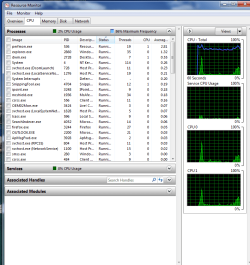
Hi guys - realise this was originated some time ago, but I seem to have struck the same problem as the original poster [Philip] - have taken a screen grab of the activity in Resource Monitor and as you'll see, CPU activity [on the face of it] seems to be fairly low, but there seems to be a blue line indicating more-or-less constant activity around the 80-90% level.

Presumably this could that something is taking up a lot of capacity in the background, but I'm not a very 'techie' person [not at all, in fact :>], so if anyone could identify the culprit from this [below] would be much appreciated...
 

My Computer

Computer Manufacturer/Model Number
Dell XPS M1530
OS
Windows 7 Home Premium 64bit
attachment this time!

Resources_Capture_1.PNG
 
Last edited by a moderator:

My Computer

Computer Manufacturer/Model Number
Dell XPS M1530
OS
Windows 7 Home Premium 64bit
Hi guys - realise this was originated some time ago, but I seem to have struck the same problem as the original poster [Philip] - have taken a screen grab of the activity in Resource Monitor and as you'll see, CPU activity [on the face of it] seems to be fairly low, but there seems to be a blue line indicating more-or-less constant activity around the 80-90% level.

Presumably this could that something is taking up a lot of capacity in the background, but I'm not a very 'techie' person [not at all, in fact :>], so if anyone could identify the culprit from this [below] would be much appreciated...

The Blue line is not activity but is a power saving feature built into the processor. The blue line represents the processor down clocking itself to save power when there is little to no work for it. You can configure this feature in Power Management > Change Plan settings > Change advance power settings > Processor power management.
 

My Computer

Computer type
PC/Desktop
Computer Manufacturer/Model Number
Alienware Aurora ALX R4
OS
Windows 10 Pro (x64)
CPU
Intel Core i7-3930K (3.2GHz - 4.5GHz)
Motherboard
Alienware Aurora-R4 x79
Memory
4x Samsung 4GB PC3-12800 DDR3 (16GB 1600MHz)
Graphics Card(s)
Nvidia Geforce GTX 690
Sound Card
SteelSeries Siberia Elite
Monitor(s) Displays
Dell UltraSharp U3011
Screen Resolution
2560x1600
Hard Drives
Samsung 850 Pro 256 GB, Seagate 1TB Desktop Hybrid HDD, 2x Western Digital 4TB Green HDD
PSU
875W Some Dell PSU <.<
Case
Alienware Aurora ALX
Cooling
Custom Liquid Cooling (EK CPU & GPU blocks) dual EK 480RAD
Keyboard
Logitech G710+ Mechanical
Mouse
Logitech G700s
Internet Speed
Verizon Fios (50 mbps average)
Other Info
Server: Intel NUC D54250WYK: i5-4250U, 16GB, 256 GB mSATA, Windows Server 2012 R2
HI, thanks for this LogicE; however the machine stills seems to have something constantly running in the background [& the pc is still running at least 60% slower than normal] are there any other obvious/likely culprits?

Thanks
A
 

My Computer

Computer Manufacturer/Model Number
Dell XPS M1530
OS
Windows 7 Home Premium 64bit
Ashfeld if you are having a computer problem I would suggest starting a new trend. Reason, tagging on the tail end of a very old trend will get lost.
 

My Computer

Computer type
PC/Desktop
Computer Manufacturer/Model Number
Home made Desktop
OS
Windows 10 Pro. 64/ version 1709 Windows 7 Pro/64
CPU
Intel i7-6800K @ 4.3
Motherboard
ASUS X-99 Deluxe II
Memory
Corsair Platinum 16 gig @2400
Graphics Card(s)
EVGA GTX 1070 OC
Monitor(s) Displays
Asus 27" LED LCD/VE278Q
Screen Resolution
1920-1080 or 1280-720 HDMI
Hard Drives
INTEL SSD 730-240 Gb Sata 3.0/
PSU
EVGA Platium 1200W
Case
Phanteks Luxe Tempered Glass 8 fans/ one radiator
Cooling
XSPC/ Water Cooled CPU
Keyboard
Das 4 Professional
Mouse
Logitech M705/MX Anywhere 2-S
Internet Speed
100 mbits
Antivirus
Microsoft Security Essentials/ Malwarebytes Premium 3.0/ SAS
Browser
I.E. 11 default/Firefox/ ISP Time Warner Cable/Spectrum
Other Info
LG BluRay Burner/
Sound system-KLipsch-THX/
Icy Dock ssd Hot Swap bays.
Back
Top