chriskay301
New member
- Local time
- 11:41 PM
- Messages
- 5
I just bought this laptop.
Amazon.com: Samsung Series 9 NP900X1A-A01US 11.6-Inch Laptop (Black): Computers & Accessories
I know the specs aren't amazing, and I can't expect the performance I get from my built desktop, but I primarily bought this for something portable for school.
Anyway, took it out of the box, started it up, everything worked great. Installed two programs (chrome and Avast), restarted after installs and played with it some.
Then I shut it down to let it charged. Turned it back on and it freezes within a minute or two after startup everytime, works fine in Safe Mode.
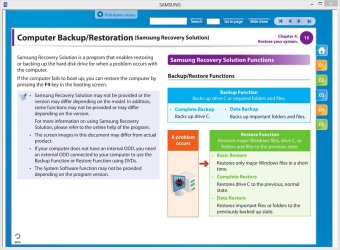
I would try a restore, but never created a restore point as soon as I bought it, silly me.
Any ideas?
Amazon.com: Samsung Series 9 NP900X1A-A01US 11.6-Inch Laptop (Black): Computers & Accessories
I know the specs aren't amazing, and I can't expect the performance I get from my built desktop, but I primarily bought this for something portable for school.
Anyway, took it out of the box, started it up, everything worked great. Installed two programs (chrome and Avast), restarted after installs and played with it some.
Then I shut it down to let it charged. Turned it back on and it freezes within a minute or two after startup everytime, works fine in Safe Mode.
I would try a restore, but never created a restore point as soon as I bought it, silly me.
Any ideas?
My Computer
At a glance
Windows 7 Ultimate 64 biti5 - 2500k @ 4ghz2x4GB G.Skill Sniper 12800 DDR3 Dual ChannelASUS Geforce GTX 560 Ti
- OS
- Windows 7 Ultimate 64 bit
- CPU
- i5 - 2500k @ 4ghz
- Motherboard
- Asus P8P67 Deluxe
- Memory
- 2x4GB G.Skill Sniper 12800 DDR3 Dual Channel
- Graphics Card(s)
- ASUS Geforce GTX 560 Ti
- Sound Card
- On-Board
- Monitor(s) Displays
- Acer 22" LCD
- Hard Drives
- Intel SSD 80GB (OS Drive)
Seagate Barracuda 750GB
WD 1TB (External Enclosure)
- PSU
- Corsair HX750
- Case
- NZXT Phantom
- Cooling
- Noctua NH-C14