

We’ve probably all gone through this before: you do a search for something, and the results just don’t seem to be related to what you were looking for.
It’s definitely not what we want to see happen, and we try to prevent it in a number of ways. For example, if you spell something wrong, we have systems to detect those misspellings and provide proper spelling predictions, so you can find web pages and information that match the words you were really searching for. We also continue to make improvements to our underlying language understanding systems in Search, so even if you don’t phrase something exactly as it’s written online, we can still understand the words and concepts in a way that makes sure you can find a good match.
But these systems don’t always work perfectly, and sometimes, there just isn’t information available on the web that matches what you typed in.
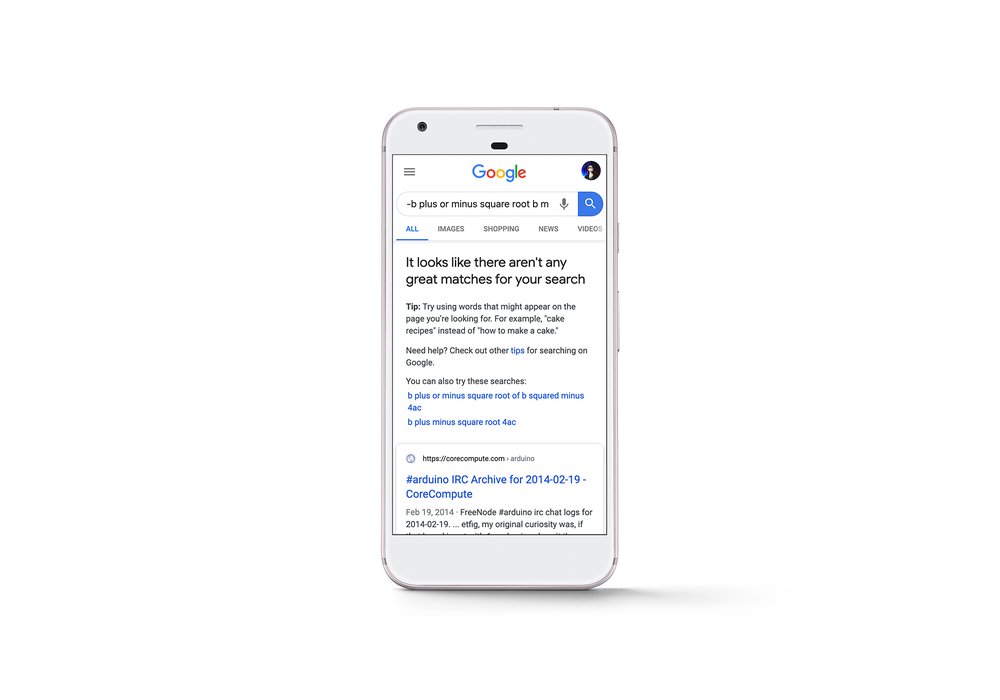
Starting today in the U.S., we’re rolling out a new message that lets you know when Google hasn’t been able to find anything that matches your search particularly well. While you can still go through the results to see for yourself if they’re helpful, the message is a signal that we probably haven’t found what you’re looking for. When possible, the feature will also provide some alternative searches as well as tips on how you could reformulate your query to better find the information you seek.
This feature shouldn’t show up too often-- after all, there’s usually something helpful we can find! But when it does, we hope it helps save you some time and gets you to the information you wanted more quickly. If it turns out that what you were hoping to find just isn’t on the web at all, you can always check back later to see if anyone has created a new article or posted new information that you’ll find helpful. And in the meantime, there’s always more to explore.
Source: Getting to great matches in Google Search
My Computer
At a glance
64-bit Windows 11 Pro for WorkstationsIntel i7-8700K OC'd to 5 GHz64 GB (4x16GB) G.SKILL TridentZ RGB DDR4 3600...ASUS ROG-STRIX-GTX1080TI-O11G-GAMING
- Computer type
- PC/Desktop
- Computer Manufacturer/Model Number
- Self built custom
- OS
- 64-bit Windows 11 Pro for Workstations
- CPU
- Intel i7-8700K OC'd to 5 GHz
- Motherboard
- ASUS ROG Maximus XI Formula Z390
- Memory
- 64 GB (4x16GB) G.SKILL TridentZ RGB DDR4 3600 MHz
- Graphics Card(s)
- ASUS ROG-STRIX-GTX1080TI-O11G-GAMING
- Sound Card
- Integrated
- Monitor(s) Displays
- 2 x Samsung Odyssey G7 27"
- Screen Resolution
- 2560x1440
- Hard Drives
- 1TB Samsung 990 PRO M.2,
4TB Samsung 990 PRO PRO M.2,
TerraMaster F8 SSD Plus NAS
- PSU
- Seasonic Prime Titanium 850W
- Case
- Thermaltake Core P3
- Cooling
- Corsair Hydro H115i
- Keyboard
- Logitech wireless K800
- Mouse
- Logitech MX Master 4
- Internet Speed
- 2 Gb/s Download and 100 Mb/s Upload
- Antivirus
- Malwarebyte Anti-Malware Premium
- Browser
- Google Chrome
- Other Info
- Logitech Z625 speaker system,
Logitech BRIO 4K Pro webcam,
HP Color LaserJet Pro MFP M477fdn,
APC SMART-UPS RT 1000 XL - SURT1000XLI,
Galaxy S23 Plus phone

