New router - 1 laptop will not connect on startup ?

trinaz

New member
Member
VIP
Local time
6:29 PM
Messages
477
Location
Phoenix
Have a home network with wireless printer and 2 laptops and other wired devices connected. On the downstairs laptop (Win XP Pro SP3) when I turn it on...I always recieve an ip address of 168.254.x.x ?

Relativly small 2 story house (1500sqft) Router is upstairs in office...one laptop is downstairs.

The manual says "Note: If your computer’s IP address is shown as 169.254.x.x: Windows and Mac OS generate and assign an IP address if the computer cannot reach a DHCP server. These autogenerated addresses are in subnet 169.254.x.x. If your IP address is in this range, check the connection from the computer to the router, and reboot your computer."

If I repair/refresh the adapter once or twice...then the correct ip is found ?

However...the other 3 wireless devices have no problems logging on at startup ?

Any suggestions on how to eliminate the constant 192.168.x.x ip error on the one laptop ?

I have moved and rotated the router but same issues on this laptop...?...my old (circa 2006 Netgear WGT 624) connected with no problems...Why would my new and improved WNR be having issues...supposed to be an "extended range router"

Do the router signals/waves bounce off objects like radio waves...or do they travel in relatively straight lines ?

Would assigning a static ip to this ( and/or all 7 devices on the network ) eliminate this issue ? Also...channel on my WNR3500v1 is set to auto...would designating a channel help with this issue ?
 

My Computer My Computer

At a glance

Windows 7 Pro 64bit SP1AMD FX-6100 Six-Core Processor2ea Corsair-1333MHz-PC3-10666-240-pin-CMX4GX3...NVIDIA GeForce GT 630 - 1023MB (EVGA)
Computer type
PC/Desktop
Computer Manufacturer/Model Number
Self built
OS
Windows 7 Pro 64bit SP1
CPU
AMD FX-6100 Six-Core Processor
Motherboard
M5A78L-M LX PLUS
Memory
2ea Corsair-1333MHz-PC3-10666-240-pin-CMX4GX3M1A1333C9
Graphics Card(s)
NVIDIA GeForce GT 630 - 1023MB (EVGA)
Sound Card
OnBoard Via High Def Audio
Monitor(s) Displays
Samsung 204B main - ASUS VS228 secondary
Screen Resolution
1920x1080 main - 1920x1080 secondary
Hard Drives
Samsung SSD 840 128GB Win7 Pro 64bit - Western Digital WDC 465GB - Seagate 640GB Sata B/U - Maxtor 500GB Sata B/U - Maxtor 200GB Sata
PSU
Antec 650 watt
Cooling
Multiple case fans
Keyboard
MS USB dual Wireless Keyboard - IntelliType Pro
Mouse
MS USB dual Wireless Mouse - IntelliPoint
Internet Speed
Cox Cable
Antivirus
Bitdefender IS 2014
Browser
FireFox Primary - IE 11
Other Info
Hauppaguge Win TV HVR-1250 (Model 22xxx, Hybrid ATSC/QAM)
Samsung HD103SI USB 1TB Desktop Drive - Backup & Disk Image storage

My Computer My Computer

At a glance

Windows 7 7600 1 X64AMD PHENOM II X 550 PROCESSOR 3.1 ghzCorsair 4 gig ddr 3ati radeon 3300
Computer Manufacturer/Model Number
Custom Build
OS
Windows 7 7600 1 X64
CPU
AMD PHENOM II X 550 PROCESSOR 3.1 ghz
Motherboard
ASUS M4A78-TE
Memory
Corsair 4 gig ddr 3
Graphics Card(s)
ati radeon 3300
Sound Card
ati hd
Monitor(s) Displays
syncmaster 2033sw
Screen Resolution
1600X900 60 hz refresh
Hard Drives
twin_seagates SATA's 1 TB & 500 Gig, hitachi_slimline 160 gig
PSU
antec_550 watt
Case
cooler master GLite
Cooling
stock_heat sink
Internet Speed
20mbs up/ 1.5mbs down
Other Info
favorite child "stewie"
favorite dog "brian"
Sorry...but I don't understand the bulk of that post...except that the troubled laptop will not connect normally when I move it upstairs even at about 20 ft distance ?? I still get the 168.254.x.x when starting up ?

The laptop has a built in wireless adapter and I had no trouble with the older Netgear WGT 624.

Are you indicating it's something to do with the New router being an "N" series router ?

Thanks...TR
 

My Computer My Computer

At a glance

Windows 7 Pro 64bit SP1AMD FX-6100 Six-Core Processor2ea Corsair-1333MHz-PC3-10666-240-pin-CMX4GX3...NVIDIA GeForce GT 630 - 1023MB (EVGA)
Computer type
PC/Desktop
Computer Manufacturer/Model Number
Self built
OS
Windows 7 Pro 64bit SP1
CPU
AMD FX-6100 Six-Core Processor
Motherboard
M5A78L-M LX PLUS
Memory
2ea Corsair-1333MHz-PC3-10666-240-pin-CMX4GX3M1A1333C9
Graphics Card(s)
NVIDIA GeForce GT 630 - 1023MB (EVGA)
Sound Card
OnBoard Via High Def Audio
Monitor(s) Displays
Samsung 204B main - ASUS VS228 secondary
Screen Resolution
1920x1080 main - 1920x1080 secondary
Hard Drives
Samsung SSD 840 128GB Win7 Pro 64bit - Western Digital WDC 465GB - Seagate 640GB Sata B/U - Maxtor 500GB Sata B/U - Maxtor 200GB Sata
PSU
Antec 650 watt
Cooling
Multiple case fans
Keyboard
MS USB dual Wireless Keyboard - IntelliType Pro
Mouse
MS USB dual Wireless Mouse - IntelliPoint
Internet Speed
Cox Cable
Antivirus
Bitdefender IS 2014
Browser
FireFox Primary - IE 11
Other Info
Hauppaguge Win TV HVR-1250 (Model 22xxx, Hybrid ATSC/QAM)
Samsung HD103SI USB 1TB Desktop Drive - Backup & Disk Image storage
If you have an Ethernet connection on the laptop I'd consider using that to establish connectivity with your router and having it assign an IP via the DHCP service it has. Check your router's client table and see what IP it is using and assign it as a Static IP in the router then disconnect the Ethernet and disable it and assign the IP manually to your wireless adapter settings and you should be fine, sometimes connections are lazy and need help this usually sets things right.
 

My Computer My Computer

At a glance

Vista 64 Ultimate, Windows 7 64 Ultimate, Ubu...i7 975 3.3 GHz Extreme (Factory OC'd to 3.6 GHz)18 Gb Tri-Channel 1066ATI 5970 2048 Mb
Computer Manufacturer/Model Number
DELL XPS Studio 435T
OS
Vista 64 Ultimate, Windows 7 64 Ultimate, Ubuntu 9.10
CPU
i7 975 3.3 GHz Extreme (Factory OC'd to 3.6 GHz)
Motherboard
DELL provided
Memory
18 Gb Tri-Channel 1066
Graphics Card(s)
ATI 5970 2048 Mb
Sound Card
X-Fi Extreme Gamer
Monitor(s) Displays
Vizio 37" HD-TV
Screen Resolution
1920 x 1080
Hard Drives
1.5 Tb HDD
1.5 Tb HDD
2.0 Tb Network Drive
512 Gb Crucial SSD
PSU
DELL Provided 475 watts
Case
DELL
Cooling
3 fans
Keyboard
Logitech Performance K350 Wireless
Mouse
Logitech Performance MX Wireless
Internet Speed
3 Mb up 750 Kb down
Other Info
Bamboo Fun Tablet, Belkin N+ Wireless router, Pioneer Dolby System Wireless Headphones, Bose 5.1 Dolby Surround Sound System, LifeCam VX 3000 Webcam, Blu-Ray/Hi Def DVD +RW combo and Blu-ray +RW,l 15 in 1 media card reader, Logitech Rumblepad 2, Hauppauge 2250 DTV Tuner with MS Media Center Remote

Laptop:Alienware M17x, Q9100 CPU, 8Gb RAM, 1920x1200 WUXGA LCD driven by 4870's in CrossFireX, Bl
Specs

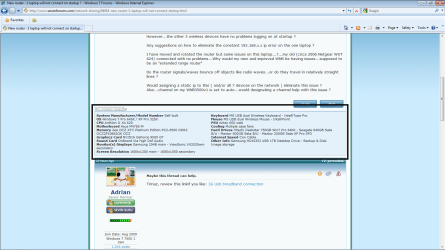
Trinaz, the laptop in question? Is it a dual boot? Your attached specs are confusing. Are these specs from the laptop in question?
Also, may we have the model of your router?
 

Attachments

  • specs.png
    specs.png
    57.4 KB · Views: 20

My Computer My Computer

At a glance

Windows 7 7600 1 X64AMD PHENOM II X 550 PROCESSOR 3.1 ghzCorsair 4 gig ddr 3ati radeon 3300
Computer Manufacturer/Model Number
Custom Build
OS
Windows 7 7600 1 X64
CPU
AMD PHENOM II X 550 PROCESSOR 3.1 ghz
Motherboard
ASUS M4A78-TE
Memory
Corsair 4 gig ddr 3
Graphics Card(s)
ati radeon 3300
Sound Card
ati hd
Monitor(s) Displays
syncmaster 2033sw
Screen Resolution
1600X900 60 hz refresh
Hard Drives
twin_seagates SATA's 1 TB & 500 Gig, hitachi_slimline 160 gig
PSU
antec_550 watt
Case
cooler master GLite
Cooling
stock_heat sink
Internet Speed
20mbs up/ 1.5mbs down
Other Info
favorite child "stewie"
favorite dog "brian"
Relativly small 2 story house (1500sqft) Router is upstairs in office...one laptop is downstairs.


Do the router signals/waves bounce off objects like radio waves...or do they travel in relatively straight lines ?

Would assigning a static ip to this ( and/or all 7 devices on the network ) eliminate this issue ? Also...channel on my WNR3500v1 is set to auto...would designating a channel help with this issue ?
Trinaz, depending where the hub router is located you are subject to radio interference from tv, fridge, walls etc. But if you had no problems or issues with the old router why switch?
 

My Computer My Computer

At a glance

Windows 7 7600 1 X64AMD PHENOM II X 550 PROCESSOR 3.1 ghzCorsair 4 gig ddr 3ati radeon 3300
Computer Manufacturer/Model Number
Custom Build
OS
Windows 7 7600 1 X64
CPU
AMD PHENOM II X 550 PROCESSOR 3.1 ghz
Motherboard
ASUS M4A78-TE
Memory
Corsair 4 gig ddr 3
Graphics Card(s)
ati radeon 3300
Sound Card
ati hd
Monitor(s) Displays
syncmaster 2033sw
Screen Resolution
1600X900 60 hz refresh
Hard Drives
twin_seagates SATA's 1 TB & 500 Gig, hitachi_slimline 160 gig
PSU
antec_550 watt
Case
cooler master GLite
Cooling
stock_heat sink
Internet Speed
20mbs up/ 1.5mbs down
Other Info
favorite child "stewie"
favorite dog "brian"
Trinaz, the laptop in question? Is it a dual boot? Your attached specs are confusing. Are these specs from the laptop in question?
Also, may we have the model of your router?

No..the laptop is XP Home Edition SP3....the XP Pro SP3 on my specs is my previous XP setup/drive..etc. I did not set up a traditional dual boot when I moved to Win 7...but can boot to either via bios settings in my desktop box.

The XP of this post is my stand alone laptop XP Home Edition SP3

Trinaz, depending where the hub router is located you are subject to radio interference from tv, fridge, walls etc. But if you had no problems or issues with the old router why switch?

My understanding was/is that the WNR3500v1 has a much faster wireless throughput than my old Netgear router and laptops have now. Laptops are older and have a 58mps max wireless adapter built in. I also bought 2 Netgear WNDA3100 USB Wireless N adapters that I was told would increase my laptop wireless throughput on the 2 laptops from a max 58mbs up to 108mbs ?

I have not connected and/or installed the software for the new USB N adapters yet.

Thanks...TR
 
Last edited:

My Computer My Computer

At a glance

Windows 7 Pro 64bit SP1AMD FX-6100 Six-Core Processor2ea Corsair-1333MHz-PC3-10666-240-pin-CMX4GX3...NVIDIA GeForce GT 630 - 1023MB (EVGA)
Computer type
PC/Desktop
Computer Manufacturer/Model Number
Self built
OS
Windows 7 Pro 64bit SP1
CPU
AMD FX-6100 Six-Core Processor
Motherboard
M5A78L-M LX PLUS
Memory
2ea Corsair-1333MHz-PC3-10666-240-pin-CMX4GX3M1A1333C9
Graphics Card(s)
NVIDIA GeForce GT 630 - 1023MB (EVGA)
Sound Card
OnBoard Via High Def Audio
Monitor(s) Displays
Samsung 204B main - ASUS VS228 secondary
Screen Resolution
1920x1080 main - 1920x1080 secondary
Hard Drives
Samsung SSD 840 128GB Win7 Pro 64bit - Western Digital WDC 465GB - Seagate 640GB Sata B/U - Maxtor 500GB Sata B/U - Maxtor 200GB Sata
PSU
Antec 650 watt
Cooling
Multiple case fans
Keyboard
MS USB dual Wireless Keyboard - IntelliType Pro
Mouse
MS USB dual Wireless Mouse - IntelliPoint
Internet Speed
Cox Cable
Antivirus
Bitdefender IS 2014
Browser
FireFox Primary - IE 11
Other Info
Hauppaguge Win TV HVR-1250 (Model 22xxx, Hybrid ATSC/QAM)
Samsung HD103SI USB 1TB Desktop Drive - Backup & Disk Image storage
In the for what it's worth catagory...got everything running fine now and at over twice the original speed of the problem laptop.

My laptop ( Toshiba M65-S909) came with a ton of Toshiba utilities and stuff...1 of these was a wireless utility called ConfigFree. Have always had occasional connection problems with this...but over all was helpful.

Decided to uninstall ConfigFree via Control panel.....install the new WNDA3100 USB Wireless N adapter's software...and then install/config the new usb adpater....smooth as can be and I've gone from 58mbs at best to a consistent 130mbs for on-line activity !!

Also...laptop connects/no drops/even before XP fully loads...from anywhere in the house...including back yard patio area...nice !

Strange that old Netgear WGT 624 would connect without issues...but the new WNR3500 had so much trouble with the ConfigFree software ?

Thanks to all the tried to help...

TR
 

My Computer My Computer

At a glance

Windows 7 Pro 64bit SP1AMD FX-6100 Six-Core Processor2ea Corsair-1333MHz-PC3-10666-240-pin-CMX4GX3...NVIDIA GeForce GT 630 - 1023MB (EVGA)
Computer type
PC/Desktop
Computer Manufacturer/Model Number
Self built
OS
Windows 7 Pro 64bit SP1
CPU
AMD FX-6100 Six-Core Processor
Motherboard
M5A78L-M LX PLUS
Memory
2ea Corsair-1333MHz-PC3-10666-240-pin-CMX4GX3M1A1333C9
Graphics Card(s)
NVIDIA GeForce GT 630 - 1023MB (EVGA)
Sound Card
OnBoard Via High Def Audio
Monitor(s) Displays
Samsung 204B main - ASUS VS228 secondary
Screen Resolution
1920x1080 main - 1920x1080 secondary
Hard Drives
Samsung SSD 840 128GB Win7 Pro 64bit - Western Digital WDC 465GB - Seagate 640GB Sata B/U - Maxtor 500GB Sata B/U - Maxtor 200GB Sata
PSU
Antec 650 watt
Cooling
Multiple case fans
Keyboard
MS USB dual Wireless Keyboard - IntelliType Pro
Mouse
MS USB dual Wireless Mouse - IntelliPoint
Internet Speed
Cox Cable
Antivirus
Bitdefender IS 2014
Browser
FireFox Primary - IE 11
Other Info
Hauppaguge Win TV HVR-1250 (Model 22xxx, Hybrid ATSC/QAM)
Samsung HD103SI USB 1TB Desktop Drive - Backup & Disk Image storage
1 Win 7 desktop will not allow incoming sharing ?

Ok...have tried everything I can think of and could find to troubleshoot in this group.

I have a network at home ( not a Win 7 "Homegroup"... problem machine was previously in it's own HomeGroup and that was discussed & removed in the following post:
http://www.sevenforums.com/network-sharing/93853-cant-leave-unwanted-homegroup.html#post811038 )

Now prior to removing the HomeGroup from this one Win 7 Pro desktop (MARYANN-PC )...I could access all network places...including MARYANN-PC...from any PC/laptop in the network.

After removing the one problem desktop (MARYANN-PC) from the inadvertent and not wanted "HomeGroup" only on MARYANN-PC via the above forum link...I now can access all PC's/laptops..printers...etc from MARYANN-PC...but can not create any incoming connections to MaryAnn-PC from any of the other Network computers ?

I always get the attached manetwork.jpg error when trying to connect in-bound PC's/shared folders on MARYANN-PC from all other pc's/laptops ?

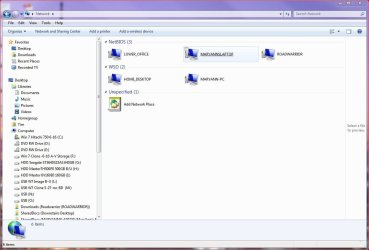
Here's a shot of the entire network in attached allnetwork.jpg. The NetBIOS machines are XP Pro SP3 and/or XP Home Editions SP3 machines.

Have checked line by line the permissions on both HOME_DESKTOP and MARYANN-PC (both Win 7 Pro machines)...and they are exactly the same as far as I can tell ?

Again I can access all shared PC folders from/outward MARYANN-PC...but can not access into the shared files/folders on MARYANN-PC..always get the attached error manetwork.jpg.

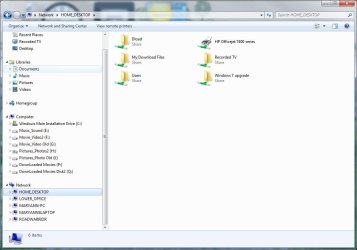
Here's the shared folders on MARYANN-PC jpg: ma.jpg attached

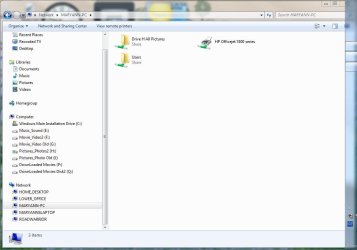
I can access all shared files from MARYANN-PC to/on other machines as: maryann-pc.jpg attahced...

can not access shared folders/files on MARYANN-PC from any machines ??

Can ping MARYANN-PC via name or IP address from all other machines ??

Please help if you can on what I am missing in MARYANN-PC's setup and or my home network setup ?

Thanks...Tim
 

Attachments

  • manetwork.jpg
    manetwork.jpg
    21.7 KB · Views: 7
  • allnetwork.jpg
    allnetwork.jpg
    83.8 KB · Views: 10
  • ma.jpg
    ma.jpg
    59.6 KB · Views: 10
  • maryann-pc.jpg
    maryann-pc.jpg
    65.1 KB · Views: 12
Last edited:

My Computer My Computer

At a glance

Windows 7 Pro 64bit SP1AMD FX-6100 Six-Core Processor2ea Corsair-1333MHz-PC3-10666-240-pin-CMX4GX3...NVIDIA GeForce GT 630 - 1023MB (EVGA)
Computer type
PC/Desktop
Computer Manufacturer/Model Number
Self built
OS
Windows 7 Pro 64bit SP1
CPU
AMD FX-6100 Six-Core Processor
Motherboard
M5A78L-M LX PLUS
Memory
2ea Corsair-1333MHz-PC3-10666-240-pin-CMX4GX3M1A1333C9
Graphics Card(s)
NVIDIA GeForce GT 630 - 1023MB (EVGA)
Sound Card
OnBoard Via High Def Audio
Monitor(s) Displays
Samsung 204B main - ASUS VS228 secondary
Screen Resolution
1920x1080 main - 1920x1080 secondary
Hard Drives
Samsung SSD 840 128GB Win7 Pro 64bit - Western Digital WDC 465GB - Seagate 640GB Sata B/U - Maxtor 500GB Sata B/U - Maxtor 200GB Sata
PSU
Antec 650 watt
Cooling
Multiple case fans
Keyboard
MS USB dual Wireless Keyboard - IntelliType Pro
Mouse
MS USB dual Wireless Mouse - IntelliPoint
Internet Speed
Cox Cable
Antivirus
Bitdefender IS 2014
Browser
FireFox Primary - IE 11
Other Info
Hauppaguge Win TV HVR-1250 (Model 22xxx, Hybrid ATSC/QAM)
Samsung HD103SI USB 1TB Desktop Drive - Backup & Disk Image storage
Make sure the permission are correct?
 

My Computer My Computer

At a glance

windows 7 enterprise
OS
windows 7 enterprise

My Computer My Computer

At a glance

Windows 10 Pro x64Intel Core i5 7400 @ 3.00GHz8GB 2133Mhz DDR4 (OEM supplied)Gygabyte Windforce GTX 1050Ti (Factory Overcl...
Computer type
PC/Desktop
Computer Manufacturer/Model Number
Medion Erazer (note to self: insert model number) - with custom additions
OS
Windows 10 Pro x64
CPU
Intel Core i5 7400 @ 3.00GHz
Motherboard
OEM supllied with PC
Memory
8GB 2133Mhz DDR4 (OEM supplied)
Graphics Card(s)
Gygabyte Windforce GTX 1050Ti (Factory Overclocked)
Sound Card
Realtek
Monitor(s) Displays
Acer Al1980 + HKC
Screen Resolution
1360*768(HKC) / 1280*1024(Acer)
Hard Drives
1TB Toshiba
1TB WD Caviar Green
120GB Samsung Evo 840
PSU
OEM supplied (no power rating on case)
Case
OEM Supplied
Cooling
Stock
Keyboard
Logitech Wireless
Mouse
Logitect Wireless
Internet Speed
40Mb/s Down 10Mb/s Up
Antivirus
Defender
Browser
Firefox
Back
Top