

We know you use LinkedIn Messaging to have a variety of professional conversations, whether it’s chatting with a teammate about work, discussing a job opportunity with a recruiter, asking a mutual connection for career advice, or sharing ideas with someone in your industry. These conversations can take a number of formats -- some more formal, others more chat-like in real-time, or in a group.
To help make it easier for you to communicate the way you want, when you want, we’ve made some updates to messaging to make your exchanges more useful and enjoyable:
Stretch your compose box to write longer messages
You can now move out of the chat-like interface and expand the message compose box across platforms for those times when you just need a little more space to compose longer, thoughtful and more formal messages. This is available now on mobile, and coming in the next few weeks to desktop.
Share attachments on-the-go

We know how hectic your work day can get so to make it easier for you to message on-the-go, we’ve now added the ability to send attachments from your phone in the LinkedIn app. Contacted by a recruiter and want to send your resume right away? Just tap the attachment icon and select from the approved file types including PDF, DOC, XLS, and PPT to upload.
This has been one of the most frequently requested messaging features from all of you, and we’re excited to make it simple to attach and send from your phone.

Send emojis from desktop with new emoji picker
Sometimes a perfectly selected emoji is worth a thousand words. We want to make it easier for you to express yourself, so now you can quickly send emojis from your desktop with our emoji picker. Select emojis by scrolling through the list, searching by keyword, or choosing a category for options.
Easily start and manage group messages
There’s now a new way to create group messages in the LinkedIn app that makes it effortless for you to start conversations with people that you care about like coworkers, alumni, or peers in the same industry. Now when you tap on the “+” icon to create a new message, you’ll be prompted with smart suggestions for groups based on your current or former company, where you went to school, or people you’ve recently messaged with.
Additionally, you can now remove people from your group messages in the LinkedIn app. Simply tap on the three dots on the top right of your group message and tap on remove people.

Mention people in your messages
With @ mentions in messaging you can now more easily direct a comment at someone in a group message. You can also @ mention any of your connections in a 1:1 conversation to share their profile and recommend that the other person reach out to them.
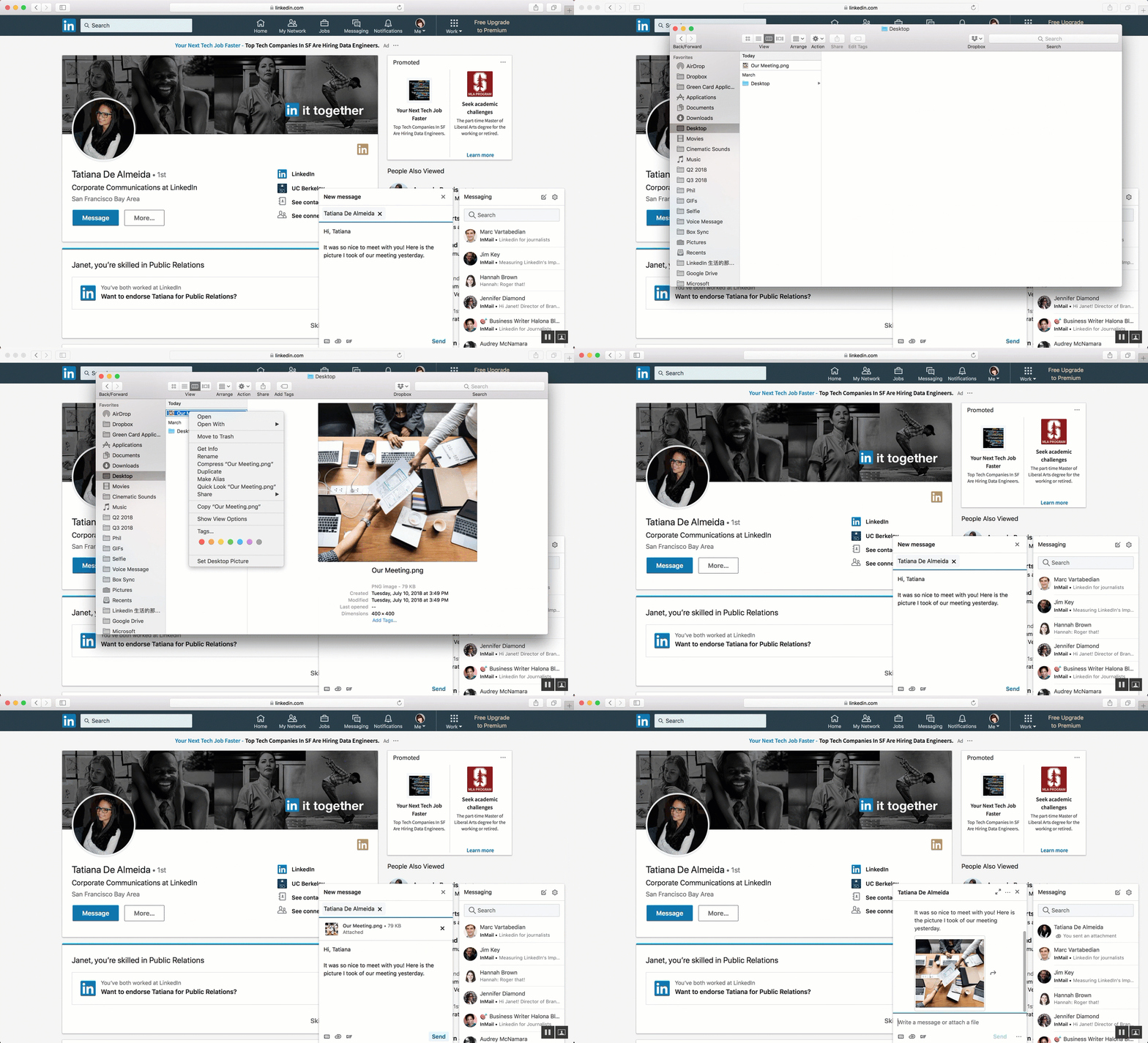
Quickly copy + paste images on web
Emojis aren’t the only way we’re helping you make your messages more visual. You can now seamlessly copy and paste images from screenshots and images on the web into your LinkedIn messages, making sharing visuals that much more quick and easy.
You asked, and we listened to your feedback to develop these improvements. We’re excited to keep building on these updates with new features that help you have more compelling conversations in LinkedIn Messaging.

Source: Bring Your Conversations to Life with New Updates in LinkedIn Messaging | Official LinkedIn Blog
My Computer
- Computer type
- PC/Desktop
- Computer Manufacturer/Model Number
- Self built custom
- OS
- 64-bit Windows 11 Pro for Workstations
- CPU
- Intel i7-8700K OC'd to 5 GHz
- Motherboard
- ASUS ROG Maximus XI Formula Z390
- Memory
- 64 GB (4x16GB) G.SKILL TridentZ RGB DDR4 3600 MHz
- Graphics Card(s)
- ASUS ROG-STRIX-GTX1080TI-O11G-GAMING
- Sound Card
- Integrated
- Monitor(s) Displays
- 2 x Samsung Odyssey G7 27"
- Screen Resolution
- 2560x1440
- Hard Drives
- 1TB Samsung 990 PRO M.2,
4TB Samsung 990 PRO PRO M.2,
TerraMaster F8 SSD Plus NAS
- PSU
- Seasonic Prime Titanium 850W
- Case
- Thermaltake Core P3
- Cooling
- Corsair Hydro H115i
- Keyboard
- Logitech wireless K800
- Mouse
- Logitech MX Master 4
- Internet Speed
- 2 Gb/s Download and 100 Mb/s Upload
- Antivirus
- Malwarebyte Anti-Malware Premium
- Browser
- Google Chrome
- Other Info
- Logitech Z625 speaker system,
Logitech BRIO 4K Pro webcam,
HP Color LaserJet Pro MFP M477fdn,
APC SMART-UPS RT 1000 XL - SURT1000XLI,
Galaxy S23 Plus phone