New windows install - SSD causing stuttering

horribad

New member
Member
Local time
3:46 AM
Messages
47
Recently upgraded to an SSD so I reinstalled windows to make use of it.

The current problem is that every now and again between half an hour and six hours of booting up the PC, i get micro stuttering and sometimes a complete freeze of whatever game or program that I was using (seems to mostly happen with WoW or any other large resource using game) that wont stop until I restart the computer. I'm relatively certain it's the SSD since it's the only new component that has been introduced recently.

In any case here is my Dxdiag and any help would be appreciated.
View attachment horribad dxdiag.zip
 

My Computer

Computer type
PC/Desktop
Computer Manufacturer/Model Number
Custom Build
OS
Microsoft Windows 7 64-bit
CPU
AMD A8-5500 Trinity 32nm Technology
Motherboard
MSI FM2-A55M-E33 (MS-7721) (P0)
Memory
8.00GB Single-Channel DDR3 @ 665MHz (9-9-9-24)
Graphics Card(s)
768MB GeForce GTX 460 (nVidia)
Monitor(s) Displays
L197 Wide (1440x900@60Hz) and Generic Non-PnP Monitor (1920x
Hard Drives
233GB Seagate ST3250820AS (SATA) and 466GB Western Digital WDC WD5000AAKS-00M9A0 (SATA)

PSU
900w
Keyboard
Razer Arctosa
Mouse
Razer Deathadder
OXxEV4gl.jpg


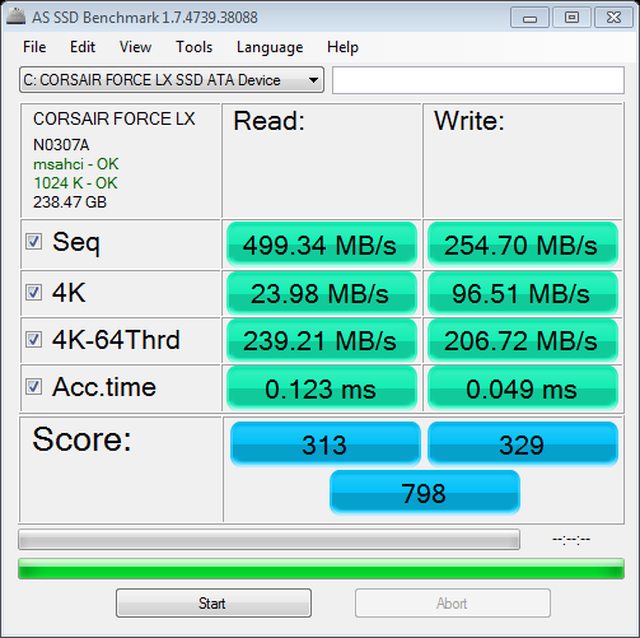
Also, here is a screen shot of an SSD benchmark I did.
 

My Computer

Computer type
PC/Desktop
Computer Manufacturer/Model Number
Custom Build
OS
Microsoft Windows 7 64-bit
CPU
AMD A8-5500 Trinity 32nm Technology
Motherboard
MSI FM2-A55M-E33 (MS-7721) (P0)
Memory
8.00GB Single-Channel DDR3 @ 665MHz (9-9-9-24)
Graphics Card(s)
768MB GeForce GTX 460 (nVidia)
Monitor(s) Displays
L197 Wide (1440x900@60Hz) and Generic Non-PnP Monitor (1920x
Hard Drives
233GB Seagate ST3250820AS (SATA) and 466GB Western Digital WDC WD5000AAKS-00M9A0 (SATA)
PSU
900w
Keyboard
Razer Arctosa
Mouse
Razer Deathadder
Don't actually have any truly constructive thoughts as to why your system performance would "degrade" over time as you describe, cured only by a re-boot. I wonder if there is some caching going on somewhere that accumulates over time and eventually drags things down.

Anyway, do you have your SSD on a SATA 3.0Gb/s or 6.0Gb/s controller? That would certainly affect performance.

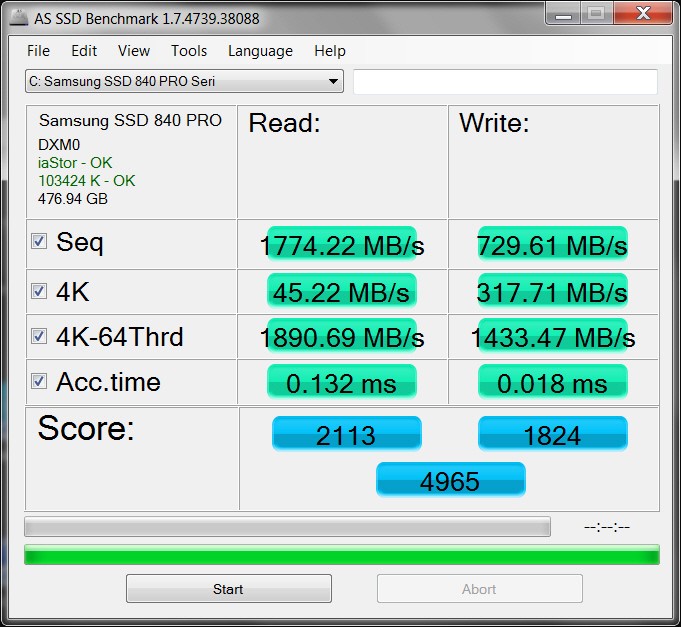
And not to play the "mine's bigger than yours" game, but the performance of my own 512GB Samsung 840 Pro SSD in my Lenovo W530 laptop (i7-3740QM, 8GB PC3-12800) with SATA 6.0GB/s controller is as follows (measured on my C partition, which is 87GB). Through Samsung Magician (software provided with the drive) I also have enabled (a) "rapid-mode", which makes use of available system RAM (I rarely use more than 50% of my 8GB of memory) as another intermediate cache buffer to further enhance SSD performance, as well as (b) "over-provisioning", which requires that I leave unallocated just under 10% of my 512GB drive for improved SSD performance especially with deleted files.

IOmvk1.jpg


I do not ever detect a deterioration (or any change, for that matter) in system performance over time. I'm also not a gamer.
 

My Computer

Computer type
PC/Desktop
Computer Manufacturer/Model Number
Home-built, two systems (1) and (2)
OS
Windows 7 Pro x64 (1), Win7 Pro X64 (2)
CPU
i5-3350p 3.1Ghz/6MB-cache (1); E8400 3.0Ghz/6MB-cache (2)
Motherboard
ASUS P8Z77-V Pro (1); ASUS P5Q3 (2)
Memory
8GB PC3-12800 DDR3 (1); 4GB PC3-10600 DDR3 (2)
Graphics Card(s)
ATI HD7750 (1), (see TV cards); ATI R7 250 (2)
Sound Card
Realtek ALC892 HD Audio (1); Realtek ALC1200 HD Audio (2)
Monitor(s) Displays
Eizo HD2441W LCD, Eizo S2433W (1); Eizo 24" S2433W (2)
Screen Resolution
1920x1200, 1920x1200 (1); 1920x1200 (2)
Hard Drives
(1) 1TB SATA-II (7200RPM), 2x2TB SATA-III (7200RPM), 250GB SATA-III (10000RPM) for OS; 2x2TB external USB 3.0

(2) 320GB SATA-II (7200RPM), 750GB SATA-II (7200RPM), 150GB SATA-II (10000RPM) for OS; 2TB external USB 3.0
PSU
Nesteq ECS-6001 600W (1); Nesteq ECS-5001 500W (2)
Case
Acousti-Case 360 (1) and (2)
Cooling
Noctua NH-U12P SE2 for CPU, 2x120mm case fans (1) and (2)
Keyboard
IBM PS/2 (1) and (2)
Mouse
Logitech MX Revolution wireless (1); Microsoft wired (2)
Internet Speed
100mbps down / 10mbps up
Antivirus
Microsoft Security Essentials; Malwarebyte Anti-Malware Pro
Browser
Firefox
Other Info
Ceton InfiniTV 4-tuner cablecard-enabled TV card as well as Hauppauge HVR-2250 OTA/ATSC 2-tuner TV card in (1), running under Win7 WMC
I'm not really certain on the controller speed but I'm assuming it's 3.0 gb/s since it's an older mobo (old as in when it was released, I only bought it a month or so ago). I'll look into some software, maybe you're right about the cache being overloaded.
 

My Computer

Computer type
PC/Desktop
Computer Manufacturer/Model Number
Custom Build
OS
Microsoft Windows 7 64-bit
CPU
AMD A8-5500 Trinity 32nm Technology
Motherboard
MSI FM2-A55M-E33 (MS-7721) (P0)
Memory
8.00GB Single-Channel DDR3 @ 665MHz (9-9-9-24)
Graphics Card(s)
768MB GeForce GTX 460 (nVidia)
Monitor(s) Displays
L197 Wide (1440x900@60Hz) and Generic Non-PnP Monitor (1920x
Hard Drives
233GB Seagate ST3250820AS (SATA) and 466GB Western Digital WDC WD5000AAKS-00M9A0 (SATA)
PSU
900w
Keyboard
Razer Arctosa
Mouse
Razer Deathadder
Back
Top