

I regularly run into this kind of message with PhotoShop Elements 6 and Mozilla Seamonkey but I can dismiss the message by clicking on one or more of the options
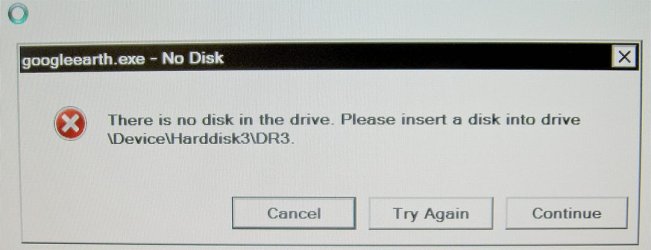
There is no disk in the drive. Please insert a disk into drive \device\Harddisk3\DR3
Cancel Try Again Continue or the right corner X in the box
0946_Sel_NoDiskInDrive_1.jpg
With Google Earth Pro, a spinning circle opens (see the upper left corner of the image.) This even prevents snipping an image or a screen dump to capture an image. The attached images are from my digital camera.
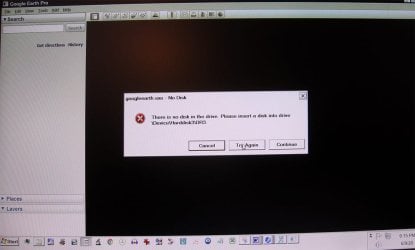
When I opened and canceled Ctrl-Alt-Del I could now see Google Earth. (See the second image)
0946_Sel_NoDiskInDrive_1.jpg
None of the buttons, "Cancel Try Again Continue or the right corner X in the error message box" had any effect, but Shift-Cancel cleared the message and allowed me into Google Earth Pro.
All of the programs are on C: my System and Programs disk.
I realize I have to relegate this computer to offline tasks very soon and use a newer one that runs Win 10 Pro/x64. I don't relish the task of making the switch, of installing all the programs I use, many of which are legacy software that I know how to use with facility. I hope they will all still run under Win10. At my age I resent having to waste hours learning how to do the simple tasks I want to do using new software which in many cases is only accessible via monthly subscription, the real reason for its creation.
Does anyone know a fix for this error message so I can keep it from popping up?
thanks,
baumgrenze
There is no disk in the drive. Please insert a disk into drive \device\Harddisk3\DR3
Cancel Try Again Continue or the right corner X in the box
0946_Sel_NoDiskInDrive_1.jpg
With Google Earth Pro, a spinning circle opens (see the upper left corner of the image.) This even prevents snipping an image or a screen dump to capture an image. The attached images are from my digital camera.
When I opened and canceled Ctrl-Alt-Del I could now see Google Earth. (See the second image)
0946_Sel_NoDiskInDrive_1.jpg
None of the buttons, "Cancel Try Again Continue or the right corner X in the error message box" had any effect, but Shift-Cancel cleared the message and allowed me into Google Earth Pro.
All of the programs are on C: my System and Programs disk.
I realize I have to relegate this computer to offline tasks very soon and use a newer one that runs Win 10 Pro/x64. I don't relish the task of making the switch, of installing all the programs I use, many of which are legacy software that I know how to use with facility. I hope they will all still run under Win10. At my age I resent having to waste hours learning how to do the simple tasks I want to do using new software which in many cases is only accessible via monthly subscription, the real reason for its creation.
Does anyone know a fix for this error message so I can keep it from popping up?
thanks,
baumgrenze
Attachments
My Computer
At a glance
Win 7 Pro 64Intel Core 2 Quad Q6600 (2.4 GHz) Quad Core2 x Crucial 4GB Kit (2GBx2) DDR2 CT2KIT25664A...Sapphire Radeon HD 3870 PCIe 512 Mb
- Computer type
- PC/Desktop
- Computer Manufacturer/Model Number
- Custom built by GamePC/Solid Electric - Palo Alto - on 03/10/08
- OS
- Win 7 Pro 64
- CPU
- Intel Core 2 Quad Q6600 (2.4 GHz) Quad Core
- Motherboard
- Gigabyte GA-P35-DS3P Intel P35 ATX (rev. 2.1)
- Memory
- 2 x Crucial 4GB Kit (2GBx2) DDR2 CT2KIT25664AA800
- Graphics Card(s)
- Sapphire Radeon HD 3870 PCIe 512 Mb
- Sound Card
- RealTek audio on MOBO + EDIROL UA-1EX
- Monitor(s) Displays
- Samsung S24A450BW 24" LED monitor
- Screen Resolution
- 1600 x 1200 at 75 Hz
- Hard Drives
- 2 Crucial 128 Gb SSD (CT128M550SSD1)
one mounted and running Win7/Pro x64
one disconnected containing only Win10/Pro upgrade - in process
1 1TB WD Caviar Black (WD1003FZEX-00MK2A0) (Data drive)
1 2TB Seagate 2TB (PN/ 9JB1N3-576 - ST2000DM001-1ER
- PSU
- Seasonic S12-HT 650W 80% Efficiency Power Supply
- Case
- Lian Li PC-B25B
- Cooling
- Gigabyte Silent-Pipe
- Keyboard
- Dell MS Comfort
- Mouse
- HP x4000 wireless
- Internet Speed
- Sonic FTTN @ 23 Mbps
- Antivirus
- Avast
- Browser
- SeaMonkey
- Other Info
- BIOS: Award Software International, Inc. F6 06/18/2009
System Specs - Updated on 09//16/19


