no network access

Lisjak

New member
Hello,
At first please forgive me for my bad english...
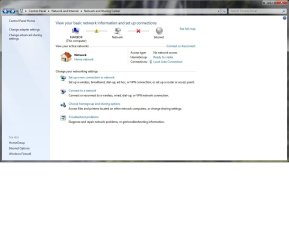
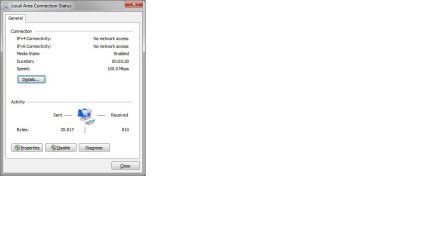
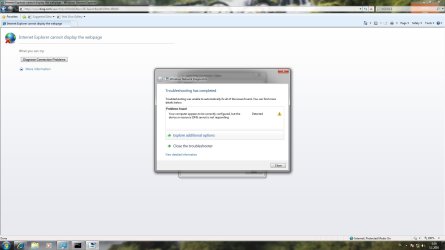
I have very common problem (as i see on the forums) but I still haven't found the solution.. :shock: I have 2 computers ... the old one (with win XP installed) and brand new one (with win 7 x64 ultimate inastalled). The problem is ... on the old computer internet works fine, but on the new one i Just can't get it work. It allways says "No network access". I have no router ... computer is wired directly to my cable modem. I tried nearly everything ... but still no succses :shock: Network card (realtek ) is integrated to my motherboard and have installed the latest driver. Here are some snapshots...
I can snapshot&attach any other window, just tell me wich one.
 

Attachments
  • TROUBLESHOOT.jpg
    TROUBLESHOOT.jpg
    214.7 KB · Views: 141
  • NATWORK AND SHARING CENTER.jpg
    NATWORK AND SHARING CENTER.jpg
    139.8 KB · Views: 142

My Computer

OS
windows 7
CPU
intel i5
Motherboard
asus p7p55d
Memory
gskill 4GB
Graphics Card(s)
sapphire ati radeon 5850
Monitor(s) Displays
24" fullhd lcd
Hard Drives
samsung f3 1TB
Case
coolermaster scout
Welcome to Seven Forums! I'm sure we can get you fixed up.

It's always advisable to have a separate wired router in between the PC and the cable or DSL modem. It's just safer and also allows considerably more flexibility in conning other devices (like more computers). If you can swing it, that's by far the best way to go.

But since you don't have one at the moment, we'll work with that.

Is it your intent to have both connected at the same time or are you replacing the XP box with the new W7 machine?

If you still have the XP box, hook it back up and get it running on the internet. Once you have that done, go to the start menu and click "run". Enter "cmd" and press enter which will open a command line window.

From the command line, type: "ipconfig /all" (no quotes) and press enter. If you can, take screen shot and post it here. What we're looking for is how the ethernet connection is configured. Rather than doing a 20 questions it just may be easier to see a picture.

Normally PC's are set to get an IP address automatically from a router. In addition, the router may do a login to the network using something called PPPoE. Sometimes the modem does it and sometimes the router does it. When you connect a PC directly to the modem, it's possible the PC could be configured to do the login.

If your XP box is configured for PPPoE, that could be the problem. PPPoE isn't a default for network connections so the new W7 box wouldn't be able to login, and thus no internet connection.

This is all a guess at this point until we see how the XP box is configured.
 

My Computer

Computer Manufacturer/Model Number
Dell C521
OS
W7 Ultimate 64bit W7 Premium 64bit W7 Premium 32bit WXP Home 32bit
CPU
Athlon 64X2 5000+
Motherboard
Dell
Memory
4GB
Graphics Card(s)
ATI X1300
Sound Card
On Board
Monitor(s) Displays
Dell 19" Flat
Screen Resolution
1280x1024
Hard Drives
500GB Western Digital Caviar Green
Mouse
Microsoft Wireless Intellimouse Explorer 2.0
Internet Speed
SBC DSL - 6Mbps
Is it your intent to have both connected at the same time or are you replacing the XP box with the new W7 machine?
I'm replacing the xp box with the new one (don't have the place really for bolth of them)

Here is screenshot from xp ipconfig. Now I'll switch the comps, and screenshot the same window ... so you could compere

brb

I'm back... here are screenshoots from win7
 

Attachments

  • xp-ipconfig.JPG
    xp-ipconfig.JPG
    61.4 KB · Views: 105
  • ipconfig-win7.jpg
    ipconfig-win7.jpg
    161.4 KB · Views: 123
  • Local Area Connection win7.jpg
    Local Area Connection win7.jpg
    50.7 KB · Views: 99
Last edited:

My Computer

OS
windows 7
CPU
intel i5
Motherboard
asus p7p55d
Memory
gskill 4GB
Graphics Card(s)
sapphire ati radeon 5850
Monitor(s) Displays
24" fullhd lcd
Hard Drives
samsung f3 1TB
Case
coolermaster scout
When you installed your cable modem did you get a setup CD by some chance?

The reason I ask is you have the same static IP address on both machines. Did you actually set that address yourself as part of a configuration process?

It's starting to look like you may have PPPoE on the XP box but not on the W7 machine. When you look at Control Panel => Network Connections on the XP box, is there an entry for a "Broadband Connection"? That would be a dead giveaway that you need to create PPPoE connection in W7.
 

My Computer

Computer Manufacturer/Model Number
Dell C521
OS
W7 Ultimate 64bit W7 Premium 64bit W7 Premium 32bit WXP Home 32bit
CPU
Athlon 64X2 5000+
Motherboard
Dell
Memory
4GB
Graphics Card(s)
ATI X1300
Sound Card
On Board
Monitor(s) Displays
Dell 19" Flat
Screen Resolution
1280x1024
Hard Drives
500GB Western Digital Caviar Green
Mouse
Microsoft Wireless Intellimouse Explorer 2.0
Internet Speed
SBC DSL - 6Mbps
When you installed your cable modem did you get a setup CD by some chance?

Yes I did get a cd, but there is only driver for usb connection. No setup, or anything usefull. The cable guy said that the modem doesn't need extra driver installed. It seems like it have an avtoupdate... I don't really know.

The reason I ask is you have the same static IP address on both machines. Did you actually set that address yourself as part of a configuration process?

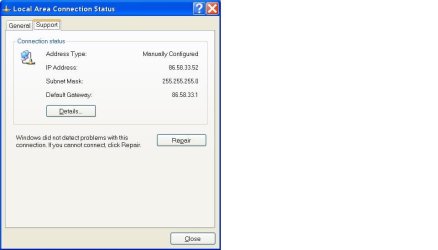
Yas, I set up menually my static ip, becouse dhcp didn't work even on xp... I did the same thing on the win7, but no succes.

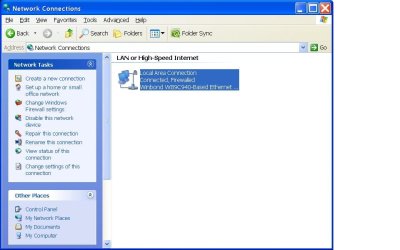
It's starting to look like you may have PPPoE on the XP box but not on the W7 machine. When you look at Control Panel => Network Connections on the XP box, is there an entry for a "Broadband Connection"? That would be a dead giveaway that you need to create PPPoE connection in W7.

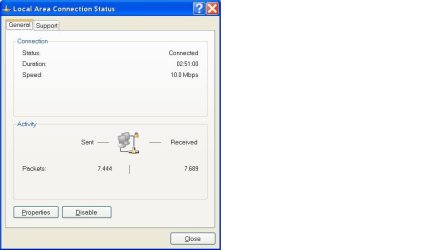
I can't find such entry... where should I look ? I attached some screens...
 

Attachments

  • Network connection XP.JPG
    Network connection XP.JPG
    64.7 KB · Views: 38
  • Local Area Connection status XP.JPG
    Local Area Connection status XP.JPG
    35.6 KB · Views: 36
  • Local Area Connection Status Support.JPG
    Local Area Connection Status Support.JPG
    40 KB · Views: 34

My Computer

OS
windows 7
CPU
intel i5
Motherboard
asus p7p55d
Memory
gskill 4GB
Graphics Card(s)
sapphire ati radeon 5850
Monitor(s) Displays
24" fullhd lcd
Hard Drives
samsung f3 1TB
Case
coolermaster scout
Here's something to try:

Disconnect the PC from the cable modem.

Power OFF the cable modem. Unplug it from the power supply. Wait about two minutes and plug it back in.

I just remembered that a friend of mine had this same issue. The cable modem "learns" the MAC address of PC that's connected to it. In order to get it to "re-learn" the new PC, you have to reset it by doing a power cycle. In his case we also had to remove a little backup battery.
 

My Computer

Computer Manufacturer/Model Number
Dell C521
OS
W7 Ultimate 64bit W7 Premium 64bit W7 Premium 32bit WXP Home 32bit
CPU
Athlon 64X2 5000+
Motherboard
Dell
Memory
4GB
Graphics Card(s)
ATI X1300
Sound Card
On Board
Monitor(s) Displays
Dell 19" Flat
Screen Resolution
1280x1024
Hard Drives
500GB Western Digital Caviar Green
Mouse
Microsoft Wireless Intellimouse Explorer 2.0
Internet Speed
SBC DSL - 6Mbps
I allready tried that ... I allways power off&on modem, when switching computers... otherwise doesn't work even on xp.

Ipv6 is disabled...

still no network access :(
 

My Computer

OS
windows 7
CPU
intel i5
Motherboard
asus p7p55d
Memory
gskill 4GB
Graphics Card(s)
sapphire ati radeon 5850
Monitor(s) Displays
24" fullhd lcd
Hard Drives
samsung f3 1TB
Case
coolermaster scout
Does the modem have a backup battery? What make and model is it?
 

My Computer

Computer Manufacturer/Model Number
Dell C521
OS
W7 Ultimate 64bit W7 Premium 64bit W7 Premium 32bit WXP Home 32bit
CPU
Athlon 64X2 5000+
Motherboard
Dell
Memory
4GB
Graphics Card(s)
ATI X1300
Sound Card
On Board
Monitor(s) Displays
Dell 19" Flat
Screen Resolution
1280x1024
Hard Drives
500GB Western Digital Caviar Green
Mouse
Microsoft Wireless Intellimouse Explorer 2.0
Internet Speed
SBC DSL - 6Mbps
can you do another screen shot of your ipconfig while ipv6 is disabled, please?
 

My Computer

OS
7 Pro

My Computer

OS
windows 7
CPU
intel i5
Motherboard
asus p7p55d
Memory
gskill 4GB
Graphics Card(s)
sapphire ati radeon 5850
Monitor(s) Displays
24" fullhd lcd
Hard Drives
samsung f3 1TB
Case
coolermaster scout
can you do another screen shot of your ipconfig while ipv6 is disabled, please?

It was disabled before I took the first screenshot.
 

My Computer

OS
windows 7
CPU
intel i5
Motherboard
asus p7p55d
Memory
gskill 4GB
Graphics Card(s)
sapphire ati radeon 5850
Monitor(s) Displays
24" fullhd lcd
Hard Drives
samsung f3 1TB
Case
coolermaster scout
That modem should be working for you. Maybe you need to try a power down to get that onboard NIC working again.

Try powering down the machine, switch off the power supply then unplug the power cord from the power supply, wait a few minutes then plug back in, hit the power switch if you have one and start up and see if anything changes.

I have also seen clearing the cmos bring back those eithernet connections.
 

My Computer

Computer type
PC/Desktop
Computer Manufacturer/Model Number
Home built
OS
Windows 7 Ult, Windows 8.1 Pro,
CPU
Q9650-4.275GHz, E8600 4.5GHz, E6750-3.8GHz
Motherboard
Evga 780i FTW
Memory
G.Skill PC2 9600 1200Mhz 5 5 5 15 2T
Graphics Card(s)
GTX480
Sound Card
Asus Xonar D2
Monitor(s) Displays
HannsG
Screen Resolution
1680X1050
Hard Drives
GSkill Phoenix Pro 120GB SSD
PSU
ThermalTake Toughpower 1000Watt modular
Case
ThermalTake XaserV
Cooling
Xigmatek S1283
Keyboard
Logitech G15
Mouse
Logitech G9
Internet Speed
T1
Also

also in internet explorer go to tools and make sure work offline did not get selected i see this happen all the time when you unsuccessfully try to connect repeated times easy to overlook this
 

My Computer

Computer Manufacturer/Model Number
Custom Built
OS
Windows 7 Ultimate 32 bit
CPU
AMD Athlon 64 X2 4200+ Overclocked to 3.0Ghz
Motherboard
Biostar TF560 A2+
Memory
2 Gigs of G.Skill DDR2 800
Graphics Card(s)
HIS ATI Radeon HD 2600 Pro With IceQ cooler
Sound Card
6.1 Channel Sound Blaster Live 24 Bit
Monitor(s) Displays
Dual 20.5 " LG Flatrons W2052TO
Screen Resolution
1152x864
Hard Drives
Dual 36 Gig 10,000 RPM Raptors
PSU
430 watt Seasonic 80%+ Dual 12v Rails 2x80mm fans
Case
CHIEFMAX YA-5X
Cooling
4-80mm case fans 1-140mm case fan freezer 64 Pro CPU cooler
Keyboard
Saitek Eclipse II
Mouse
A4Tech wireless battery free optical scroll mouse
Internet Speed
1.5 meg down 384 up
Other Info
Logisys LED fan/light controller and dual 16" LED sticks mounted inside top of case all fans are LED all lighting is blue
DVD RW and CD RW both and Memory card reader
That modem should be working for you. Maybe you need to try a power down to get that onboard NIC working again.

Try powering down the machine, switch off the power supply then unplug the power cord from the power supply, wait a few minutes then plug back in, hit the power switch if you have one and start up and see if anything changes.

I have also seen clearing the cmos bring back those eithernet connections.

According to the Arris web site, that model of modem can be restricted by the ISP to disallow multiple devices. The only way to do that is by mac address. He should contact his ISP about it.

Typically what I've seen is the modem has learned the mac and needs to be cleared. In my case doing a power cycle didn't work. Turned out the modem had a backup battery. Certain models of this modem also have battery backup. The cover is on the edge of the modem as you look at the rear and the release tab is towards the front.

I've seen this exact same issue before with cable modems. It varies from ISP to ISP though. Either way it at least warrants a call to his ISP to make sure.
 

My Computer

Computer Manufacturer/Model Number
Dell C521
OS
W7 Ultimate 64bit W7 Premium 64bit W7 Premium 32bit WXP Home 32bit
CPU
Athlon 64X2 5000+
Motherboard
Dell
Memory
4GB
Graphics Card(s)
ATI X1300
Sound Card
On Board
Monitor(s) Displays
Dell 19" Flat
Screen Resolution
1280x1024
Hard Drives
500GB Western Digital Caviar Green
Mouse
Microsoft Wireless Intellimouse Explorer 2.0
Internet Speed
SBC DSL - 6Mbps
RedBirdDad

good advice RedBirdDad
 

My Computer

Computer Manufacturer/Model Number
Custom Built
OS
Windows 7 Ultimate 32 bit
CPU
AMD Athlon 64 X2 4200+ Overclocked to 3.0Ghz
Motherboard
Biostar TF560 A2+
Memory
2 Gigs of G.Skill DDR2 800
Graphics Card(s)
HIS ATI Radeon HD 2600 Pro With IceQ cooler
Sound Card
6.1 Channel Sound Blaster Live 24 Bit
Monitor(s) Displays
Dual 20.5 " LG Flatrons W2052TO
Screen Resolution
1152x864
Hard Drives
Dual 36 Gig 10,000 RPM Raptors
PSU
430 watt Seasonic 80%+ Dual 12v Rails 2x80mm fans
Case
CHIEFMAX YA-5X
Cooling
4-80mm case fans 1-140mm case fan freezer 64 Pro CPU cooler
Keyboard
Saitek Eclipse II
Mouse
A4Tech wireless battery free optical scroll mouse
Internet Speed
1.5 meg down 384 up
Other Info
Logisys LED fan/light controller and dual 16" LED sticks mounted inside top of case all fans are LED all lighting is blue
DVD RW and CD RW both and Memory card reader
I can't find any battery cover, or anything that could be opened... only if you unscrew 2 screws at the bottom (whole modem bottom cover). I also think this isn't the problem... becouse Cable guy pluged his laptop on this modem (he had also win7 installed) and his internet worked fine. I'm running out of options :(
 

My Computer

OS
windows 7
CPU
intel i5
Motherboard
asus p7p55d
Memory
gskill 4GB
Graphics Card(s)
sapphire ati radeon 5850
Monitor(s) Displays
24" fullhd lcd
Hard Drives
samsung f3 1TB
Case
coolermaster scout
Setup Network

have you went through the steps to connect to a network in network and sharing and setup homegroup also make sure network discovery is turned on
 

My Computer

Computer Manufacturer/Model Number
Custom Built
OS
Windows 7 Ultimate 32 bit
CPU
AMD Athlon 64 X2 4200+ Overclocked to 3.0Ghz
Motherboard
Biostar TF560 A2+
Memory
2 Gigs of G.Skill DDR2 800
Graphics Card(s)
HIS ATI Radeon HD 2600 Pro With IceQ cooler
Sound Card
6.1 Channel Sound Blaster Live 24 Bit
Monitor(s) Displays
Dual 20.5 " LG Flatrons W2052TO
Screen Resolution
1152x864
Hard Drives
Dual 36 Gig 10,000 RPM Raptors
PSU
430 watt Seasonic 80%+ Dual 12v Rails 2x80mm fans
Case
CHIEFMAX YA-5X
Cooling
4-80mm case fans 1-140mm case fan freezer 64 Pro CPU cooler
Keyboard
Saitek Eclipse II
Mouse
A4Tech wireless battery free optical scroll mouse
Internet Speed
1.5 meg down 384 up
Other Info
Logisys LED fan/light controller and dual 16" LED sticks mounted inside top of case all fans are LED all lighting is blue
DVD RW and CD RW both and Memory card reader
I can't find any battery cover, or anything that could be opened... only if you unscrew 2 screws at the bottom (whole modem bottom cover). I also think this isn't the problem... becouse Cable guy pluged his laptop on this modem (he had also win7 installed) and his internet worked fine. I'm running out of options :(

Ok, this one doesn't have a battery.

Before you give up, just try a call to the ISP just in case. They may just have some info on this kind of a problem.
 

My Computer

Computer Manufacturer/Model Number
Dell C521
OS
W7 Ultimate 64bit W7 Premium 64bit W7 Premium 32bit WXP Home 32bit
CPU
Athlon 64X2 5000+
Motherboard
Dell
Memory
4GB
Graphics Card(s)
ATI X1300
Sound Card
On Board
Monitor(s) Displays
Dell 19" Flat
Screen Resolution
1280x1024
Hard Drives
500GB Western Digital Caviar Green
Mouse
Microsoft Wireless Intellimouse Explorer 2.0
Internet Speed
SBC DSL - 6Mbps
Maybe the Op needs to reset his MAC address. Lots of problems with MAC addresses and Window 7 for some reason. You can use the software in the link below for this, it has a good tutorial also.
Mac MakeUp - MAC Address spoofing tool

Or you can try to do it in the NIC settings or the registry. The TechNet link below covers most of the ways you can do this. How to change a MAC address on Windows 7

Follow this steps:

Network and Sharing Center > Change adapter settings > right click on adapter name, then Properties > Configure > Advanced tab > Network address> put some values in and it seems like starting with 12 works best for Windows 7 according to TechNet site.

It worked for this guy anyway and it's all I can think of.
http://www.sevenforums.com/network-...-network-no-internet-access-2.html#post490125
 

My Computer

Computer type
PC/Desktop
Computer Manufacturer/Model Number
Home built
OS
Windows 7 Ult, Windows 8.1 Pro,
CPU
Q9650-4.275GHz, E8600 4.5GHz, E6750-3.8GHz
Motherboard
Evga 780i FTW
Memory
G.Skill PC2 9600 1200Mhz 5 5 5 15 2T
Graphics Card(s)
GTX480
Sound Card
Asus Xonar D2
Monitor(s) Displays
HannsG
Screen Resolution
1680X1050
Hard Drives
GSkill Phoenix Pro 120GB SSD
PSU
ThermalTake Toughpower 1000Watt modular
Case
ThermalTake XaserV
Cooling
Xigmatek S1283
Keyboard
Logitech G15
Mouse
Logitech G9
Internet Speed
T1
Back
Top