Solved Non win7-sys apps open only tiny window & text

Update report:
Reading the upload method that UNI provided. Have shots .jpg files of problem "small" view apps. Got online screen resolution improved but still on the too large side

Other readers NOTICE!! The following registry cleaner names are NOT for your use. Great precautions are needed. Many (Most?) registry cleaner programs are junk & can cause you problems.
@ UNI. With all the precautions I mentioned before, here are the registry cleaners: Eusing Registry Cleaner [ I run just this one as is. Never ever had a problem.]. Regseeker [Use caution!! Do NOT use left hand side "Auto Clean". It can/will mess you up. Use only the right side "GO" Run it and look thru the keys it finds first. Study them & research each type before proceeding. I have run this outright but that was dumb & I stopped. Be selective. Its VERY thorough. Gets "root" keys. You can just run and see results before deleting on your choices. I like the "extension not used" cleanup feature. Why have them if not used?

Anyway, the reason I was told "way back" that good registry cleaning speeds your puter up, is that when its operating with all the old registry key dead end paths, they are attempted to be used > but now once cleaned are no longer there. I had a friend at work tell me that he just eliminated (deleted) a BUNCH of programs. He had different programs opening up at random & such but his puter would not fully run. Gave him Eusing. He ran it & found like 400+ dead end keys. Fixed the puter. It then ran fully again. XP OS. That's about all I can say. Jim
 
Last edited:

My Computer

Computer type
PC/Desktop
Computer Manufacturer/Model Number
gateway
OS
win7 Home Premium x64
Antivirus
avast
Browser
Firefox
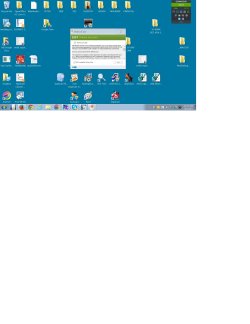
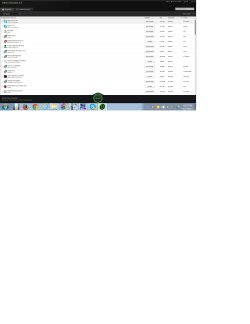
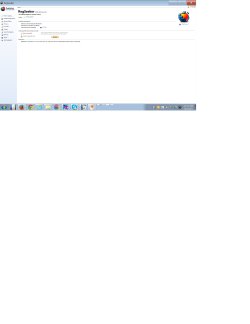
Here are the shots (with Paint). its just "some" apps that does this mini window/text thing. Tks for the help! Jim.
Emsisoft 2.jpg

Eset window & text.jpg

Heard Protect.jpg

IOBIT UNINSTALL.jpg

Regseeker.jpg
 

My Computer

Computer type
PC/Desktop
Computer Manufacturer/Model Number
gateway
OS
win7 Home Premium x64
Antivirus
avast
Browser
Firefox
To be honest, those windows look normal, it is as if your icons are larger than they should be.

Right click desktop on an empty place and select Screen Resolution. What does it say as resolution? Click the resolution dropdown box and see what is the recommended resolution (if it is not already chosen).

And what make/model is your monitor?
 

My Computer

Computer type
PC/Desktop
Computer Manufacturer/Model Number
Custom Build
OS
Windows 7 Ultimate x64 SP1
CPU
AMD Phenom 2 1090T
Motherboard
Gigabyte GA-890FXA-UD5
Memory
2x8GB Kingston HyperX Fury Black 1600Mhz Unganged
Graphics Card(s)
MSI GTX 970 Gaming 4G
Sound Card
Realtek On-Board HD 7.1 Audio / Logitech G35
Monitor(s) Displays
3xAcer GD245HQ
Screen Resolution
1920x1080
Hard Drives
Samsung 850 Pro 512GB SSD - OS /
WD Caviar Black SATA 3 - 1 TBx2 - Dynamic RAID 0 /
WD Caviar Green SATA 2 - 640GBx2 - Dynamic RAID 0 /
WD Caviar Green SATA 2 - 640GB - Internal Backup /
Seagate Barracude SATA 3 - 3TB - External Backup/ Sync
PSU
HighPower 1000W
Case
Cooler Master HAF 932
Cooling
Noctua NH-D14
Keyboard
Logitech G19
Mouse
Logitech G500
Internet Speed
100/4 Mbit Cable (100GB quota)
Antivirus
ZoneAlarm Extreme Security / MBAM Pro / MBAE Free / SAS Free
Browser
IE 11 - Firefox - Chrome
Other Info
Logitech F710/ G27/ G940/ Z5500 // TrackIR 5 // Nvidia 3D Surround Vision
Hello again Guys. While researching I came across a thought(s). One is the graphics driver apparently one just does a reinstall by deleting in like usual.The other is that I had bought my Acer screen when I was running xp (poor old forgotten boy) I looked up the Acer drivers and there are separate listing for XP & win 7 drivers. Bet I need win7 drivers maybe and the $M update did everything for my win7 x64 NOT xp for my Acer monitor.

What do you guys think? Thank, Jim
 

My Computer

Computer type
PC/Desktop
Computer Manufacturer/Model Number
gateway
OS
win7 Home Premium x64
Antivirus
avast
Browser
Firefox
Please address post #23.

Then run: devmgmt.msc and take a screenshot.
 

My Computer

Computer type
PC/Desktop
Computer Manufacturer/Model Number
Custom Build
OS
Windows 7 Ultimate x64 SP1
CPU
AMD Phenom 2 1090T
Motherboard
Gigabyte GA-890FXA-UD5
Memory
2x8GB Kingston HyperX Fury Black 1600Mhz Unganged
Graphics Card(s)
MSI GTX 970 Gaming 4G
Sound Card
Realtek On-Board HD 7.1 Audio / Logitech G35
Monitor(s) Displays
3xAcer GD245HQ
Screen Resolution
1920x1080
Hard Drives
Samsung 850 Pro 512GB SSD - OS /
WD Caviar Black SATA 3 - 1 TBx2 - Dynamic RAID 0 /
WD Caviar Green SATA 2 - 640GBx2 - Dynamic RAID 0 /
WD Caviar Green SATA 2 - 640GB - Internal Backup /
Seagate Barracude SATA 3 - 3TB - External Backup/ Sync
PSU
HighPower 1000W
Case
Cooler Master HAF 932
Cooling
Noctua NH-D14
Keyboard
Logitech G19
Mouse
Logitech G500
Internet Speed
100/4 Mbit Cable (100GB quota)
Antivirus
ZoneAlarm Extreme Security / MBAM Pro / MBAE Free / SAS Free
Browser
IE 11 - Firefox - Chrome
Other Info
Logitech F710/ G27/ G940/ Z5500 // TrackIR 5 // Nvidia 3D Surround Vision
Well, Gokay just saw your post about monitor. How you can say these shots windows look normal is very odd. They are either waaaay too small in width and/or text or both. You can barely read them. Real surprised to read that reply.

But our attention went to same direction on the Acer G235H monitor. Just saw a reply flash. Bet its you. Will be back
 

My Computer

Computer type
PC/Desktop
Computer Manufacturer/Model Number
gateway
OS
win7 Home Premium x64
Antivirus
avast
Browser
Firefox
Just wrote how I felt once I saw the screenshots. Hopefully we will get to the bottom of this once you supply the resolution information. Depending on the resolutions etc they may look quite small for the untrained eye.
 

My Computer

Computer type
PC/Desktop
Computer Manufacturer/Model Number
Custom Build
OS
Windows 7 Ultimate x64 SP1
CPU
AMD Phenom 2 1090T
Motherboard
Gigabyte GA-890FXA-UD5
Memory
2x8GB Kingston HyperX Fury Black 1600Mhz Unganged
Graphics Card(s)
MSI GTX 970 Gaming 4G
Sound Card
Realtek On-Board HD 7.1 Audio / Logitech G35
Monitor(s) Displays
3xAcer GD245HQ
Screen Resolution
1920x1080
Hard Drives
Samsung 850 Pro 512GB SSD - OS /
WD Caviar Black SATA 3 - 1 TBx2 - Dynamic RAID 0 /
WD Caviar Green SATA 2 - 640GBx2 - Dynamic RAID 0 /
WD Caviar Green SATA 2 - 640GB - Internal Backup /
Seagate Barracude SATA 3 - 3TB - External Backup/ Sync
PSU
HighPower 1000W
Case
Cooler Master HAF 932
Cooling
Noctua NH-D14
Keyboard
Logitech G19
Mouse
Logitech G500
Internet Speed
100/4 Mbit Cable (100GB quota)
Antivirus
ZoneAlarm Extreme Security / MBAM Pro / MBAE Free / SAS Free
Browser
IE 11 - Firefox - Chrome
Other Info
Logitech F710/ G27/ G940/ Z5500 // TrackIR 5 // Nvidia 3D Surround Vision
The resolution is 1920 x 1080 (recommended). have had it back and forth a few. another flash reply. going there now we are playing tag
 

My Computer

Computer type
PC/Desktop
Computer Manufacturer/Model Number
gateway
OS
win7 Home Premium x64
Antivirus
avast
Browser
Firefox
you are welcome to visit my computer to see for yourself if that helps.:) Jim
 

My Computer

Computer type
PC/Desktop
Computer Manufacturer/Model Number
gateway
OS
win7 Home Premium x64
Antivirus
avast
Browser
Firefox
Your icons are double the size of mine, did you change their size yourself?
 

My Computer

Computer type
PC/Desktop
Computer Manufacturer/Model Number
Custom Build
OS
Windows 7 Ultimate x64 SP1
CPU
AMD Phenom 2 1090T
Motherboard
Gigabyte GA-890FXA-UD5
Memory
2x8GB Kingston HyperX Fury Black 1600Mhz Unganged
Graphics Card(s)
MSI GTX 970 Gaming 4G
Sound Card
Realtek On-Board HD 7.1 Audio / Logitech G35
Monitor(s) Displays
3xAcer GD245HQ
Screen Resolution
1920x1080
Hard Drives
Samsung 850 Pro 512GB SSD - OS /
WD Caviar Black SATA 3 - 1 TBx2 - Dynamic RAID 0 /
WD Caviar Green SATA 2 - 640GBx2 - Dynamic RAID 0 /
WD Caviar Green SATA 2 - 640GB - Internal Backup /
Seagate Barracude SATA 3 - 3TB - External Backup/ Sync
PSU
HighPower 1000W
Case
Cooler Master HAF 932
Cooling
Noctua NH-D14
Keyboard
Logitech G19
Mouse
Logitech G500
Internet Speed
100/4 Mbit Cable (100GB quota)
Antivirus
ZoneAlarm Extreme Security / MBAM Pro / MBAE Free / SAS Free
Browser
IE 11 - Firefox - Chrome
Other Info
Logitech F710/ G27/ G940/ Z5500 // TrackIR 5 // Nvidia 3D Surround Vision
JamesEJ,
If I might offer some steps that have nothing to do with your issue...
...but might make things easier for us to help you:

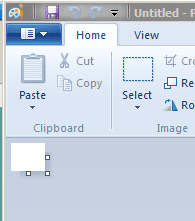
open MS Paint
scroll to the bottom of the white area
scroll to the right of the white area
shrink that white area by dragging the bottom right corner of the white area up to the top left corner.

Leave an area that is about one inch square.

paint.PNG

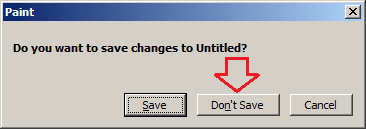
Close MS Paint. When prompted to save your changes, select Don't Save.

paint2.PNG

The next time that you open MS Paint, the white area should be small.

The next screenshot that you paste in should have no white areas around it.

It will look much better in forum posts :-)
 

My Computer

Computer type
Laptop
Computer Manufacturer/Model Number
Employer provided Dell Latitude
OS
W7 Pro SP1 64bit
CPU
i7
Memory
8GB
Graphics Card(s)
Intel HD Graphics
Hard Drives
crappy SSD
Antivirus
Employer mandated Symantec Endpoint Protection
Browser
Pale Moon 64bit, IE11 64bit & Chrome 64bit
Ok, checked what was going on with TeamViewer. As suspected there was nothing wrong with the text and windows but they were too small for the OP due to personal reasons.

DPI was set to 150% already so I decreased the resolution to 1440x900 (worked best for the OP in terms of readability).
For future reference:
Screen resolution - http://www.sevenforums.com/tutorials/255-screen-resolution-display-settings.html
DPI settings - http://www.sevenforums.com/tutorials/443-dpi-display-size-settings-change.html

In case if you ever need - Magnifier - http://www.sevenforums.com/tutorials/38827-magnifier-starts-startup-enable-disable.html
 

My Computer

Computer type
PC/Desktop
Computer Manufacturer/Model Number
Custom Build
OS
Windows 7 Ultimate x64 SP1
CPU
AMD Phenom 2 1090T
Motherboard
Gigabyte GA-890FXA-UD5
Memory
2x8GB Kingston HyperX Fury Black 1600Mhz Unganged
Graphics Card(s)
MSI GTX 970 Gaming 4G
Sound Card
Realtek On-Board HD 7.1 Audio / Logitech G35
Monitor(s) Displays
3xAcer GD245HQ
Screen Resolution
1920x1080
Hard Drives
Samsung 850 Pro 512GB SSD - OS /
WD Caviar Black SATA 3 - 1 TBx2 - Dynamic RAID 0 /
WD Caviar Green SATA 2 - 640GBx2 - Dynamic RAID 0 /
WD Caviar Green SATA 2 - 640GB - Internal Backup /
Seagate Barracude SATA 3 - 3TB - External Backup/ Sync
PSU
HighPower 1000W
Case
Cooler Master HAF 932
Cooling
Noctua NH-D14
Keyboard
Logitech G19
Mouse
Logitech G500
Internet Speed
100/4 Mbit Cable (100GB quota)
Antivirus
ZoneAlarm Extreme Security / MBAM Pro / MBAE Free / SAS Free
Browser
IE 11 - Firefox - Chrome
Other Info
Logitech F710/ G27/ G940/ Z5500 // TrackIR 5 // Nvidia 3D Surround Vision
I concur with GokAy in principle, who was very professional, courteous and helpful on TeamViewer. The results were much more than just great for the local PC resolution subject of this thread. It does feel very good to have someone on your computer that is obviously honest (YOU ALL KNOW>rather than just trying to sell something with scare tactics). GokAy is a substantive positive contributor to this forum and Windows 7.

GokAy I personally thank you publicly for your unsupervised outstanding performance!!:thumbsup:
 

My Computer

Computer type
PC/Desktop
Computer Manufacturer/Model Number
gateway
OS
win7 Home Premium x64
Antivirus
avast
Browser
Firefox
Back
Top