
Hi all,
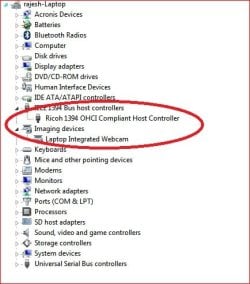
I tried searching whole of internet and this forum for the problem of not been able to see my Sony DCR-TRV30 in device manager and not been able to capture my video...but all efforts in vain..I tried uninstalling IEEE 1394 driver and reinstalling it again....no luck..
I am connecting my camcorder using Firewire 4-4 wire with my laptop which is Dell Inspiron 1525...
Please help..Please find below a few screenshots of my system state to be able to provide some hints on what to do?
Any help and pointer is highly appreciated..
Thanks a lot...
I tried searching whole of internet and this forum for the problem of not been able to see my Sony DCR-TRV30 in device manager and not been able to capture my video...but all efforts in vain..I tried uninstalling IEEE 1394 driver and reinstalling it again....no luck..
I am connecting my camcorder using Firewire 4-4 wire with my laptop which is Dell Inspiron 1525...
Please help..Please find below a few screenshots of my system state to be able to provide some hints on what to do?
Any help and pointer is highly appreciated..
Thanks a lot...
Attachments

Last edited:
My Computer
At a glance
windows 7Intel Core2 Duo T5450 @1.66GHz4 Gb
- Computer Manufacturer/Model Number
- Dell Inspiron 1525
- OS
- windows 7
- CPU
- Intel Core2 Duo T5450 @1.66GHz
- Memory
- 4 Gb
- Hard Drives
- 320Gb
