Solved Not enough dedicated video RAM, how to acces & change bios

AndrewJohnson

New member
Local time
12:30 AM
Messages
10
Location
Europe
Hey, i'm Andrew.

My problem: Not enough Dedicated Video RAM (currently 64MB)

Story:

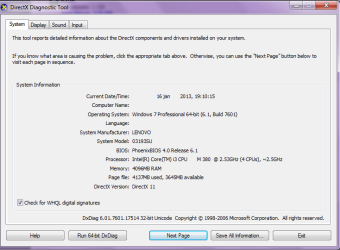
I want to play this game, but i always check it first with www.CanYouRunIt.com and my Lenovo ThinkPad meets all requirements except one. "Dedicated Video Ram" , its needs to be 256 MB.

So i searched the web and found a topic on this website (Click Here), with the same issue only the solution there was for HP model.

Question:

How do i change this value? (Change it in my Bios right?)

Computer model:

Lenovo Thinkpad Edge 15 15.6" (500 GB, Core i3, 2.53 GHz, 4 GB) Notebook - Black (03193SU)


Picture:
Run --> dxdiag.exe
 

Attachments
  • RUN dxdiag.exe test.png
    RUN dxdiag.exe test.png
    19.3 KB · Views: 24
Last edited:

My Computer My Computer

At a glance

Windows 7 Professional x644096 MB
Computer Manufacturer/Model Number
LENOVO - 03193SU
OS
Windows 7 Professional x64
Memory
4096 MB
You'd get much better advice if you supply the complete model number of your laptop. (I assume that it's a laptop.)
 

My Computer My Computer

At a glance

Windows 7 Pro X64 SP1Intel Core I7-3930k16 GB Gskill DDR3-2133eVGA GTX680
Computer Manufacturer/Model Number
homegrown
OS
Windows 7 Pro X64 SP1
CPU
Intel Core I7-3930k
Motherboard
Asus P9X79 Pro
Memory
16 GB Gskill DDR3-2133
Graphics Card(s)
eVGA GTX680
Sound Card
Creative X-Fi Titanium
Monitor(s) Displays
As PA246Q
Screen Resolution
1920 X 1200
Hard Drives
Corsair Force GT, 120 GB
WDC 1.5TB Caviar Black
PSU
PCP&C Silencer 750 Crossfire
Case
Silverstone FT02
Cooling
Noctua NH-D14
Keyboard
cheap Logitech USB
Mouse
Microsoft Intellimouse Explorer (old optical) USB
Internet Speed
6Mb cable
Other Info
Pioneer BDR-205
Samsung SH-203B
Monsoon 5.1 speakers
You'd get much better advice if you supply the complete model number of your laptop. (I assume that it's a laptop.)

Computer model:

Lenovo Thinkpad Edge 15 15.6" (500 GB, Core i3, 2.53 GHz, 4 GB) Notebook - Black (03193SU)

My system:
 

Attachments

  • System.png
    System.png
    5.4 KB · Views: 13
Last edited:

My Computer My Computer

At a glance

Windows 7 Professional x644096 MB
Computer Manufacturer/Model Number
LENOVO - 03193SU
OS
Windows 7 Professional x64
Memory
4096 MB
You'd get much better advice if you supply the complete model number of your laptop. (I assume that it's a laptop.)
It's a Lenovo ThinkPad Edge 15 (0319-3SU)
 

My Computer My Computer

At a glance

Windows 8.1 Pro RTM x64Intel Core-i5-3570K 4-core @ 3.4GHz (Ivy Brid...4 x 4GB DDR3-1600 Corsair Vengeance CMZ8GX3M2...MSI GeForce GTX770 Gaming OC 2GB
Computer type
PC/Desktop
Computer Manufacturer/Model Number
Dwarf Dwf/11/2012 r09/2013
OS
Windows 8.1 Pro RTM x64
CPU
Intel Core-i5-3570K 4-core @ 3.4GHz (Ivy Bridge) (OC 4.4GHz)
Motherboard
ASRock Z77 Extreme4-M
Memory
4 x 4GB DDR3-1600 Corsair Vengeance CMZ8GX3M2A1600C9B (16GB)
Graphics Card(s)
MSI GeForce GTX770 Gaming OC 2GB
Sound Card
Realtek High Definition on board solution (ALC 898)
Monitor(s) Displays
ViewSonic VA1912w Widescreen (VGA)
Screen Resolution
1440x900
Hard Drives
OCZ Agility 3 SSD 120GB SATA III x2 (RAID 0)
Samsung HD501LJ 500GB SATA II x2
Hitachi HDS721010CLA332 1TB SATA II
Iomega 1.5TB Ext USB 2.0
WD 2.0TB Ext USB 3.0
PSU
XFX Pro Series 850W Semi-Modular
Case
Gigabyte IF233
Cooling
1 x 120mm Front Inlet 1 x 120mm Rear Exhaust
Keyboard
Microsoft Comfort Curve Keyboard 3000 (USB)
Mouse
Microsoft Comfort Mouse 3000 for Business (USB)
Internet Speed
NetGear DG834Gv3 ADSL Modem/Router (Ethernet) ~4.0 Mb/s (O2)
Antivirus
Avast! 8.0.1497
Browser
IE 11
Other Info
Optical Drive: HL-DT-ST BD-RE BH10LS30 SATA Bluray
Lexmark S305 Printer/Scanner/Copier (USB)
WEI Score: 8.1/8.1/8.5/8.5/8.25
Asus Eee PC 1011PX Netbook (Windows 7 x86 Starter)

My Computer My Computer

At a glance

Windows 7 Professional x644096 MB
Computer Manufacturer/Model Number
LENOVO - 03193SU
OS
Windows 7 Professional x64
Memory
4096 MB
no-one can help?
 

My Computer My Computer

At a glance

Windows 7 Professional x644096 MB
Computer Manufacturer/Model Number
LENOVO - 03193SU
OS
Windows 7 Professional x64
Memory
4096 MB
I had a quick look at the Lenovo site, but couldn't find anything. Specifically, I was looking for information on BIOS settings, as this is where I believe this setting would reside. What graphics options do you have in the BIOS (if any) ?
 

My Computer My Computer

At a glance

Windows 8.1 Pro RTM x64Intel Core-i5-3570K 4-core @ 3.4GHz (Ivy Brid...4 x 4GB DDR3-1600 Corsair Vengeance CMZ8GX3M2...MSI GeForce GTX770 Gaming OC 2GB
Computer type
PC/Desktop
Computer Manufacturer/Model Number
Dwarf Dwf/11/2012 r09/2013
OS
Windows 8.1 Pro RTM x64
CPU
Intel Core-i5-3570K 4-core @ 3.4GHz (Ivy Bridge) (OC 4.4GHz)
Motherboard
ASRock Z77 Extreme4-M
Memory
4 x 4GB DDR3-1600 Corsair Vengeance CMZ8GX3M2A1600C9B (16GB)
Graphics Card(s)
MSI GeForce GTX770 Gaming OC 2GB
Sound Card
Realtek High Definition on board solution (ALC 898)
Monitor(s) Displays
ViewSonic VA1912w Widescreen (VGA)
Screen Resolution
1440x900
Hard Drives
OCZ Agility 3 SSD 120GB SATA III x2 (RAID 0)
Samsung HD501LJ 500GB SATA II x2
Hitachi HDS721010CLA332 1TB SATA II
Iomega 1.5TB Ext USB 2.0
WD 2.0TB Ext USB 3.0
PSU
XFX Pro Series 850W Semi-Modular
Case
Gigabyte IF233
Cooling
1 x 120mm Front Inlet 1 x 120mm Rear Exhaust
Keyboard
Microsoft Comfort Curve Keyboard 3000 (USB)
Mouse
Microsoft Comfort Mouse 3000 for Business (USB)
Internet Speed
NetGear DG834Gv3 ADSL Modem/Router (Ethernet) ~4.0 Mb/s (O2)
Antivirus
Avast! 8.0.1497
Browser
IE 11
Other Info
Optical Drive: HL-DT-ST BD-RE BH10LS30 SATA Bluray
Lexmark S305 Printer/Scanner/Copier (USB)
WEI Score: 8.1/8.1/8.5/8.5/8.25
Asus Eee PC 1011PX Netbook (Windows 7 x86 Starter)
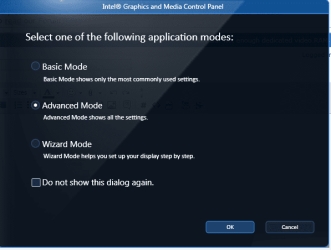
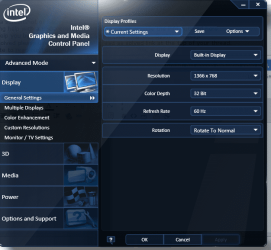
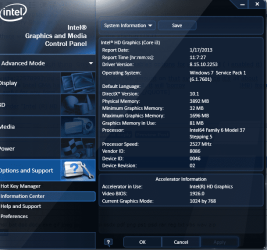
These are my Graphics options:
 

Attachments

  • GraphicOption1.png
    GraphicOption1.png
    26.2 KB · Views: 11
  • GraphicOption2.png
    GraphicOption2.png
    57.5 KB · Views: 13
  • GraphicOption3.png
    GraphicOption3.png
    60.8 KB · Views: 21

My Computer My Computer

At a glance

Windows 7 Professional x644096 MB
Computer Manufacturer/Model Number
LENOVO - 03193SU
OS
Windows 7 Professional x64
Memory
4096 MB
Or did you mean, my options when i interrupt the startup proces to get into bios settings?
 

My Computer My Computer

At a glance

Windows 7 Professional x644096 MB
Computer Manufacturer/Model Number
LENOVO - 03193SU
OS
Windows 7 Professional x64
Memory
4096 MB
Yes, the bios.
 

My Computer My Computer

At a glance

Windows 7 professional X64AMD A10-5800K OC@ 4.4Ghz.8GB Kingston HyperX Blu 1333mhzXFX HD7870 2GB Core Edition
Computer type
PC/Desktop
OS
Windows 7 professional X64
CPU
AMD A10-5800K OC@ 4.4Ghz.
Motherboard
Gigabyte F2A85X-UP4
Memory
8GB Kingston HyperX Blu 1333mhz
Graphics Card(s)
XFX HD7870 2GB Core Edition
Monitor(s) Displays
Acer AL2216W
Screen Resolution
1680x1050
Hard Drives
Seagate Barracuda 500gb 7200rpm
Seagate Barracuda 1.5TB 7200rpm
PSU
Cooler Master Silent Pro M 850W
Case
Thermaltake Commander MS-I
Cooling
Cooler Master N520
Mouse
Logitech M504
Internet Speed
10Mbps
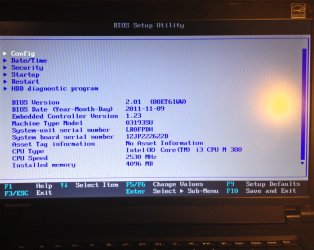
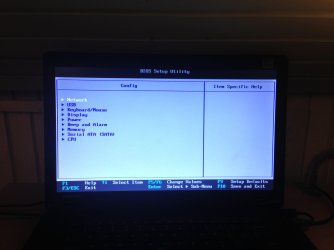
Ok i made some pictures with my phone.

This is what i get when i interrupt that proces:
 

Attachments

  • image.jpg
    image.jpg
    201.2 KB · Views: 20

My Computer My Computer

At a glance

Windows 7 Professional x644096 MB
Computer Manufacturer/Model Number
LENOVO - 03193SU
OS
Windows 7 Professional x64
Memory
4096 MB
And
 

Attachments

  • image.jpg
    image.jpg
    268.2 KB · Views: 13

My Computer My Computer

At a glance

Windows 7 Professional x644096 MB
Computer Manufacturer/Model Number
LENOVO - 03193SU
OS
Windows 7 Professional x64
Memory
4096 MB
Ok, maybe..


I heard that windows 7 can share ram with vram. Q1: Is it true? Q2: How can it be done?

thanks in advance,

i'm really trying to figure it out :S
 

My Computer My Computer

At a glance

Windows 7 Professional x644096 MB
Computer Manufacturer/Model Number
LENOVO - 03193SU
OS
Windows 7 Professional x64
Memory
4096 MB
Look under "Display" or "Memory" in the BIOS settings and see if you can't find something called Memory Share or VGA Share Memory.
 

My Computer My Computer

At a glance

Win10 Pro 64-bitAMD Ryzen 7 3800X32 GB Kingston DDR4-2666MSI nVidia GT 710 (2GB)
Computer type
PC/Desktop
Computer Manufacturer/Model Number
Self-Built
OS
Win10 Pro 64-bit
CPU
AMD Ryzen 7 3800X
Motherboard
Gigabyte X570 UD
Memory
32 GB Kingston DDR4-2666
Graphics Card(s)
MSI nVidia GT 710 (2GB)
Sound Card
Creative Audigy FX 5.1
Monitor(s) Displays
ViewSonic VG2439Smh 24"
Screen Resolution
1920x1080
Hard Drives
3xWD1TB; 1xSeagate 1TB... all spinning rust
PSU
EVGA 100-W1-0500-KR (500w)
Case
SilverStone PS10 (modified)
Cooling
CPU:AMD Wraith Prism. Case:3x Noctua 120mm
Keyboard
Compaq Professional PS/2
Mouse
Microsoft Basic Optical Mouse 2.0
Internet Speed
Fiber 1Gbit/sec down/up
Antivirus
Avast Free
Browser
FF, Chrome
Other Info
2x LG GH24NSC0 DVD burners, Mackie CR3 monitor speakers
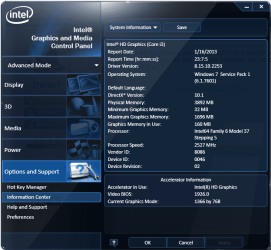
You can't adjust the video ram amount on that system since it's all about shared memory, i.e the Intel GMA has no dedicated memory at all, it will 'borrow' memory (32-1696MB) from the RAM. Pretty awful for any form of gaming/intensive 3D Apps.
 

My Computer My Computer

At a glance

Windows 10 Pro x64, Arch LinuxIntel Core 2 Quad Q8200 OC'd 3.08GHz8GB DDR2 900MhzMSI GT730 2GB GDDR5 (Kepler)
Computer type
PC/Desktop
Computer Manufacturer/Model Number
Custom Build
OS
Windows 10 Pro x64, Arch Linux
CPU
Intel Core 2 Quad Q8200 OC'd 3.08GHz
Motherboard
Asus Rampage formula LGA775
Memory
8GB DDR2 900Mhz
Graphics Card(s)
MSI GT730 2GB GDDR5 (Kepler)
Sound Card
Supreme FX2
Monitor(s) Displays
Samsung LS22F350 LED
Screen Resolution
1080P
Hard Drives
Kingston SSDNow UV400 120GB, 500GB Hitachi, 2TB Samsung, 500GB Seagate FreeAgent, 640GB Samsung, 160GB Toshiba (Arch)
PSU
AeroCool 500W Bronze
Cooling
Cooler Master V6 + 3X fans
Keyboard
Prolink keyboard
Mouse
Logitech M705
Internet Speed
1MiB/s
Browser
Chrome Beta
Look under "Display" or "Memory" in the BIOS settings and see if you can't find something called Memory Share or VGA Share Memory.

Under "Display" there was only an option to change the startup LOGO

and

Under "Memory" there was no such thing. Only enabled and disabled options for using VRAM ( i enabled it)

You can't adjust the video ram amount on that system since it's all about shared memory, i.e the Intel GMA has no dedicated memory at all, it will 'borrow' memory (32-1696MB) from the RAM. Pretty awful for any form of gaming/intensive 3D Apps.

Yes i found that under "Intel (R) HD Graphics" (see picture)

So if it borrows, why cant it borrow more than 64MB for dedicated memory :(?
 

Attachments

  • GraphicOption4.png
    GraphicOption4.png
    61.3 KB · Views: 7

My Computer My Computer

At a glance

Windows 7 Professional x644096 MB
Computer Manufacturer/Model Number
LENOVO - 03193SU
OS
Windows 7 Professional x64
Memory
4096 MB
Dedicated memory falls under the umbrella of Hardware Reserved, which in this case is a portion of RAM that the BIOS has allocated to the graphics for its exclusive use. This amount may, or may not, be able to be changed if the BIOS permits. If this option isn't there, then you're stuck with the default. Shared memory, and this depends on the amount of memory in your system, is dynamically assigned as and when required. However, as more memory is assigned to the graphics, it means that less is available for other uses and the reliance on the paging file will increase, together with a general slowing down of your machine.

Unfortunately, there isn't a great deal you can do. Laptops just simply are not designed for heavy graphics applications such as games; rather they are intended as business/office type machines where there is less graphics demand. That is not to say that they won't run games; they will, but it won't be as smooth as on a desktop.
 

My Computer My Computer

At a glance

Windows 8.1 Pro RTM x64Intel Core-i5-3570K 4-core @ 3.4GHz (Ivy Brid...4 x 4GB DDR3-1600 Corsair Vengeance CMZ8GX3M2...MSI GeForce GTX770 Gaming OC 2GB
Computer type
PC/Desktop
Computer Manufacturer/Model Number
Dwarf Dwf/11/2012 r09/2013
OS
Windows 8.1 Pro RTM x64
CPU
Intel Core-i5-3570K 4-core @ 3.4GHz (Ivy Bridge) (OC 4.4GHz)
Motherboard
ASRock Z77 Extreme4-M
Memory
4 x 4GB DDR3-1600 Corsair Vengeance CMZ8GX3M2A1600C9B (16GB)
Graphics Card(s)
MSI GeForce GTX770 Gaming OC 2GB
Sound Card
Realtek High Definition on board solution (ALC 898)
Monitor(s) Displays
ViewSonic VA1912w Widescreen (VGA)
Screen Resolution
1440x900
Hard Drives
OCZ Agility 3 SSD 120GB SATA III x2 (RAID 0)
Samsung HD501LJ 500GB SATA II x2
Hitachi HDS721010CLA332 1TB SATA II
Iomega 1.5TB Ext USB 2.0
WD 2.0TB Ext USB 3.0
PSU
XFX Pro Series 850W Semi-Modular
Case
Gigabyte IF233
Cooling
1 x 120mm Front Inlet 1 x 120mm Rear Exhaust
Keyboard
Microsoft Comfort Curve Keyboard 3000 (USB)
Mouse
Microsoft Comfort Mouse 3000 for Business (USB)
Internet Speed
NetGear DG834Gv3 ADSL Modem/Router (Ethernet) ~4.0 Mb/s (O2)
Antivirus
Avast! 8.0.1497
Browser
IE 11
Other Info
Optical Drive: HL-DT-ST BD-RE BH10LS30 SATA Bluray
Lexmark S305 Printer/Scanner/Copier (USB)
WEI Score: 8.1/8.1/8.5/8.5/8.25
Asus Eee PC 1011PX Netbook (Windows 7 x86 Starter)
Back
Top