Not parental control, lock out setting and access to certain programs?

camd5pt0

New member
Local time
1:34 PM
Messages
3
I've set up computers already imaged this was so I don't know how to do it.

How can I make a profile, that can't access anything unless they can access it on the desktop?

So this user is not using parental control. I want to be able to change settings in admin profile. But user profile they can not access anything unless it can be run from desktop. Thank you!!!
 

My Computer My Computer

Computer type
PC/Desktop
OS
Win 8

My Computer My Computer

Computer type
Laptop
Computer Manufacturer/Model Number
HP Elitebook 8540p
OS
Windows 7 Pro 32
CPU
Intel(R) Core(TM) i5 CPU M 540 @ 2.53GHz
Motherboard
Hewlett-Packard 1521
Memory
4,00 GB (Usable 2,98)
Graphics Card(s)
NVIDIA NVS 5100M
Sound Card
NVIDIA High Definition Audio
Screen Resolution
1600x900
Hard Drives
INTEL SSDSA2CW120G3
Antivirus
F-Secure Internet Security
Browser
IE, Firefox, Opera
Other Info
Sandboxie,
SRP (Software Restriction Policy),
EMET (Enhanced Mitigation Experience Toolkit),
WFC (Windows Firewall Control by BiniSoft),
Malwarebytes Premium
Hi and welcome to SevenForums!

Usually you do it with Group Policy, depending on what Windows version it is. In Pro and higher take a look at Software Restriction Policy and AppLocker. More info: http://www.sevenforums.com/system-security/359832-best-protection-against-malware.html

A good setup shouldn't restrict apps to only the desktop, but instead look at where the programs are located by the shortcuts on the desktop.

Thanks I played with the Group Policy way, much easier way and does exactly what I want.
But some changes apply to the Admin profile. How do I just apply GP for the other profile I created? Btw the user profile I have set up as guest.
 

My Computer My Computer

Computer type
PC/Desktop
OS
Win 8
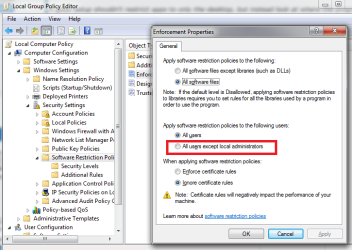
You should look for options to limit it to only certain users/groups.

For Software Restriction Policy for example there's a different setting(marked in red):
srp.png
 

My Computer My Computer

Computer type
Laptop
Computer Manufacturer/Model Number
HP Elitebook 8540p
OS
Windows 7 Pro 32
CPU
Intel(R) Core(TM) i5 CPU M 540 @ 2.53GHz
Motherboard
Hewlett-Packard 1521
Memory
4,00 GB (Usable 2,98)
Graphics Card(s)
NVIDIA NVS 5100M
Sound Card
NVIDIA High Definition Audio
Screen Resolution
1600x900
Hard Drives
INTEL SSDSA2CW120G3
Antivirus
F-Secure Internet Security
Browser
IE, Firefox, Opera
Other Info
Sandboxie,
SRP (Software Restriction Policy),
EMET (Enhanced Mitigation Experience Toolkit),
WFC (Windows Firewall Control by BiniSoft),
Malwarebytes Premium
You should look for options to limit it to only certain users/groups.

For Software Restriction Policy for example there's a different setting(marked in red):
View attachment 349459

Thanks that would've worked but I am not using applocker, or restricting apps. I found it easier to manage making it no possible to go anywhere or run any programs other than what I have on the desktop. How would I apply all the changes here to user profile and not local admin?
 

Attachments

  • policy changes.png
    policy changes.png
    38.1 KB · Views: 1
  • lockout.png
    lockout.png
    173.1 KB · Views: 1

My Computer My Computer

Computer type
PC/Desktop
OS
Win 8
I've never applied "User Configuration" policies so I had to search a little. But found this :)

"By default the Local Group Policy Editor is applied to all users unless you use a specific users or groups, or all users except administrators Local Group Policy Editor to apply User Configuration policies."

from http://www.sevenforums.com/tutorials/3652-local-group-policy-editor-open.html

So I guess you have to undo your changes and then choose one of the two other approaches for the Group Policy Editor.
 

My Computer My Computer

Computer type
Laptop
Computer Manufacturer/Model Number
HP Elitebook 8540p
OS
Windows 7 Pro 32
CPU
Intel(R) Core(TM) i5 CPU M 540 @ 2.53GHz
Motherboard
Hewlett-Packard 1521
Memory
4,00 GB (Usable 2,98)
Graphics Card(s)
NVIDIA NVS 5100M
Sound Card
NVIDIA High Definition Audio
Screen Resolution
1600x900
Hard Drives
INTEL SSDSA2CW120G3
Antivirus
F-Secure Internet Security
Browser
IE, Firefox, Opera
Other Info
Sandboxie,
SRP (Software Restriction Policy),
EMET (Enhanced Mitigation Experience Toolkit),
WFC (Windows Firewall Control by BiniSoft),
Malwarebytes Premium
Back
Top