Not receiving all emails

DonTeb

New member
Local time
9:43 AM
Messages
3
I just purchased a laptop with Windows 7 64 bit and have downloaded Office 2010 Professional. I find I am receiving some but not all my emails in my inbox. I know this because I still am receiving emails on my old computer, and there is an occasional one on my old computer, which is not on my new one. I just ran an experiment by sending 10 test emails from my wife's computer, and only received the tenth one! My old computer received all 10. I checked my online server inbox, and they are not there. I am afraid to close my old account now! What might be causing this? :confused:
 

My Computer My Computer

Computer Manufacturer/Model Number
Toshiba/Satellite
OS
Windows 7 x64
Need the following information.

* Which account you are using?
* What account type (IMAP/POP3)?
 

My Computer My Computer

Computer Manufacturer/Model Number
Custom Built
OS
Windows 7 Ultimate 64bit
CPU
Intel(R) Core(TM)2 Duo CPU E7500
Motherboard
DG41RQ
Memory
2.00 GB
Graphics Card(s)
Intel(R) G41 Express Chipset
Sound Card
Realtek
Monitor(s) Displays
Acer 20" Wide LCD
Screen Resolution
1600x900
Hard Drives
Seagate 500 GB Internal
Keyboard
Microsoft Cordless
Mouse
Microsoft Cordless
Thanks Prabz for checking in and asking. I have Outlook from Microsoft Office Professional Plus 2010. Is this what you wanted? I am getting a bit frustrated with Windows 7 hiding stuff - I just spent a couple hours (!) looking for the incoming server, which I thought should show if I have POP3, with no success. Windows XP had a handy right click bringing up Properties showing server & IP address, but I could only locate the IP Address here. Stupid thing...thoughts?
 

My Computer My Computer

Computer Manufacturer/Model Number
Toshiba/Satellite
OS
Windows 7 x64
Hello Don, can you give me what email you use with Outlook such as yahoo, hotmail, etc. I will try to get you the configuration settings if possible.
 

My Computer My Computer

Computer Manufacturer/Model Number
Custom Built
OS
Windows 7 Ultimate 64bit
CPU
Intel(R) Core(TM)2 Duo CPU E7500
Motherboard
DG41RQ
Memory
2.00 GB
Graphics Card(s)
Intel(R) G41 Express Chipset
Sound Card
Realtek
Monitor(s) Displays
Acer 20" Wide LCD
Screen Resolution
1600x900
Hard Drives
Seagate 500 GB Internal
Keyboard
Microsoft Cordless
Mouse
Microsoft Cordless
Thanks Prabz for checking in and asking. I have Outlook from Microsoft Office Professional Plus 2010. Is this what you wanted? I am getting a bit frustrated with Windows 7 hiding stuff - I just spent a couple hours (!) looking for the incoming server, which I thought should show if I have POP3, with no success. Windows XP had a handy right click bringing up Properties showing server & IP address, but I could only locate the IP Address here. Stupid thing...thoughts?

You need to have the props to enter the first time then it will show both. Did you import or clean install outlook?

Have you the pop, and smtp info frm your isp for in and out servers?

should look something like this


Ken J
 
Last edited:

My Computer My Computer

Computer Manufacturer/Model Number
HP Pavillion dv-7 1005 Tx
OS
Win 8 Release candidate 8400
CPU
[email protected]
Memory
4 gigs
Graphics Card(s)
Nvidia 9600M
Sound Card
HD built-in
Monitor(s) Displays
17" Wxga
Screen Resolution
1440x900
Cooling
none
Internet Speed
45Mb down 5Mb up
As zigzag3143 said contact your ISP and ask for details on how to set up outlook correctly
 

My Computer My Computer

Computer type
PC/Desktop
Computer Manufacturer/Model Number
Self Built Custom Computer.
OS
Windows 10 Pro x64
CPU
i7-4770K
Motherboard
Asus Z87 Sabertooth
Memory
16Gig DDR3-2400
Graphics Card(s)
Gigabyte GT740
Sound Card
Onboard
Monitor(s) Displays
Benq 27" - Dell 23' - Benq 22"
Screen Resolution
1680x1050
Hard Drives
Samsung 840 Pro 128g SSD
1xWestern Digital Caviar Green 1tb
2xWestern Digital Caviar Green 2 tb
PSU
Seasonic 760 watt Platinum
Case
Coolermaster Haf - X
Cooling
Noctua NH-C12P CPU Cooler
Keyboard
Logitech illuminated keyboard
Mouse
Logitech Perfomance MX
Internet Speed
Cable = speeds to 20Mbps downsteam and 512kbps upsteam
Antivirus
Avast Internet Security
Browser
Firefox
Sorry for the delay guys - been busy :shock: I did contact my ISP and he made a few settings changes but to no avail. I have a POP3 account with settings:
Incoming mail server: pop-server.roadrunner.com
Outgoing mail server (SMPT): smtp-server.roadrunner.com
I am taking online courses from a University with a perk of being able to download online Microsoft Office Professional Plus 2010, which includes Microsoft Outlook, of course. (This is FREE, but maybe the problem is with the Outlook software as suggested by the ISP guy, so it might not be really free). Another observation - when sending an email to me, I can see it come into the Roadrunner online Inbox. Then if I receive the message on old computer first, it doesn't come into my new computer. If I receive it on my new computer first, I do receive it on the old computer as well!! Weird
 

My Computer My Computer

Computer Manufacturer/Model Number
Toshiba/Satellite
OS
Windows 7 x64
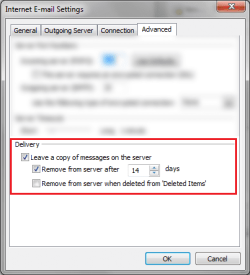
Probably you may play with Delivery options in outlook settings,

Delivery.png

or use IMAP instead of POP3
 

My Computer My Computer

Computer Manufacturer/Model Number
Custom Built
OS
Windows 7 Ultimate 64bit
CPU
Intel(R) Core(TM)2 Duo CPU E7500
Motherboard
DG41RQ
Memory
2.00 GB
Graphics Card(s)
Intel(R) G41 Express Chipset
Sound Card
Realtek
Monitor(s) Displays
Acer 20" Wide LCD
Screen Resolution
1600x900
Hard Drives
Seagate 500 GB Internal
Keyboard
Microsoft Cordless
Mouse
Microsoft Cordless
Back
Top