Solved Not seeing notification icon in automatic when there's a new update

Yes, Action Center is "On" on both computers.

No settings were changed voluntarily on either computer. In fact one of the computers basically gets no use except for monthly updates and it still lost the WU icon. Pretty sure a monthly update broke it somehow. The fact it isn't universal among Win 7 users leads me to believe it resulted from an update, that perhaps not everyone installed.

Hi:

Can't find the link to the source at the moment, but I'm pretty sure that if you have disabled/uninstalled/hidden some/all of the fairly recent Win7 telemetry features, you will no longer see the usual Windows Update icon in the system tray, regardless of your Windows Update settings.
Someone here created a desktop shortcut to the Windows Update applet on his system as a workaround (still looking for that link, too).

HTH,
MM
On one computer I hid many of those updates, on the other computer I think most got installed but I agree it is related. Why more aren't posting about it I am not sure.
 

My Computer My Computer

At a glance

Win 7 Home Premium x64Intel Core i3-540 3.07 GHz4 GB (2 X 2) Dual-Channel PC-10600 DDR3 @ 665...Integrated Intel H57
Computer Manufacturer/Model Number
HP p6608f
OS
Win 7 Home Premium x64
CPU
Intel Core i3-540 3.07 GHz
Motherboard
MS-7613 (Iona-GL8E)
Memory
4 GB (2 X 2) Dual-Channel PC-10600 DDR3 @ 665MHz (9-9-9-24)
Graphics Card(s)
Integrated Intel H57
Sound Card
Integrated Realtek ALC888S Audio
Monitor(s) Displays
17" SDM-HS73 (a vestige from my old computer)
Screen Resolution
1280 X 1024
Hard Drives
750GB SATA 7200 RPM
PSU
250W
Keyboard
HP USB keyboard
Mouse
HP USB optical mouse
Internet Speed
15Mbps/1Mbps
MoxieMomma, I've done all the 'Uninstall and Hiding of offending KBs' and Registry/Task scheduler tweaks on two Pro machines. But Notifications of Updates are showing up in the Action Centre when available for download.
The only thing I have done differently to many others is, I have allowed the windows Update Client KBs to be installed. (Except for the June one, which was buggy anyway) So perhaps that is why I'm getting no 'notification' problems.
 

My Computer My Computer

At a glance

W7 Pro x86 SP1 + XP Pro USP4v2 + W7 HP x86 + ...Intel Core 2 Duo E7500 + Intel Core 2 Duo E68504.00GB Dual-Channel DDR3 @ 531MHz (7-7-7-20)(Intel 4 Series Internal Chipset) + Asus ATI ...
Computer type
PC/Desktop
Computer Manufacturer/Model Number
Dell Optiplex 780 SFF + Asus P5K SE Custom Tower
OS
W7 Pro x86 SP1 + XP Pro USP4v2 + W7 HP x86 + Linux Mint x64
CPU
Intel Core 2 Duo E7500 + Intel Core 2 Duo E6850
Motherboard
Dell Inc. 03NVJ6 + Asus P5K SE
Memory
4.00GB Dual-Channel DDR3 @ 531MHz (7-7-7-20)
Graphics Card(s)
(Intel 4 Series Internal Chipset) + Asus ATI Radeon HD 3450
Sound Card
SoundMAX Integrated Digital High Definition Audio
Monitor(s) Displays
DELL 1702FP
Screen Resolution
1280x1024
Hard Drives
WDC WD1600AAJS-75M0A0 ATA Device + WDC x 3 + Intel SSD
Case
SFF + PCSpecialist Tower
Antivirus
MSE + MBAM Pro + MBAE + Panda (XP USP4)
Browser
Firefox
Sorry Bru, It was worth a try. From what I read here and elswhere, you are very much not alone.
 

My Computer My Computer

At a glance

W7 Pro x86 SP1 + XP Pro USP4v2 + W7 HP x86 + ...Intel Core 2 Duo E7500 + Intel Core 2 Duo E68504.00GB Dual-Channel DDR3 @ 531MHz (7-7-7-20)(Intel 4 Series Internal Chipset) + Asus ATI ...
Computer type
PC/Desktop
Computer Manufacturer/Model Number
Dell Optiplex 780 SFF + Asus P5K SE Custom Tower
OS
W7 Pro x86 SP1 + XP Pro USP4v2 + W7 HP x86 + Linux Mint x64
CPU
Intel Core 2 Duo E7500 + Intel Core 2 Duo E6850
Motherboard
Dell Inc. 03NVJ6 + Asus P5K SE
Memory
4.00GB Dual-Channel DDR3 @ 531MHz (7-7-7-20)
Graphics Card(s)
(Intel 4 Series Internal Chipset) + Asus ATI Radeon HD 3450
Sound Card
SoundMAX Integrated Digital High Definition Audio
Monitor(s) Displays
DELL 1702FP
Screen Resolution
1280x1024
Hard Drives
WDC WD1600AAJS-75M0A0 ATA Device + WDC x 3 + Intel SSD
Case
SFF + PCSpecialist Tower
Antivirus
MSE + MBAM Pro + MBAE + Panda (XP USP4)
Browser
Firefox
Hi:

My reply applies only to the presence or absence of the Windows Update system tray icon, not to the ability of Windows Update to check for or notify about update availability, per se.

IOW it does not impact the ability of Windows Update itself, merely the "cosmetic" issue of whether or not the icon appears in the system tray, as we were used to seeing with Win7 for many years (until the whole telemetry thing started).

I am pretty sure there are actually several threads about this here at this forum and elsewhere, e.g. at bleeping.
A Google search would probably turn up a few relevant links.

Sorry that I don't have time to search the specific links at this moment, but that is my understanding of the behavior (which I see on both of my Win7 rigs, too).

Cheers,
 

My Computer My Computer

At a glance

OEM Windows 7 Ult (x64) SP1Intel Core-i7 3770 @ 3.4 GHz16 GB DDR3 SDRAM @ 1333 MHzNVidia GeForce GT620 1 GB
Computer type
PC/Desktop
Computer Manufacturer/Model Number
Dell Studio XPS 8500
OS
OEM Windows 7 Ult (x64) SP1
CPU
Intel Core-i7 3770 @ 3.4 GHz
Motherboard
"Dell" branded
Memory
16 GB DDR3 SDRAM @ 1333 MHz
Graphics Card(s)
NVidia GeForce GT620 1 GB
Sound Card
THX TruStudio PC
Monitor(s) Displays
Dell U2410 Full HD
Hard Drives
2.0 TB SATA2 @ 7200 RPM
PSU
350W
Keyboard
MS 4000 Ergon - Wired
Mouse
Logitech Anywhere MX
Internet Speed
Cable HSI w/Turbo (router)
Antivirus
KIS-MBAM Premium-MBAE Premium
Browser
Fx (current version); IE
Other Info
And a Win7/64 Pro laptop; And a Win10/64 Pro desktop.
Hi:

I am pretty sure there are actually several threads about this here at this forum and elsewhere, e.g. at bleeping.
A Google search would probably turn up a few relevant links.
I didn't find a lot when I first searched but now I see a few more here and the one on Bleeping. Looks like I will have to manually check or else add the shortcut. Have to do that in Win 8 too so I should be used to it.
 

My Computer My Computer

At a glance

Win 7 Home Premium x64Intel Core i3-540 3.07 GHz4 GB (2 X 2) Dual-Channel PC-10600 DDR3 @ 665...Integrated Intel H57
Computer Manufacturer/Model Number
HP p6608f
OS
Win 7 Home Premium x64
CPU
Intel Core i3-540 3.07 GHz
Motherboard
MS-7613 (Iona-GL8E)
Memory
4 GB (2 X 2) Dual-Channel PC-10600 DDR3 @ 665MHz (9-9-9-24)
Graphics Card(s)
Integrated Intel H57
Sound Card
Integrated Realtek ALC888S Audio
Monitor(s) Displays
17" SDM-HS73 (a vestige from my old computer)
Screen Resolution
1280 X 1024
Hard Drives
750GB SATA 7200 RPM
PSU
250W
Keyboard
HP USB keyboard
Mouse
HP USB optical mouse
Internet Speed
15Mbps/1Mbps
Hi:

Can't find the link to the source at the moment, but I'm pretty sure that if you have disabled/uninstalled/hidden some/all of the fairly recent Win7 telemetry features, you will no longer see the usual Windows Update icon in the system tray, regardless of your Windows Update settings.
Someone here created a desktop shortcut to the Windows Update applet on his system as a workaround (still looking for that link, too).

HTH,
MM

That would be me. I went into the Control panel, right clicked on Windows Update, then clicked on create shortcut. I moved the shortcut to the Quick Launch folder but one can put it pretty much anywhere.

On my desktop rig, the icon for when updates are available is ephemeral. It will appear for a short while, then disappear; rinse and repeat. It spends more time out of sight than visible. I just click on the shortcut I made every few days or so to see if MSpy is trying to sneak something in.
 

My Computer My Computer

At a glance

Win 7 Ultimate 64 bitIntel i7-3930KKingston HyperX Genesis 32GB Kit (8x4GB Modul...MSI R7850 Twin Frozr 2GD5/OC Radeon HD 7850 2...
Computer type
PC/Desktop
Computer Manufacturer/Model Number
Custom Build
OS
Win 7 Ultimate 64 bit
CPU
Intel i7-3930K
Motherboard
ASUS P9X79 WS
Memory
Kingston HyperX Genesis 32GB Kit (8x4GB Modules) 1600MHz DDR
Graphics Card(s)
MSI R7850 Twin Frozr 2GD5/OC Radeon HD 7850 2GB 256-bit GDDR
Sound Card
Asus Xonar Essence STX
Monitor(s) Displays
3x Asus VG248QE 24", Vizio 32" TV
Screen Resolution
1920 x 1080, ?
Hard Drives
Samsung 128GB 840 Pro SSD (1),
Samsung 4TB 850 EVO SSDs (4)
Samsung 4TB 850 EVO SSDs (16) external backup drives used in 2.5" hot swap bays in the computer.
PSU
Corsair HX750w
Case
Antec Two Hundred v2 (modified)
Cooling
Cooler Master GeminII S524 120mm (fan replaced with a 140mm)
Keyboard
Logitech G510s
Mouse
Logitech M525 (two in use)
Internet Speed
=< 32Mbps down, 8Mbps up
Antivirus
AVAST!, MBAM, SAS, Spybot S&D (all but MBAM free) Glary Util
Browser
IE11
Other Info
LSI 9211-8i HBA card (8 SATA III ports), 2.5" & 3.5" Hot Swap Bays, HooToo HT-CR001 PCI-E to USB 3.0 Internal Hub + 6 Slot Card Reader, and LG Model CH12LS28 BD-ROM Optical Drive. Also, ScanSnap S1500 ADF duplexing scanner, Canon 9000F flat bed scanner, Corsair SP2500 2.1 speakers, Samsung CLP 415nw laser color printer, Cyberpower PP2200SW UPS
I didn't find a lot when I first searched but now I see a few more here and the one on Bleeping. Looks like I will have to manually check or else add the shortcut. Have to do that in Win 8 too so I should be used to it.

Windows Update phones home normally for me (checks for updates and notifies).
I just have to remember to check the applet from time to time, so see if I am offered something.
(For example, there was a new, optional patch for a foreign currency (KB3102429) available last night.)

So, at least on my 2 systems, I do not have manually run Windows Update.

I just do it from the start menu, as I have Windows Update pinned there.

(Click Start, type "Windows Update" and let the search results appear. Press and hold the SHIFT key down, right-click on "Windows Update" (in Search results) and select "Pin to Start Menu". Note that the Pin... option doesn't appear if the SHIFT key is not depressed.)

HTH,

MM
 

My Computer My Computer

At a glance

OEM Windows 7 Ult (x64) SP1Intel Core-i7 3770 @ 3.4 GHz16 GB DDR3 SDRAM @ 1333 MHzNVidia GeForce GT620 1 GB
Computer type
PC/Desktop
Computer Manufacturer/Model Number
Dell Studio XPS 8500
OS
OEM Windows 7 Ult (x64) SP1
CPU
Intel Core-i7 3770 @ 3.4 GHz
Motherboard
"Dell" branded
Memory
16 GB DDR3 SDRAM @ 1333 MHz
Graphics Card(s)
NVidia GeForce GT620 1 GB
Sound Card
THX TruStudio PC
Monitor(s) Displays
Dell U2410 Full HD
Hard Drives
2.0 TB SATA2 @ 7200 RPM
PSU
350W
Keyboard
MS 4000 Ergon - Wired
Mouse
Logitech Anywhere MX
Internet Speed
Cable HSI w/Turbo (router)
Antivirus
KIS-MBAM Premium-MBAE Premium
Browser
Fx (current version); IE
Other Info
And a Win7/64 Pro laptop; And a Win10/64 Pro desktop.
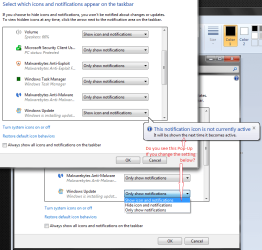
@bru, Can you try one more thing to test the os response to a change in WU notification configuration.
(This is driving me nuts too now)
 

Attachments

  • 005.png
    005.png
    44.2 KB · Views: 1

My Computer My Computer

At a glance

W7 Pro x86 SP1 + XP Pro USP4v2 + W7 HP x86 + ...Intel Core 2 Duo E7500 + Intel Core 2 Duo E68504.00GB Dual-Channel DDR3 @ 531MHz (7-7-7-20)(Intel 4 Series Internal Chipset) + Asus ATI ...
Computer type
PC/Desktop
Computer Manufacturer/Model Number
Dell Optiplex 780 SFF + Asus P5K SE Custom Tower
OS
W7 Pro x86 SP1 + XP Pro USP4v2 + W7 HP x86 + Linux Mint x64
CPU
Intel Core 2 Duo E7500 + Intel Core 2 Duo E6850
Motherboard
Dell Inc. 03NVJ6 + Asus P5K SE
Memory
4.00GB Dual-Channel DDR3 @ 531MHz (7-7-7-20)
Graphics Card(s)
(Intel 4 Series Internal Chipset) + Asus ATI Radeon HD 3450
Sound Card
SoundMAX Integrated Digital High Definition Audio
Monitor(s) Displays
DELL 1702FP
Screen Resolution
1280x1024
Hard Drives
WDC WD1600AAJS-75M0A0 ATA Device + WDC x 3 + Intel SSD
Case
SFF + PCSpecialist Tower
Antivirus
MSE + MBAM Pro + MBAE + Panda (XP USP4)
Browser
Firefox
@bru, Can you try one more thing to test the os response to a change in WU notification configuration.
(This is driving me nuts too now)
As I think I said I don't have the Windows Update icon there at all so I can't change its behavior. Happened on both my Win7 machines.

Someone on Bleeping reports running a tool restores it. But now I am unclear if the icon was completely gone like I see.

Why doesn't windows notify me about updates? - Page 3 - Windows 7
Windows Update phones home normally for me (checks for updates and notifies).
I just have to remember to check the applet from time to time, so see if I am offered something.
(For example, there was a new, optional patch for a foreign currency (KB3102429) available last night.)

So, at least on my 2 systems, I do not have manually run Windows Update.
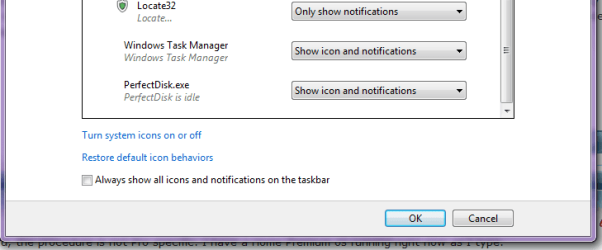
WU works fine for me too, I just no longer have the icon to tell me when there are updates. The icon is completely gone. It doesn't show at all in customize Notification Area. I know Rich O has it but is this not what others reporting this problem see?
 

My Computer My Computer

At a glance

Win 7 Home Premium x64Intel Core i3-540 3.07 GHz4 GB (2 X 2) Dual-Channel PC-10600 DDR3 @ 665...Integrated Intel H57
Computer Manufacturer/Model Number
HP p6608f
OS
Win 7 Home Premium x64
CPU
Intel Core i3-540 3.07 GHz
Motherboard
MS-7613 (Iona-GL8E)
Memory
4 GB (2 X 2) Dual-Channel PC-10600 DDR3 @ 665MHz (9-9-9-24)
Graphics Card(s)
Integrated Intel H57
Sound Card
Integrated Realtek ALC888S Audio
Monitor(s) Displays
17" SDM-HS73 (a vestige from my old computer)
Screen Resolution
1280 X 1024
Hard Drives
750GB SATA 7200 RPM
PSU
250W
Keyboard
HP USB keyboard
Mouse
HP USB optical mouse
Internet Speed
15Mbps/1Mbps
I posted this here in another thread, but I recall that the update notification shield stopped showing up in the task bar right after I hid all of the W10 prep. updates. My system checks for updates at least once a day, usually at boot up. If the PC is left on all night for backup or malware scanning, it will do the check sometime during the day. WU works just fine anyway. If there are updates, WU will say so. My paranoia is that MS will change my update settings without my knowing it (again).
 

My Computer My Computer

At a glance

Windows 7 Home Premium 64 bit SP1i5-2320 @3.00 GHz6GBNVIDIA GeForce 7300 LE
Computer type
PC/Desktop
Computer Manufacturer/Model Number
ASUS
OS
Windows 7 Home Premium 64 bit SP1
CPU
i5-2320 @3.00 GHz
Memory
6GB
Graphics Card(s)
NVIDIA GeForce 7300 LE
Monitor(s) Displays
Acer S200HQL 19.5 LED
Screen Resolution
1280 x 800 (1900 x 900 max)
Hard Drives
Drive 1: 1 TB SATA internal: C drive
Drive 2: 250 GB SATA internal: User Data Backup
Drive 3: 500 GB SATA USB: Full System Backup 1, Father
Drive 4: 500 GB SATA USB: Full System Backup 2, Son
Drive 5: 40 GB IDE USB: Kindle, ASUS Tabl
Keyboard
ASUS KB34211
Mouse
Logitech m325 cordless
Internet Speed
27Mb down, 3 Mb up cable modem w/Netgear R6400 WiFi
Antivirus
NIS, Spybot S&D, CCleaner, Malwarebytes, MSERT, MRT
Browser
FF v44.0.2;IE11 v11.0.9600.18015,uv11.0.23;Chrome v44.0.2403
Other Info
FF has AdBlockPlus and Ghostery plugins,
This is what I was talking about in post #11
Could try attached & see if it helps.
 

Attachments

My Computer My Computer

At a glance

Win 7 Home Premium x64/Linux Lite 2.6 x64
Computer type
Laptop
OS
Win 7 Home Premium x64/Linux Lite 2.6 x64
Back
Top