Notification Area Icons - Reset

How to Reset the Notification Area Icons Cache in Vista, Windows 7, and Windows 8

   Information
The notification area is a part of the taskbar that provides a temporary source for notifications and status. It can also be used to display icons for system and program features that are not on the desktop.

This will show you how reset the Notification Area Icons cache to fix any corrupted icons and remove any old icons of uninstalled programs from the Notification area Icons hide or show settings for your account in Windows 7/8 and Vista.


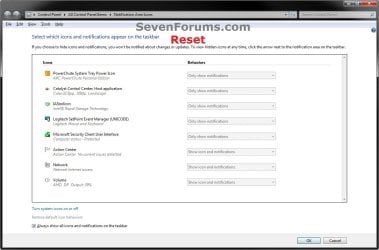
EXAMPLE: Windows 7 and Windows 8 "Notification Area Icons" Before and After Reset
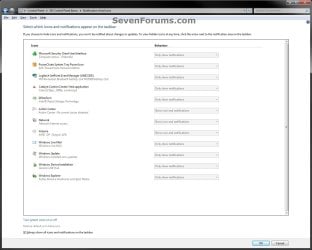
Windows7-Before.jpg

Windows7-After.jpg

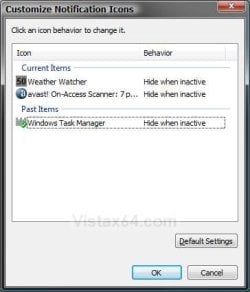
EXAMPLE: Vista "Customize Notification Icons" Before and After Reset
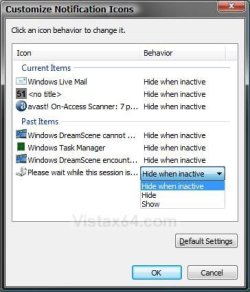
Vista-Before.jpg

Vista-After.jpg


Here's How:

1. Click/tap on the Download button below to download the file below.
Reset_Notification_Area_Icons_Cache.bat

   Note
This .bat (batch) file will confirm with you to kill the explorer.exe process, delete the registry keys IconStreams and PastIconsStream, restart the explorer.exe process, and confirm with you to restart the computer.

TrayNotify.jpg


2. Save the .bat file to your desktop.

3. Double click/tap on the .bat file to run it, click/tap on Run (if prompted by UAC), and follow the onscreen instructions in the command prompt.
NOTE: If you like, you can stop getting the Run prompt by unblocking the .bat file.

4. This is what you will see if the registry keys IconStreams and PastIconsStream have already been deleted.
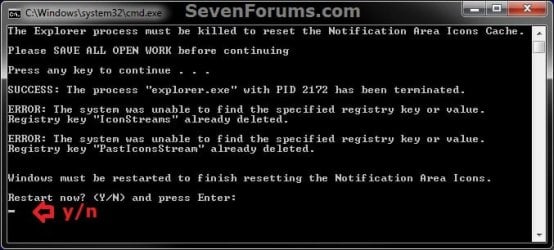
Already_Deleted.jpg
5. This is what you will see if the registry keys IconStreams and PastIconsStream have not already been deleted.
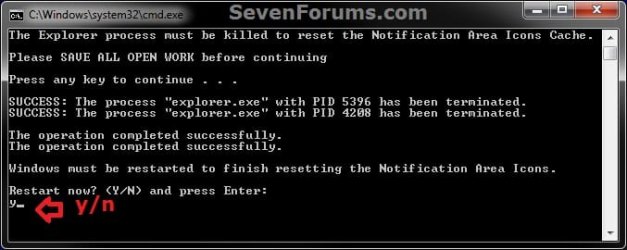
Not_Deleted_Yet.jpg
6. After the computer restarts, the IconStreams and PastIconsStream binary values in the registry will automatically be recreated the next time you make any change to the notification area icons in Windows 7/8 and Vista.


That's it,
Shawn Brink


Attachments

Last edited:

My Computer

Computer type
PC/Desktop
OS
Windows 8.1 Enterprise x64/x86
Antivirus
AppGuard, Exe Radar Pro, Sandboxie, AppCheck
You're most welcome. :)
 

My Computer

Computer type
PC/Desktop
Computer Manufacturer/Model Number
Self built custom
OS
64-bit Windows 11 Pro for Workstations
CPU
Intel i7-8700K OC'd to 5 GHz
Motherboard
ASUS ROG Maximus XI Formula Z390
Memory
64 GB (4x16GB) G.SKILL TridentZ RGB DDR4 3600 MHz
Graphics Card(s)
ASUS ROG-STRIX-GTX1080TI-O11G-GAMING
Sound Card
Integrated
Monitor(s) Displays
2 x Samsung Odyssey G7 27"
Screen Resolution
2560x1440
Hard Drives
1TB Samsung 990 PRO M.2,
4TB Samsung 990 PRO PRO M.2,
TerraMaster F8 SSD Plus NAS
PSU
Seasonic Prime Titanium 850W
Case
Thermaltake Core P3
Cooling
Corsair Hydro H115i
Keyboard
Logitech wireless K800
Mouse
Logitech MX Master 4
Internet Speed
2 Gb/s Download and 100 Mb/s Upload
Antivirus
Malwarebyte Anti-Malware Premium
Browser
Google Chrome
Other Info
Logitech Z625 speaker system,
Logitech BRIO 4K Pro webcam,
HP Color LaserJet Pro MFP M477fdn,
APC SMART-UPS RT 1000 XL - SURT1000XLI,
Galaxy S23 Plus phone
hello,
the reg keys create again after deleting them i deleted some messages and restarting explorer from file and added file to startup to deleting theme each time windows starts but CMD windows appear each time.is there any way to hide it and run file in background?
 

My Computer

Computer type
PC/Desktop
OS
windows 7-32 bit
Hello hhay, and welcome to Seven Forums. :-)

This is normal for the reg values to be recreated for the cache.

Deleting them is only to reset and clear the cache so it can start fresh.
 

My Computer

Computer type
PC/Desktop
Computer Manufacturer/Model Number
Self built custom
OS
64-bit Windows 11 Pro for Workstations
CPU
Intel i7-8700K OC'd to 5 GHz
Motherboard
ASUS ROG Maximus XI Formula Z390
Memory
64 GB (4x16GB) G.SKILL TridentZ RGB DDR4 3600 MHz
Graphics Card(s)
ASUS ROG-STRIX-GTX1080TI-O11G-GAMING
Sound Card
Integrated
Monitor(s) Displays
2 x Samsung Odyssey G7 27"
Screen Resolution
2560x1440
Hard Drives
1TB Samsung 990 PRO M.2,
4TB Samsung 990 PRO PRO M.2,
TerraMaster F8 SSD Plus NAS
PSU
Seasonic Prime Titanium 850W
Case
Thermaltake Core P3
Cooling
Corsair Hydro H115i
Keyboard
Logitech wireless K800
Mouse
Logitech MX Master 4
Internet Speed
2 Gb/s Download and 100 Mb/s Upload
Antivirus
Malwarebyte Anti-Malware Premium
Browser
Google Chrome
Other Info
Logitech Z625 speaker system,
Logitech BRIO 4K Pro webcam,
HP Color LaserJet Pro MFP M477fdn,
APC SMART-UPS RT 1000 XL - SURT1000XLI,
Galaxy S23 Plus phone
Do you know if there is a way to load the NTUSER.dat file to run this fix when a user is not logged in?

It appears that the IconStreams value is only created at login time and is not available when the user is logged off, but I wanted to verify your thoughts.
 

My Computer

Computer type
PC/Desktop
Computer Manufacturer/Model Number
Dell
OS
Windows 10 Enterprise x64
Do you know if there is a way to load the NTUSER.dat file to run this fix when a user is not logged in?

It appears that the IconStreams value is only created at login time and is not available when the user is logged off, but I wanted to verify your thoughts.

Hello, and welcome to Seven Forums. :-)

Not that I'm aware of.
 

My Computer

Computer type
PC/Desktop
Computer Manufacturer/Model Number
Self built custom
OS
64-bit Windows 11 Pro for Workstations
CPU
Intel i7-8700K OC'd to 5 GHz
Motherboard
ASUS ROG Maximus XI Formula Z390
Memory
64 GB (4x16GB) G.SKILL TridentZ RGB DDR4 3600 MHz
Graphics Card(s)
ASUS ROG-STRIX-GTX1080TI-O11G-GAMING
Sound Card
Integrated
Monitor(s) Displays
2 x Samsung Odyssey G7 27"
Screen Resolution
2560x1440
Hard Drives
1TB Samsung 990 PRO M.2,
4TB Samsung 990 PRO PRO M.2,
TerraMaster F8 SSD Plus NAS
PSU
Seasonic Prime Titanium 850W
Case
Thermaltake Core P3
Cooling
Corsair Hydro H115i
Keyboard
Logitech wireless K800
Mouse
Logitech MX Master 4
Internet Speed
2 Gb/s Download and 100 Mb/s Upload
Antivirus
Malwarebyte Anti-Malware Premium
Browser
Google Chrome
Other Info
Logitech Z625 speaker system,
Logitech BRIO 4K Pro webcam,
HP Color LaserJet Pro MFP M477fdn,
APC SMART-UPS RT 1000 XL - SURT1000XLI,
Galaxy S23 Plus phone
Thank you so much, Shawn!!! It worked great for my Windows 8.1 PC to clean out those pesky icons! (I should note that if more than one user account has leftover icons, the .bat file should be run from each account as the registry settings are saved independently per user.)
 

My Computers

System One System Two

  • Computer type
    PC/Desktop
    OS
    Windows 8.1 Home 64 bit
  • Computer type
    PC/Desktop
Thank you so much, Shawn!!! It worked great for my Windows 8.1 PC to clean out those pesky icons! (I should note that if more than one user account has leftover icons, the .bat file should be run from each account as the registry settings are saved independently per user.)

:thumbsup:
 

My Computer

Computer type
PC/Desktop
Computer Manufacturer/Model Number
Self built custom
OS
64-bit Windows 11 Pro for Workstations
CPU
Intel i7-8700K OC'd to 5 GHz
Motherboard
ASUS ROG Maximus XI Formula Z390
Memory
64 GB (4x16GB) G.SKILL TridentZ RGB DDR4 3600 MHz
Graphics Card(s)
ASUS ROG-STRIX-GTX1080TI-O11G-GAMING
Sound Card
Integrated
Monitor(s) Displays
2 x Samsung Odyssey G7 27"
Screen Resolution
2560x1440
Hard Drives
1TB Samsung 990 PRO M.2,
4TB Samsung 990 PRO PRO M.2,
TerraMaster F8 SSD Plus NAS
PSU
Seasonic Prime Titanium 850W
Case
Thermaltake Core P3
Cooling
Corsair Hydro H115i
Keyboard
Logitech wireless K800
Mouse
Logitech MX Master 4
Internet Speed
2 Gb/s Download and 100 Mb/s Upload
Antivirus
Malwarebyte Anti-Malware Premium
Browser
Google Chrome
Other Info
Logitech Z625 speaker system,
Logitech BRIO 4K Pro webcam,
HP Color LaserJet Pro MFP M477fdn,
APC SMART-UPS RT 1000 XL - SURT1000XLI,
Galaxy S23 Plus phone
7-8 Notification Clear Bat in Windows 11

Codo's to you Shawn... I've used the 7-8 version thru 10 and it's worked perfectly. I tried it in 11... nope.
Came up with an error on one Win10 Home and although it ran in Win10 Pro, it still did nothing.
I looked up the Registry addresses and seems 11 stores the notification area icons in a different reg location.
Wondered if you had an updated version for 11?
Great proggie for 7 & 10 and has helped me greatly during builds and afterwards.
Thanks for the help....
Tektrax / USA / TN
 

My Computers

System One System Two

  • Computer Manufacturer/Model Number
    Various System Intel and AMD, Laptops to Desktops
    OS
    Ver 6.1 Build 7601 SP1
  • Computer type
    PC/Desktop
Codo's to you Shawn... I've used the 7-8 version thru 10 and it's worked perfectly. I tried it in 11... nope.
Came up with an error on one Win10 Home and although it ran in Win10 Pro, it still did nothing.
I looked up the Registry addresses and seems 11 stores the notification area icons in a different reg location.
Wondered if you had an updated version for 11?
Great proggie for 7 & 10 and has helped me greatly during builds and afterwards.
Thanks for the help....
Tektrax / USA / TN

Hello, :-)

Sure thing. Here's the W11 version below:

Reset Notification Icons on Taskbar System Tray in Windows 11 | Windows 11 Forum
 

My Computer

Computer type
PC/Desktop
Computer Manufacturer/Model Number
Self built custom
OS
64-bit Windows 11 Pro for Workstations
CPU
Intel i7-8700K OC'd to 5 GHz
Motherboard
ASUS ROG Maximus XI Formula Z390
Memory
64 GB (4x16GB) G.SKILL TridentZ RGB DDR4 3600 MHz
Graphics Card(s)
ASUS ROG-STRIX-GTX1080TI-O11G-GAMING
Sound Card
Integrated
Monitor(s) Displays
2 x Samsung Odyssey G7 27"
Screen Resolution
2560x1440
Hard Drives
1TB Samsung 990 PRO M.2,
4TB Samsung 990 PRO PRO M.2,
TerraMaster F8 SSD Plus NAS
PSU
Seasonic Prime Titanium 850W
Case
Thermaltake Core P3
Cooling
Corsair Hydro H115i
Keyboard
Logitech wireless K800
Mouse
Logitech MX Master 4
Internet Speed
2 Gb/s Download and 100 Mb/s Upload
Antivirus
Malwarebyte Anti-Malware Premium
Browser
Google Chrome
Other Info
Logitech Z625 speaker system,
Logitech BRIO 4K Pro webcam,
HP Color LaserJet Pro MFP M477fdn,
APC SMART-UPS RT 1000 XL - SURT1000XLI,
Galaxy S23 Plus phone
Win11 SysTray-Reset Update

Thank Shawn for the quick response. I tried the updated version and got this cmd response:

The explorer process must be temporarily killed before deleting your taskbar corner overflow notification icons cache.Please SAVE ALL OPEN WORK before continuing.Press any key to continue . . .The operation completed successfully.SUCCESS: The process "explorer.exe" with PID 7776 has been terminated.SUCCESS: The process "explorer.exe" with PID 9544 has been terminated.SUCCESS: The process "explorer.exe" with PID 3236 has been terminated.SUCCESS: The process "explorer.exe" with PID 6328 has been terminated.SUCCESS: The process "explorer.exe" with PID 12340 has been terminated.SUCCESS: The process "explorer.exe" with PID 9764 has been terminated.ERROR: The system was unable to find the specified registry key or value.Registry key "IconStreams" already deleted.ERROR: The system was unable to find the specified registry key or value.Registry key "PastIconsStream" already deleted.You will need to restart the PC to finish resetting your taskbar corner overflow notification icons.Do you want to restart the PC now? [Y,N]?

I chose NO and it exited and restarted the desktop correctly.
The errors reporting is the same report I got with the 7-10 version.
I viewed the contents of the batch file, and it seems the same as before. Is the link you provided the right one?
I also found the systray icons in HKEY_CURRENT_USER\Control Panel\NotifyIconSettingsl deleted all entries individually and after a reboot, the systray was corrected. Many phantoms and 'should not be there' icons were gone.

Your thoughts please.
Tektrax/USA/TN
 

My Computers

System One System Two

  • Computer Manufacturer/Model Number
    Various System Intel and AMD, Laptops to Desktops
    OS
    Ver 6.1 Build 7601 SP1
  • Computer type
    PC/Desktop
Thank Shawn for the quick response. I tried the updated version and got this cmd response:

The explorer process must be temporarily killed before deleting your taskbar corner overflow notification icons cache.Please SAVE ALL OPEN WORK before continuing.Press any key to continue . . .The operation completed successfully.SUCCESS: The process "explorer.exe" with PID 7776 has been terminated.SUCCESS: The process "explorer.exe" with PID 9544 has been terminated.SUCCESS: The process "explorer.exe" with PID 3236 has been terminated.SUCCESS: The process "explorer.exe" with PID 6328 has been terminated.SUCCESS: The process "explorer.exe" with PID 12340 has been terminated.SUCCESS: The process "explorer.exe" with PID 9764 has been terminated.ERROR: The system was unable to find the specified registry key or value.Registry key "IconStreams" already deleted.ERROR: The system was unable to find the specified registry key or value.Registry key "PastIconsStream" already deleted.You will need to restart the PC to finish resetting your taskbar corner overflow notification icons.Do you want to restart the PC now? [Y,N]?

I chose NO and it exited and restarted the desktop correctly.
The errors reporting is the same report I got with the 7-10 version.
I viewed the contents of the batch file, and it seems the same as before. Is the link you provided the right one?
I also found the systray icons in HKEY_CURRENT_USER\Control Panel\NotifyIconSettingsl deleted all entries individually and after a reboot, the systray was corrected. Many phantoms and 'should not be there' icons were gone.

Your thoughts please.
Tektrax/USA/TN

Were you able to successfully reset them?
 

My Computer

Computer type
PC/Desktop
Computer Manufacturer/Model Number
Self built custom
OS
64-bit Windows 11 Pro for Workstations
CPU
Intel i7-8700K OC'd to 5 GHz
Motherboard
ASUS ROG Maximus XI Formula Z390
Memory
64 GB (4x16GB) G.SKILL TridentZ RGB DDR4 3600 MHz
Graphics Card(s)
ASUS ROG-STRIX-GTX1080TI-O11G-GAMING
Sound Card
Integrated
Monitor(s) Displays
2 x Samsung Odyssey G7 27"
Screen Resolution
2560x1440
Hard Drives
1TB Samsung 990 PRO M.2,
4TB Samsung 990 PRO PRO M.2,
TerraMaster F8 SSD Plus NAS
PSU
Seasonic Prime Titanium 850W
Case
Thermaltake Core P3
Cooling
Corsair Hydro H115i
Keyboard
Logitech wireless K800
Mouse
Logitech MX Master 4
Internet Speed
2 Gb/s Download and 100 Mb/s Upload
Antivirus
Malwarebyte Anti-Malware Premium
Browser
Google Chrome
Other Info
Logitech Z625 speaker system,
Logitech BRIO 4K Pro webcam,
HP Color LaserJet Pro MFP M477fdn,
APC SMART-UPS RT 1000 XL - SURT1000XLI,
Galaxy S23 Plus phone
Reset for SysTray Icons didn't work (11)

Sorry Shawm. I have several custom computers in the works. 2 are Win11's; 1 Home 1 Pro. Didn't work on either. I tried my finding on the pro machine and that worked by deleting every entry in HKEY_CURRENT_USER\Control Panel\NotifyIconSettings\ and restarting the machine. But on the other one with SysTray icons I know should not be there, I tried the one you sent me, and it didn't work. I compared the one you sent me with the one you have for Win7 and they're both the same. I was wondering if you gave me the Win7 link by mistake. Your Thoughts????
Tektrax/USA/TN
 

My Computers

System One System Two

  • Computer Manufacturer/Model Number
    Various System Intel and AMD, Laptops to Desktops
    OS
    Ver 6.1 Build 7601 SP1
  • Computer type
    PC/Desktop
Sorry Shawm. I have several custom computers in the works. 2 are Win11's; 1 Home 1 Pro. Didn't work on either. I tried my finding on the pro machine and that worked by deleting every entry in HKEY_CURRENT_USER\Control Panel\NotifyIconSettings\ and restarting the machine. But on the other one with SysTray icons I know should not be there, I tried the one you sent me, and it didn't work. I compared the one you sent me with the one you have for Win7 and they're both the same. I was wondering if you gave me the Win7 link by mistake. Your Thoughts????
Tektrax/USA/TN

Nope, it below is for W11.

Reset Notification Icons on Taskbar System Tray in Windows 11 | Windows 11 Forum

Usually if the app is still listed, it's still installed or didn't get fully uninstalled leaving remnants.

Are you able to at least turn off any you don't want showing for now?
 

My Computer

Computer type
PC/Desktop
Computer Manufacturer/Model Number
Self built custom
OS
64-bit Windows 11 Pro for Workstations
CPU
Intel i7-8700K OC'd to 5 GHz
Motherboard
ASUS ROG Maximus XI Formula Z390
Memory
64 GB (4x16GB) G.SKILL TridentZ RGB DDR4 3600 MHz
Graphics Card(s)
ASUS ROG-STRIX-GTX1080TI-O11G-GAMING
Sound Card
Integrated
Monitor(s) Displays
2 x Samsung Odyssey G7 27"
Screen Resolution
2560x1440
Hard Drives
1TB Samsung 990 PRO M.2,
4TB Samsung 990 PRO PRO M.2,
TerraMaster F8 SSD Plus NAS
PSU
Seasonic Prime Titanium 850W
Case
Thermaltake Core P3
Cooling
Corsair Hydro H115i
Keyboard
Logitech wireless K800
Mouse
Logitech MX Master 4
Internet Speed
2 Gb/s Download and 100 Mb/s Upload
Antivirus
Malwarebyte Anti-Malware Premium
Browser
Google Chrome
Other Info
Logitech Z625 speaker system,
Logitech BRIO 4K Pro webcam,
HP Color LaserJet Pro MFP M477fdn,
APC SMART-UPS RT 1000 XL - SURT1000XLI,
Galaxy S23 Plus phone
Sorry for my delay to respond. You are right. Some installs placed the icons I didn't want into the SysTray even though I prevented those programs from booting with Windows. Example: The "Copilot 365" Icon refused to disappear even though every copilot on the system was turned off or uninstalled and the residuals eliminated. There were others that acted similar. So, for phantoms that remain even if uninstalled or otherwise, your batch file works perfectly. Still the erroring shows up when running the batch because there's no such key as "IconStreams" or "PastIconsStream" which doesn't hurt anything. So, for my purpose, deleting the contents of "HKEY_CURRENT_USER\Control Panel\NotifyIconSettings" works because after reboot, only those programs indigenous to the OS and wanted installations end up in the Icons List, and able to be hidden or shown in the tray.
Your info, files, and responses have pointed me in the right direction.
Thanks so much for your help and I appreciate any thoughts you have on this.
By the way, my preferred OS is 7 although I have 10's for testing.
RRB/USA/TN
 

My Computers

System One System Two

  • Computer Manufacturer/Model Number
    Various System Intel and AMD, Laptops to Desktops
    OS
    Ver 6.1 Build 7601 SP1
  • Computer type
    PC/Desktop
Sorry for my delay to respond. You are right. Some installs placed the icons I didn't want into the SysTray even though I prevented those programs from booting with Windows. Example: The "Copilot 365" Icon refused to disappear even though every copilot on the system was turned off or uninstalled and the residuals eliminated. There were others that acted similar. So, for phantoms that remain even if uninstalled or otherwise, your batch file works perfectly. Still the erroring shows up when running the batch because there's no such key as "IconStreams" or "PastIconsStream" which doesn't hurt anything. So, for my purpose, deleting the contents of "HKEY_CURRENT_USER\Control Panel\NotifyIconSettings" works because after reboot, only those programs indigenous to the OS and wanted installations end up in the Icons List, and able to be hidden or shown in the tray.
Your info, files, and responses have pointed me in the right direction.
Thanks so much for your help and I appreciate any thoughts you have on this.
By the way, my preferred OS is 7 although I have 10's for testing.
RRB/USA/TN

You're most welcome. :-)
 

My Computer

Computer type
PC/Desktop
Computer Manufacturer/Model Number
Self built custom
OS
64-bit Windows 11 Pro for Workstations
CPU
Intel i7-8700K OC'd to 5 GHz
Motherboard
ASUS ROG Maximus XI Formula Z390
Memory
64 GB (4x16GB) G.SKILL TridentZ RGB DDR4 3600 MHz
Graphics Card(s)
ASUS ROG-STRIX-GTX1080TI-O11G-GAMING
Sound Card
Integrated
Monitor(s) Displays
2 x Samsung Odyssey G7 27"
Screen Resolution
2560x1440
Hard Drives
1TB Samsung 990 PRO M.2,
4TB Samsung 990 PRO PRO M.2,
TerraMaster F8 SSD Plus NAS
PSU
Seasonic Prime Titanium 850W
Case
Thermaltake Core P3
Cooling
Corsair Hydro H115i
Keyboard
Logitech wireless K800
Mouse
Logitech MX Master 4
Internet Speed
2 Gb/s Download and 100 Mb/s Upload
Antivirus
Malwarebyte Anti-Malware Premium
Browser
Google Chrome
Other Info
Logitech Z625 speaker system,
Logitech BRIO 4K Pro webcam,
HP Color LaserJet Pro MFP M477fdn,
APC SMART-UPS RT 1000 XL - SURT1000XLI,
Galaxy S23 Plus phone
Back
Top