O% CPU Usage, 54 Physical Memory

hybucket

New member
Local time
7:00 PM
Messages
15
Don't know much about computers, but...just started occasionally getting one short beep or two short beeps every once in a while. Read thru a few forums, and found some responses concerning memory. Checked my Task Manager (I'm on Windows 7 on an Acer laptop a few months old) and all the CPU usage was at 0, but the usage at the bottom was changing from 9% to maybe 45%. I checked off show processes from all users, but it didn't make a difference. Also, the physical memory reads anywhere from 35-45%. Aside from a small slowdown in things like typing on a website (or here), there are no significant problems. I ran a virus scan, and rebooted, to no avail. But if it's beeping, there must be something wrong. Is it time to consider repair shop? Any one with any ideas?
 

My Computer

OS
Windows 7
might not be needed but could you fill out your system specs using speccy or cpu id
 

My Computer

Computer Manufacturer/Model Number
Packard Bell iMedia 2218 -- Has Been Running For Almost 7 Years!
OS
Windows 7 Ultimate x86
CPU
Intel Pentium D 925 @ 3.00GHz
Motherboard
Socket 775 MCP73VT-PM
Memory
1GB DDR2 667MHz
Graphics Card(s)
Overclocked Asus ATI Radeon X1600 Pro 512MB
Sound Card
Sound Blaster Audigy 570
Monitor(s) Displays
19" LCD Monitor; MW19E-AAA
Screen Resolution
1440 x 900
Hard Drives
500gb 7200rpm (Windows 7) ---
160gb 7200rpm (Backup) ---
1TB Iomega External Drive (7200rpm)
PSU
250w Packard Bell Standard
Case
Packard Bell standard
Cooling
Intel Socket 775 Air Cooler
Keyboard
Wired PS/2 Keyboard
Mouse
Dell Wireless USB Mouse
Internet Speed
Wireles --- Download - 6.63 Mbps Upload - 0.38 Mbps
Other Info
Currently Planning To Build New Computer --- Also Got A Samsung Galaxy Ace II (Plays All Games You Throw At It)
HI,

Physical memory increases when many applications run simultaneously reaching a bottleneck.Computers always need enough physical memory for smooth handling all running applications. According to the size and usage of application, consumes more memory. Operating system itself consumes some memory for handling all applications. So running out of memory lead to the unresponsive operating system.
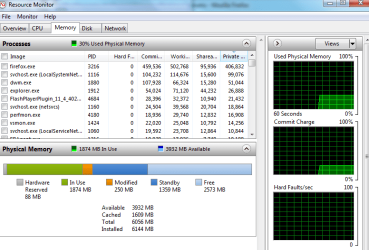
Open Resource Monitor and click on the Memory tab. That will show you how your RAM is being used. Windows 7 is a lot better at allocating and using memory than previous versions of Windows. The basic philosophy of Windows 7 is "unused RAM is wasted RAM." Please post a screenshot of the Memory tab.

http://www.sevenforums.com/tutorials/12523-resource-monitor.html

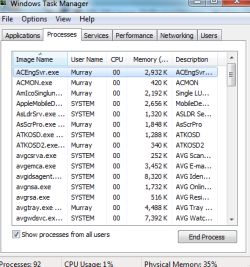
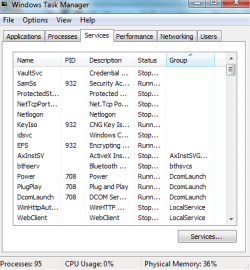
Please upload full spec of your system and pictures of the services and process running , for detail analysis .
 

My Computer

Computer Manufacturer/Model Number
Custom self assembled
OS
Windows 7 Ultimate x64
CPU
Intel Core i7 930
Motherboard
Gigabyte GA X58A UD7
Memory
Gskill 2x3 GB Ram
Graphics Card(s)
Sapphire ATI Radeon HD 5870
Monitor(s) Displays
LG 24MP88 24" LED Monitor
Screen Resolution
1920 X 1080
Hard Drives
Seagate barracuda 1 TB
PSU
Corsair GS 600W
Case
Cooler Master 690 II Plus
Cooling
Cooler Master Hyper 212X
Keyboard
Logitech G15 Gaming keyboard
Mouse
Logitech MX518 Gaming Mouse
Internet Speed
Broadband 50 Mbps speed [Hathway]
Other Info
Xbox 360 Wired Controller (x2)
AverMedia TV tuner Card [Internal]
Logitech HD C110 Web Camera
Netgear WGR614 Wireless-N 150 Router
Razer Goliathus Fragged Alpha Control Edition Mouse Pad
Pedroc-
Keep in mind I am not a computer wiz. I am not sure what you mean by "speccy or cpu id"

AliKhan - How do I upload to this forum, and what screens would help?
 

My Computer

OS
Windows 7
Let me try this...
 

Attachments

  • resourcemonitor.png
    resourcemonitor.png
    69.2 KB · Views: 26

My Computer

OS
Windows 7
Now that I've figured it out...here are a couple more...processes.png

services.png
 

My Computer

OS
Windows 7
Everything is normal with your memory and C.P.U usage . Nothing of concern in that area but that beeping sound you are experiencing need to be figured out. :confused:
 

My Computer

Computer Manufacturer/Model Number
Custom self assembled
OS
Windows 7 Ultimate x64
CPU
Intel Core i7 930
Motherboard
Gigabyte GA X58A UD7
Memory
Gskill 2x3 GB Ram
Graphics Card(s)
Sapphire ATI Radeon HD 5870
Monitor(s) Displays
LG 24MP88 24" LED Monitor
Screen Resolution
1920 X 1080
Hard Drives
Seagate barracuda 1 TB
PSU
Corsair GS 600W
Case
Cooler Master 690 II Plus
Cooling
Cooler Master Hyper 212X
Keyboard
Logitech G15 Gaming keyboard
Mouse
Logitech MX518 Gaming Mouse
Internet Speed
Broadband 50 Mbps speed [Hathway]
Other Info
Xbox 360 Wired Controller (x2)
AverMedia TV tuner Card [Internal]
Logitech HD C110 Web Camera
Netgear WGR614 Wireless-N 150 Router
Razer Goliathus Fragged Alpha Control Edition Mouse Pad
It doesn't happen over and over...just occasionally. But, as I said, I'm not experiencing any problems...at least yet. Last time I rebooted, shortly thereafter, I heard ONE beep. Several minutes later, TWO. Has been running now for over an hour with no further beeping. Not sure what to do at this point....Thanks.
 

My Computer

OS
Windows 7
Hey ... did you check your ram is properly inserted . Try removing it and then inserting it properly in the ram slot.
 

My Computer

Computer Manufacturer/Model Number
Custom self assembled
OS
Windows 7 Ultimate x64
CPU
Intel Core i7 930
Motherboard
Gigabyte GA X58A UD7
Memory
Gskill 2x3 GB Ram
Graphics Card(s)
Sapphire ATI Radeon HD 5870
Monitor(s) Displays
LG 24MP88 24" LED Monitor
Screen Resolution
1920 X 1080
Hard Drives
Seagate barracuda 1 TB
PSU
Corsair GS 600W
Case
Cooler Master 690 II Plus
Cooling
Cooler Master Hyper 212X
Keyboard
Logitech G15 Gaming keyboard
Mouse
Logitech MX518 Gaming Mouse
Internet Speed
Broadband 50 Mbps speed [Hathway]
Other Info
Xbox 360 Wired Controller (x2)
AverMedia TV tuner Card [Internal]
Logitech HD C110 Web Camera
Netgear WGR614 Wireless-N 150 Router
Razer Goliathus Fragged Alpha Control Edition Mouse Pad
I would not know how to do that. And I just beeped twice as I'm typing this. I am on a laptop, BTW.
 

My Computer

OS
Windows 7
Wait for suggestion from other members of the forum.
 

My Computer

Computer Manufacturer/Model Number
Custom self assembled
OS
Windows 7 Ultimate x64
CPU
Intel Core i7 930
Motherboard
Gigabyte GA X58A UD7
Memory
Gskill 2x3 GB Ram
Graphics Card(s)
Sapphire ATI Radeon HD 5870
Monitor(s) Displays
LG 24MP88 24" LED Monitor
Screen Resolution
1920 X 1080
Hard Drives
Seagate barracuda 1 TB
PSU
Corsair GS 600W
Case
Cooler Master 690 II Plus
Cooling
Cooler Master Hyper 212X
Keyboard
Logitech G15 Gaming keyboard
Mouse
Logitech MX518 Gaming Mouse
Internet Speed
Broadband 50 Mbps speed [Hathway]
Other Info
Xbox 360 Wired Controller (x2)
AverMedia TV tuner Card [Internal]
Logitech HD C110 Web Camera
Netgear WGR614 Wireless-N 150 Router
Razer Goliathus Fragged Alpha Control Edition Mouse Pad
to check your RAM see this link

How to Install RAM in Your Acer Laptop | eHow.com

'most' ACER machines have a memory access door on the bottom of the machine (read your manual or tell us here what the model number is) and the above linked instructions should apply--note that RAM can get loose if a laptop is bounced around a bit

note: Be aware, though, that Acer is also notorious for its "hidden memory compartment" under the keyboard, which will be 'more difficult' to check
 

My Computer

Computer Manufacturer/Model Number
SALEON model 2.2b
OS
win7 ultimate 32bit
CPU
core2 Extreme QX6850-OCd to 3.15 GHz
Motherboard
ASUS P5G41-M LE
Memory
4 GB
Graphics Card(s)
NVidia 8600 GT
Monitor(s) Displays
23" acer
Hard Drives
one SATA 250GB partitioned equally in half
one SATA 160GB-internal storage
PSU
500W Thermaltake
Case
mini tower
Model # is X73S. I don't really bounce the laptop around much, but you never know, I guess. If it's easily accessible, I could probably take a look (and save the million dollar charge at MicroCenter).
 

My Computer

OS
Windows 7
no one really bounces their laptop around--but--just riding in a vehicle or being carried in a backpack can cause bouncing--Acer doesn't appear to make an X73S--but Asus does--so which is it? IF Acer there should be an access door on bottom.

in an earlier post someone mentioned using CPU ID--it's free and you can get it here:

CPUID - System & hardware benchmark, monitoring, reporting


download install and run it--it will show tons of info about your ram, motherboard, cpu and BIOS version which makes it easy to diagnose beep codes.

once you know what version BIOS (Mainboard Tab in CPU-Z) you have you can look up the beep codes here:
How To Troubleshoot Beep Codes
 

Attachments

  • Capture.JPG
    Capture.JPG
    55.9 KB · Views: 3

My Computer

Computer Manufacturer/Model Number
SALEON model 2.2b
OS
win7 ultimate 32bit
CPU
core2 Extreme QX6850-OCd to 3.15 GHz
Motherboard
ASUS P5G41-M LE
Memory
4 GB
Graphics Card(s)
NVidia 8600 GT
Monitor(s) Displays
23" acer
Hard Drives
one SATA 250GB partitioned equally in half
one SATA 160GB-internal storage
PSU
500W Thermaltake
Case
mini tower
Pedroc-
Keep in mind I am not a computer wiz. I am not sure what you mean by "speccy or cpu id"
"speccy" is a program that goes and looks at what hardware you have.
We have the forum's own program for that, that will automatically fill the "my specs" table (scroll down to the 7th step of that tutorial) so we can see it and provide more tailored help.
 

My Computer

Computer type
PC/Desktop
Computer Manufacturer/Model Number
custom built
OS
Win 7 Pro 64-bit 7601
CPU
AMD Phenom 9650 QuadCore, revision DR-B3
Motherboard
ASUS M4A78
Memory
5 GB yes I run 2x 2GB and 1x 1GB, different brand, spank me.
Graphics Card(s)
NVIDIA GeForce 9800 GT 512 Mb, unknown manufacturer.
Sound Card
Crappy Realtek Integrated Audio
Monitor(s) Displays
Fujitsu Siemens P19-3P
Screen Resolution
1280 x 1024 x 32 bits @ 60 Hz Oh yeah, 4:3 rocks!
Hard Drives
(1) MAXTOR S TM3320613AS SATA Disk Device (2) STM35004 18AS SATA Disk Device (3) TOSHIBA USB 2.5"-HDD
PSU
whatever, around 450w
Case
Scavenged from old company PC, 10+ years old
Cooling
CPU fan, GPU fan, case fan, nothing fancy
Keyboard
Microsoft, PS/2, white.
Mouse
Optical, logitec.
Internet Speed
effective max speeds: 70-ish kB/s down 30-ish kB/s up
Antivirus
Avira, free edition.
Browser
Firefox with FXChrome to make it look like Google Chrome :P
Other Info
Was discarded by previous owner due to "horrible performance".
Was running Win Xp from a IDE drive. Yeah. Was a pain.
SATA II drive and Win7 and it zips away! Yay!

My Computer

Computer type
PC/Desktop
Computer Manufacturer/Model Number
Home made Desktop
OS
Windows 10 Pro. 64/ version 1709 Windows 7 Pro/64
CPU
Intel i7-6800K @ 4.3
Motherboard
ASUS X-99 Deluxe II
Memory
Corsair Platinum 16 gig @2400
Graphics Card(s)
EVGA GTX 1070 OC
Monitor(s) Displays
Asus 27" LED LCD/VE278Q
Screen Resolution
1920-1080 or 1280-720 HDMI
Hard Drives
INTEL SSD 730-240 Gb Sata 3.0/
PSU
EVGA Platium 1200W
Case
Phanteks Luxe Tempered Glass 8 fans/ one radiator
Cooling
XSPC/ Water Cooled CPU
Keyboard
Das 4 Professional
Mouse
Logitech M705/MX Anywhere 2-S
Internet Speed
100 mbits
Antivirus
Microsoft Security Essentials/ Malwarebytes Premium 3.0/ SAS
Browser
I.E. 11 default/Firefox/ ISP Time Warner Cable/Spectrum
Other Info
LG BluRay Burner/
Sound system-KLipsch-THX/
Icy Dock ssd Hot Swap bays.
Back
Top