Odd computer behavior.. Weird internet connections ect.

itsjustalogin

New member
Local time
2:01 PM
Messages
7
Odd computer behavior-Programs crashing/unresponsive(Still need help)

Hello everyone, I've recently had a false positive virus on my computer that was quarantined as a keylogger [Click Here] and since then my computer has seemed to act sort of strange. First of all, hardly any programs respond correctly or are extremely slow, as an example, I just opened notepad, a seemingly easy program to run but as I was typing or just anything, it froze then became unresponsive along with explorer.exe (windows.exe = start menu, task bar, desktop ect.). The day before I ran three different virus scanners to determine if I had anymore virus's on my computer or not. (I ran Malwarebytes Anti-Malware, BitDefender, and Microsoft Security Essentials).
Malwarebytes came up as clean but BitDefender and Microsoft Security Essentials both came up with one trojan each. But I determined that they where both false positives because I've used them for a while and they caused me no trouble at all, but back to my main problem. Whenever I start up Google Chrome or any web browser it takes a very long time for them to load the webpage or anything at all, sometimes not even loading at all (simply crashing).

I've looked at the "Monday Internet Doomsday" virus on the FBI's website and scanned my computer's IP and DNS and found out they where clean or supposedly clean. Then just curious I started the Command Prompt and typed in "ipconfig /allcompartments /all" and first noticed that my desktop's "Ethernet Adapter Local Area Connection" was different from my laptop's (I know that they aren't supposed to be exactly the same.).

The bit that I found different was the "Connection-specific DNS Suffix", for my laptop it came out as:

Ethernet Adapter Local Area Connection:
Media state: Media disconnected
Connection-specific DNS Suffix: N/A (It's just blank)
Description: Realtek PCIe FE Family Controller
Physical Address: 98-4B-E1-94-A2-91
DHCP Enabled: Yes
Auto Configuration: Yes

Then my desktop came out as this:

Ethernet Adapter Local Area Connection:
Media state: Media disconnected
Connection-specific DNS Suffix: sgt.cpqcorp.net
Description: Realtek PCIe 6BE Family Controller
Physical Address: 38-60-77-77-50-pF
DHCP Enabled: Yes
Auto Configuration: Yes

The "sgt.cpqcorp.net" seemed suspicious to me as it's not on my laptop or two other computers in my house. (All of the "Connection-specific DNS Suffix" are blank)
So what should I do? Am I infected with this new virus, or what's going on with my computer? As I said all of my virus scanners are coming up clean but it just still has problems.

Thanks a lot in advance for help.
 
Last edited:

My Computer

OS
Windows 7 Home Premium 64bit
Hiyya and welcome itsa am no expert but just out of curiosity what security are you running mate and that sgt.***** you mentioned I did a Google search and come up with some problems similar to what you are asking - take a look -
Google

You could get it checked with one of those agencies like AV Comparatives (web address under construction or www.matousec.com: Security software testing, analyses, research and reviews. I think they will check it out for you or anything else you find.
There are more online scanners like Kaspersky TDSS Killer that go for rootkits etc and there are more like Hitman Pro take a peek at this too 10 Free Online Malware and Virus Scanners

?tried the Microsoft tool? Malware Removal | Anti-Malware | Remove Malware

Let us know how you go:)
 

My Computer

Computer type
PC/Desktop
Computer Manufacturer/Model Number
Own build (new) Desk1 / Asus ROG Win 7 / Desk2 1st build
OS
Desk1 7 Home Prem / Desk2 10 Pro / Main lap Asus ROG 10 Pro 2 laptop Toshiba 7 Pro Asus P2520 7 & 10
CPU
Desk1 i5 3750K / Laptop i7 GTX 860M / Desk2 i5 2500
Motherboard
Desk1 Asus P877-V / Desk2 Gigabyte H67 UD3H / Laptop ?
Memory
Desk1 8GB (1866) / Desk2 16GB (1333) / Laptop 8Gb DDR3
Graphics Card(s)
Desk 1& 2NVidia GTX 650 & Laptops on board Intel
Sound Card
Desk 1 & 2 -XONAR DG Realtek High Def audio Laptop
Monitor(s) Displays
Desk 1 Benq HD 2450 / Desk2 Philips 24" / Laptop 17.5"
Screen Resolution
1920x1080 D1 & D2 & Laptop 1
Hard Drives
Desk1 Samsung 120GB 830 SSD
Asus ROG 256GB 850 Pro SSD
Desk2 Samsung 840 256 SSD
Toshiba 120GB EVO
PSU
Desk 1 Corsair HX 1050/ Laptop ? / Desk 2 Corsair HX 650
Case
Desk 1 Cooler HAF XM ? Toshiba laptop / Desk2 Coolermaster
Cooling
Fans on all Desk1 -2 Desk2 - all Coolermasters 5 Laptop ?
Keyboard
Desk 1 MS Sidewinder X6 Desk 2 MS Sidewinder X 4
Mouse
Desk 1&2 - Gigabyte MS 900 gamer - laptop - Logitec wireless
Internet Speed
ADSL2+
Other Info
One other Desktop (tester) and spare Toshba laptop both with SSD's
Running Kaspersky 2016 ISS on all machines config'd identically
Logitec audio stereo systems on each machine (x3)
Canon MG5250MFC
Router/modem TP-Link running WPA2SK
Well thank you for replying, been waiting for someone to answer, and I have looked up the DNS Suffix that I'm getting like you did but what I found wasn't really what I thought I was having problems with. I can connect to the internet perfectly with 4 bars of signal but it just sometimes takes a while for pages to load. I've tried the online scanners but they all come up clean/never finding any problems really, and as for the Microsoft Tool, it just crashes when I try to start it, that's the same with MSE.
 

My Computer

OS
Windows 7 Home Premium 64bit
Hum mate now like I said I am no expert but just for the record it's always handy to know what you are running hardware and software wise - it makes life a tad bit easier when we have that sort of info.

For example it sounds like you are using a non cable hook up so am assuming it's a laptop and I guess you are running 7 of some sort or else you wouldn't be here :)


Now I am not a great lover of free security to be honest except for a very small group including Comodo Avira and Avast. Personally I run Kaspersky on all my main machines and will not change it for anything.

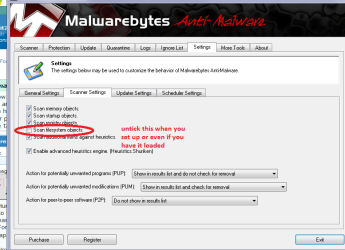
Whatever you are running freebie or paid for can you let us know and also if you are not aware are - if you are running more than one security software - never a good idea because of the conflicts. Malwarebytes is ok if you are just running he free version and not the paid for - in my experience and you need to set the scanner settings to not include the file system -see pic as some of the reasoning behind that is it takes a very long time to scan and if you run MBAM on a regular basis then it would have already been through what you have been downloading so to speak and tends to check the latest "gear".

But ass Isaid it would be nice to know what you are running apart from the 7.
 

Attachments

  • MBAM2.PNG
    MBAM2.PNG
    123.7 KB · Views: 12

My Computer

Computer type
PC/Desktop
Computer Manufacturer/Model Number
Own build (new) Desk1 / Asus ROG Win 7 / Desk2 1st build
OS
Desk1 7 Home Prem / Desk2 10 Pro / Main lap Asus ROG 10 Pro 2 laptop Toshiba 7 Pro Asus P2520 7 & 10
CPU
Desk1 i5 3750K / Laptop i7 GTX 860M / Desk2 i5 2500
Motherboard
Desk1 Asus P877-V / Desk2 Gigabyte H67 UD3H / Laptop ?
Memory
Desk1 8GB (1866) / Desk2 16GB (1333) / Laptop 8Gb DDR3
Graphics Card(s)
Desk 1& 2NVidia GTX 650 & Laptops on board Intel
Sound Card
Desk 1 & 2 -XONAR DG Realtek High Def audio Laptop
Monitor(s) Displays
Desk 1 Benq HD 2450 / Desk2 Philips 24" / Laptop 17.5"
Screen Resolution
1920x1080 D1 & D2 & Laptop 1
Hard Drives
Desk1 Samsung 120GB 830 SSD
Asus ROG 256GB 850 Pro SSD
Desk2 Samsung 840 256 SSD
Toshiba 120GB EVO
PSU
Desk 1 Corsair HX 1050/ Laptop ? / Desk 2 Corsair HX 650
Case
Desk 1 Cooler HAF XM ? Toshiba laptop / Desk2 Coolermaster
Cooling
Fans on all Desk1 -2 Desk2 - all Coolermasters 5 Laptop ?
Keyboard
Desk 1 MS Sidewinder X6 Desk 2 MS Sidewinder X 4
Mouse
Desk 1&2 - Gigabyte MS 900 gamer - laptop - Logitec wireless
Internet Speed
ADSL2+
Other Info
One other Desktop (tester) and spare Toshba laptop both with SSD's
Running Kaspersky 2016 ISS on all machines config'd identically
Logitec audio stereo systems on each machine (x3)
Canon MG5250MFC
Router/modem TP-Link running WPA2SK
Malwarebytes came up as clean but BitDefender and Microsoft Security Essentials both came up with one trojan each. But I determined that they where both false positives because I've used them for a while and they caused me no trouble at all, but back to my main problem.

Hi,

What is the application that caused the FP? Its very odd that both MSE and Bitdefender flagged this as an issue.

Regards,
Golden
 

My Computer

Computer type
PC/Desktop
Computer Manufacturer/Model Number
Golden Mk. I.4
OS
Windows 10 Pro x64 ; Xubuntu x64
CPU
Intel i7 860 @ 2.80 GHz O/C'ed to 4.0GHz
Motherboard
Gigabyte P55A-UD3R Rev.1. Award BIOS F13
Memory
16GB Corsair Vengance DDR3 @ 661 MHz Dual Channel (9-9-9-24)
Graphics Card(s)
EVGA NVidia GTX 560 1024MB
Sound Card
Realtek Integrated
Monitor(s) Displays
Dual Samsung SyncMaster 2494HS
Screen Resolution
1920*1080 and 1920*1080
Hard Drives
1*Samsung 840 EVO 120GB SSD;
1*OCZ Vertex 2 60GB SSD;
2*Samsung F3 SpinPoint 1TB in RAID0;
1*Samsung F1 SpinPoint 1TB;
2*Western Digital 1TB External USB 3.0
1*Western Digital 500GB External USB 3.0
1*Seagate 500GB External USB 2.0
PSU
Thermaltake ToughPower QFan 750W
Case
Thermaltake Element S VK60001W2Z
Cooling
Corsair H60 Water Cooling, 2*230mm and 2*80mm case fans
Keyboard
Logitech G110
Mouse
Logitech MX518

My Computer

Computer type
PC/Desktop
Computer Manufacturer/Model Number
Home made Desktop
OS
Windows 10 Pro. 64/ version 1709 Windows 7 Pro/64
CPU
Intel i7-6800K @ 4.3
Motherboard
ASUS X-99 Deluxe II
Memory
Corsair Platinum 16 gig @2400
Graphics Card(s)
EVGA GTX 1070 OC
Monitor(s) Displays
Asus 27" LED LCD/VE278Q
Screen Resolution
1920-1080 or 1280-720 HDMI
Hard Drives
INTEL SSD 730-240 Gb Sata 3.0/
PSU
EVGA Platium 1200W
Case
Phanteks Luxe Tempered Glass 8 fans/ one radiator
Cooling
XSPC/ Water Cooled CPU
Keyboard
Das 4 Professional
Mouse
Logitech M705/MX Anywhere 2-S
Internet Speed
100 mbits
Antivirus
Microsoft Security Essentials/ Malwarebytes Premium 3.0/ SAS
Browser
I.E. 11 default/Firefox/ ISP Time Warner Cable/Spectrum
Other Info
LG BluRay Burner/
Sound system-KLipsch-THX/
Icy Dock ssd Hot Swap bays.
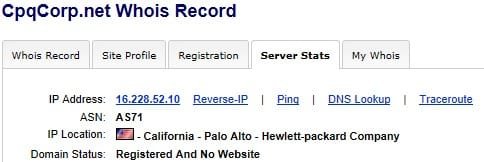
Hopefully this will help a bit
 

Attachments

  • sgtcpqcorpnet.jpg
    sgtcpqcorpnet.jpg
    25.3 KB · Views: 11

My Computer

Computer type
PC/Desktop
Computer Manufacturer/Model Number
Bruce ... somewhere in his 40's
OS
Windows 7 Ultimate 32bit SP1
CPU
Intel(R) Core(TM)2 Quad CPU @ 2.40GHz, 2400 MHz
Motherboard
INTEL/D975XBX2
Memory
4 GB
Graphics Card(s)
ATI Radeon HD 2600 Pro
Monitor(s) Displays
Samsung SyncMaster 914v
Screen Resolution
1280 x 1024
Hard Drives
2/500GB each ... ST3500630AS ATA Device.
One is not connected
PSU
Rocketfish 700 W
Case
G.Skill Gigabyte Chassis
Keyboard
Standard PS/2 Keyboard
Mouse
Microsoft PS/2 Mouse
Internet Speed
DSL
Antivirus
Avira Internet Security
Browser
IE 11
Other Info
ATI HDMI Audio
Back
Top