
CaptDrizzle
New member
- Local time
- 3:37 PM
- Messages
- 4
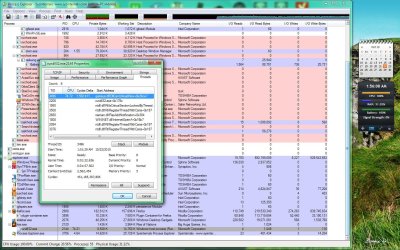
Whenever I start a game (rise of nations in this example) and I am NOT connected to the internet, it doesn't load and "rundll32.exe" starts hogging up CPU cycles. Looking at the threads for the process shows "gameux.dll" is the culprit. When I kill the individual thread, the game continues to load just fine. Check out the attached screen shot to see Process Explorer and the "rundll32.dll" threads. This applies to all games that are listed in Games Explorer.
However, when I AM connected to the internet, this problem is non-existant. I have tested this multiple times on my machine and the only variable is my internet connection status. I have loaded Games Explorer and disabled "Game updates and news" as well as "Download art and information about installed games" and "Collect most recently played game information", but I still have this problem.
It is VERY annoying when connecting to personal LANs for old-school Unreal Tournament action where we don't need an internet connection. Does anybody have a solution?
However, when I AM connected to the internet, this problem is non-existant. I have tested this multiple times on my machine and the only variable is my internet connection status. I have loaded Games Explorer and disabled "Game updates and news" as well as "Download art and information about installed games" and "Collect most recently played game information", but I still have this problem.
It is VERY annoying when connecting to personal LANs for old-school Unreal Tournament action where we don't need an internet connection. Does anybody have a solution?
Attachments
My Computer
- Computer Manufacturer/Model Number
- Toshiba Laptop
- OS
- Windows 7 Professional 32-bit
- CPU
- Intel Celeron 2 GHz
- Memory
- 3GB
- Graphics Card(s)
- Mobile Intel 4 Series Express Chipset Family (Onboard)
- Screen Resolution
- 1440x900
- Hard Drives
- 230GB
