Office 2007 not responding

stewarta13wsb

New member
Local time
10:09 PM
Messages
16
Location
ballachulish
I've had an intermittent, ongoing problem with my computer freezing that no forum question has ever solved.
As time has gone on I think I've narrowed the problem down to Office 2007 - if not totally then certainly a frequent culprit.
Occasionally when I open Word or Excel and then click to open a document it goes to 'not responding' in the top bar. Any other programs open at the same time all eventually 'fall over' too - with the same message.
I've also discovered that if I wait long enough it does eventually sort itself out and return to normal with the document open.
Previously, since task manager didn't open, I just used to switch off (I'm not very patient:o)

Any thoughts?

Stewart
 

My Computer My Computer

At a glance

windows 7
OS
windows 7
Action Center

Hi Stewart and welcome to Windows 7 Support forums,
Please review your action center and see in activities if you are experiencing "APPCRASH" when you try to launch. If you are let us know so we can go to the next step.
 

My Computer My Computer

At a glance

Windows 7 7600 1 X64AMD PHENOM II X 550 PROCESSOR 3.1 ghzCorsair 4 gig ddr 3ati radeon 3300
Computer Manufacturer/Model Number
Custom Build
OS
Windows 7 7600 1 X64
CPU
AMD PHENOM II X 550 PROCESSOR 3.1 ghz
Motherboard
ASUS M4A78-TE
Memory
Corsair 4 gig ddr 3
Graphics Card(s)
ati radeon 3300
Sound Card
ati hd
Monitor(s) Displays
syncmaster 2033sw
Screen Resolution
1600X900 60 hz refresh
Hard Drives
twin_seagates SATA's 1 TB & 500 Gig, hitachi_slimline 160 gig
PSU
antec_550 watt
Case
cooler master GLite
Cooling
stock_heat sink
Internet Speed
20mbs up/ 1.5mbs down
Other Info
favorite child "stewie"
favorite dog "brian"
Hmm, if I'm reading the right thing all it says is 'stopped working' and there are only 2 entries for Word and none for Excel!
On the other hand I now notice there are over 30 for Windows Explorer :eek:

Does that point to something else?

Thanks for the speedy reply,

Stewart
 

My Computer My Computer

At a glance

windows 7
OS
windows 7
Hmm, if I'm reading the right thing all it says is 'stopped working' and there are only 2 entries for Word and none for Excel!
On the other hand I now notice there are over 30 for Windows Explorer :eek:

Does that point to something else?

Thanks for the speedy reply,

Stewart
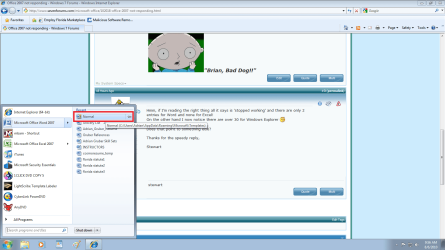
Attached is an image for your review, as I use my winword.exe from my start menu on the lower left of the image in red you will the small file "normal"! This is a basic template that is referenced by winword.exe. Your "NORMAL" template file has been corrupted. Hence when you launch winword.exe you experience "APPCRASH" because winword cannot read the corrupted template.
The solution to this issue is to delete the "NORMAL" file, reboot your system and launch winword and allow it to make the "NORMAL" file anew.
 

Attachments

  • app.png
    app.png
    66.7 KB · Views: 165

My Computer My Computer

At a glance

Windows 7 7600 1 X64AMD PHENOM II X 550 PROCESSOR 3.1 ghzCorsair 4 gig ddr 3ati radeon 3300
Computer Manufacturer/Model Number
Custom Build
OS
Windows 7 7600 1 X64
CPU
AMD PHENOM II X 550 PROCESSOR 3.1 ghz
Motherboard
ASUS M4A78-TE
Memory
Corsair 4 gig ddr 3
Graphics Card(s)
ati radeon 3300
Sound Card
ati hd
Monitor(s) Displays
syncmaster 2033sw
Screen Resolution
1600X900 60 hz refresh
Hard Drives
twin_seagates SATA's 1 TB & 500 Gig, hitachi_slimline 160 gig
PSU
antec_550 watt
Case
cooler master GLite
Cooling
stock_heat sink
Internet Speed
20mbs up/ 1.5mbs down
Other Info
favorite child "stewie"
favorite dog "brian"
Sounds fine.... but I can't find the 'normal' file anywhere - even if I type it in the search panel:o
Where might it be stored?

Stewart
 

My Computer My Computer

At a glance

windows 7
OS
windows 7
Sounds fine.... but I can't find the 'normal' file anywhere - even if I type it in the search panel:o
Where might it be stored?

Stewart
Use windows 7 search feature at the bottom left of your task bar you will see the search option, type normal and see the results.
 

My Computer My Computer

At a glance

Windows 7 7600 1 X64AMD PHENOM II X 550 PROCESSOR 3.1 ghzCorsair 4 gig ddr 3ati radeon 3300
Computer Manufacturer/Model Number
Custom Build
OS
Windows 7 7600 1 X64
CPU
AMD PHENOM II X 550 PROCESSOR 3.1 ghz
Motherboard
ASUS M4A78-TE
Memory
Corsair 4 gig ddr 3
Graphics Card(s)
ati radeon 3300
Sound Card
ati hd
Monitor(s) Displays
syncmaster 2033sw
Screen Resolution
1600X900 60 hz refresh
Hard Drives
twin_seagates SATA's 1 TB & 500 Gig, hitachi_slimline 160 gig
PSU
antec_550 watt
Case
cooler master GLite
Cooling
stock_heat sink
Internet Speed
20mbs up/ 1.5mbs down
Other Info
favorite child "stewie"
favorite dog "brian"
Appcrash

Stewart, for you review is a link to help you further: winword.exe appcrash

Also issues with PDF files.
 

My Computer My Computer

At a glance

Windows 7 7600 1 X64AMD PHENOM II X 550 PROCESSOR 3.1 ghzCorsair 4 gig ddr 3ati radeon 3300
Computer Manufacturer/Model Number
Custom Build
OS
Windows 7 7600 1 X64
CPU
AMD PHENOM II X 550 PROCESSOR 3.1 ghz
Motherboard
ASUS M4A78-TE
Memory
Corsair 4 gig ddr 3
Graphics Card(s)
ati radeon 3300
Sound Card
ati hd
Monitor(s) Displays
syncmaster 2033sw
Screen Resolution
1600X900 60 hz refresh
Hard Drives
twin_seagates SATA's 1 TB & 500 Gig, hitachi_slimline 160 gig
PSU
antec_550 watt
Case
cooler master GLite
Cooling
stock_heat sink
Internet Speed
20mbs up/ 1.5mbs down
Other Info
favorite child "stewie"
favorite dog "brian"
Sounds fine.... but I can't find the 'normal' file anywhere - even if I type it in the search panel:o
Where might it be stored?

Stewart

It just didn't come up - honestly:confused:

Anyway, I've now found it from a follow-on post which was talking about the same/similar problem, so it's deleted and I'll see how it goes and report back either way.

Thanks all

Stewart
 

My Computer My Computer

At a glance

windows 7
OS
windows 7

My Computer My Computer

At a glance

Windows 7 7600 1 X64AMD PHENOM II X 550 PROCESSOR 3.1 ghzCorsair 4 gig ddr 3ati radeon 3300
Computer Manufacturer/Model Number
Custom Build
OS
Windows 7 7600 1 X64
CPU
AMD PHENOM II X 550 PROCESSOR 3.1 ghz
Motherboard
ASUS M4A78-TE
Memory
Corsair 4 gig ddr 3
Graphics Card(s)
ati radeon 3300
Sound Card
ati hd
Monitor(s) Displays
syncmaster 2033sw
Screen Resolution
1600X900 60 hz refresh
Hard Drives
twin_seagates SATA's 1 TB & 500 Gig, hitachi_slimline 160 gig
PSU
antec_550 watt
Case
cooler master GLite
Cooling
stock_heat sink
Internet Speed
20mbs up/ 1.5mbs down
Other Info
favorite child "stewie"
favorite dog "brian"
Thanks for the thought Adrian, fingers crossed, it seems OK so far but I've been at work for the last 4 days and haven't been on the PC as much as usual.

I'll monitor for a bit longer before I let you off the hook though :p
 

My Computer My Computer

At a glance

windows 7
OS
windows 7
Thanks for the thought Adrian, fingers crossed, it seems OK so far but I've been at work for the last 4 days and haven't been on the PC as much as usual.

I'll monitor for a bit longer before I let you off the hook though :p
cheers Matey!!
 

My Computer My Computer

At a glance

Windows 7 7600 1 X64AMD PHENOM II X 550 PROCESSOR 3.1 ghzCorsair 4 gig ddr 3ati radeon 3300
Computer Manufacturer/Model Number
Custom Build
OS
Windows 7 7600 1 X64
CPU
AMD PHENOM II X 550 PROCESSOR 3.1 ghz
Motherboard
ASUS M4A78-TE
Memory
Corsair 4 gig ddr 3
Graphics Card(s)
ati radeon 3300
Sound Card
ati hd
Monitor(s) Displays
syncmaster 2033sw
Screen Resolution
1600X900 60 hz refresh
Hard Drives
twin_seagates SATA's 1 TB & 500 Gig, hitachi_slimline 160 gig
PSU
antec_550 watt
Case
cooler master GLite
Cooling
stock_heat sink
Internet Speed
20mbs up/ 1.5mbs down
Other Info
favorite child "stewie"
favorite dog "brian"
Drat! Spoke too soon, although it was Excel this time not Word.

It opened up fine, I clicked on open file, made my selection with a double click, and then it went to not responding for around a minute, then it had loaded fine!

Once I had updated it and clicked on save it did the same not responding but just for about 10 seconds then saved and worked fine??

Stewart
 

My Computer My Computer

At a glance

windows 7
OS
windows 7
Drat! Spoke too soon, although it was Excel this time not Word.

It opened up fine, I clicked on open file, made my selection with a double click, and then it went to not responding for around a minute, then it had loaded fine!

Once I had updated it and clicked on save it did the same not responding but just for about 10 seconds then saved and worked fine??

Stewart
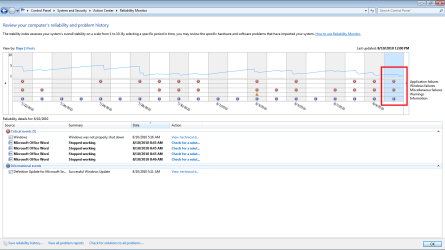
Stewie, would you please goto the action center and pull up your relaibility report and make a screenshot.
 

Attachments

  • appcrash.png
    appcrash.png
    29.6 KB · Views: 30

My Computer My Computer

At a glance

Windows 7 7600 1 X64AMD PHENOM II X 550 PROCESSOR 3.1 ghzCorsair 4 gig ddr 3ati radeon 3300
Computer Manufacturer/Model Number
Custom Build
OS
Windows 7 7600 1 X64
CPU
AMD PHENOM II X 550 PROCESSOR 3.1 ghz
Motherboard
ASUS M4A78-TE
Memory
Corsair 4 gig ddr 3
Graphics Card(s)
ati radeon 3300
Sound Card
ati hd
Monitor(s) Displays
syncmaster 2033sw
Screen Resolution
1600X900 60 hz refresh
Hard Drives
twin_seagates SATA's 1 TB & 500 Gig, hitachi_slimline 160 gig
PSU
antec_550 watt
Case
cooler master GLite
Cooling
stock_heat sink
Internet Speed
20mbs up/ 1.5mbs down
Other Info
favorite child "stewie"
favorite dog "brian"
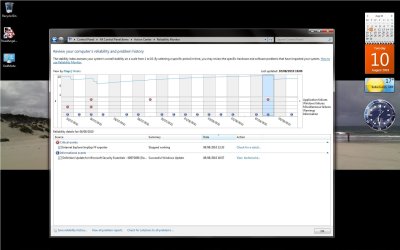
OK, but nothing to see here :( ??
 

Attachments

  • Untitled.jpg
    Untitled.jpg
    128.9 KB · Views: 12

My Computer My Computer

At a glance

windows 7
OS
windows 7
Back
Top