Solved Old problem (2011) new for me - Win 7 Ult 64bit post-install

NickyCroc

New member
Local time
6:27 PM
Messages
20
I saw the screen dump here:

http://www.sevenforums.com/general-...ame-system-properties-system-information.html

Which looks just like mine. I bought a Lenovo that came with win 8 but wanted my old win 7 from my Dell that died so I just wiped the drive and installed from the backup cd then installed the Lenovo drivers.

The system seems to run fine but I can not do any os updates and I've already installed/run a whole lot of apps. Any way to fix the system information page? I'm missing the Windows Edition section information and the System section has the Dell icon although it has the correct Intel processor, etc.

Thanks!

PS I just saw that my system specs are from 2010, which was a different computer; I'll have to change them!
 
Last edited:

My Computer My Computer

At a glance

Windows 7 Ultimate x64 SP1Intel(R) Core(TM) i7-4700MQ CPU @ 2.40GHz8 GB System RAM & 2 MB GDDR5 on nVidiaIntel HD Graphics 4600 & nVidia GeForce GT750M
Computer type
PC/Desktop
Computer Manufacturer/Model Number
Lenovo Y410P
OS
Windows 7 Ultimate x64 SP1
CPU
Intel(R) Core(TM) i7-4700MQ CPU @ 2.40GHz
Memory
8 GB System RAM & 2 MB GDDR5 on nVidia
Graphics Card(s)
Intel HD Graphics 4600 & nVidia GeForce GT750M
Sound Card
Intel HD Sound, RealTek HD & Digital, Lenovo Sound
Monitor(s) Displays
Lenovo 14", Sony 38", Panasonic 42", Samsung 52" on HDMI/VGA
Screen Resolution
Various
Hard Drives
1 TB SCSI
Internet Speed
300 Mbps on D-Link XtremeN
Antivirus
Malwarebytes Anti-Malware (PRO) 1.75.0.1300
Browser
Mozilla Firefox 33.0
Was this Dell preinstalled with Win7, and you used the Dell Reinstallation or Recovery media to install Win7 on the Lenovo? If so you'd need to buy a new Win7 key, which comes with its own installation media to http://www.sevenforums.com/tutorials/1649-clean-install-windows-7-a.html. Using Dell media likely accounts for the missing information on the System page.

If you already have a Product Key then use the same media provided and same steps as in http://www.sevenforums.com/tutorials/219487-clean-reinstall-factory-oem-windows-7-a.html#post1839164.

I have a Lenovo G500 which required in BIOS setup disabling Secure Boot on Security tab, then enabling Legacy Mode and UEFI first if you want a UEFI install. If you want a Legacy install to an MBR disk then you need to set Legacy First, go to final BIOS tab to Reset to Factory Defaults (not Windows 8 defaults). Either way you should delete all partitions during the booted install.
 
Your best bet (in my opinion of course) is to reinstall Windows 8 via the recovery partition or the DVDs you created from Windows 8 before you installed Windows 7 then install Classic shell to give you a normal Start button and boot to the Desktop. Looks and feels like Windows 7.

Leaves you access to Windows 8 stuff so you can play with it as/when you want but do all your normal stuff in the Windows 7(ish) environment.
 

My Computer My Computer

At a glance

Windows 10 Pro X64Intel Quad Core i7-4770 @ 3.4Ghz16.0GB PC3-12800 DDR3 SDRAM 1600 MHzIntel Integrated HD Graphics
Computer type
PC/Desktop
Computer Manufacturer/Model Number
Lenovo IdeaCenter 450
OS
Windows 10 Pro X64
CPU
Intel Quad Core i7-4770 @ 3.4Ghz
Memory
16.0GB PC3-12800 DDR3 SDRAM 1600 MHz
Graphics Card(s)
Intel Integrated HD Graphics
Sound Card
Realtek HD Audio
Monitor(s) Displays
HP 22" LCD
Screen Resolution
1680 x 1050
Hard Drives
250GB Samsung EVO SATA-3 SSD
2TB Seagate ST2000DM001 SATA-2
1.5TB Seagate ST3150041AS SATA
Keyboard
Dell USB
Mouse
Lenovo USB
Internet Speed
Cable via Road Runner 3MB Upload, 30MB Download
Antivirus
Windows Defender, MBAM Pro, MBAE
Browser
Seamonkey
Other Info
UEFI/GPT
PLDS DVD-RW DH16AERSH
Thanks for both replies.

1st - I can't re-install Windows 8 but I had done what you suggested when I did the initial install at least up to the point of simulating Windows 7 without the 'classic shell' part because I didn't/don't know anything about that. Long story short, I worked with Lenovo customer support and the Lenovo forum for almost 6 weeks but got nowhere; cs was looking for money and the forum had a bunch of questions almost exactly like mine because my machine was one of the first out the door (y410p) without any real, workable answers and I was way beyond the point of being without a computer (End of July 2013 - middle of September 2013) so I ultimately wiped the drive and installed the 7.

2nd - Yes, I know all about 'leasing' and I know when it began, around 1984 when I came home with software and for the first time I read it was leased and not purchased. Did you know that originally software was purchased/owned? I drove back to the store and demanded a refund but ultimately we are all over a barrel of greed but I'll say no more about that. Fact is I 'bought' Win 7 Pro 32bit oem for a black box desktop and Win 7 home 64bit oem for another one. The Win 7 Ult 64bit is a 'backup' disk that came with the laptop that died last year and I replaced with the y410p but since it was so late in the game I couldn't get a 'newly leased' version so I used my backup which registered fine no problem since it is a bona fide Microsoft product.

I am going to check out that link you sent me. Really, the only reason I want this OS is for the Bitlocker Drive Encryption utility; originally it was also for the 64bit but almost none of the software I have or can buy comes 64bit, at least not yet. And since I had gone into the BIOS to change all the settings to 'legacy' and then downloaded/installed the 7 drivers from Lenovo, the machine seems to run ok but I DID see different system characteristics like AMD cpu and Intel, etc. in different places and can not install SP1.

Thanks for reading all this; if there's a character limit it will blow my mind!!! I'm off to check that link:confused:
 

My Computer My Computer

At a glance

Windows 7 Ultimate x64 SP1Intel(R) Core(TM) i7-4700MQ CPU @ 2.40GHz8 GB System RAM & 2 MB GDDR5 on nVidiaIntel HD Graphics 4600 & nVidia GeForce GT750M
Computer type
PC/Desktop
Computer Manufacturer/Model Number
Lenovo Y410P
OS
Windows 7 Ultimate x64 SP1
CPU
Intel(R) Core(TM) i7-4700MQ CPU @ 2.40GHz
Memory
8 GB System RAM & 2 MB GDDR5 on nVidia
Graphics Card(s)
Intel HD Graphics 4600 & nVidia GeForce GT750M
Sound Card
Intel HD Sound, RealTek HD & Digital, Lenovo Sound
Monitor(s) Displays
Lenovo 14", Sony 38", Panasonic 42", Samsung 52" on HDMI/VGA
Screen Resolution
Various
Hard Drives
1 TB SCSI
Internet Speed
300 Mbps on D-Link XtremeN
Antivirus
Malwarebytes Anti-Malware (PRO) 1.75.0.1300
Browser
Mozilla Firefox 33.0
I don't know what you mean exactly by "leasing" software or who said anything about that here. You purchase Win7 retail in a box or with a PC and it then belongs to you for its life or the life of the PC to reinstall as often and in the way you please. OEM's may deny this to try to enforce their bloatware but that 's the reason MS requires them to put the COA sticker with Product Key on the PC.

You said you bought two retail OEM Win7's licenses, correct? Those are locked to the first mobo installed upon, so you'd have to have never installed one of them to use its Key to activate this install.

You said you used another PC's Reinstallation DVD to install Win7 on the Lenovo. What you haven't made clear is how you activated it. This disk should not activate on another PC because a branded reinstallation DVD contains factory SLP activation which works only on the PC it is intended for. Check now at Computer>Properties to see the activation status.

If you don't have SP1 then you've not got Win7 yet. I don't know why you can't install it from Windows Update unless you have not run them all yet. The first thing you should do after install is to enable Automatically deliver drivers via Windows Update (Step 3) then run all of your Important and Optional Windows Updates, with reboots, until there are no more to get your drivers and patches. Only import drivers from Lenovo that are still missing.

If you have a way to activate Win7 then I would start over as I said before with the official installer with SP1 for your licensed version provided in http://www.sevenforums.com/tutorials/219487-clean-reinstall-factory-oem-windows-7-a.html#post1839164, then follow those steps so that you get a perfect install.
 
just lost 2 replies due to entering in 'quick' then clicking on 'post reply'
 

My Computer My Computer

At a glance

Windows 7 Ultimate x64 SP1Intel(R) Core(TM) i7-4700MQ CPU @ 2.40GHz8 GB System RAM & 2 MB GDDR5 on nVidiaIntel HD Graphics 4600 & nVidia GeForce GT750M
Computer type
PC/Desktop
Computer Manufacturer/Model Number
Lenovo Y410P
OS
Windows 7 Ultimate x64 SP1
CPU
Intel(R) Core(TM) i7-4700MQ CPU @ 2.40GHz
Memory
8 GB System RAM & 2 MB GDDR5 on nVidia
Graphics Card(s)
Intel HD Graphics 4600 & nVidia GeForce GT750M
Sound Card
Intel HD Sound, RealTek HD & Digital, Lenovo Sound
Monitor(s) Displays
Lenovo 14", Sony 38", Panasonic 42", Samsung 52" on HDMI/VGA
Screen Resolution
Various
Hard Drives
1 TB SCSI
Internet Speed
300 Mbps on D-Link XtremeN
Antivirus
Malwarebytes Anti-Malware (PRO) 1.75.0.1300
Browser
Mozilla Firefox 33.0
I want to make your post SOLVED

I don't know what you mean exactly by "leasing" software or who said anything about that here. You purchase Win7 retail in a box or with a PC and it then belongs to you for its life or the life of the PC to reinstall as often and in the way you please. OEM's may deny this to try to enforce their bloatware but that 's the reason MS requires them to put the COA sticker with Product Key on the PC.

You said you bought two retail OEM Win7's licenses, correct? Those are locked to the first mobo installed upon, so you'd have to have never installed one of them to use its Key to activate this install.

You said you used another PC's Reinstallation DVD to install Win7 on the Lenovo. What you haven't made clear is how you activated it. This disk should not activate on another PC because a branded reinstallation DVD contains factory SLP activation which works only on the PC it is intended for. Check now at Computer>Properties to see the activation status.

If you don't have SP1 then you've not got Win7 yet. I don't know why you can't install it from Windows Update unless you have not run them all yet. The first thing you should do after install is to enable Automatically deliver drivers via Windows Update (Step 3) then run all of your Important and Optional Windows Updates, with reboots, until there are no more to get your drivers and patches. Only import drivers from Lenovo that are still missing.

If you have a way to activate Win7 then I would start over as I said before with the official installer with SP1 for your licensed version provided in http://www.sevenforums.com/tutorials/219487-clean-reinstall-factory-oem-windows-7-a.html#post1839164, then follow those steps so that you get a perfect install.

I can't believe how much typing I've lost but now I want to mark this as solved by you.
 

My Computer My Computer

At a glance

Windows 7 Ultimate x64 SP1Intel(R) Core(TM) i7-4700MQ CPU @ 2.40GHz8 GB System RAM & 2 MB GDDR5 on nVidiaIntel HD Graphics 4600 & nVidia GeForce GT750M
Computer type
PC/Desktop
Computer Manufacturer/Model Number
Lenovo Y410P
OS
Windows 7 Ultimate x64 SP1
CPU
Intel(R) Core(TM) i7-4700MQ CPU @ 2.40GHz
Memory
8 GB System RAM & 2 MB GDDR5 on nVidia
Graphics Card(s)
Intel HD Graphics 4600 & nVidia GeForce GT750M
Sound Card
Intel HD Sound, RealTek HD & Digital, Lenovo Sound
Monitor(s) Displays
Lenovo 14", Sony 38", Panasonic 42", Samsung 52" on HDMI/VGA
Screen Resolution
Various
Hard Drives
1 TB SCSI
Internet Speed
300 Mbps on D-Link XtremeN
Antivirus
Malwarebytes Anti-Malware (PRO) 1.75.0.1300
Browser
Mozilla Firefox 33.0
What was the 'exact' solution?

Well, there were several that you provided, namely the links to your site. For those I am happy.
As far as the mobo comment, I am fully aware that you've answered your own question as to who was talking about leasing vs buying (above) and truth be told, since last writing I bought a USB DVD RW for $45 which now makes my defunct Dell operational again and will most likely re-install this OS back on it and put the 'Retail Box' on here because that transcends hardware, as I'm sure you know. OEM with a pc is tied to the hardware; Retail Box is in no way tied. You think anyone would pay whatever, $400+, for an OS tied to hardware? :sarc:
But I really didn't want to go there! The simple fact is, you are one of the, if not THE most knowledgeable Windows technicians since:
"Cd Mom the Mother of All Windows Books"by Woody Leonhard (Author), Barry Simon (Author)


and
PC Mom: The Mother of All PC Books by Woody Leonhard and Barry Simon (Oct 1994)


What you suggested, I intentionally did not do, namely during installation enable Windows Update; I also did not load the .NET framework and I don't remember what else because I had no intention of doing any updates, etc. It was only later, much later, that I began to load programs that needed Windows updates (some) to be present.

This machine was to be my 'offline' machine and the desktop the online machine. Lenovo provided drivers for 7; they did not provide the option of purchasing the OS.
BTW, the 7 Update Advisor just told me the Lenovo ACPI-Compliant Virtual Power Controller and WSE 3 runtime are both not compatable with Win 7 but I don't care.

So, much as I hate the thought of it (time-wise), I am going to do exactly what you said:

"If you have a way to activate Win7 then I would start over as I said before with the official installer with SP1 for your licensed version provided in http://www.sevenforums.com/tutorials...ml#post1839164, then follow those steps so that you get a perfect install."

and THAT is the solution to my issue and I truly thank you too! :geek:

Old Man Pete
 

My Computer My Computer

At a glance

Windows 7 Ultimate x64 SP1Intel(R) Core(TM) i7-4700MQ CPU @ 2.40GHz8 GB System RAM & 2 MB GDDR5 on nVidiaIntel HD Graphics 4600 & nVidia GeForce GT750M
Computer type
PC/Desktop
Computer Manufacturer/Model Number
Lenovo Y410P
OS
Windows 7 Ultimate x64 SP1
CPU
Intel(R) Core(TM) i7-4700MQ CPU @ 2.40GHz
Memory
8 GB System RAM & 2 MB GDDR5 on nVidia
Graphics Card(s)
Intel HD Graphics 4600 & nVidia GeForce GT750M
Sound Card
Intel HD Sound, RealTek HD & Digital, Lenovo Sound
Monitor(s) Displays
Lenovo 14", Sony 38", Panasonic 42", Samsung 52" on HDMI/VGA
Screen Resolution
Various
Hard Drives
1 TB SCSI
Internet Speed
300 Mbps on D-Link XtremeN
Antivirus
Malwarebytes Anti-Malware (PRO) 1.75.0.1300
Browser
Mozilla Firefox 33.0
So my machine made 2 trips to Lenovo since the end of this thread, one in 8/2014 to their Texas facility and the other in 9/2014 to their North Carolina software SWAT team (yes, that's what they call them). Both times it returned with Windows 8.
Long story short, last week plugged in the external drive with my system re-image and the system repair dvd into the optical drive, did a diskpart> clean all ... followed by a clean re-image of the system disk with the backups I made after first registering Windows. Then found the SP1 in the Windows online center and installed it so now I'm a happy camper with a lean OS and the exact applications I installed a year ago and of course, just did another system image and system repair set of backups so I won't have to go through hoops again should I need to do a refresh.

Who solved the problem? Me? You? I'm pragmatic and have a sense of humor too so perhaps I'll throw in Lenovo's terrible support as a possible solution provider too but I just wanted to formally close what I had opened and in a quick perusal of the entire thread I am mystified as to where my head had gone for all those months ... Nevernever Land!
 

My Computer My Computer

At a glance

Windows 7 Ultimate x64 SP1Intel(R) Core(TM) i7-4700MQ CPU @ 2.40GHz8 GB System RAM & 2 MB GDDR5 on nVidiaIntel HD Graphics 4600 & nVidia GeForce GT750M
Computer type
PC/Desktop
Computer Manufacturer/Model Number
Lenovo Y410P
OS
Windows 7 Ultimate x64 SP1
CPU
Intel(R) Core(TM) i7-4700MQ CPU @ 2.40GHz
Memory
8 GB System RAM & 2 MB GDDR5 on nVidia
Graphics Card(s)
Intel HD Graphics 4600 & nVidia GeForce GT750M
Sound Card
Intel HD Sound, RealTek HD & Digital, Lenovo Sound
Monitor(s) Displays
Lenovo 14", Sony 38", Panasonic 42", Samsung 52" on HDMI/VGA
Screen Resolution
Various
Hard Drives
1 TB SCSI
Internet Speed
300 Mbps on D-Link XtremeN
Antivirus
Malwarebytes Anti-Malware (PRO) 1.75.0.1300
Browser
Mozilla Firefox 33.0
I'd take another backup image with SP1 installed. No need to keep reinstalling it. ;)
 
Onward

I'd take another backup image with SP1 installed. No need to keep reinstalling it. ;)

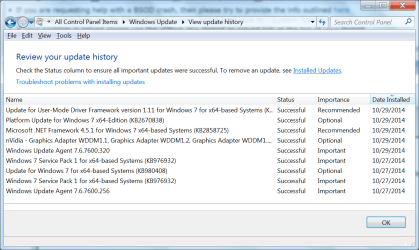
Yes indeed, I did it right after updating my Windows Update Agent, which became a requirement in order to download/install a couple of particular items I wanted, one being .Net 4.5 and the other was something associated with the exact nVidia chip on this machine. So I selectively chose what I needed (see attached) and then did what you suggested, the image b/u + repair disk.

My final task before real work begins will be to search this site for anything/everything pertaining to BitLocker Drive Encryption.

Stay cool GregRocker :cool:
 

Attachments

  • WindowsUpdates.png
    WindowsUpdates.png
    61.7 KB · Views: 0

My Computer My Computer

At a glance

Windows 7 Ultimate x64 SP1Intel(R) Core(TM) i7-4700MQ CPU @ 2.40GHz8 GB System RAM & 2 MB GDDR5 on nVidiaIntel HD Graphics 4600 & nVidia GeForce GT750M
Computer type
PC/Desktop
Computer Manufacturer/Model Number
Lenovo Y410P
OS
Windows 7 Ultimate x64 SP1
CPU
Intel(R) Core(TM) i7-4700MQ CPU @ 2.40GHz
Memory
8 GB System RAM & 2 MB GDDR5 on nVidia
Graphics Card(s)
Intel HD Graphics 4600 & nVidia GeForce GT750M
Sound Card
Intel HD Sound, RealTek HD & Digital, Lenovo Sound
Monitor(s) Displays
Lenovo 14", Sony 38", Panasonic 42", Samsung 52" on HDMI/VGA
Screen Resolution
Various
Hard Drives
1 TB SCSI
Internet Speed
300 Mbps on D-Link XtremeN
Antivirus
Malwarebytes Anti-Malware (PRO) 1.75.0.1300
Browser
Mozilla Firefox 33.0
You're super Greg! Thanks, this is my first time back online....
 

My Computer My Computer

At a glance

Windows 7 Ultimate x64 SP1Intel(R) Core(TM) i7-4700MQ CPU @ 2.40GHz8 GB System RAM & 2 MB GDDR5 on nVidiaIntel HD Graphics 4600 & nVidia GeForce GT750M
Computer type
PC/Desktop
Computer Manufacturer/Model Number
Lenovo Y410P
OS
Windows 7 Ultimate x64 SP1
CPU
Intel(R) Core(TM) i7-4700MQ CPU @ 2.40GHz
Memory
8 GB System RAM & 2 MB GDDR5 on nVidia
Graphics Card(s)
Intel HD Graphics 4600 & nVidia GeForce GT750M
Sound Card
Intel HD Sound, RealTek HD & Digital, Lenovo Sound
Monitor(s) Displays
Lenovo 14", Sony 38", Panasonic 42", Samsung 52" on HDMI/VGA
Screen Resolution
Various
Hard Drives
1 TB SCSI
Internet Speed
300 Mbps on D-Link XtremeN
Antivirus
Malwarebytes Anti-Malware (PRO) 1.75.0.1300
Browser
Mozilla Firefox 33.0
Back
Top