Only getting 24mb on my 60mb virgin broadband unless I'm in safe mode.

sogeking99

New member
Member
Local time
10:10 PM
Messages
32
EDIT: It seems I was mistaken. I went on safe mode with networking on my computer and did speedtest with wireless and I still get only 20mbps.

My USB network adapter SHOULD be capable of up to 300mbps, and the virgin broadband came with the Netgear 'Super Hub', which should do 60mbps. So why am I only getting 20mbps?

http://www.digitus.info/en/products...s/wireless-300n-usb-antenna-adapter-dn-70540/

Wired to the laptop I am getting 60, so something must be going wrong on my end.
 
Last edited:

My Computer My Computer

At a glance

Windows 7 home premium 64bit
OS
Windows 7 home premium 64bit
EDIT: It seems I was mistaken. I went on safe mode with networking on my computer and did speedtest with wireless and I still get only 20mbps.

My USB network adapter SHOULD be capable of up to 300mbps, and the virgin broadband came with the Netgear 'Super Hub', which should do 60mbps. So why am I only getting 20mbps?

Wireless 300N USB antenna adapter-DN-70540 | DIGITUS

Wired to the laptop I am getting 60, so something must be going wrong on my end.

Wireless always shows up slower on ISP speed tests, what you are seeing is perfectly normal. :geek:

If you want the wireless to be faster then use the 802.11n Only setting on your router, this setting only works if all clients can use wireless n.
 

My Computer My Computer

At a glance

Windows 7 Ult, Windows 8.1 Pro,Q9650-4.275GHz, E8600 4.5GHz, E6750-3.8GHzG.Skill PC2 9600 1200Mhz 5 5 5 15 2TGTX480
Computer type
PC/Desktop
Computer Manufacturer/Model Number
Home built
OS
Windows 7 Ult, Windows 8.1 Pro,
CPU
Q9650-4.275GHz, E8600 4.5GHz, E6750-3.8GHz
Motherboard
Evga 780i FTW
Memory
G.Skill PC2 9600 1200Mhz 5 5 5 15 2T
Graphics Card(s)
GTX480
Sound Card
Asus Xonar D2
Monitor(s) Displays
HannsG
Screen Resolution
1680X1050
Hard Drives
GSkill Phoenix Pro 120GB SSD
PSU
ThermalTake Toughpower 1000Watt modular
Case
ThermalTake XaserV
Cooling
Xigmatek S1283
Keyboard
Logitech G15
Mouse
Logitech G9
Internet Speed
T1
EDIT: It seems I was mistaken. I went on safe mode with networking on my computer and did speedtest with wireless and I still get only 20mbps.

My USB network adapter SHOULD be capable of up to 300mbps, and the virgin broadband came with the Netgear 'Super Hub', which should do 60mbps. So why am I only getting 20mbps?

Wireless 300N USB antenna adapter-DN-70540 | DIGITUS

Wired to the laptop I am getting 60, so something must be going wrong on my end.

Wireless always shows up slower on ISP speed tests, what you are seeing is perfectly normal. :geek:

If you want the wireless to be faster then use the 802.11n Only setting on your router, this setting only works if all clients can use wireless n.

I am sure it is normal to be slower through wireless. But I am paying for 60mb and only getting 30mb through wireless. Is this really the best I can expect?

When you say set it to use 802.11n, no you mean 5Ghz? Because I tried that and it seems nothing I own supports it.
 

My Computer My Computer

At a glance

Windows 7 home premium 64bit
OS
Windows 7 home premium 64bit
EDIT: It seems I was mistaken. I went on safe mode with networking on my computer and did speedtest with wireless and I still get only 20mbps.

My USB network adapter SHOULD be capable of up to 300mbps, and the virgin broadband came with the Netgear 'Super Hub', which should do 60mbps. So why am I only getting 20mbps?

Wireless 300N USB antenna adapter-DN-70540 | DIGITUS

Wired to the laptop I am getting 60, so something must be going wrong on my end.

Wireless always shows up slower on ISP speed tests, what you are seeing is perfectly normal. :geek:

If you want the wireless to be faster then use the 802.11n Only setting on your router, this setting only works if all clients can use wireless n.

I am sure it is normal to be slower through wireless. But I am paying for 60mb and only getting 30mb through wireless. Is this really the best I can expect?

When you say set it to use 802.11n, no you mean 5Ghz? Because I tried that and it seems nothing I own supports it.

This may be the best you can expect provided that you are using the 802.11n Only setting in your router's set up page for wireless.

This isn't about 5Ghz, this is a 2.4Ghz setting that all routers should have, that setting will give you the best possible wireless n speeds which should allow for the fastest possible ISP speeds through your wireless connection. :)
 

My Computer My Computer

At a glance

Windows 7 Ult, Windows 8.1 Pro,Q9650-4.275GHz, E8600 4.5GHz, E6750-3.8GHzG.Skill PC2 9600 1200Mhz 5 5 5 15 2TGTX480
Computer type
PC/Desktop
Computer Manufacturer/Model Number
Home built
OS
Windows 7 Ult, Windows 8.1 Pro,
CPU
Q9650-4.275GHz, E8600 4.5GHz, E6750-3.8GHz
Motherboard
Evga 780i FTW
Memory
G.Skill PC2 9600 1200Mhz 5 5 5 15 2T
Graphics Card(s)
GTX480
Sound Card
Asus Xonar D2
Monitor(s) Displays
HannsG
Screen Resolution
1680X1050
Hard Drives
GSkill Phoenix Pro 120GB SSD
PSU
ThermalTake Toughpower 1000Watt modular
Case
ThermalTake XaserV
Cooling
Xigmatek S1283
Keyboard
Logitech G15
Mouse
Logitech G9
Internet Speed
T1
Wireless always shows up slower on ISP speed tests, what you are seeing is perfectly normal. :geek:

If you want the wireless to be faster then use the 802.11n Only setting on your router, this setting only works if all clients can use wireless n.

I am sure it is normal to be slower through wireless. But I am paying for 60mb and only getting 30mb through wireless. Is this really the best I can expect?

When you say set it to use 802.11n, no you mean 5Ghz? Because I tried that and it seems nothing I own supports it.

This may be the best you can expect provided that you are using the 802.11n Only setting in your router's set up page for wireless.

This isn't about 5Ghz, this is a 2.4Ghz setting that all routers should have, that setting will give you the best possible wireless n speeds which should allow for the fastest possible ISP speeds through your wireless connection. :)

TP-Link PA411KIT AV500 500 Mbps Powerline Adapter - Twin Pack: Amazon.co.uk: Computers & Accessories

Will these give me closer to the proper speed?
 

My Computer My Computer

At a glance

Windows 7 home premium 64bit
OS
Windows 7 home premium 64bit
Theres allsorts of reasons why you are not getting 60mps using wireless. You have achieved 60 using hard wired, thats the way to go then. How you get there is up to you, you know the config of your rooms, where your router is located etc, all the things impacting on hard wiring, we dont. That product may work, but it relies on your electric supply all on the same circuit, though some have said it works regardless.
 

My Computer My Computer

At a glance

win 7 home premium 64 bitintel I5 3470 3.2ghz12gbasus radeon 5450 512mb
Computer type
PC/Desktop
Computer Manufacturer/Model Number
gigabyte z77-d3sh
OS
win 7 home premium 64 bit
CPU
intel I5 3470 3.2ghz
Motherboard
gigabyte z77-d3sh
Memory
12gb
Graphics Card(s)
asus radeon 5450 512mb
Sound Card
no
Monitor(s) Displays
viewsonic
Screen Resolution
1920*1080
Hard Drives
Crucial m4 sata 3 SSD
PSU
0cz
Case
corair carbide 200
Cooling
corsair h60
Keyboard
wireless logitech
Internet Speed
60 mbs
I am sure it is normal to be slower through wireless. But I am paying for 60mb and only getting 30mb through wireless. Is this really the best I can expect?

When you say set it to use 802.11n, no you mean 5Ghz? Because I tried that and it seems nothing I own supports it.

This may be the best you can expect provided that you are using the 802.11n Only setting in your router's set up page for wireless.

This isn't about 5Ghz, this is a 2.4Ghz setting that all routers should have, that setting will give you the best possible wireless n speeds which should allow for the fastest possible ISP speeds through your wireless connection. :)

TP-Link PA411KIT AV500 500 Mbps Powerline Adapter - Twin Pack: Amazon.co.uk: Computers & Accessories

Will these give me closer to the proper speed?

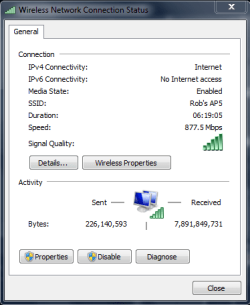
If you really want to eliminate the wireless bottle neck to your ISP, the Asus AC66U router plus the Asus AC66U PCE NIC, both of which I'm using now to the effect of 877.5 Mbps and that number is about to go up as I extend the antenna a bit further.

This certainly isn't cheap but it's the best and you get what you pay for here. :)

ASUS RT-AC66U Dual-Band Wireless-AC1750 Gigabit Router IEEE 802.11ac, IEEE 802.11a/b/g/n, IEEE 802.3/3u/3ab - Newegg.com

ASUS PCE-AC66 PCI Express Next Generation AC Dual-Band Wireless Adapter - Newegg.com
 

Attachments

  • 877Mbps.PNG
    877Mbps.PNG
    12.3 KB · Views: 3

My Computer My Computer

At a glance

Windows 7 Ult, Windows 8.1 Pro,Q9650-4.275GHz, E8600 4.5GHz, E6750-3.8GHzG.Skill PC2 9600 1200Mhz 5 5 5 15 2TGTX480
Computer type
PC/Desktop
Computer Manufacturer/Model Number
Home built
OS
Windows 7 Ult, Windows 8.1 Pro,
CPU
Q9650-4.275GHz, E8600 4.5GHz, E6750-3.8GHz
Motherboard
Evga 780i FTW
Memory
G.Skill PC2 9600 1200Mhz 5 5 5 15 2T
Graphics Card(s)
GTX480
Sound Card
Asus Xonar D2
Monitor(s) Displays
HannsG
Screen Resolution
1680X1050
Hard Drives
GSkill Phoenix Pro 120GB SSD
PSU
ThermalTake Toughpower 1000Watt modular
Case
ThermalTake XaserV
Cooling
Xigmatek S1283
Keyboard
Logitech G15
Mouse
Logitech G9
Internet Speed
T1
wifi specs

It might just be the specs on your comp, ethernet upto 100 is normal, but depending upon your wireless,
my wife's Toshiba laptop has RTL8188 wireless chipset although classified as N the max on this card is only 54.
 

My Computer My Computer

At a glance

W7 home premium 32bit/W7HP 64bit/w10 tp insid...E5300 dual core3gbNvidia Geforce 7100 Nforce 630i
Computer type
PC/Desktop
Computer Manufacturer/Model Number
medionl/Aspire 6930G/acer x55a
OS
W7 home premium 32bit/W7HP 64bit/w10 tp insider ring
CPU
E5300 dual core
Motherboard
medion MS7366
Memory
3gb
Graphics Card(s)
Nvidia Geforce 7100 Nforce 630i
Monitor(s) Displays
avixc
Internet Speed
n (isp resticted to 72)
Antivirus
mse/pands
Browser
palemoon
Other Info
Belkin Fd7050 n USB using Railink RT2870 drivers, more upto date
It might just be the specs on your comp, ethernet upto 100 is normal, but depending upon your wireless,
my wife's Toshiba laptop has RTL8188 wireless chipset although classified as N the max on this card is only 54.

It may appear that way, but the reality is that most N laptops are capable of at least 150Mbps, the reason you are seeing 54Mbps is because incorrect setting are used on the router to support legacy devices which often times isn't required.

The mixed settings N,G,B etc. will only give you 54 Mbps, however, the 802.11N Only setting will allow the router to work at actual wireless N speeds instead of having to slow down in order to talk to legacy devices.

The built in wireless specs on any device will prevent you from seeing the true ISP speeds, wireless just isn't fast enough to prevent this. Though it is possible to upgrade hardware and get rid of most of this bottle neck.

Most people are completely unaware of these router settings and therefore are permanently stuck on 54Mbps rather than true 802.11n which is capable of up too 450 Mbps, or 802.11ac which is capable of 1.3 Gbps, but 802.11ac requires that the router and NIC be updated.
 

My Computer My Computer

At a glance

Windows 7 Ult, Windows 8.1 Pro,Q9650-4.275GHz, E8600 4.5GHz, E6750-3.8GHzG.Skill PC2 9600 1200Mhz 5 5 5 15 2TGTX480
Computer type
PC/Desktop
Computer Manufacturer/Model Number
Home built
OS
Windows 7 Ult, Windows 8.1 Pro,
CPU
Q9650-4.275GHz, E8600 4.5GHz, E6750-3.8GHz
Motherboard
Evga 780i FTW
Memory
G.Skill PC2 9600 1200Mhz 5 5 5 15 2T
Graphics Card(s)
GTX480
Sound Card
Asus Xonar D2
Monitor(s) Displays
HannsG
Screen Resolution
1680X1050
Hard Drives
GSkill Phoenix Pro 120GB SSD
PSU
ThermalTake Toughpower 1000Watt modular
Case
ThermalTake XaserV
Cooling
Xigmatek S1283
Keyboard
Logitech G15
Mouse
Logitech G9
Internet Speed
T1
rtl8188

Hi chev,
direct from RALINK system specs page max speed on RTL8188 wifi 54,
get higher shown on mine running non standard rtl driver on belkin usb n
 

My Computer My Computer

At a glance

W7 home premium 32bit/W7HP 64bit/w10 tp insid...E5300 dual core3gbNvidia Geforce 7100 Nforce 630i
Computer type
PC/Desktop
Computer Manufacturer/Model Number
medionl/Aspire 6930G/acer x55a
OS
W7 home premium 32bit/W7HP 64bit/w10 tp insider ring
CPU
E5300 dual core
Motherboard
medion MS7366
Memory
3gb
Graphics Card(s)
Nvidia Geforce 7100 Nforce 630i
Monitor(s) Displays
avixc
Internet Speed
n (isp resticted to 72)
Antivirus
mse/pands
Browser
palemoon
Other Info
Belkin Fd7050 n USB using Railink RT2870 drivers, more upto date
Hi chev,
direct from RALINK system specs page max speed on RTL8188 wifi 54,
get higher shown on mine running non standard rtl driver on belkin usb n


You are mistaken, the 54Mbps refers to the legacy supported speeds of that adaptor which are a max for wireless G "legacy".

When in wireless N only mode the RTL8188 is capable of precisely 150Mbps, per this from Intel.

The Realtek RTL8188SU-GR is a highly integrated single-chip Wireless LAN (WLAN) USB 2.0 network interface controller compatible with the IEEE 802.11n specification. It combines a MAC, a 1T1R capable baseband, and RF in a single chip. The RTL8188SU-GR provides a complete solution for a high-performance wireless client.

The RTL8188SU-GR baseband implements Multiple Input, Multiple Output (MIMO) Orthogonal Frequency Division Multiplexing (OFDM) with one transmit and one receive path (1T1R). Features include one spatial stream transmission, short Guard Interval (GI) of 400ns, spatial spreading, and support for both 20MHz and 40MHz channel bandwidth.

For legacy compatibility, Direct Sequence Spread Spectrum (DSSS), Complementary Code Keying (CCK) and OFDM baseband processing are included to support all IEEE 802.11b, and 802.11g data rates. Differential phase shift keying modulation schemes, DBPSK and DQPSK with data scrambling capability are available, and CCK provides support for legacy data rates, with long or short preamble. The high speed FFT/IFFT paths, combined with BPSK, QPSK, 16QAM, and 64QAM modulation of the individual subcarriers, and rate compatible punctured convolutional coding with coding rate of 1/2, 2/3, 3/4, and 5/6, provide higher data rates of 54Mbps and 150Mbps for IEEE 802.11g and 802.11n OFDM respectively.


Maybe next time you should listen to my advice and use the 802.11n Only setting as I was referring to earlier. :)

In fact I made another slight adjustment and I'm now getting this. 802.11ac you better believe it's fast. This completely gets rid of the wireless bottle neck, I get the same ISP speeds wired or wireless now.
 

Attachments

  • 1.1Gbps.PNG
    1.1Gbps.PNG
    13.4 KB · Views: 0
Last edited:

My Computer My Computer

At a glance

Windows 7 Ult, Windows 8.1 Pro,Q9650-4.275GHz, E8600 4.5GHz, E6750-3.8GHzG.Skill PC2 9600 1200Mhz 5 5 5 15 2TGTX480
Computer type
PC/Desktop
Computer Manufacturer/Model Number
Home built
OS
Windows 7 Ult, Windows 8.1 Pro,
CPU
Q9650-4.275GHz, E8600 4.5GHz, E6750-3.8GHz
Motherboard
Evga 780i FTW
Memory
G.Skill PC2 9600 1200Mhz 5 5 5 15 2T
Graphics Card(s)
GTX480
Sound Card
Asus Xonar D2
Monitor(s) Displays
HannsG
Screen Resolution
1680X1050
Hard Drives
GSkill Phoenix Pro 120GB SSD
PSU
ThermalTake Toughpower 1000Watt modular
Case
ThermalTake XaserV
Cooling
Xigmatek S1283
Keyboard
Logitech G15
Mouse
Logitech G9
Internet Speed
T1
Back
Top