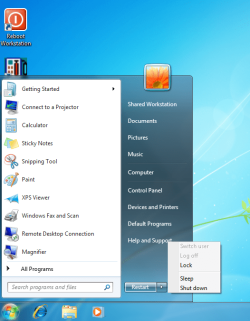
Only show restart in start menu

EarlThePearl

New member
Member
Local time
3:51 AM
Messages
9
Location
TX
Is there a way to only display restart in the Windows 7 start menu without any other options? I work in a domain environment and I recently deployed 30 machines with a generic username that logs on automatically. We need these particular machines to be up and ready for a user when they walk up to it with no login required. I walked around yesterday to check some other stuff and found almost half had been logged off and back on as different users, then locked. You could still switch user and log in, but that is defeating the purpose. I don't necessarily want to disable log off or shutdown, but I would like to remove all the buttons from the start menu or the ctrl-alt-del screen. I would even be okay with hiding them all including restart, then create a restart icon on the desktop. This will prevent a n00b user from jacking with with it, but would still allow a tech to type in the command if need be. I've scoured Google and my group policy settings and I've found tidbits here and there, but nothing clean. I was hoping someone here might have some insight on how best to handle this.
 

My Computer My Computer

At a glance

WinXPPro/Win7Pro
OS
WinXPPro/Win7Pro
I know about this policy. This setting still allows logoff, lock, and switch user. If I had to choose I'd rather allow shutdown and restart than the other options.

Refer to the attachment. This is what I've done so far with group policy. It's a clever combination of user and computer configuration settings, along with one registry edit. Lock is displayed, but doesn't function. Sleep and shutdown are still possible, and log off still shows and functions on the ctrl-alt-del screen.
 

Attachments

  • power options.png
    power options.png
    82.2 KB · Views: 71

My Computer My Computer

At a glance

WinXPPro/Win7Pro
OS
WinXPPro/Win7Pro
Found more group policy that basically removes everything from ctrl-alt-del. So now the only 2 bad things users can do from any menu is sleep and shutdown. Plus a tech can still type in commands for shutdown and logoff if need be. I almost have this one licked, just wish there was something built into group policy where I could manage it better.
 

My Computer My Computer

At a glance

WinXPPro/Win7Pro
OS
WinXPPro/Win7Pro

My Computer My Computer

At a glance

XP / Win7 x64 ProIntel Quad-Core Q9450 @ 3.2GHz2x2GB GSkill DDR2NVIDIA GeForce 8600 GTS (EVGA)
OS
XP / Win7 x64 Pro
CPU
Intel Quad-Core Q9450 @ 3.2GHz
Motherboard
Asus P5-E
Memory
2x2GB GSkill DDR2
Graphics Card(s)
NVIDIA GeForce 8600 GTS (EVGA)
Monitor(s) Displays
Dell 2408WFP
Screen Resolution
1920x1200

My Computer My Computer

At a glance

Win 7 Pro x64 / Win 10 ProIntel(R) Core(TM) i7-3630QM CPU @ 2.40GHz12 GB(1) Intel(R) HD Graphics 4000 (2) NVIDIA GeFo...
Computer type
Laptop
Computer Manufacturer/Model Number
Sager NP9170
OS
Win 7 Pro x64 / Win 10 Pro
CPU
Intel(R) Core(TM) i7-3630QM CPU @ 2.40GHz
Motherboard
CLEVO P170EM
Memory
12 GB
Graphics Card(s)
(1) Intel(R) HD Graphics 4000 (2) NVIDIA GeForce GTX 675M
Sound Card
(1) Realtek High Definition Audio (2) Intel(R) Display Aud
Monitor(s) Displays
17.3
Screen Resolution
1920x1080
Hard Drives
(1) Samsung 860 EVO 500GB(OS) (1) Samsung 860 EVO 500GB(Data)
Keyboard
Backlite
Antivirus
MSE, Malwarebytes Pro
Browser
Firefox
Other Info
DESKTOP: Custom-built.
OS: Win 10 Pro x64.
CASE: Rosewill R5.
CPU: Intel I5 4670K CPU @ 3.40GHz.
CPU COOLER: Cool Master Hyper 212 EVO.
MOTHERBOARD: Asus Z87-A.
MEMORY: Kingston HyperX 2x4 GB.
GPU: Nvidia Geforce 650 TI.
PSU: Corsair TX750.
DRIVES: (1) Samsung 840 120 GB SSD (2) Western Digital blue 500 GB 7200 RPM.
Interesting reading Bongo, but not exactly what I want. It seems as if you have the same need I do. I'm not sure why they wouldn't include something in GP that would let you customize this to a specific need. Microsoft can't the forest for the trees at times.
 
Last edited:

My Computer My Computer

At a glance

WinXPPro/Win7Pro
OS
WinXPPro/Win7Pro

My Computer My Computer

At a glance

64-bit Windows 11 Pro for WorkstationsIntel i7-8700K OC'd to 5 GHz64 GB (4x16GB) G.SKILL TridentZ RGB DDR4 3600...ASUS ROG-STRIX-GTX1080TI-O11G-GAMING
Computer type
PC/Desktop
Computer Manufacturer/Model Number
Self built custom
OS
64-bit Windows 11 Pro for Workstations
CPU
Intel i7-8700K OC'd to 5 GHz
Motherboard
ASUS ROG Maximus XI Formula Z390
Memory
64 GB (4x16GB) G.SKILL TridentZ RGB DDR4 3600 MHz
Graphics Card(s)
ASUS ROG-STRIX-GTX1080TI-O11G-GAMING
Sound Card
Integrated
Monitor(s) Displays
2 x Samsung Odyssey G7 27"
Screen Resolution
2560x1440
Hard Drives
1TB Samsung 990 PRO M.2,
4TB Samsung 990 PRO PRO M.2,
TerraMaster F8 SSD Plus NAS
PSU
Seasonic Prime Titanium 850W
Case
Thermaltake Core P3
Cooling
Corsair Hydro H115i
Keyboard
Logitech wireless K800
Mouse
Logitech MX Master 4
Internet Speed
2 Gb/s Download and 100 Mb/s Upload
Antivirus
Malwarebyte Anti-Malware Premium
Browser
Google Chrome
Other Info
Logitech Z625 speaker system,
Logitech BRIO 4K Pro webcam,
HP Color LaserJet Pro MFP M477fdn,
APC SMART-UPS RT 1000 XL - SURT1000XLI,
Galaxy S23 Plus phone
Back
Top