
Opinions/Advice on Bloatware and Startup Programs

Brandon138

New member
I recently had to use a system recovery and set default factory setting too my Toshiba Satellite (windows 7 64 home premium). Toshiba asked me to use their recovery software, as recommended for warranties sake. Before I had done this recovery, I was told by the people at Toshiba (after they reviewed my system configuration) that I might have uninstalled/configured some software incorrectly (mistaking it for bloatware) which lead to some system instability.

I was just wondering if I could gather some input from those more knowledgeable than myself as to what is important and what is not. I only installed a couple programs, so this is pretty much my default factory settings:
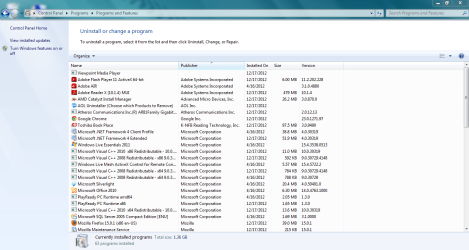
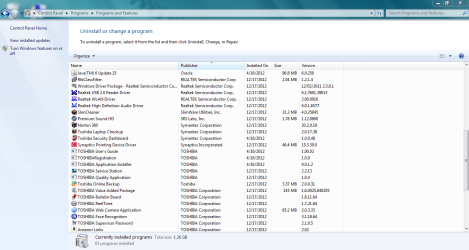
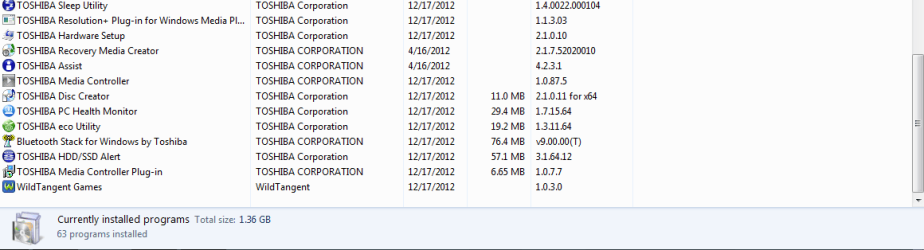
programs1.PNG

programs2.PNG

programs3.PNG

And here is my startup configuration:
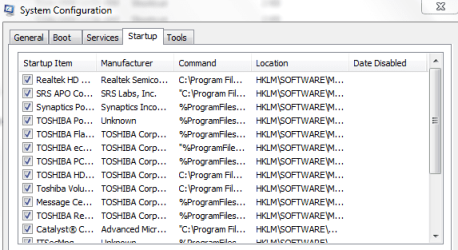
startup1.PNG

startup2.PNG

There are a couple of the preinstalled programs that I like, such as the health monitor that shows the computers temp. and power consumption, etc.

Otherwise, any opinion or advice would be welcome. I want windows 7 to run as good as possible, and I want to avoid mistakes as best I can.

Thanks,

Brandon
 

My Computer

Computer Manufacturer/Model Number
Toshibua Satellite Pro s850 series
OS
Windows 7 Home Premium 64bit.
In my opinion anything that has the name toshiba in it is bloatware/crapware
A clean install of windows as MS intended it is always best in my opinion not the version they have given you
I know you say there are a few apps you like they have given you but IMHO i would http://www.sevenforums.com/tutorials/1649-clean-install-windows-7-a.html and then add any apps i wanted such as temp monitor etc there are plenty of free apps out there that will prob do it better than there stuff (although i must add i have never owned a toshiba and am unfamiliar with there crapware)
 

My Computer

Computer type
PC/Desktop
Computer Manufacturer/Model Number
Pauly Special
OS
Win7 Ultimate X64
CPU
Intel i5 3570K
Motherboard
Gigabyte Z77X-DS3H
Memory
8GB DDR3 1600
Graphics Card(s)
Onboard
Sound Card
Onboard
Screen Resolution
1280x1024
Hard Drives
Samsung 840 Evo SSD (OS)
1TB Spinner (Data)
PSU
800W Arctic
Case
Cooler Master
Cooling
3x120mm Fans
Keyboard
MS Wireless
Mouse
MS Wireless
Internet Speed
20M
:ditto:

I have owned a Toshiba and can testify to the HUGE amount of bloatware they so graciously give you. A clean install would probably be best. Make sure you make a copy of the wifi drivers first though!

Failing that...... start by getting rid of anything branded "Toshiba" that you KNOW you won't be using. Keep the web - cam stuff IF you think you'll be using it. Most of, if not all, the "Toshiba" things can be had for free and usually work better. Get your machine the way you want it then make a system image. Will save you time the next time you have to do this. Same with the start up stuff.

The amount of this crap they put on a new machine is one of the main reasons I bought my Asus instead of the Qosmio.
 

My Computer

Computer type
Laptop
Computer Manufacturer/Model Number
MSI GE72VR Apache Pro-416
OS
Windows 10x64 Build 1709
CPU
Intel i7 7700HQ Kaby Lake
Motherboard
Micro-Star Intl. MS-179B (U3C1)
Memory
16 GB DDR4 @2400
Graphics Card(s)
Nvidia Geforce GTX 1060
Screen Resolution
1920x1080 120Hz
Hard Drives
256 GB Nvme M.2 SSD

1TB HDD@7200
Cooling
Cooler Blast 4
Keyboard
Steel Series
Antivirus
Bit Defender Free
Browser
Edge
:ditto:

I have owned a Toshiba and can testify to the HUGE amount of bloatware they so graciously give you. A clean install would probably be best. Make sure you make a copy of the wifi drivers first though!

That is one thing I do not have, the drivers and such. I bought my toshiba through amazon, and got a great deal on it. But when it came, it just came with the box and the software installed, it came with absolutely nothing else. I am far from being any kind of computer guru, and I'm honestly not sure how to go about a clean install, the very idea of it is intimidating to me after viewing your link.

I have heard that there is actual software that is designed to rid your computer of bloatware based on what it perceives to be unimportant in the running of windows. Do you have any opinion on that?

As the open gentleman said before, anything with the name toshiba on it, minus the couple apps I wanted to keep, would be a safe bet to remove. I was thinking this as well, but I wanted a second opinion.
 

My Computer

Computer Manufacturer/Model Number
Toshibua Satellite Pro s850 series
OS
Windows 7 Home Premium 64bit.
Removing them is a start but a clean install is the best option by far, you may be surprised thats its not that hard there are plenty of tutorials on it and if its something you want to do we can help you through it
Plus you only have to do it once, get the machine setup and running then you can take a backup image of your computer and will always be able to get back to that point in the future if you hit problems
 

My Computer

Computer type
PC/Desktop
Computer Manufacturer/Model Number
Pauly Special
OS
Win7 Ultimate X64
CPU
Intel i5 3570K
Motherboard
Gigabyte Z77X-DS3H
Memory
8GB DDR3 1600
Graphics Card(s)
Onboard
Sound Card
Onboard
Screen Resolution
1280x1024
Hard Drives
Samsung 840 Evo SSD (OS)
1TB Spinner (Data)
PSU
800W Arctic
Case
Cooler Master
Cooling
3x120mm Fans
Keyboard
MS Wireless
Mouse
MS Wireless
Internet Speed
20M
Yeah ..... go ahead and start deleting that stuff. Make a restore point before each one though.... that way if you lose something you want you can go back and get it and start from there. Get your machine the way you like it, then make a system image, it WILL come in handy. Not hard to make a copy of the drivers and there are many free utilities that will walk you through it. I would not recommend a 3rd party program to tell me what IT thinks is unimportant, if for no other reason than I want to know whats in my system. Toshiba makes fine machines, if they would only stop with the crap/bloatware I'd still own one. Don't be intimidated by working on your system.... just use a fair amount of caution and if you DO have any problems, we'll be here to help!:)
 

My Computer

Computer type
Laptop
Computer Manufacturer/Model Number
MSI GE72VR Apache Pro-416
OS
Windows 10x64 Build 1709
CPU
Intel i7 7700HQ Kaby Lake
Motherboard
Micro-Star Intl. MS-179B (U3C1)
Memory
16 GB DDR4 @2400
Graphics Card(s)
Nvidia Geforce GTX 1060
Screen Resolution
1920x1080 120Hz
Hard Drives
256 GB Nvme M.2 SSD

1TB HDD@7200
Cooling
Cooler Blast 4
Keyboard
Steel Series
Antivirus
Bit Defender Free
Browser
Edge

My Computer

Computer type
PC/Desktop
Computer Manufacturer/Model Number
Pauly Special
OS
Win7 Ultimate X64
CPU
Intel i5 3570K
Motherboard
Gigabyte Z77X-DS3H
Memory
8GB DDR3 1600
Graphics Card(s)
Onboard
Sound Card
Onboard
Screen Resolution
1280x1024
Hard Drives
Samsung 840 Evo SSD (OS)
1TB Spinner (Data)
PSU
800W Arctic
Case
Cooler Master
Cooling
3x120mm Fans
Keyboard
MS Wireless
Mouse
MS Wireless
Internet Speed
20M
Thanks guys good advice and knowledge as always, and I appreciate the attention you have paid to my situation. Best wishes for a good holiday to you all.
 

My Computer

Computer Manufacturer/Model Number
Toshibua Satellite Pro s850 series
OS
Windows 7 Home Premium 64bit.
Most tech enthusiasts would never run the bloated factory preinstall which throttles Win7 native performance. Consider a Clean Reinstall - Factory OEM Windows 7 using only the tools and methods which assure getting and keeping a perfect install.

Until then you can Clean Up Factory Bloatware

Thanks Greg, that worked very good, I got rid of just about everything I wanted gone. I kept two things because I actually like them, but for the most part I cleaned out a fair bit of nonsense. The one thing I cannot seem to get rid of is "netzero internet service" that's listed in my "all programs" listings, but not in my startup configuration or my list of programs on my uninstall listings. Is this perhaps something I need to have that's just built into toshiba satellites, or can it be removed?

Also, is there anyway to actually remove the iexplorer browser altogether? I never use it and was wondering if that was possible, because people have told me it's actually built into windows itself and cannot be removed.
 

My Computer

Computer Manufacturer/Model Number
Toshibua Satellite Pro s850 series
OS
Windows 7 Home Premium 64bit.
Netzero bloatware is just a URL link which you can rightclick to Delete.

IE9 can be turned off (not uninstalled) in Control Panel>Programs and Features. But I'd have a backup browser because sometimes a URL will not open and on the fly you want to be able to open and paste it in another browser to keep working until you have time to see what's wrong with your browser.

If you choose to keep IE make sure it's 9 and kept updated, as is best with any browser. In fact be sure to keep Updates set to Automatic and install them all since this is a key to safety and performance and any problem Updates are more than one in a million.
 
Thanks Greg will do. Yeah I see what you mean about netzero, I feel pretty stupid, I did not realize it was just a link. I turned off IE 9. I use Firefox and Google Chrome as my back up, so I do not really need 3 web browsers. All looks good, I got about 85-90% of all the bloatware out, and everything seems well. Thanks again for all the help.
 

My Computer

Computer Manufacturer/Model Number
Toshibua Satellite Pro s850 series
OS
Windows 7 Home Premium 64bit.
Perfectly understandable. It surprises everyone that bloatmongers would bothers with something as piddly as a URL.

Remember the standard for Win7 is "always instantaneous, never hangs" on adequate hardware. That should guide you if you need the Clean Reinstall - Factory OEM Windows 7.

Glad to help and keep us posted.
 
Back
Top
