
brescreations
New member
- Local time
- 7:26 PM
- Messages
- 4
Windows 7 hp 64 bit/HP Pavillion dv6 notebook pc
ssd 1tb Touro
(everything is backed up as well as system image to ehd)
also did a system repair disc
I used EaseUS clone disk wizard to clone OS. Everything went well (or so I thought). Changed boot order (BIOS),tried to boot from ssd- didn't work. Booted from repair disc & went through recovery options/ start-up repair 3+ times.. ssd still would not boot.
Followed a few tutorials that had me do basically the same thing.. still not working.
Tried christopher heiser's "fix a broken or missing bootloader in windows 7"... didn't work.
Went through tutorial from EasyBCD, tried automated repair, manually repairing windows bootloader & nuclear Holocaust..
All the commands completed (nuclear holocaust) added new entry.. everything was ok.
But it is still not booting
Please help!
I hate to be a pain & even ask this question b/c I know there are tutorials everywhere to do this but something just isn't going right & before I wipe my ssd and spend another day cloning my OS, I figured I would ask..
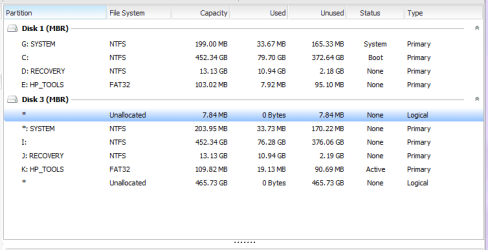
I also seem to of gained a few additions to my ssd (the * in the photo). Here is what my drives look like via EaseUS-attached.
Thanks for your help!
Bre
ssd 1tb Touro
(everything is backed up as well as system image to ehd)
also did a system repair disc
I used EaseUS clone disk wizard to clone OS. Everything went well (or so I thought). Changed boot order (BIOS),tried to boot from ssd- didn't work. Booted from repair disc & went through recovery options/ start-up repair 3+ times.. ssd still would not boot.
Followed a few tutorials that had me do basically the same thing.. still not working.
Tried christopher heiser's "fix a broken or missing bootloader in windows 7"... didn't work.
Went through tutorial from EasyBCD, tried automated repair, manually repairing windows bootloader & nuclear Holocaust..
All the commands completed (nuclear holocaust) added new entry.. everything was ok.
But it is still not booting
Please help!
I hate to be a pain & even ask this question b/c I know there are tutorials everywhere to do this but something just isn't going right & before I wipe my ssd and spend another day cloning my OS, I figured I would ask..
I also seem to of gained a few additions to my ssd (the * in the photo). Here is what my drives look like via EaseUS-attached.
Thanks for your help!
Bre
Attachments
My Computer
At a glance
Windows 7 HP 64 bit8 gb
- Computer type
- Laptop
- Computer Manufacturer/Model Number
- HP
- OS
- Windows 7 HP 64 bit
- Memory
- 8 gb
- Hard Drives
- Ehd-Seagate 1tb
Ssd-Touro 1tb
- Browser
- Chrome

