
Solved OS split across 2 drives, want to put all on a third

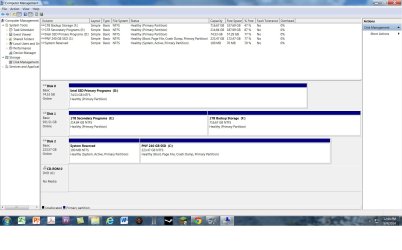
Ok, so sorry for the long delay. Got sick and finally got a chance to get the SS taken.

And thank you all again for the help!
 

Attachments

  • Screenshot of Storage Configuration.jpg
    Screenshot of Storage Configuration.jpg
    157.8 KB · Views: 5

My Computer My Computer

At a glance

Windows 7 Professional 64 BitAMD Phenom X2 955 Black8 Gb CorsairATI XXX HD4970
Computer type
PC/Desktop
Computer Manufacturer/Model Number
Custom
OS
Windows 7 Professional 64 Bit
CPU
AMD Phenom X2 955 Black
Motherboard
Asus
Memory
8 Gb Corsair
Graphics Card(s)
ATI XXX HD4970
Hard Drives
Agility 3 SSD 60 Gb
WD Velociraptor 300 GB
WD 1 TB
Intel SSD 80 GB
Antivirus
AVG
Browser
Chrome
And this is what I am seeing when I try to make a system image with Windows Backup and Restore. I just am trying at this point to figure out why I have system files on the 1 TB drive as all of my user files are on the System C: drive at this point.
 

Attachments

  • Windows Backup and Restore SS.jpg
    Windows Backup and Restore SS.jpg
    45.2 KB · Views: 0

My Computer My Computer

At a glance

Windows 7 Professional 64 BitAMD Phenom X2 955 Black8 Gb CorsairATI XXX HD4970
Computer type
PC/Desktop
Computer Manufacturer/Model Number
Custom
OS
Windows 7 Professional 64 Bit
CPU
AMD Phenom X2 955 Black
Motherboard
Asus
Memory
8 Gb Corsair
Graphics Card(s)
ATI XXX HD4970
Hard Drives
Agility 3 SSD 60 Gb
WD Velociraptor 300 GB
WD 1 TB
Intel SSD 80 GB
Antivirus
AVG
Browser
Chrome
If you have a single remaining User folder on the data drive, or any Programs which were placed on it, then these are deemed System files which should be moved back to C in order to have it not force-included in the backup image. Programs are best installed on C anyway since they write registry keys which integrate them into the OS until uninstalled. So I'd uninstall them and reinstall to C. Check User Folder Properties Location tab to see where each of those reside now.

A workaround is to use another imaging program like Macrium - Image your system
since only Win7 imaging restricts this.
 
Thanks Gregrocker! I have checked and there aren't any user files on the 1TB drive. So you are thinking perhaps some misc programs are registering as system programs for some reason?
 

My Computer My Computer

At a glance

Windows 7 Professional 64 BitAMD Phenom X2 955 Black8 Gb CorsairATI XXX HD4970
Computer type
PC/Desktop
Computer Manufacturer/Model Number
Custom
OS
Windows 7 Professional 64 Bit
CPU
AMD Phenom X2 955 Black
Motherboard
Asus
Memory
8 Gb Corsair
Graphics Card(s)
ATI XXX HD4970
Hard Drives
Agility 3 SSD 60 Gb
WD Velociraptor 300 GB
WD 1 TB
Intel SSD 80 GB
Antivirus
AVG
Browser
Chrome
Last edited:
Thanks for your help everyone!
 

My Computer My Computer

At a glance

Windows 7 Professional 64 BitAMD Phenom X2 955 Black8 Gb CorsairATI XXX HD4970
Computer type
PC/Desktop
Computer Manufacturer/Model Number
Custom
OS
Windows 7 Professional 64 Bit
CPU
AMD Phenom X2 955 Black
Motherboard
Asus
Memory
8 Gb Corsair
Graphics Card(s)
ATI XXX HD4970
Hard Drives
Agility 3 SSD 60 Gb
WD Velociraptor 300 GB
WD 1 TB
Intel SSD 80 GB
Antivirus
AVG
Browser
Chrome
Back
Top