Outlook 2007 in start menu

kensiko

New member
Member
VIP
Local time
1:25 PM
Messages
212
Location
Canada
Hello, this is a question for Seven and Vista.

Is there any way to remove e-mail results in start menu with Outlook 2007 without disabling completely Outlook indexing?
 

My Computer

OS
Win7 64 bits FR
CPU
2500K @ 4.5 GHz
Motherboard
Asrock Z68 Gen3 Extreme3
Memory
4x4GB 1600MHz GSkill CL9.
Graphics Card(s)
HD6850 Powercolor stock
Sound Card
Integrated
Monitor(s) Displays
Samsung 2343 + Dell 20in 4/3
Screen Resolution
2048x1152, 1600x1200
Hard Drives
OCZ Vertex LE SSD, 50GB
OCZ Solid 3 120GB
OCZ Vertex 2 240GB
Western Digital Scorpio 320GB 5400 rpm
PSU
KingWin Lazer Platinum (90+) 550Watts
Case
HAF912
Cooling
CPU: OCZ Vendetta 2
Keyboard
MX5500 revolution bluetooth
Mouse
MX5500 revolution bluetooth
Internet Speed
Cable 7 Mbps
Hello, this is a question for Seven and Vista.

Is there any way to remove e-mail results in start menu with Outlook 2007 without disabling completely Outlook indexing?

Not too sure what you mean. If indexing is turned on then searches will produce results based on the index folders included. I'll have a quick look at outlook now for you....

UPDATE: Just looked but can't get results for start menu indexing search. Can you provide a screenshot if possible please?
 

My Computer

Computer Manufacturer/Model Number
Compaq Desktop
OS
Windows 7 Ultimate x64
CPU
AMD Sempron Dual Core
Memory
3GB
Graphics Card(s)
NVIDIA GeForce 6150SE nForce 430
Screen Resolution
1024x768
Hard Drives
150GB Sata
As far as I can see there's no option to link Outlook 2007 indexing with General Windows indexing. Is it Outlook results showing or possibly Windows Mail or Live Mail?

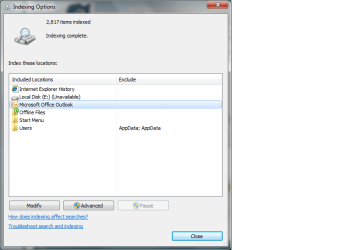
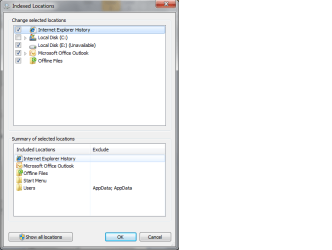
UPDATE: Looks like I was wrong. If you type 'indexing' in the start menu search it will display 'Indexing Options'. If you click that you can modify the list to remove 'Office Outlook'.

See attatched..
 

Attachments

  • indexing.png
    indexing.png
    17.2 KB · Views: 70
  • options.png
    options.png
    15.8 KB · Views: 49

My Computer

Computer Manufacturer/Model Number
Compaq Desktop
OS
Windows 7 Ultimate x64
CPU
AMD Sempron Dual Core
Memory
3GB
Graphics Card(s)
NVIDIA GeForce 6150SE nForce 430
Screen Resolution
1024x768
Hard Drives
150GB Sata
As far as I can see there's no option to link Outlook 2007 indexing with General Windows indexing. Is it Outlook results showing or possibly Windows Mail or Live Mail?

UPDATE: Looks like I was wrong. If you type 'indexing' in the start menu search it will display 'Indexing Options'. If you click that you can modify the list to remove 'Office Outlook'.

See attatched..


Thanks for the reply. I know what you are saying, in fact I already done that many times, but Outlook always reappears automatically again in the indexing options :cry:
 

My Computer

OS
Win7 64 bits FR
CPU
2500K @ 4.5 GHz
Motherboard
Asrock Z68 Gen3 Extreme3
Memory
4x4GB 1600MHz GSkill CL9.
Graphics Card(s)
HD6850 Powercolor stock
Sound Card
Integrated
Monitor(s) Displays
Samsung 2343 + Dell 20in 4/3
Screen Resolution
2048x1152, 1600x1200
Hard Drives
OCZ Vertex LE SSD, 50GB
OCZ Solid 3 120GB
OCZ Vertex 2 240GB
Western Digital Scorpio 320GB 5400 rpm
PSU
KingWin Lazer Platinum (90+) 550Watts
Case
HAF912
Cooling
CPU: OCZ Vendetta 2
Keyboard
MX5500 revolution bluetooth
Mouse
MX5500 revolution bluetooth
Internet Speed
Cable 7 Mbps
Thanks for the reply. I know what you are saying, in fact I already done that many times, but Outlook always reappears automatically again in the indexing options :cry:

That's quite strange as I tried it & didn't see the issue as soon as it was disabled. You could try disabling within Outlook through 'Tools -> Options -> Search Options'

Other than that i don't know :confused:
 

My Computer

Computer Manufacturer/Model Number
Compaq Desktop
OS
Windows 7 Ultimate x64
CPU
AMD Sempron Dual Core
Memory
3GB
Graphics Card(s)
NVIDIA GeForce 6150SE nForce 430
Screen Resolution
1024x768
Hard Drives
150GB Sata
Once I disabled all search function in Outlook and it disappeared from the start menu, but no search was possible under outlook!

It's strange that you don't have the same problem as me (outlook reappearing automatically in indexing option). I got Outlook French, that could be a reason.

For the reappearing problem, could you check again? I saw it was reappearing after a few minutes, not right away.
 

My Computer

OS
Win7 64 bits FR
CPU
2500K @ 4.5 GHz
Motherboard
Asrock Z68 Gen3 Extreme3
Memory
4x4GB 1600MHz GSkill CL9.
Graphics Card(s)
HD6850 Powercolor stock
Sound Card
Integrated
Monitor(s) Displays
Samsung 2343 + Dell 20in 4/3
Screen Resolution
2048x1152, 1600x1200
Hard Drives
OCZ Vertex LE SSD, 50GB
OCZ Solid 3 120GB
OCZ Vertex 2 240GB
Western Digital Scorpio 320GB 5400 rpm
PSU
KingWin Lazer Platinum (90+) 550Watts
Case
HAF912
Cooling
CPU: OCZ Vendetta 2
Keyboard
MX5500 revolution bluetooth
Mouse
MX5500 revolution bluetooth
Internet Speed
Cable 7 Mbps
I've just tested this again and found no issue when de-selecting the 'Personal Folders' in Outlook 2007 (Tools->Options->Search Options').

The Windows Indexing Options have not been changed & I found that this option produced the results that you require while still allowing searching within Outlook. The only thing I can think of is that it's a bug with 7057 (i presume that's what you are using) as i'm using 7068 with no issue.

Have you downloaded all the updates for Outlook 2007 & Office?
 

My Computer

Computer Manufacturer/Model Number
Compaq Desktop
OS
Windows 7 Ultimate x64
CPU
AMD Sempron Dual Core
Memory
3GB
Graphics Card(s)
NVIDIA GeForce 6150SE nForce 430
Screen Resolution
1024x768
Hard Drives
150GB Sata
Ok then I'll give it another try.

I had this problem since Windows Vista. Yesterday I went from 7057 to 7068.
 

My Computer

OS
Win7 64 bits FR
CPU
2500K @ 4.5 GHz
Motherboard
Asrock Z68 Gen3 Extreme3
Memory
4x4GB 1600MHz GSkill CL9.
Graphics Card(s)
HD6850 Powercolor stock
Sound Card
Integrated
Monitor(s) Displays
Samsung 2343 + Dell 20in 4/3
Screen Resolution
2048x1152, 1600x1200
Hard Drives
OCZ Vertex LE SSD, 50GB
OCZ Solid 3 120GB
OCZ Vertex 2 240GB
Western Digital Scorpio 320GB 5400 rpm
PSU
KingWin Lazer Platinum (90+) 550Watts
Case
HAF912
Cooling
CPU: OCZ Vendetta 2
Keyboard
MX5500 revolution bluetooth
Mouse
MX5500 revolution bluetooth
Internet Speed
Cable 7 Mbps
Ok now it seems to work, I got the search function working in outlook and no e-mail results in start menu. Last time I tried this was on Windows Vista, 1.5 year ago.

Thank you for you help!
 

My Computer

OS
Win7 64 bits FR
CPU
2500K @ 4.5 GHz
Motherboard
Asrock Z68 Gen3 Extreme3
Memory
4x4GB 1600MHz GSkill CL9.
Graphics Card(s)
HD6850 Powercolor stock
Sound Card
Integrated
Monitor(s) Displays
Samsung 2343 + Dell 20in 4/3
Screen Resolution
2048x1152, 1600x1200
Hard Drives
OCZ Vertex LE SSD, 50GB
OCZ Solid 3 120GB
OCZ Vertex 2 240GB
Western Digital Scorpio 320GB 5400 rpm
PSU
KingWin Lazer Platinum (90+) 550Watts
Case
HAF912
Cooling
CPU: OCZ Vendetta 2
Keyboard
MX5500 revolution bluetooth
Mouse
MX5500 revolution bluetooth
Internet Speed
Cable 7 Mbps
Ok then I'll give it another try.

I had this problem since Windows Vista. Yesterday I went from 7057 to 7068.

Let us know how you get on :)
 

My Computer

Computer Manufacturer/Model Number
Compaq Desktop
OS
Windows 7 Ultimate x64
CPU
AMD Sempron Dual Core
Memory
3GB
Graphics Card(s)
NVIDIA GeForce 6150SE nForce 430
Screen Resolution
1024x768
Hard Drives
150GB Sata
Back
Top