Outlook 2007 keeps setting up email as imap acct in separate folders

larryccf

Banned
Local time
7:23 PM
Messages
43
i'm pulling my hair out on this one - I'm running windows 7 64 bit, and i had to do a complete re-install of win 7 and everything else.

I've had to re-install microsoft office outlook 2007 before, on this very computer and have not had this issue, plus i still have it installed on a laptop and copying the settings from the laptop installation do not work.

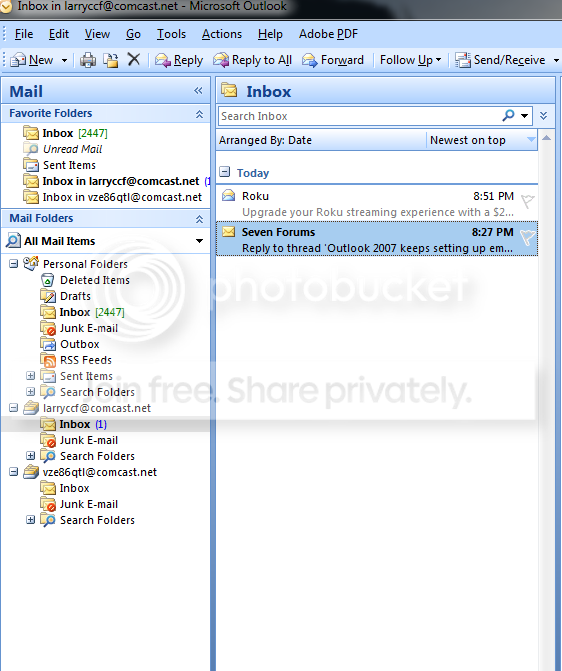
The problem - when i enter the gmail email address, it automatically finds the server and sets the account up as a pop3 acct. When i insert the comcast email addresses it sets them up as imap accounts and sets up separate folders for them, so to check my inboxes i have to scroll all the way down the navigation pane. On my laptop outlook seven set the comcast accts up as mail.comcast.net accts and incoming emails just pop into the one inbox where my pop3 emails show up.

i've googled the bejesus out of this, and none of the "change" the folder instructions work - there is no "change folder" button where all the instructions show it residing, in the bottom box on the "data" page of account settings. When i try to use the "change" selection at the top of the box listing the email accts, i cannot change the folder address for the imap accts.

When i try to set the accounts up manually as "mail.comcast.net" accounts, they will connect or log on to the server but not succeed in sending a test message.

I'm not a software engineer but neither am i a complete fred flintstone of email accounts, but i haven't been this frustrated since windows 95 when i finally brought a sledge hammer into the room and threatened to introduce the computer to "Mr Sledge" intimately - surprisingly, that threat worked.

I have gone thru the myriad settings in outlook 7 until i'm blue in the face, and cannot find anything to change or why it would choose to set up accounts as imap accounts when on the laptop and on this computer previously, it had set them up as "mail.comcast.net" accounts.

any suggestions
 

My Computer My Computer

At a glance

windows 7 ultimate 64bitI7-479016 GB 1600 MHz DDR3GTX 750 Ti
Computer type
PC/Desktop
Computer Manufacturer/Model Number
ASUS CUSTOM
OS
windows 7 ultimate 64bit
CPU
I7-4790
Motherboard
ASUS Z97M-PLUS
Memory
16 GB 1600 MHz DDR3
Graphics Card(s)
GTX 750 Ti
Hard Drives
samsung ssd 840 evo 250 gb, 3x
Antivirus
emsisoft
Browser
mozilla firefox

My Computer My Computer

At a glance

Windows 7 Home Premium 64 bit sp1Intel i5 3570 3.4Ghz Ivy Bridge SKT 1155 quad...G-Skill Rip Jaws 16Gb (8x2) DDR3 -1600 PC3 12...Gigabyte NVIDIA GT610 1Gb DDR3 810/1200 PCI-E...
Computer type
PC/Desktop
Computer Manufacturer/Model Number
Self built using existing case
OS
Windows 7 Home Premium 64 bit sp1
CPU
Intel i5 3570 3.4Ghz Ivy Bridge SKT 1155 quad core
Motherboard
Gigabyte Z77-HD3 SKT 1155 2xSata 3, 4x USB 3.0
Memory
G-Skill Rip Jaws 16Gb (8x2) DDR3 -1600 PC3 12800 CL 10 red
Graphics Card(s)
Gigabyte NVIDIA GT610 1Gb DDR3 810/1200 PCI-E 2.0 Silent
Sound Card
NVIDIA High Definition & Realtech High Definition Audio
Monitor(s) Displays
2 x Philips 226V4L 16:9 aspect ratio
Screen Resolution
1920 x 1080 HD
Hard Drives
Samsung 840 Pro 256gb SSD, SATA 3.
Hitachi Touro Portable 1tb, USB 3.0 HDD used for image b/ups.
PSU
Corsair VS450
Case
Codeng
Cooling
PSU fan & CPU fan
Keyboard
Logitech
Mouse
Logitech Wireless trackball M570
Internet Speed
Wireless 3G. 3mg down & 550kb up.
Antivirus
Bitdefender Internet Security 2020
Browser
Opera (Current Version) & Firefox
Other Info
MS Office 2013 Pro. Davis weather station software. MGE Nova 600 avr UPS.
NOPE - that just gives me what i've got right now

again, the issue is that for some reason, where outlook 2007 would set up the email accounts as "mail.comcast.net" accounts, now it sets them up as "imap.comcast.net" accounts, which means that as imap accounts they get individual folders and i now have 3 separate inboxes, which is a pain to check

note below

Capture_zps7sk9qgo7.png


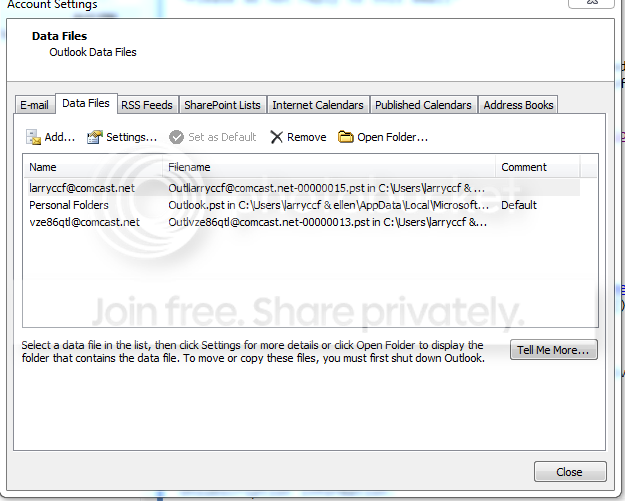
then, if you go to account settings and then select one of the imap addresses and select "data files", there should be a "change folder" button at the bottom left, but there isn't. If you clik on "settings" a small menu window will open that will show the file name you see below, but while it should allow me to change that file name to the "OUTLOOK.Pst" file name, it won't - it will highlight but not let me delete or alter it

I've un-installed outlook 2007 and re- installed 3 or 4x, i've copied the outlook.pst file from the laptop and tried it on one of the fresh re-installs, no luck

Capture2_zpso8coj6mt.png


it just doesn't make sense why on previous clean re-installs i had zero issues, but now no matter what i try, it insists on making the two comcast addresses imap accounts, when on the laptop they're "mail.comcast.net" accounts and all download into the same Outlook.pst folder

thanks though
 

My Computer My Computer

At a glance

windows 7 ultimate 64bitI7-479016 GB 1600 MHz DDR3GTX 750 Ti
Computer type
PC/Desktop
Computer Manufacturer/Model Number
ASUS CUSTOM
OS
windows 7 ultimate 64bit
CPU
I7-4790
Motherboard
ASUS Z97M-PLUS
Memory
16 GB 1600 MHz DDR3
Graphics Card(s)
GTX 750 Ti
Hard Drives
samsung ssd 840 evo 250 gb, 3x
Antivirus
emsisoft
Browser
mozilla firefox
I can't offer an explanation. Have you tried duplicating all the email settings, in the set up of email accounts, exactly as you have them on your laptop. If those setting work on the laptop they should work on the desktop.

I use Outlook 2013 & I have 2 email accounts from 2 different IP's, so of course I have an inbox etc. for each of them. This suits me fine as I know which email account in being used, so I can reply using which ever one I want to. I really can't see that if you have different email accounts how you don't end up with a separate folder for each account.
 

My Computer My Computer

At a glance

Windows 7 Home Premium 64 bit sp1Intel i5 3570 3.4Ghz Ivy Bridge SKT 1155 quad...G-Skill Rip Jaws 16Gb (8x2) DDR3 -1600 PC3 12...Gigabyte NVIDIA GT610 1Gb DDR3 810/1200 PCI-E...
Computer type
PC/Desktop
Computer Manufacturer/Model Number
Self built using existing case
OS
Windows 7 Home Premium 64 bit sp1
CPU
Intel i5 3570 3.4Ghz Ivy Bridge SKT 1155 quad core
Motherboard
Gigabyte Z77-HD3 SKT 1155 2xSata 3, 4x USB 3.0
Memory
G-Skill Rip Jaws 16Gb (8x2) DDR3 -1600 PC3 12800 CL 10 red
Graphics Card(s)
Gigabyte NVIDIA GT610 1Gb DDR3 810/1200 PCI-E 2.0 Silent
Sound Card
NVIDIA High Definition & Realtech High Definition Audio
Monitor(s) Displays
2 x Philips 226V4L 16:9 aspect ratio
Screen Resolution
1920 x 1080 HD
Hard Drives
Samsung 840 Pro 256gb SSD, SATA 3.
Hitachi Touro Portable 1tb, USB 3.0 HDD used for image b/ups.
PSU
Corsair VS450
Case
Codeng
Cooling
PSU fan & CPU fan
Keyboard
Logitech
Mouse
Logitech Wireless trackball M570
Internet Speed
Wireless 3G. 3mg down & 550kb up.
Antivirus
Bitdefender Internet Security 2020
Browser
Opera (Current Version) & Firefox
Other Info
MS Office 2013 Pro. Davis weather station software. MGE Nova 600 avr UPS.
yeah, neither copying settings from the laptop by hand nor copying and pasting the outlook.pst file from the laptop does any good.

and i've always had different email accts, whether gmail, yahoo, msn etc and they always downloaded into the same inbox, automatically.


My Computer My Computer

At a glance

windows 7 ultimate 64bitI7-479016 GB 1600 MHz DDR3GTX 750 Ti
Computer type
PC/Desktop
Computer Manufacturer/Model Number
ASUS CUSTOM
OS
windows 7 ultimate 64bit
CPU
I7-4790
Motherboard
ASUS Z97M-PLUS
Memory
16 GB 1600 MHz DDR3
Graphics Card(s)
GTX 750 Ti
Hard Drives
samsung ssd 840 evo 250 gb, 3x
Antivirus
emsisoft
Browser
mozilla firefox
That certainly is beyond me. Before I used Outlook I used MSN Mail & when I set up the two email Accounts in it, there was a separate folder for each account.
 

My Computer My Computer

At a glance

Windows 7 Home Premium 64 bit sp1Intel i5 3570 3.4Ghz Ivy Bridge SKT 1155 quad...G-Skill Rip Jaws 16Gb (8x2) DDR3 -1600 PC3 12...Gigabyte NVIDIA GT610 1Gb DDR3 810/1200 PCI-E...
Computer type
PC/Desktop
Computer Manufacturer/Model Number
Self built using existing case
OS
Windows 7 Home Premium 64 bit sp1
CPU
Intel i5 3570 3.4Ghz Ivy Bridge SKT 1155 quad core
Motherboard
Gigabyte Z77-HD3 SKT 1155 2xSata 3, 4x USB 3.0
Memory
G-Skill Rip Jaws 16Gb (8x2) DDR3 -1600 PC3 12800 CL 10 red
Graphics Card(s)
Gigabyte NVIDIA GT610 1Gb DDR3 810/1200 PCI-E 2.0 Silent
Sound Card
NVIDIA High Definition & Realtech High Definition Audio
Monitor(s) Displays
2 x Philips 226V4L 16:9 aspect ratio
Screen Resolution
1920 x 1080 HD
Hard Drives
Samsung 840 Pro 256gb SSD, SATA 3.
Hitachi Touro Portable 1tb, USB 3.0 HDD used for image b/ups.
PSU
Corsair VS450
Case
Codeng
Cooling
PSU fan & CPU fan
Keyboard
Logitech
Mouse
Logitech Wireless trackball M570
Internet Speed
Wireless 3G. 3mg down & 550kb up.
Antivirus
Bitdefender Internet Security 2020
Browser
Opera (Current Version) & Firefox
Other Info
MS Office 2013 Pro. Davis weather station software. MGE Nova 600 avr UPS.
Larry, by default Outlook will setup imap accounts and each IMAP account will have its own pst.

You have to manually create the account and choose POP. During setup you can choose to point all addresses to the same .pst. You'll need the POP settings from Comcast, they will be different than the IMAP settings. Looks like

  • Incoming Mail Server - Name: mail.comcast.net
  • Incoming Mail Server - Port Number: 995 (POP3 With SSL) or 110 (POP3 Without SSL)
from Using Email Client Programs with Comcast Email
 

My Computer My Computer

At a glance

Windows 7 Pro 64-bit
Computer type
PC/Desktop
OS
Windows 7 Pro 64-bit
Hi,
Not a good idea to have your complete email addresses showing in a public forum ;)
Cheers.
 

My Computer My Computer

At a glance

Win-7-Pro64bit 7-H-Prem-64biti7-5930K 2nd i9-9940x both water blocked VRM'...Trident-z 3200C14 2nd Trident-z 3600C16EVGA 1080ti ftw3 2nd Titan Xp both water blocked
Computer type
PC/Desktop
Computer Manufacturer/Model Number
Custom assembled by me :}
OS
Win-7-Pro64bit 7-H-Prem-64bit
CPU
i7-5930K 2nd i9-9940x both water blocked VRM's too
Motherboard
ASUS SABERTOOTH X99 2nd ASUS x299 Apex
Memory
Trident-z 3200C14 2nd Trident-z 3600C16
Graphics Card(s)
EVGA 1080ti ftw3 2nd Titan Xp both water blocked
Sound Card
Built-in Realtek
Monitor(s) Displays
1-AOC G2460PG 24"G-Sync 144Hz/ 2nd 1-ASUS VG248QE 24" 144Hz
Screen Resolution
1920 x 1080 144Hz
Hard Drives
2-Samsung M.2 Evo & Evo Plus
2-Samsung 850 EVO 500GB SSD's/ 3-2.5 W.D. Black 1tb-&3-1tb/3-3.5 WD Black 1tb hdd's
PSU
EVGA SuperNOVA 1000-P2 2nd 1200-P2
Case
2-Corsair Obsidian Series 450D Black ATX Mid Tower
Cooling
Custom water loops
Keyboard
Logitech G710+/ 2nd Logitech G910
Mouse
2-RedDragon M901 Perdition 16400 dpi Gaming mouse = wired
Internet Speed
Comcast Ping 19ms 89.31mbps download speed 6.12mbps upload
Antivirus
Malwarebytes Pro/ Superantispyware Pro
Browser
FireFox & Pale moon
Other Info
2nd ASUS X299 Apex/Intel i9-9940x with Custom water loop/7H-Prem-x64/Corsair 450D case/Ram Trident-z 3600C16 4x8gb / Samsung970Evo plus 500gb SSD/Dual ssd EZ swap evo/PSU EVGA SuperNova 1200w-P2 80+Platinum/GPU Titan Xp /8-ML-140 on push-pull on 2-280GTX rads
@larryccf
If you come back here and haven't fixed this, post back.
There is something you can try to fix the manual POP setup for this issue from post #1
When i try to set the accounts up manually as "mail.comcast.net" accounts, they will connect or log on to the server but not succeed in sending a test message.
 

My Computer My Computer

At a glance

Multi-Boot W7_Pro_x64 W8.1_Pro_x64 W10_Pro_x6...AMD Athlon II x4 6206GB GSkill DDR2 800AMD 4670 GPU + AMD 4200 IGP
Computer type
PC/Desktop
Computer Manufacturer/Model Number
home built
OS
Multi-Boot W7_Pro_x64 W8.1_Pro_x64 W10_Pro_x64 +Linux_VMs +Chromium_VM
CPU
AMD Athlon II x4 620
Motherboard
Gigabyte GA-MA785G-UD3H
Memory
6GB GSkill DDR2 800
Graphics Card(s)
AMD 4670 GPU + AMD 4200 IGP
Sound Card
on board Realtek ALC889A
Monitor(s) Displays
RCA 40" LCD TV, Insignia 32" LCD TV, HP 15" LCD monitor
Screen Resolution
1680 x 1050
Hard Drives
OCZ Vertex 3 120GB,
Samsung F3 1TB (3),
Several others - WD, Seagate, Hitachi, ...
PSU
Corsair 500 W
Case
Rosewill mid tower
Cooling
CM 90mm rifle
Keyboard
Gyration wireless, Logitech wireless, Dell USB wired
Mouse
Gyration wireless, Logitech wireless, V7 USB wired
Internet Speed
Spectrum - 100Mbps D / 10Mbps U
Antivirus
Avast, MBAM3, EMET, WinPatrol
Browser
Pale Moon, Firefox, IE
Other Info
2 multi-boot PC's
Mainly HTPC/Office/Gen purpose (no gaming).
Trendnet USB KVM.
LG DVD burner/Blue Ray Player.
Tray system for removable SATA backup drives.

Not currently OCd, under-volted.
I use Hybrid sleep, rarely re-boot or shutdown.

Hauppauge HD-PVR, Avermedia PCIe TV Tuner, Hauppauge PCI TV Tuner.
This is an issue I often wrestled with before but have not been able to find a resolution to it.

Did you manage to get a fix for this?
 

My Computer My Computer

At a glance

Win 7 Professional
OS
Win 7 Professional
Back
Top