Outlook pro plus 2010 - email remains in preview pane after deletion

gormann

New member
Local time
8:29 PM
Messages
2
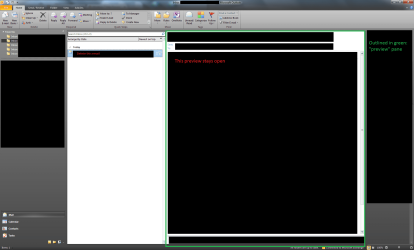
Occasionally when I delete an email while I have the preview pane open (this may be the incorrect name, but I've attached a screenshot so hopefully it's clear) the email remains in the preview pane until I click to another folder.

This isn't a big issue or anything, it's just a small annoyance. This doesn't happen all the time and I haven't noticed any common factor between the emails that remain in the pane when deleted.

OS: Windows 7 Pro 32-bit (6.1, Build 7601)
Office: Pro Plus 2010
Outlook: 14.9.4734.1000 (32-bit)

It looks to me like this is purely an office issue that I won't be able to fix, but you never know - any help would be appreciated!

EDIT:
I found a thread on the issue elsewhere;
https://social.technet.microsoft.co...in-preview-pane-of-outlook-2010?forum=outlook
They conclude that SP1 fixes the problem, but I'm running SP1 already and it certainly doesn't!
 

My Computer My Computer

At a glance

7 pro
Computer type
PC/Desktop
OS
7 pro
Hi gormann, welcome to Windows Seven Forums.

You screen shot is not showing in your post.

Have you tried a repair of Office 2010. to do that open Control Panel, select Programs & Features & scroll down to Microsoft Office 2010, Right Click on it & select Change & this should open a couple of repair options.
Also have all your Office updates been installed.
 

My Computer My Computer

At a glance

Windows 7 Home Premium 64 bit sp1Intel i5 3570 3.4Ghz Ivy Bridge SKT 1155 quad...G-Skill Rip Jaws 16Gb (8x2) DDR3 -1600 PC3 12...Gigabyte NVIDIA GT610 1Gb DDR3 810/1200 PCI-E...
Computer type
PC/Desktop
Computer Manufacturer/Model Number
Self built using existing case
OS
Windows 7 Home Premium 64 bit sp1
CPU
Intel i5 3570 3.4Ghz Ivy Bridge SKT 1155 quad core
Motherboard
Gigabyte Z77-HD3 SKT 1155 2xSata 3, 4x USB 3.0
Memory
G-Skill Rip Jaws 16Gb (8x2) DDR3 -1600 PC3 12800 CL 10 red
Graphics Card(s)
Gigabyte NVIDIA GT610 1Gb DDR3 810/1200 PCI-E 2.0 Silent
Sound Card
NVIDIA High Definition & Realtech High Definition Audio
Monitor(s) Displays
2 x Philips 226V4L 16:9 aspect ratio
Screen Resolution
1920 x 1080 HD
Hard Drives
Samsung 840 Pro 256gb SSD, SATA 3.
Hitachi Touro Portable 1tb, USB 3.0 HDD used for image b/ups.
PSU
Corsair VS450
Case
Codeng
Cooling
PSU fan & CPU fan
Keyboard
Logitech
Mouse
Logitech Wireless trackball M570
Internet Speed
Wireless 3G. 3mg down & 550kb up.
Antivirus
Bitdefender Internet Security 2020
Browser
Opera (Current Version) & Firefox
Other Info
MS Office 2013 Pro. Davis weather station software. MGE Nova 600 avr UPS.
Hi Ranger, thanks for the welcome!

I have located the problem with the screenshot, apparently you have to attach them, they don't magically attach themselves! What a bother - hopefully in W10 this issue will be fixed! For now I will manually click the buttons :)


Office is up to date, I will do a repair and see if this helps. The issue is intermittent so it's hard to tell if it's fixed or not though.
 

Attachments

  • Untitled.png
    Untitled.png
    63.4 KB · Views: 2

My Computer My Computer

At a glance

7 pro
Computer type
PC/Desktop
OS
7 pro
Thanks for getting back. Yes, you do have to attach screen shots & this is really part of the Forum requirements, otherwise you could not control what was attached.

Intermittent problems are always the hardest to fix, but try the Repair & see if it fixes it. Otherwise I really can't offer a solution.

You could check your Auto Archive settings to reduce the size of archived emails that you know longer need. If this gets crowded it may be causing the problem. To find the Auto Archive settings, open Outlook select File then Options & then Advanced & you should see it. Click on it & reset as required.
 

My Computer My Computer

At a glance

Windows 7 Home Premium 64 bit sp1Intel i5 3570 3.4Ghz Ivy Bridge SKT 1155 quad...G-Skill Rip Jaws 16Gb (8x2) DDR3 -1600 PC3 12...Gigabyte NVIDIA GT610 1Gb DDR3 810/1200 PCI-E...
Computer type
PC/Desktop
Computer Manufacturer/Model Number
Self built using existing case
OS
Windows 7 Home Premium 64 bit sp1
CPU
Intel i5 3570 3.4Ghz Ivy Bridge SKT 1155 quad core
Motherboard
Gigabyte Z77-HD3 SKT 1155 2xSata 3, 4x USB 3.0
Memory
G-Skill Rip Jaws 16Gb (8x2) DDR3 -1600 PC3 12800 CL 10 red
Graphics Card(s)
Gigabyte NVIDIA GT610 1Gb DDR3 810/1200 PCI-E 2.0 Silent
Sound Card
NVIDIA High Definition & Realtech High Definition Audio
Monitor(s) Displays
2 x Philips 226V4L 16:9 aspect ratio
Screen Resolution
1920 x 1080 HD
Hard Drives
Samsung 840 Pro 256gb SSD, SATA 3.
Hitachi Touro Portable 1tb, USB 3.0 HDD used for image b/ups.
PSU
Corsair VS450
Case
Codeng
Cooling
PSU fan & CPU fan
Keyboard
Logitech
Mouse
Logitech Wireless trackball M570
Internet Speed
Wireless 3G. 3mg down & 550kb up.
Antivirus
Bitdefender Internet Security 2020
Browser
Opera (Current Version) & Firefox
Other Info
MS Office 2013 Pro. Davis weather station software. MGE Nova 600 avr UPS.
Back
Top