
Outlook search does not work - Indexing not working - tried many thing

ltrip

New member
Local time
4:22 PM
Messages
19
Windows 7 Pro 64 bit. Office Pro 2010. 32 bit Outlook. HP laptop.

This started with my searches in Outlook not working. I looked for solutions.
Here is my status and things I have tried:
- Ran scanpst. Errors were repaired.
- Ran Office 2010 "repair" from control panel. Errors were fixed.
- Ran SFC. Errors were found in system files. But when I look at the log file, there are NO files listed as corrupt. Not sure what to do next on this.
- When I go to "Indexing options" There no locations specified for indexing and it says "Indexing is not running"; when I go to "advanced" options, there is NO "file types" tab at all, file settings are grayed out, there is no "index location". when I click "troubleshoot", I get: "An error occured while troubleshooting" "A problem is preventing the troubleshooter from starting". Error detail in attachment.
- I went to "Windows features" under Programs in Control panel. I did NOT turn off Windows search. I turned ON, Indexing service, with no impact.

Yes, I am frustrated.
Can anyone provide additional steps?

I am considering reinstalling and/or repairing Win 7 and Office 2010 from DVDs, if it would not be too disruptive of all my personal settings. Any thoughts on this? I have the DVDs for both with product keys.

Thanks!
 

Attachments
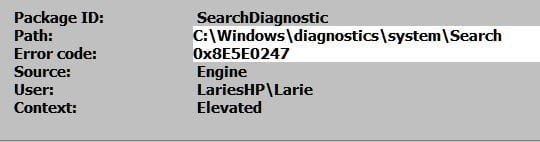
  • Indexing error.JPG
    Indexing error.JPG
    17.8 KB · Views: 13

My Computer My Computer

At a glance

Windows 7 Home Premium 64 bit
OS
Windows 7 Home Premium 64 bit

My Computer My Computer

At a glance

Windows 7 Home Premium 64 bit sp1Intel i5 3570 3.4Ghz Ivy Bridge SKT 1155 quad...G-Skill Rip Jaws 16Gb (8x2) DDR3 -1600 PC3 12...Gigabyte NVIDIA GT610 1Gb DDR3 810/1200 PCI-E...
Computer type
PC/Desktop
Computer Manufacturer/Model Number
Self built using existing case
OS
Windows 7 Home Premium 64 bit sp1
CPU
Intel i5 3570 3.4Ghz Ivy Bridge SKT 1155 quad core
Motherboard
Gigabyte Z77-HD3 SKT 1155 2xSata 3, 4x USB 3.0
Memory
G-Skill Rip Jaws 16Gb (8x2) DDR3 -1600 PC3 12800 CL 10 red
Graphics Card(s)
Gigabyte NVIDIA GT610 1Gb DDR3 810/1200 PCI-E 2.0 Silent
Sound Card
NVIDIA High Definition & Realtech High Definition Audio
Monitor(s) Displays
2 x Philips 226V4L 16:9 aspect ratio
Screen Resolution
1920 x 1080 HD
Hard Drives
Samsung 840 Pro 256gb SSD, SATA 3.
Hitachi Touro Portable 1tb, USB 3.0 HDD used for image b/ups.
PSU
Corsair VS450
Case
Codeng
Cooling
PSU fan & CPU fan
Keyboard
Logitech
Mouse
Logitech Wireless trackball M570
Internet Speed
Wireless 3G. 3mg down & 550kb up.
Antivirus
Bitdefender Internet Security 2020
Browser
Opera (Current Version) & Firefox
Other Info
MS Office 2013 Pro. Davis weather station software. MGE Nova 600 avr UPS.
I went to "Windows features" under Programs in Control panel. I did NOT turn off Windows search. I turned ON, Indexing service, with no impact.

I would try uninstalling Windows Search. Reboot a time or two then re-enable it and reboot. I've had it fix the search feature a few times when things were messed up.
 

My Computer My Computer

At a glance

Windows 7 Pro 64-bit
Computer type
PC/Desktop
OS
Windows 7 Pro 64-bit
Ranger4, Thank you! I had tried #1 earlier. #2 didn't really apply. #3 did show me something new to try...Repair when installing from the DVD.
I confirmed the following as I looked at these:
- I do not have an OST file, I am not on Exchange, so those solutions don't apply.
- When I get to 'Indexing Options", it says "Indexing is not running" and there are no files/locations listed in the box. The "Modify" option is grayed out and not available.
- When looking for OST file in Windows Explorer, it told me that indexing was not running and offered to turn it on. I did. But later, the Indexing Options still shows Indexing not running.
Very frustrating.

CyberSAR, Thank you! I can enable or disable Windows search.
I have done that with no change.
I do not know how to uninstall Windows search, as you suggest. It is not listed in Control Panel as a program available to uninstall.. If I did uninstall, somehow, what would I use to install?

I will try the "repair" from the DVD.

Thanks again.

Cheers,
 

My Computer My Computer

At a glance

Windows 7 Home Premium 64 bit
OS
Windows 7 Home Premium 64 bit
CyberSar, Thank you! This is not directed at you, but the tool. It was useless. It found 3 errors and could not fix them, or tell me how to fix them.
The tool was focused on search, and I know that indexing is related to search. My indexing is not running, and the advanced options show no locations for indexing.
Anyway, my searching in Outlook, which relies on indexing, is still not working.
I am still considering a "repair"/reinstall of Win 7 as a brute force method to fix it.
Cheers,
 

My Computer My Computer

At a glance

Windows 7 Home Premium 64 bit
OS
Windows 7 Home Premium 64 bit
Sorry about sending you on a wild goose chase. I don't have indexing turned on and my search in Windows and Outlook 2010 work fine.

Before a repair install I would try running (as administrator) sfc /scannow a few times. If you find corruption that it won't fix try Dism /Online /Cleanup-Image /RestoreHealth

If you get search in Windows working but not in Outlook you could try a repair of Office and/or scanpst.exe on your .pst files.
 

My Computer My Computer

At a glance

Windows 7 Pro 64-bit
Computer type
PC/Desktop
OS
Windows 7 Pro 64-bit
cyberSAR, thanks again. Please no need to apologize. I sincerely appreciate your help.
I have tried sfc once..it said it found errors, but the log file did not show them. Very frustrating. I will try a couple more times, like you suggest.
I have done an Office repair, with no luck. I have done a scanpst with no luck.

Please explain this further: try Dism /Online /Cleanup-Image /RestoreHealth
Is this a program on my system? I have no idea what this is, but am willing to try it.

Thanks,
 

My Computer My Computer

At a glance

Windows 7 Home Premium 64 bit
OS
Windows 7 Home Premium 64 bit
Great! I will try that in the next 2-3 days.
 

My Computer My Computer

At a glance

Windows 7 Home Premium 64 bit
OS
Windows 7 Home Premium 64 bit
Hi...My question relates exactly to this post aside from sfc /scannow being 100%OK.

I have done it all...except shouted at MS. One thing that bothers me is Indexing Status - never finishes....it has run for days...

I have not done a re-install as I am not good and worried I will loose all my programmes....

HELP!!!!

Dan
 

My Computer My Computer

At a glance

Wind 7 Pro 64-bit
OS
Wind 7 Pro 64-bit
Back
Top