Hi, I am new here, but I thought I would add another paid software that I use often. They have both 32 bit and 64bit, and I am currently using 64 bit.. System Mechanics. www.iolo.com .. I have downloaded and used the 64bit latest version and it works fine for windows 7
Update: System Mechanics stops working for some reason, so please do not add to the list for now. Sorry.
Acronis True Image Home 2009 works well on x86. It takes a while longer to start up than in Vista, but so far the features I use regularly works perfectly.
I would like to see such posts as these and tuts qualified by a defined OS i.e. Win7 build eg 6801, Beta etc and architecture x86, x64 I think it is really needed to avoid people wasting time.
I note on the latter posts on this thread are really good, as posters have started putting the info; which is great and very helpful.
PS - would also be great if original poster could add info from posts so that all info is in first post rather than having to troll through endless posts.
Last edited:
My Computer
OS
Windows Se7en Ultimate x64
CPU
AMD Athlon Phenom II 550 (Dual Core at the moment)
Motherboard
DFI LPJR790GX-M2RS
Memory
4GB OCZ reaper DDR2 PC8500 1066
Graphics Card(s)
CrosssFire 2 x Sapphire RADEON HD3650 (512 MB GDDR3)
Sound Card
Built-in
Monitor(s) Displays
Samsung LE-40B551 40 in. HDTV, HP w2007v, Elo Touchscreen
Screen Resolution
1920 x 1080 pixels
Hard Drives
OCZ Agility Series 30GB SATA II 2.5" Solid State Drive
Samsung Spinpoint F3 1TB SATA II
Samsung Spinpoint F1 500GB SATA II
Western Digital Caviar 500GB SATA II
Wow, MS would have real problems if this bit of Software wasn't compatible. Most big orgs haven't even migrated to this version yet in the UK.
I'll give it a whirl now and confirm either way.
My Computer
OS
Windows Se7en Ultimate x64
CPU
AMD Athlon Phenom II 550 (Dual Core at the moment)
Motherboard
DFI LPJR790GX-M2RS
Memory
4GB OCZ reaper DDR2 PC8500 1066
Graphics Card(s)
CrosssFire 2 x Sapphire RADEON HD3650 (512 MB GDDR3)
Sound Card
Built-in
Monitor(s) Displays
Samsung LE-40B551 40 in. HDTV, HP w2007v, Elo Touchscreen
Screen Resolution
1920 x 1080 pixels
Hard Drives
OCZ Agility Series 30GB SATA II 2.5" Solid State Drive
Samsung Spinpoint F3 1TB SATA II
Samsung Spinpoint F1 500GB SATA II
Western Digital Caviar 500GB SATA II
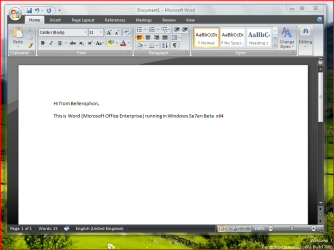
Have just installed MS Office 2007 Enterprise on Win7 Beta x64 with no problems so can confirm it is working OK.
Attachments
Office 2007 Enterprise.PNG
298.1 KB
· Views: 372
My Computer
OS
Windows Se7en Ultimate x64
CPU
AMD Athlon Phenom II 550 (Dual Core at the moment)
Motherboard
DFI LPJR790GX-M2RS
Memory
4GB OCZ reaper DDR2 PC8500 1066
Graphics Card(s)
CrosssFire 2 x Sapphire RADEON HD3650 (512 MB GDDR3)
Sound Card
Built-in
Monitor(s) Displays
Samsung LE-40B551 40 in. HDTV, HP w2007v, Elo Touchscreen
Screen Resolution
1920 x 1080 pixels
Hard Drives
OCZ Agility Series 30GB SATA II 2.5" Solid State Drive
Samsung Spinpoint F3 1TB SATA II
Samsung Spinpoint F1 500GB SATA II
Western Digital Caviar 500GB SATA II
It has been working on mine ok since the transition to 7. I look frequently at Java powered weather radar maps. At times it has seemed slow to load but I have been blaming that on servers at the site.
My Computer
Computer type
PC/Desktop
Computer Manufacturer/Model Number
Dell 1720 Laptop and two Dell desktops. HP Spectre x360
adobe acrobat 8 pro www.adobe.com Doesn't seem to be working any more... the program just closes after being open for about 5-10 seconds. If I bring up a save window it won't close the program, but as soon as I save it will close the program. I'm not getting any errors... I got it to work in Compatibility mode.. it stays open now. I have since removed the compatibility mode, and it works fine now too. I do not know what was wrong with it.
Everything that I had working on my old vista x64 hard drive has installed and worked flawlessly with windows 7 x64.
I also installed Trend Micro (PC-Cillin) Internet Security 2009, the install went smoothly and as I was downloading an update I recieved a blue screen for a Driver IRQL less or not equal. I am unsure if the error was caused by Trend Micro, but the software seems to be working fine now. www.TrendMicro.com
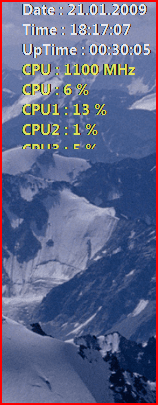
Everest OSD doesn't like Windows7 beta. It gets cut off by Aero, funny thing is, if you right click where it should be you still get the options. Just cant see it. The only workaround that I have found in the moment is to turn Aero off.
Pooch
My bad it's the windows 7 Nvidia driver thats causing the problem I have gone back to an earlier version and its working fine
Attachments
Capture.PNG
155.5 KB
· Views: 18
Last edited:
My Computer
Computer Manufacturer/Model Number
Something I threw together
OS
Windows 7 Ultimate x64
CPU
Intel Core i7-2600K
Motherboard
Asus P8P67
Memory
16 GB G Skill F3-10666 CL9D-4GBRL
Graphics Card(s)
ATI Radeon HD 6870
Sound Card
ATI Radeon HDMI / Realtek ALC892
Monitor(s) Displays
2 x 22" standard monitors / LG32LC56v TV to watch films
Screen Resolution
1920 x1080
Hard Drives
2 x OCZ Vertex2 111.79GB
3 x Samsung103SJ
1 x Samsung103UJ
1 x WD3200BEVT
1 x Hitachi5K320-160
PSU
Thermaltake Toughpower Cable Management 750W
Case
Antec 300
Cooling
Noctua NH-U12P SE2 and 5 120mm Case fans
Keyboard
Microsoft Comfort Curve Keyboard 2000
Mouse
Hama M3110 / Logitech M305
Internet Speed
16000
Other Info
I have also used Fedora, Suse, Ubuntu Linux
And all other Windows from 95 to date except ME
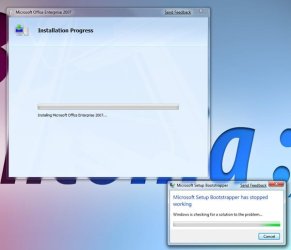
I am trying to install Nero 9 but I keep getting an error message realting to Temp App Data, I have cleard outa all the temp fiels but the problems still happen. Any ideas?





 funny thing is, if you right click where it should be you still get the options.
  Just cant see it. The only workaround that I have found in the moment is to turn Aero off.