Partition problem, but another one

stachu

New member
Local time
8:26 PM
Messages
5
Hello!
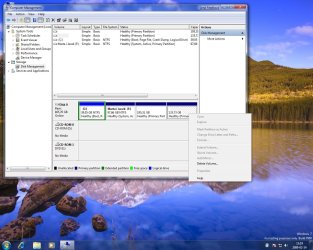
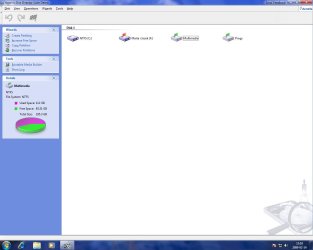
Excusse me for my bad english. I've got a big problem after my win7 instalation. The system doesn't see my partitions. I've tried with letter assigment, but i cannot do this. Don't know why? I made some pictures.


It seems like it doesnt see my partitions. And the acronis disk doctor see them. I don't know what to do. Help please.
 

My Computer

OS
Windows 7
So when you right click on the partion without a letter it doesn't give you an option to change the drive letter?

Can you use the paperclip on your post to upload your images directly to the forum, and can you show what options you have in the context menu on one of the drives without a letter?
 

My Computer

Computer Manufacturer/Model Number
Home Brew
OS
Windows 7 Ultimate Vista Ultimate x64
CPU
Core 2 Duo E8500 3.16Ghz @ 3.8Ghz
Motherboard
eVGA 750i FTW
Memory
2x2Gigs Patriot PC2-6400 LL
Graphics Card(s)
Inno3D GeForce GTX260 216 SP
Monitor(s) Displays
ASUS VW222U 22" 2ms Response time
Screen Resolution
1680x1050
Hard Drives
SATA 150GB
SATA II 250GB
USB IDE 750GB Ext.
PSU
HYTEC 600W & Thermaltake 650W Toughpower Power Exp
Case
Thermaltake Armor LCS (Liquid Cooling System)
Cooling
Liquid Cooling System
Keyboard
Logitech G15 Gaming Keyboard
Mouse
Logitech G9 Gaming Mouse
The partition doesnt have letter nor name. The thing is that it seems to be empty on the win7's program.
I think now the photos are uploaded to this post.
I don't have any options. Only delete. Win seven doesn't read? the partitions I think. But dunno why. And acronis disk doctor see them.
 

Attachments

  • disck2.jpg
    disck2.jpg
    149.2 KB · Views: 49
  • disck1.jpg
    disck1.jpg
    54 KB · Views: 26

My Computer

OS
Windows 7
I notice you have some windows Updates there, have you installed all the latest chipset drivers and so on from your manufacturers Website? What Mother Board do you have?
 

My Computer

Computer Manufacturer/Model Number
Home Brew
OS
Windows 7 Ultimate Vista Ultimate x64
CPU
Core 2 Duo E8500 3.16Ghz @ 3.8Ghz
Motherboard
eVGA 750i FTW
Memory
2x2Gigs Patriot PC2-6400 LL
Graphics Card(s)
Inno3D GeForce GTX260 216 SP
Monitor(s) Displays
ASUS VW222U 22" 2ms Response time
Screen Resolution
1680x1050
Hard Drives
SATA 150GB
SATA II 250GB
USB IDE 750GB Ext.
PSU
HYTEC 600W & Thermaltake 650W Toughpower Power Exp
Case
Thermaltake Armor LCS (Liquid Cooling System)
Cooling
Liquid Cooling System
Keyboard
Logitech G15 Gaming Keyboard
Mouse
Logitech G9 Gaming Mouse
Strange, I thought you were doing something wrong but Acronis proves you weren't...

Try using DISKPART instead of Disk Management.

To do that, open a command prompt (Run as administrator) and type:

diskpart {enter}

DISKPART> LIST DISK {enter}

DISKPART> SELECT DISK 0 (or you hard disk number listed)

DISKPART> LIST PARTITION (this will show you all available partitions)

DISKPART> SELECT PARTITION 2 (this should be your 3rd partition, change if necessary or repeat for partition 3 (your 4th partition)

DISKPART> ASSIGN

DISKPART> EXIT

Let us know if this help or what error this would return if so
 

My Computer

Computer Manufacturer/Model Number
ENIAC
OS
Windows 7 RC 7100 32bit/64bit
CPU
Intel Core2Duo E4500 2.20 GHz
Motherboard
ASUS P5LD2-X/1333
Memory
2x1GB Kinsgston DDR2 800MHz
Graphics Card(s)
Nvidia 8500GT
Sound Card
Onboard High Definition Audio Device
Monitor(s) Displays
Sony Bravia 42"
Case
LINKW 2222
Cooling
Standard Intel
Keyboard
Some cheap one
Mouse
Microsoft Intellimouse something
Internet Speed
24MBps ADSL
After seeing Mr.Grim's post, I also remembered another guy having a similar problem. The solution for his was to download Intel Matrix Storage driver from his motherboard manufacturer's download page.
 

My Computer

Computer Manufacturer/Model Number
ENIAC
OS
Windows 7 RC 7100 32bit/64bit
CPU
Intel Core2Duo E4500 2.20 GHz
Motherboard
ASUS P5LD2-X/1333
Memory
2x1GB Kinsgston DDR2 800MHz
Graphics Card(s)
Nvidia 8500GT
Sound Card
Onboard High Definition Audio Device
Monitor(s) Displays
Sony Bravia 42"
Case
LINKW 2222
Cooling
Standard Intel
Keyboard
Some cheap one
Mouse
Microsoft Intellimouse something
Internet Speed
24MBps ADSL
Yeah I was in configuration phase there. But everything is installed :)
The thing is I've got one 500gb sata disk. And 4 partitions. Two of them are working. One was working from the begining and another need the letter assigment to work.

I don't think it is the problem with my mother board, because I had vista ultimate x64 earlier and everything was working pretty good.
 

My Computer

OS
Windows 7
Strange, I thought you were doing something wrong but Acronis proves you weren't...

Try using DISKPART instead of Disk Management.

To do that, open a command prompt (Run as administrator) and type:

diskpart {enter}

DISKPART> LIST DISK {enter}

DISKPART> SELECT DISK 0 (or you hard disk number listed)

DISKPART> LIST PARTITION (this will show you all available partitions)

DISKPART> SELECT PARTITION 2 (this should be your 3rd partition, change if necessary or repeat for partition 3 (your 4th partition)

DISKPART> ASSIGN

DISKPART> EXIT

Let us know if this help or what error this would return if so

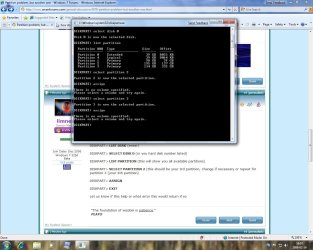
I've tried this. But it's not working. I made a ss. Check it please.

Here is my motherboard on Gigabyte site. What should i download?GIGABYTE - Support&Download - Motherboard - Driver - GA-M61PME-S2 (rev. 2.x)
 

Attachments

  • disk3.jpg
    disk3.jpg
    136.2 KB · Views: 39

My Computer

OS
Windows 7
Hello!
I've tried everyting what you said here, and it's still not working. I know that the best thing maybe would be to format everything, but I cannot loss my dates there ;/ Please help me because its very important.
 

My Computer

OS
Windows 7
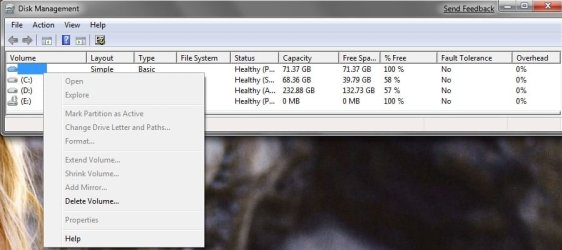
I am having the same problem, I used partition magic to split my xp installation to install Win 7 and now I can't access my XP partition at all. In diskmgmt it says it is a healthy partition but won't let me do anything with it.

Here is a screenshot attached.
 

Attachments

  • diskmgmt.jpg
    diskmgmt.jpg
    44.1 KB · Views: 30

My Computer

OS
Windows 7 Beta Build 7000 x64
CPU
AMD DC Opteron 170 @ 2.0GHz
Motherboard
DFI Lanparty Expert
Memory
OCZ Platinum 2x1GB
Graphics Card(s)
Nvidia 7800gt
Sound Card
X-Fi Xtreme Music
Monitor(s) Displays
Samsung SyncMaster T220
Screen Resolution
1680x1050
Hard Drives
Primary: WD Raptor 150GB 10,000RPM
Secondary: Maxtor 250GB
PSU
OCZ 500W
Case
Soprano
Cooling
Stock Air Cpu; 3 Case Fans
Keyboard
Saitek Eclipse
Mouse
Razer Copperhead
Internet Speed
2/1
Back
Top