Partition types ?

bawldiggle

GrayGhost2 ret.
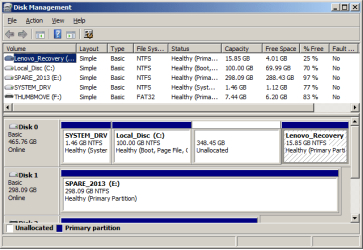
I have just shrunk the C: partition (with bootable MiniTools) on my new Lenovo from 400+ GB to 100 GB ... :party:

disk_management.png

My experience and knowledge of partition types is minimal other than ... max 4 primary partions on any HDD

I would like to create these new partitions . . .

  1. a virtual drive Win-7 for testing
    Using imaging to simplify a "clean-up" as neccessary
  2. downloads partition, accessible from C:
    there is no point in defragging downloads, I defrag my systems monthly on all my 2 and 3 drive rigs and laptops (latter are original factory setups)
    Defragging has been optimized for System at the expense of apps and some data files (majority of data is saved on an external HDD)
  3. portable apps accessible from C:
    If C: is corrupted and replaced with an image, atleast portable-apps (including scripts) are not affected
  4. Linux for browsing and email ... not dual boot
    I would appreciate experienced advice especially on this one too
I am vascilating between an imaged virtual-drive or Sand Boxxie for . . .
  1. testing in Windows
  2. Linux for browsing and email
I do not want to be logging off and on between Win-7 and Linux, so maybe Sand Boxxie is a solution ?
- I think(?) dual booting limits one OS to be running at any time ?
All this attempted "organisation" is the result of my ignorance and neglect, over 25 years. :o
Previously when a PC became unstable the only fix was a clean install and the painful process of setting up ... AGAIN!
For about 18 months I have followed several imaging "posts" in this forum (whs and others).
. . . my 800+ posts count represents 99% questions​
Q1: What format/type should each partition be ?
As a partions/virtual drives/Sand Boxxie noob I would appreciate any help, thank you :)

--------------------
LENOVO E540 SPECS:
E540-20C600BVAU
Intel i5 | 500GB HDD | 4GB RAM | 2x USB3 | 1x USB2
Win-7 PRO 64-bit
--------------------

Sent from my ancient 2012 ailing Toshiba, with broken email and moody browser
 

My Computer

Computer type
PC/Desktop
Computer Manufacturer/Model Number
Toshiba, Lenovo (laptops) + 4 rigs
OS
XP Pro (x86) | 7 HP (x86) & (x64) | 7 Pro (x64)
On any disk you need only 1 primary partition and that is the active partition (provided you want to boot from this disk). All other partitions can be logical partitions. A maximum of 4 primary partitions is for MBR disks.
 

My Computer

Computer Manufacturer/Model Number
HP, Dell, Gateway, Toshiba - 4 laptops and 2 desktops
OS
Vista, Windows7, Mint Mate, Zorin, Windows 8
CPU
from 1.6GHz Duo to i7
Monitor(s) Displays
2x HP w2207
Hard Drives
5x HDD, 7x SSD, 12x Externals
Keyboard
with trackball - no mices
Mouse
Trackball mice
Internet Speed
DSL 6000
I use VMware to run Virtual Machines (VM) using Win 7 x64 as the Host OS.
I've run various Linux distros, Win 8.1, and Win 10 as a VM without problems.
For me a VM performs much better if it is stored on a SSD rather than a spinner HD.
With VMware a virtual machine is just a folder on the Host OS.
It can be backed up using a simple copy, no need for imaging it.

I use a lot of Portable Apps and have them in a separate partition (not C), so they are not affected when i restore a C (Windows) backup image.
 

My Computer

Computer type
PC/Desktop
Computer Manufacturer/Model Number
home built
OS
Multi-Boot W7_Pro_x64 W8.1_Pro_x64 W10_Pro_x64 +Linux_VMs +Chromium_VM
CPU
AMD Athlon II x4 620
Motherboard
Gigabyte GA-MA785G-UD3H
Memory
6GB GSkill DDR2 800
Graphics Card(s)
AMD 4670 GPU + AMD 4200 IGP
Sound Card
on board Realtek ALC889A
Monitor(s) Displays
RCA 40" LCD TV, Insignia 32" LCD TV, HP 15" LCD monitor
Screen Resolution
1680 x 1050
Hard Drives
OCZ Vertex 3 120GB,
Samsung F3 1TB (3),
Several others - WD, Seagate, Hitachi, ...
PSU
Corsair 500 W
Case
Rosewill mid tower
Cooling
CM 90mm rifle
Keyboard
Gyration wireless, Logitech wireless, Dell USB wired
Mouse
Gyration wireless, Logitech wireless, V7 USB wired
Internet Speed
Spectrum - 100Mbps D / 10Mbps U
Antivirus
Avast, MBAM3, EMET, WinPatrol
Browser
Pale Moon, Firefox, IE
Other Info
2 multi-boot PC's
Mainly HTPC/Office/Gen purpose (no gaming).
Trendnet USB KVM.
LG DVD burner/Blue Ray Player.
Tray system for removable SATA backup drives.

Not currently OCd, under-volted.
I use Hybrid sleep, rarely re-boot or shutdown.

Hauppauge HD-PVR, Avermedia PCIe TV Tuner, Hauppauge PCI TV Tuner.
Same here. And my VMs are also on an SSD - but external attached via USB3. That is really fast. I made the test with a VM on the internal SSD. There was barely any performance difference.
 

My Computer

Computer Manufacturer/Model Number
HP, Dell, Gateway, Toshiba - 4 laptops and 2 desktops
OS
Vista, Windows7, Mint Mate, Zorin, Windows 8
CPU
from 1.6GHz Duo to i7
Monitor(s) Displays
2x HP w2207
Hard Drives
5x HDD, 7x SSD, 12x Externals
Keyboard
with trackball - no mices
Mouse
Trackball mice
Internet Speed
DSL 6000
For the partitions question, modern OSes, like Windows Vista+ or Linux don't need primary partitions to be installed, if you have only one, that is active (bootable), the rest can be extended/logical partitions.
So, for that question in particular, you don't need any more primary partitions, just one extended partition that can hold as many logical partitions as you may need (theorical limit for those are... 128 partitions or am I confused with GPT disks?)

Funny data about this, as slow as I am, I just discovered that the System Reserved partition Windows creates has this effect, as long as it exists, is active and holds boot files, Windows can be installed on a logical partition with no issues, so you can live with only one primary partition and have more than 4 copies of windows multi-booting...

Yes, I'm slow.

For VM's, unless you want to store them on another partition in case you need to clean install without backing up (aka, FerchogtX the lazy), you don't really need another partition, those can be stored anywere, even external drives, as @whs says.
 

My Computer

Computer type
PC/Desktop
Computer Manufacturer/Model Number
Assembled Desktop PC
OS
Microsoft Windows 7 Home Premium SP1 64-bit Build 7600
CPU
AMD Athlon 64 X2 5200+ Dual Core CPU @ 2.7 Ghz (Brisbane)
Motherboard
PCChips A13G+ v3.0
Memory
2x2 GB DDR2 PC-5300 (667 Mhz) Kingston ValueRAM
Graphics Card(s)
XFX ATI Radeon HD 4350 GPU (512 MB + 512 MB HM)
Sound Card
Realtek High Definition Audio Driver ALC660 @ MCP61S
Monitor(s) Displays
HP S2031 20" LED HD Widescreen Display Monitor
Screen Resolution
1600 x 900 px
Hard Drives
Maxtor Diamond Max 10 (160 GB, 7200 RPM, SATA-II Hard Disk)
Western Digital Scorpion Blue (250 GB, 5400 RPM, SATA-II External Hard Disk - Personal Data)
Toshiba MQ01ABD050 (500 GB, 5400 RPM, SATA-II External Hard Disk - Software & ISOs)
PSU
Pixxo Transformer 850W 80+ Certification PSU
Case
Compaq 5BW353 Case
Cooling
Many solutions, see other info...
Keyboard
Green Leaf (Mitzu) Standard Keyboard
Mouse
Microsoft USB Lasser Pointing Device
Internet Speed
10 MB
Antivirus
Avast Antivirus Free
Browser
Firefox, Chrome, Internet Explorer
Other Info
Windows Experience Index Result: 3.8 of 7.9.

Cooling solutions:
- AVC @ 2000/5000 RPM Copper Heatpipes (For Athlon 64 X2 6000+ CPU used in an Athlon 64 X2 5200+)
- Rear Fan 80 mm @ 2700 RPM for heat extraction
- Manhatan Chipset Cooler @ 4700/7200 RPM (For nVidia Chipset in MoBo)
- Foxconn @ 2500 RPM (Old Pentium III heatsink fan) in XFX ATI Radeon HD 4350
Back
Top