I've got a little problem with my PC powering itself on after I've shut it down ie. shut it down before I go to bed, wake up next morning and it's on waiting for me to put my password in for logon. I've checked a number of options in Windows such as scheduled tasks etc. but nothing is scheduled to run so I don't know what's actually causing this(my computer is haunted j/k). It's not a serious issue but I just want it fixed so it doesn't impact the electricity bill.
My Computer
Computer type
PC/Desktop
Computer Manufacturer/Model Number
Gigabyte
OS
Windows 7 Ultimate 64-bit
CPU
AMD Athlon FX 4100 ~3.6GHZ
Motherboard
Gigabyte 970A-D3
Memory
16GB DDR3
Graphics Card(s)
Gigabyte 4GB GeForce GTX 760
Sound Card
Asus Xonar DG
Monitor(s) Displays
BenQ GL2230
Screen Resolution
1920x1080
Hard Drives
1x Western Digital 80GB
1x Western Digital 500GB
1x Western Digital 1TB Caviar Green
Hiyya Andartheil mate check your Power Options settings in the Control Panel I think (I could be wrong) that you may have hibernation set up or something similar
My Computer
Computer type
PC/Desktop
Computer Manufacturer/Model Number
Own build (new) Desk1 / Asus ROG Win 7 / Desk2 1st build
OS
Desk1 7 Home Prem / Desk2 10 Pro / Main lap Asus ROG 10 Pro 2 laptop Toshiba 7 Pro Asus P2520 7 & 10
One other Desktop (tester) and spare Toshba laptop both with SSD's
Running Kaspersky 2016 ISS on all machines config'd identically
Logitec audio stereo systems on each machine (x3)
Canon MG5250MFC
Router/modem TP-Link running WPA2SK
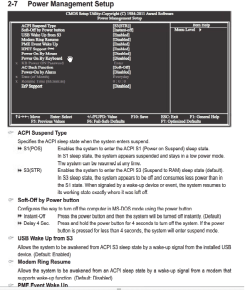
I think your problem lies in the Bios settings (Power Management).
Press F2 or whichever key gets you into the bios and disable one by one some of the enabled sleep/wake modes.
I think your problem lies in the Bios settings (Power Management).
Press F2 or whichever key gets you into the bios and disable one by one some of the enabled sleep/wake modes.
One other Desktop (tester) and spare Toshba laptop both with SSD's
Running Kaspersky 2016 ISS on all machines config'd identically
Logitec audio stereo systems on each machine (x3)
Canon MG5250MFC
Router/modem TP-Link running WPA2SK
I think your problem lies in the Bios settings (Power Management).
Press F2 or whichever key gets you into the bios and disable one by one some of the enabled sleep/wake modes.
I think your problem lies in the Bios settings (Power Management).
Press F2 or whichever key gets you into the bios and disable one by one some of the enabled sleep/wake modes.
Disabled everything in there and it's still happening. As for Power Management, I set it to Balanced and I triple checked all the settings for it. And there's nothing in there that's responsible for this problem(all disabled).
My Computer
Computer type
PC/Desktop
Computer Manufacturer/Model Number
Gigabyte
OS
Windows 7 Ultimate 64-bit
CPU
AMD Athlon FX 4100 ~3.6GHZ
Motherboard
Gigabyte 970A-D3
Memory
16GB DDR3
Graphics Card(s)
Gigabyte 4GB GeForce GTX 760
Sound Card
Asus Xonar DG
Monitor(s) Displays
BenQ GL2230
Screen Resolution
1920x1080
Hard Drives
1x Western Digital 80GB
1x Western Digital 500GB
1x Western Digital 1TB Caviar Green