Periodic messages from action center saying turn on AV and WU.

jonnyhillow

Banned
Local time
11:41 AM
Messages
637
Location
NJ native & NC
Hi folks , it seems everyday now at some point action center is giving me a "turn on Kaspersky" and "view windows update settings" and i don't know why. My AV is always up to date and on so somethings wrong.

With the windows update , it changes itself from auto update to check with you first even though i set it to auto update

The computer is definitely clean as even brand new reinstalls show this message , error codes indicate there is something wrong with messages being received with the computer as i get repeated error messages saying diagnostics can't read data , and windows failed to diagnose the problem and so on.

Any ideas
 

My Computer My Computer

At a glance

Microsoft Windows 7 Home Premium 64-bit 7601 ...Intel(R) Core(TM) i5-2430M CPU @ 2.40GHz6.00 GBIntel(R) HD Graphics 3000
Computer type
Laptop
Computer Manufacturer/Model Number
Asus laptop U56E
OS
Microsoft Windows 7 Home Premium 64-bit 7601 Multiprocessor Free Service Pack 1
CPU
Intel(R) Core(TM) i5-2430M CPU @ 2.40GHz
Motherboard
ASUSTeK Computer Inc. U56E
Memory
6.00 GB
Graphics Card(s)
Intel(R) HD Graphics 3000
Sound Card
(1) High Definition Audio Device (2) High Definition Audio
Screen Resolution
1366 x 768 x 32 bits (4294967296 colors) @ 60 Hz
Hard Drives
WDC WD6400BPVT-80HXZT3
Where did you get the Win7 installation media for your reinstalls? Use only the official ISO for your licensed version, stick with the tools and methods in http://www.sevenforums.com/tutorials/219487-clean-reinstall-factory-oem-windows-7-a.html#post1839164 (same for retail) which compiles what works best in Win7 since beta.

You may have a program, update or something else you're installing or setting that corrupts a fresh install, so I'd do a diagnostic install in which I wipe the HD with http://www.sevenforums.com/tutorials/52129-disk-clean-clean-all-diskpart-command.html then install the OS, get online to enable http://www.sevenforums.com/tutorials/2803-device-installation-settings.html then run all Important and Optional Updates, with requested reboots, until no more are offered. Then test performance.

Set up your browser and again test performance.

Now install programs one at a time with restore points set for each. Test performance after each.

Post back as you go and clear any tweaks with us first as those you may assume are good might not be. Nine times out of ten with these types of problems its some tweaking suite or reg change that "always worked in XP" which doesn't in Win7.

If you'd rather try tracing the problem before doing the diagnostic reinstall, work through the http://www.sevenforums.com/tutorials/220165-troubleshooting-steps-windows-7-a.html reporting back as you go.
 
Actually i always follow Seven forums instructions and i have numerous Win 7 ISO's from the provided links , the problem is always with the search and indexing , no matter what i do it still says it's corrupt , rebuilding doesn't help either.


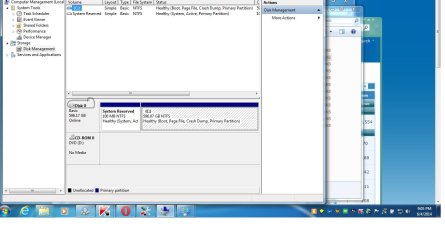
How do i assign a letter to the partition?
 

Attachments

  • Untitled.jpg
    Untitled.jpg
    83.7 KB · Views: 0
Last edited:

My Computer My Computer

At a glance

Microsoft Windows 7 Home Premium 64-bit 7601 ...Intel(R) Core(TM) i5-2430M CPU @ 2.40GHz6.00 GBIntel(R) HD Graphics 3000
Computer type
Laptop
Computer Manufacturer/Model Number
Asus laptop U56E
OS
Microsoft Windows 7 Home Premium 64-bit 7601 Multiprocessor Free Service Pack 1
CPU
Intel(R) Core(TM) i5-2430M CPU @ 2.40GHz
Motherboard
ASUSTeK Computer Inc. U56E
Memory
6.00 GB
Graphics Card(s)
Intel(R) HD Graphics 3000
Sound Card
(1) High Definition Audio Device (2) High Definition Audio
Screen Resolution
1366 x 768 x 32 bits (4294967296 colors) @ 60 Hz
Hard Drives
WDC WD6400BPVT-80HXZT3
Back
Top