- Local time
- 3:39 PM
- Messages
- 394
Dear Forum,
I recently changed computer and therefore had to use a external hard drive.
I have placed some documents onto the desktop until l
1. I figure out where to locate it.
2. I also recently had the Windows Update crash my documents and altered the settings - after looking how to do it.
http://www.sevenforums.com/general-discussion/292941-recycle-bin-corrupt-permission-settings-confusion-external-hdd-2.html
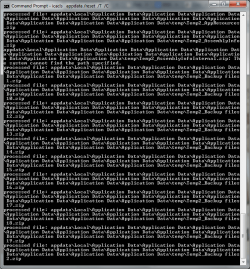
I followed a prior thread and my Command Prompt has not moved from the last command
To solve the desktop issue: (also elevated command prompt)
Code:
cd %userprofile%
You see C:\users\<your name> now.
Code:
icacls Contacts /reset /T /C
icacls Desktop /reset /T /C
icacls Documents /reset /T /C
icacls Downloads /reset /T /C
icacls Favorites /reset /T /C
icacls Links /reset /T /C
icacls Music /reset /T /C
icacls Pictures /reset /T /C
icacls "Saved Games" /reset /T /C
icacls Searches /reset /T /C
icacls Videos /reset /T /C
icacls appdata /reset /T /C
Is this common thing to happen?
I am being patient. I am glad that I had assistance from this forum. Better than others.
I am hopeless. I think I was inpatient, and perfectionist and should not go into items I should not. I am now going through all the issues of retrieving everything from the recycle bin. That caused a multitude of problems. I also have invested in a couple of external hard drives from a nurse that felt sorry for me.
I have left most things alone - I lacked a lot of energy and had no time.
Thanks
I recently changed computer and therefore had to use a external hard drive.
I have placed some documents onto the desktop until l
1. I figure out where to locate it.
2. I also recently had the Windows Update crash my documents and altered the settings - after looking how to do it.
http://www.sevenforums.com/general-discussion/292941-recycle-bin-corrupt-permission-settings-confusion-external-hdd-2.html
I followed a prior thread and my Command Prompt has not moved from the last command
To solve the desktop issue: (also elevated command prompt)
Code:
cd %userprofile%
You see C:\users\<your name> now.
Code:
icacls Contacts /reset /T /C
icacls Desktop /reset /T /C
icacls Documents /reset /T /C
icacls Downloads /reset /T /C
icacls Favorites /reset /T /C
icacls Links /reset /T /C
icacls Music /reset /T /C
icacls Pictures /reset /T /C
icacls "Saved Games" /reset /T /C
icacls Searches /reset /T /C
icacls Videos /reset /T /C
icacls appdata /reset /T /C
Is this common thing to happen?
I am being patient. I am glad that I had assistance from this forum. Better than others.
I am hopeless. I think I was inpatient, and perfectionist and should not go into items I should not. I am now going through all the issues of retrieving everything from the recycle bin. That caused a multitude of problems. I also have invested in a couple of external hard drives from a nurse that felt sorry for me.
I have left most things alone - I lacked a lot of energy and had no time.
Thanks
Attachments


Last edited:
My Computer
At a glance
Windows 7 Home Premium 64bitWindows 7 Service Pack 1 x86 NTFS4 GB
- Computer type
- Laptop
- Computer Manufacturer/Model Number
- Sony VAIO / E Series VPCEB46FG
- OS
- Windows 7 Home Premium 64bit
- CPU
- Windows 7 Service Pack 1 x86 NTFS
- Motherboard
- AMD E-350 Processor
- Memory
- 4 GB
- Hard Drives
- 500GB
- Other Info
- 1.6GHz