
Greetings,
I've been scouring forums, trying different scenarios/settings, and spent many hours trying to figure this one out.
Here's the situation:
My speakers are plugged in (Logitech 5.1 Surround Sound), I have the latest drivers from Realtek (Version 6.1.7100.0), and my sound is not muted. I can't hear sounds from audio files that I play (through Windows Media Player, iTunes, YouTube, Pandora radio, other music streaming sites, etc.) but I can hear sound from video games (Team Fortress 2, Counter-Strike:Source, WoW).
I've tried everything I can think of and numerous things on these forums as well as others. Maybe it's something obvious, maybe it's something I would never think of. Anyway, any advice or help is greatly appreciated.
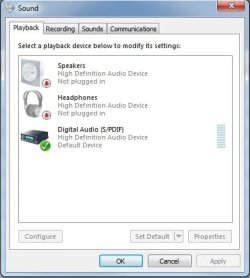
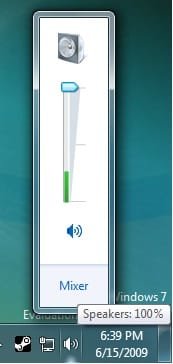
I have included some screenshots of various sound settings that I have just in case that will help.
***It is also important that you know I do not have a sound card and that I am using onboard sound. I have had both Windows XP and Vista running on this machine before and have had no problems.***
I will check this thread frequently and post back with updates.
Other than that, 7 is pretty cool.
Regards,
Connor
I've been scouring forums, trying different scenarios/settings, and spent many hours trying to figure this one out.
Here's the situation:
My speakers are plugged in (Logitech 5.1 Surround Sound), I have the latest drivers from Realtek (Version 6.1.7100.0), and my sound is not muted. I can't hear sounds from audio files that I play (through Windows Media Player, iTunes, YouTube, Pandora radio, other music streaming sites, etc.) but I can hear sound from video games (Team Fortress 2, Counter-Strike:Source, WoW).
I've tried everything I can think of and numerous things on these forums as well as others. Maybe it's something obvious, maybe it's something I would never think of. Anyway, any advice or help is greatly appreciated.
I have included some screenshots of various sound settings that I have just in case that will help.
***It is also important that you know I do not have a sound card and that I am using onboard sound. I have had both Windows XP and Vista running on this machine before and have had no problems.***
I will check this thread frequently and post back with updates.
Other than that, 7 is pretty cool.
Regards,
Connor
Attachments

My Computer
- OS
- Windows 7 Build 7100
- CPU
- AMD Athlon 64 X2 4800+ Brisbane 2.5GHz
- Motherboard
- Gigabyte GA-M57SLI-S4
- Memory
- 2 GB RAM
- Graphics Card(s)
- nVidia 8600 GT
- Sound Card
- Onboard sound
- Monitor(s) Displays
- 30" Dell
- Screen Resolution
- 2560x1600
- PSU
- 500 Watts
