Solved Physical memory 16GB and 1800 free?! nothing Running HELP!!

liltitan16

New member
Local time
10:16 AM
Messages
4
Yeah the title says it all , I'm checking my Physical memory on Task manager and it says :

total 16232
Cached 11023
Available 12465
Free 1800 ?!?!?!?!

Any help thanks

P.S ( I play alot of games and when free drops below 10 it Causes my Games to Not respond exc..)
 

Attachments

  • Physicalmemissue.png
    Physicalmemissue.png
    14 KB · Views: 22

My Computer My Computer

At a glance

Windows 7 Home premium 64bitAMD 6350Fx 6 core16gb VIper7990
Computer type
PC/Desktop
Computer Manufacturer/Model Number
Custom build
OS
Windows 7 Home premium 64bit
CPU
AMD 6350Fx 6 core
Motherboard
Sabretooth AMD
Memory
16gb VIper
Graphics Card(s)
7990
Hard Drives
1 Western Digital 1tb
Antivirus
Bitdefender
Browser
Chrome + firefox
And what is the problem ?? Look into Resource Monitor > Memory tab. That gives you a nice graph and more info.
 

My Computer My Computer

At a glance

Vista, Windows7, Mint Mate, Zorin, Windows 8from 1.6GHz Duo to i7
Computer Manufacturer/Model Number
HP, Dell, Gateway, Toshiba - 4 laptops and 2 desktops
OS
Vista, Windows7, Mint Mate, Zorin, Windows 8
CPU
from 1.6GHz Duo to i7
Monitor(s) Displays
2x HP w2207
Hard Drives
5x HDD, 7x SSD, 12x Externals
Keyboard
with trackball - no mices
Mouse
Trackball mice
Internet Speed
DSL 6000
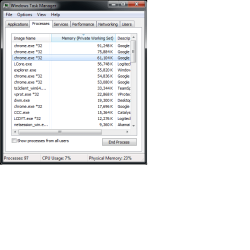
Nothing is running and that's what i'm getting No Applications nothing.
 

Attachments

  • physmemissue.png
    physmemissue.png
    17.1 KB · Views: 21

My Computer My Computer

At a glance

Windows 7 Home premium 64bitAMD 6350Fx 6 core16gb VIper7990
Computer type
PC/Desktop
Computer Manufacturer/Model Number
Custom build
OS
Windows 7 Home premium 64bit
CPU
AMD 6350Fx 6 core
Motherboard
Sabretooth AMD
Memory
16gb VIper
Graphics Card(s)
7990
Hard Drives
1 Western Digital 1tb
Antivirus
Bitdefender
Browser
Chrome + firefox
That doesn't add up to nearly 5gb let alone 14-15

And here's Resource monitor.
 

Attachments

  • resourcemon.png
    resourcemon.png
    25 KB · Views: 0

My Computer My Computer

At a glance

Windows 7 Home premium 64bitAMD 6350Fx 6 core16gb VIper7990
Computer type
PC/Desktop
Computer Manufacturer/Model Number
Custom build
OS
Windows 7 Home premium 64bit
CPU
AMD 6350Fx 6 core
Motherboard
Sabretooth AMD
Memory
16gb VIper
Graphics Card(s)
7990
Hard Drives
1 Western Digital 1tb
Antivirus
Bitdefender
Browser
Chrome + firefox
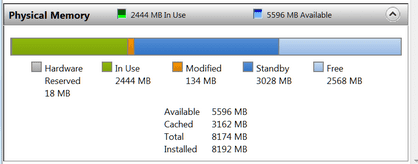
This looks normal to me. Your system must have been running quite a while since the last reboot because you have a lot of cached stuff.

Everything that is blue is 'available'. So there is really nothing to worry about. And don't try to add up the processes. There is a lot you don't see.

Mine is similar, but I have only 8GB of RAM. The more RAM you have, the more the system will use - and this is good.
 

Attachments

  • 2014-02-16_1851.png
    2014-02-16_1851.png
    8.3 KB · Views: 22

My Computer My Computer

At a glance

Vista, Windows7, Mint Mate, Zorin, Windows 8from 1.6GHz Duo to i7
Computer Manufacturer/Model Number
HP, Dell, Gateway, Toshiba - 4 laptops and 2 desktops
OS
Vista, Windows7, Mint Mate, Zorin, Windows 8
CPU
from 1.6GHz Duo to i7
Monitor(s) Displays
2x HP w2207
Hard Drives
5x HDD, 7x SSD, 12x Externals
Keyboard
with trackball - no mices
Mouse
Trackball mice
Internet Speed
DSL 6000
Alright thanks.
 

My Computer My Computer

At a glance

Windows 7 Home premium 64bitAMD 6350Fx 6 core16gb VIper7990
Computer type
PC/Desktop
Computer Manufacturer/Model Number
Custom build
OS
Windows 7 Home premium 64bit
CPU
AMD 6350Fx 6 core
Motherboard
Sabretooth AMD
Memory
16gb VIper
Graphics Card(s)
7990
Hard Drives
1 Western Digital 1tb
Antivirus
Bitdefender
Browser
Chrome + firefox
You are welcome.
 

My Computer My Computer

At a glance

Vista, Windows7, Mint Mate, Zorin, Windows 8from 1.6GHz Duo to i7
Computer Manufacturer/Model Number
HP, Dell, Gateway, Toshiba - 4 laptops and 2 desktops
OS
Vista, Windows7, Mint Mate, Zorin, Windows 8
CPU
from 1.6GHz Duo to i7
Monitor(s) Displays
2x HP w2207
Hard Drives
5x HDD, 7x SSD, 12x Externals
Keyboard
with trackball - no mices
Mouse
Trackball mice
Internet Speed
DSL 6000
Far a variety of reasons adding up the items in the memory usage column rarely produces useful or even meaningful results. Modern operating systems are far too complex for that kind of thing.

Everything looks good in the screenshot in post #4. I would like to see less free memory but that is a minor thing and often not avoidable. The idea that free memory is desirable is hopelessly outdated and has no place in any modern OS (just about anything released in the last 20 years). Standby memory is better than free memory in every way. Standby memory contributes quite a bit to performance while free memory does nothing at all. In a modern OS free memory is evil and something to be kept to a minimum. The ideal would be zero free memory at all times but we are not there yet.

The more RAM you have, the more Windows will use. This is a good thing. It is far better that memory be put to some useful purpose than sit idle.
 

My Computer My Computer

At a glance

Windows 7 Pro 64 bitXeon W35208 GBNvidia Geforce 210

Computer type
PC/Desktop
Computer Manufacturer/Model Number
HP
OS
Windows 7 Pro 64 bit
CPU
Xeon W3520
Memory
8 GB
Graphics Card(s)
Nvidia Geforce 210
Back
Top