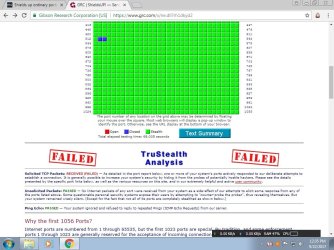
Port No.513,514 shown as closed rather than stealthed? why? fix for it

jraju

New member
Member
VIP
Local time
6:34 PM
Messages
759
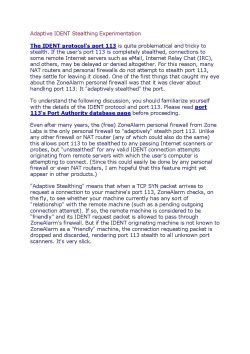
grc.com is reliable testing centre for network security tools. Scan by the shields up for all ports in grc.com , shows solicited tcp received and failed and shows the above ports 513 and 514 as blue, closed instead of stealthed. Downunder, the description of the problematic port 113 has been given . I tried to contact them, but they asked me to direct the question to their forum, which is confusing to register to ask query. Hence i ask in this forum.
513 is shown as a la telnet and 514 as sys.log. Why these ports are not shown stealthy in first place?
Why details about 113 port, auth is shown downunder. I also checked ordinary ports results, which shows 113 as stealth, but not circled as stealth as other ports.I know that it could only be answered by the experts of those ports actual details.
My dlink router has port forwarding tab, and one solution to port forward 113 to a non existent ip in my ip pool range as suggested by crc.com could not be done, as there is no selection possible. How to disable port forwarding. Why there are default entries of ports for different services already selected default by router there? Could i expect a detailed reply? How to fix that to show all the ports as stealthy
 

Attachments
My Computer My Computer

At a glance

Microsoft Windows 7 Ultimate 64-bit 7601 Mult...Intel(R) Core(TM)2 Duo CPU E7200 @ 2.53GHz4.00 GBNVIDIA GeForce 210
Computer type
PC/Desktop
Computer Manufacturer/Model Number
custom build
OS
Microsoft Windows 7 Ultimate 64-bit 7601 Multiprocessor Free Service Pack 1
CPU
Intel(R) Core(TM)2 Duo CPU E7200 @ 2.53GHz
Motherboard
To be filled by O.E.M. To be filled by O.E.M.
Memory
4.00 GB
Graphics Card(s)
NVIDIA GeForce 210
Sound Card
(1) NVIDIA High Definition Audio (2) Realtek High Definiti
Screen Resolution
1920 x 1080 x 32 bits (4294967296 colors) @ 60 Hz
Hard Drives
ST3500312CS ATA Device
In continuation of my post, please also find the grc.com test result. I do not know, whether i could add more enclosure in one post itself
 

Attachments

  • grcporttest all.jpg
    grcporttest all.jpg
    136.9 KB · Views: 0

My Computer My Computer

At a glance

Microsoft Windows 7 Ultimate 64-bit 7601 Mult...Intel(R) Core(TM)2 Duo CPU E7200 @ 2.53GHz4.00 GBNVIDIA GeForce 210
Computer type
PC/Desktop
Computer Manufacturer/Model Number
custom build
OS
Microsoft Windows 7 Ultimate 64-bit 7601 Multiprocessor Free Service Pack 1
CPU
Intel(R) Core(TM)2 Duo CPU E7200 @ 2.53GHz
Motherboard
To be filled by O.E.M. To be filled by O.E.M.
Memory
4.00 GB
Graphics Card(s)
NVIDIA GeForce 210
Sound Card
(1) NVIDIA High Definition Audio (2) Realtek High Definiti
Screen Resolution
1920 x 1080 x 32 bits (4294967296 colors) @ 60 Hz
Hard Drives
ST3500312CS ATA Device
Put very simply if a port is stealth anything try to connect gets no response at all closed means it gets a response that it's closed so it's still secure. Some ports are never used so can be stealth some may on occasions be used so it get a response
 

My Computer My Computer

At a glance

win 8 32 bit
Computer type
PC/Desktop
OS
win 8 32 bit
Hi, I understand. But when all ports are shown stealthy, the closed ports cause concern to me. Some solution to block port via port forwarding the port to a ip not found in my ip pool range does not work for me. I could not portward anything , other than the predefined one by my router. As there is no radio button to the left of select. If suppose, i enter some data and give the ip, either no select made to modified response or if there is possibility returns the error, that the port is not in range and the fourth ocates are above the range.
Could you suggest some thing. I tried in windows firewall in incoming and outgoing, but it is the same result.
I think , the port has to be blocked in router , but i find no ways .
 

My Computer My Computer

At a glance

Microsoft Windows 7 Ultimate 64-bit 7601 Mult...Intel(R) Core(TM)2 Duo CPU E7200 @ 2.53GHz4.00 GBNVIDIA GeForce 210
Computer type
PC/Desktop
Computer Manufacturer/Model Number
custom build
OS
Microsoft Windows 7 Ultimate 64-bit 7601 Multiprocessor Free Service Pack 1
CPU
Intel(R) Core(TM)2 Duo CPU E7200 @ 2.53GHz
Motherboard
To be filled by O.E.M. To be filled by O.E.M.
Memory
4.00 GB
Graphics Card(s)
NVIDIA GeForce 210
Sound Card
(1) NVIDIA High Definition Audio (2) Realtek High Definiti
Screen Resolution
1920 x 1080 x 32 bits (4294967296 colors) @ 60 Hz
Hard Drives
ST3500312CS ATA Device
Block the port and tcip won't work note: TCP port 513 uses the Transmission Control Protocol. TCP is one of the main protocols in TCP/IP networks. Whereas the IP protocol deals only with packets, TCP enables two hosts to establish a connection and exchange streams of data. TCP guarantees delivery of data and also guarantees that packets will be delivered on port 513 in the same order in which they were sent. Guaranteed communication over port 513 is the key difference between TCP and UDP. UDP port 513 would not have guaranteed communication in the same way as TCP.
 

My Computer My Computer

At a glance

win 8 32 bit
Computer type
PC/Desktop
OS
win 8 32 bit
Hi, Sam,
So , i could leave as it is, it seems from your advice. Already those ports are shown as closed. But, why security sites like grc.com, is showing it as somewhat problematic could not be understood. The peculiar thing is , this port is shown as stealth in ordinary posts scan by the same site. Looking to specific ports also shows as stealthy.
I thought of asking thro the forum, but i could not understand, how to go about it. Thanks sam for your reply. Some users other than me also would be benefited by your advice
 

My Computer My Computer

At a glance

Microsoft Windows 7 Ultimate 64-bit 7601 Mult...Intel(R) Core(TM)2 Duo CPU E7200 @ 2.53GHz4.00 GBNVIDIA GeForce 210
Computer type
PC/Desktop
Computer Manufacturer/Model Number
custom build
OS
Microsoft Windows 7 Ultimate 64-bit 7601 Multiprocessor Free Service Pack 1
CPU
Intel(R) Core(TM)2 Duo CPU E7200 @ 2.53GHz
Motherboard
To be filled by O.E.M. To be filled by O.E.M.
Memory
4.00 GB
Graphics Card(s)
NVIDIA GeForce 210
Sound Card
(1) NVIDIA High Definition Audio (2) Realtek High Definiti
Screen Resolution
1920 x 1080 x 32 bits (4294967296 colors) @ 60 Hz
Hard Drives
ST3500312CS ATA Device
Back
Top