Solved Possible "open with" workaround Question

Wire Foxer

New member
Local time
10:42 AM
Messages
3
Hi All,

This is my first post on this forum. I'm just going through the new windows 7 trials & tribs. I have an old app that I used alot on my Vista laptop - "uLead iphoto express". It is very basic and very old but it does everything I need and I love it!

I have managed to get it running by using the control panel option for running old programs, BUT, I can't seem to use it as an "open with" option when opening my photo files. Without this it will be a real PIA to use. The only way to have "uLead iphoto express" readily accessible is to pin it to the taskbar.

PS If I could go and buy a similar app for W7 I would, but all the modern ones I've found (Gimp etc) are all way to complicated for me
 

My Computer

OS
Windows 7 home premium 64bit
Did you try right clicking on the image file, and selecting Open With menu from the context menu?

If "uLead iphoto express" program is not present in the list of programs presented by Open With menu, click on Choose default program.

From the opened dialog box, make sure you have a check mark on "Always use the selected program to open this kind of file".

Now press "Browse" button and navigate to the "uLead iphoto express" folder and select the executable to run the program.

Next time you use the Open With menu you will find "uLead iphoto express" added to the list of programs.
 

My Computer

Computer Manufacturer/Model Number
Toshiba Satellite P775-S7232
OS
MS Windows 7 Ultimate 64-bit SP1
CPU
i5-2410M 2.3GHz (2.9GHz Turbo-Boost) Sandy Bridge 32nm
Motherboard
Toshiba PHRAA ver. PSBY1U-00F003
Memory
4GB+4GB Samsung DDR3 PC3-10700 (1333 MHz)
Graphics Card(s)
Video Intel(R) HD Graphics Family, 1696MB available memory
Sound Card
Realtek High Definition Audio version=6.0.1.6323
Monitor(s) Displays
17.3 " Trubrite TFT LCD, LED Backlit
Screen Resolution
1600x900 32 bit, Native support for 720P content
Hard Drives
TOSHIBA MK6476GSXN
580.614 [GB] partitioned C: 80GB and D: 500GB with hidden recovery partitons.

Spare bay for 2nd HDD but no SATA connector :-(
PSU
Toshiba AC/DC Adapter
Case
Notebook
Cooling
Built-in Fan
Keyboard
Premium Raised Tile keyboard
Mouse
Logitech M215 wireless mouse
Internet Speed
Not fast enough
Other Info
Built-in Harman Kardon speakers with Dolby Advanced Audio, Waves MaxxAudio® 3. HDMI, 1xUSB3+3xUSB2 ports, WebCam, Battery life 4hrs 11mins, 4GB Readyboost SDHC card, WD My Book Essential Ext HDDs 2 TB, 2x1TB, My Passport SE 1TB and WDTV 1st Gen for Multimedia playing on a Sony Wega 32" LCD.
Recent addition to my toys are Asus Transformer Pad TF300T with 32GB onboard sd card + 32GB microsd card.
Hi rroad, thanks for your reply, however - none of what you describe works - hence the reason for my post! - The ulead app is not listed in the locations you describe, i'm assuming because I opened it (can only open it) via the "alternative route"
 

My Computer

OS
Windows 7 home premium 64bit
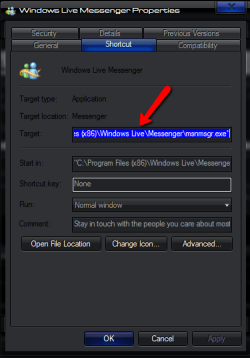
when you have the ulead in the taskbar right click it, right click again on the ulead name and select properties in the properties window copy the target location then paste that into the browse window that opens when you select the open with default program

for example /target location foe messenger

2011-10-08_1254.png
 

My Computer

Computer Manufacturer/Model Number
Hewlett packard/p6512uk
OS
Microsoft Windows 7 Home Premium 64-bit 7600
CPU
IIx4 amd athelon 635 processor
Motherboard
FOXCONN 2AA9
Memory
2x2gb
Graphics Card(s)
ati radeon HD 5450
Sound Card
(1) Realtek High Definition Audio (2) AMD High Definition
Monitor(s) Displays
samsung lcd tv 32"
Screen Resolution
1360x 768
Hard Drives
(1) WDC WD10 01FAES-60Z2A0 SATA Disk Device (2) Maxtor OneTouch USB Device (3) ST310003 33AS USB Device (4) WD My Book 1111 USB Device
PSU
?
Cooling
air!
Keyboard
wireless hp
Mouse
wireless Hp,optical
Internet Speed
1.10mb/s
Antivirus
MSE
Browser
Firefox
Thankyou BooBah - problem sorted! - all works as before on Vista - Excellent !! :D
 

My Computer

OS
Windows 7 home premium 64bit
Back
Top