Possible to create a new "Key" with a keyboard that has g keys?

Jemjem787

New member
Member
VIP
Local time
3:53 PM
Messages
277
Possible to create a new "Key" with a keyboard that has g keys?

Currently almost every key on my keyboard is binded to something, and i am running out of keys to do stuff with. I currently have 12 g keys though. Is it possable to create new "keys" with the g keys? Currently all i am able to do is bind the keys to another key or a key combination. I think i am explaining this right
 

My Computer My Computer

At a glance

MS Windows 7 Home Premium 64-bit SP1Intel Core i7 3770K @ 3.50GHz8.00 GB Dual-Channel DDR3 @ 679MHzEVGA GeForce GTX 760 Graphic Card - 1085MHz C...
Computer type
PC/Desktop
Computer Manufacturer/Model Number
Custom Build
OS
MS Windows 7 Home Premium 64-bit SP1
CPU
Intel Core i7 3770K @ 3.50GHz
Motherboard
ASUSTeK COMPUTER INC. P8Z77-V LX (LGA1155)
Memory
8.00 GB Dual-Channel DDR3 @ 679MHz
Graphics Card(s)
EVGA GeForce GTX 760 Graphic Card - 1085MHz Core - 4GB GDDR5
Sound Card
Realtek High Definition Audio
Monitor(s) Displays
2 Acer and 1 Asus
Screen Resolution
1920x1080 and 1280x1024 ans 1280x800
Hard Drives
120GB Kingston HyperX SSD
1.8TB Western Digital
932GB Western Digital
PSU
750W Coolermaster
Case
Coolermaster 912
Cooling
3 Fans, an Extreme CoolerMaster CPU Heatsink
Keyboard
G110 Logitect Black USB Backlighting Keyboard
Mouse
Synaptics PS/2 Port TouchPad
Internet Speed
60MB p/s
Antivirus
Microsoft Security Essentials
Browser
Chrome
Currently almost every key on my keyboard is binded to something, and i am running out of keys to do stuff with. I currently have 12 g keys though. Is it possable to create new "keys" with the g keys? Currently all i am able to do is bind the keys to another key or a key combination. I think i am explaining this right

I'm assuming you are referring to the keyboard in your system specs. Do you have the utility for the G110 installed? If so, you should be able to use it to create macros for just about anything you want on the G keys. I used to use the G110 and had the G keys programmed to print special characters, such as —, °, ¢, etc. from the character map and website URLs. I also have the G keys on my current G510 programmed to do the same, plus shortcuts to various drives in my computer. You should also be able to program them to open up programs.
 

My Computer My Computer

At a glance

Win 7 Ultimate 64 bitIntel i7-3930KKingston HyperX Genesis 32GB Kit (8x4GB Modul...MSI R7850 Twin Frozr 2GD5/OC Radeon HD 7850 2...
Computer type
PC/Desktop
Computer Manufacturer/Model Number
Custom Build
OS
Win 7 Ultimate 64 bit
CPU
Intel i7-3930K
Motherboard
ASUS P9X79 WS
Memory
Kingston HyperX Genesis 32GB Kit (8x4GB Modules) 1600MHz DDR
Graphics Card(s)
MSI R7850 Twin Frozr 2GD5/OC Radeon HD 7850 2GB 256-bit GDDR
Sound Card
Asus Xonar Essence STX
Monitor(s) Displays
3x Asus VG248QE 24", Vizio 32" TV
Screen Resolution
1920 x 1080, ?
Hard Drives
Samsung 128GB 840 Pro SSD (1),
Samsung 4TB 850 EVO SSDs (4)
Samsung 4TB 850 EVO SSDs (16) external backup drives used in 2.5" hot swap bays in the computer.
PSU
Corsair HX750w
Case
Antec Two Hundred v2 (modified)
Cooling
Cooler Master GeminII S524 120mm (fan replaced with a 140mm)
Keyboard
Logitech G510s
Mouse
Logitech M525 (two in use)
Internet Speed
=< 32Mbps down, 8Mbps up
Antivirus
AVAST!, MBAM, SAS, Spybot S&D (all but MBAM free) Glary Util
Browser
IE11
Other Info
LSI 9211-8i HBA card (8 SATA III ports), 2.5" & 3.5" Hot Swap Bays, HooToo HT-CR001 PCI-E to USB 3.0 Internal Hub + 6 Slot Card Reader, and LG Model CH12LS28 BD-ROM Optical Drive. Also, ScanSnap S1500 ADF duplexing scanner, Canon 9000F flat bed scanner, Corsair SP2500 2.1 speakers, Samsung CLP 415nw laser color printer, Cyberpower PP2200SW UPS
had the G keys programmed to print special characters, such as —, °, ¢, etc.

Oh my god this is exactly what i'm looking for. And yes i have the utility installed. I will try to get it working and when i got it working/have problems with it i will come back here, thanks!
 

My Computer My Computer

At a glance

MS Windows 7 Home Premium 64-bit SP1Intel Core i7 3770K @ 3.50GHz8.00 GB Dual-Channel DDR3 @ 679MHzEVGA GeForce GTX 760 Graphic Card - 1085MHz C...
Computer type
PC/Desktop
Computer Manufacturer/Model Number
Custom Build
OS
MS Windows 7 Home Premium 64-bit SP1
CPU
Intel Core i7 3770K @ 3.50GHz
Motherboard
ASUSTeK COMPUTER INC. P8Z77-V LX (LGA1155)
Memory
8.00 GB Dual-Channel DDR3 @ 679MHz
Graphics Card(s)
EVGA GeForce GTX 760 Graphic Card - 1085MHz Core - 4GB GDDR5
Sound Card
Realtek High Definition Audio
Monitor(s) Displays
2 Acer and 1 Asus
Screen Resolution
1920x1080 and 1280x1024 ans 1280x800
Hard Drives
120GB Kingston HyperX SSD
1.8TB Western Digital
932GB Western Digital
PSU
750W Coolermaster
Case
Coolermaster 912
Cooling
3 Fans, an Extreme CoolerMaster CPU Heatsink
Keyboard
G110 Logitect Black USB Backlighting Keyboard
Mouse
Synaptics PS/2 Port TouchPad
Internet Speed
60MB p/s
Antivirus
Microsoft Security Essentials
Browser
Chrome
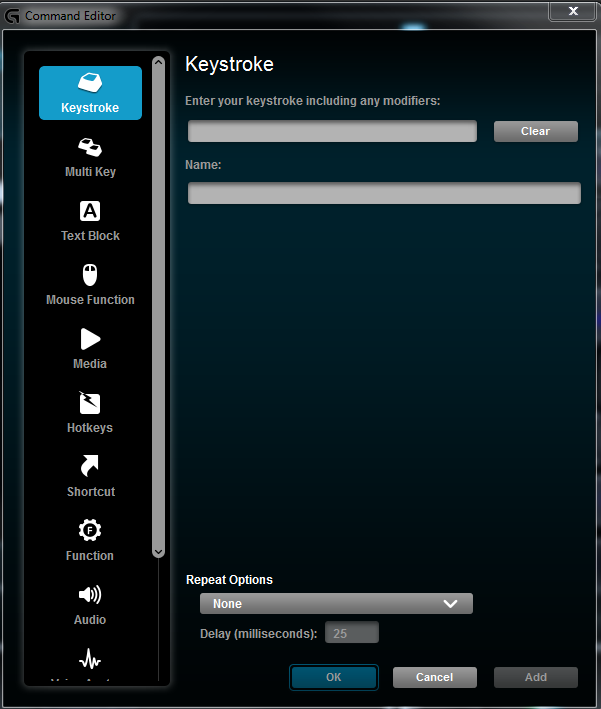
I am having a problem getting the special keys into this keystroke box

7157115f02c78c9463194ba2d7e9f592.png


When i CTRL-V it registers the keystroke as CTRL-V, and i'm getting no option to paste it in when right clicking.

EDIT: I've tried looking for the configurations files to manually paste the right character but i couldn't find it.
 

My Computer My Computer

At a glance

MS Windows 7 Home Premium 64-bit SP1Intel Core i7 3770K @ 3.50GHz8.00 GB Dual-Channel DDR3 @ 679MHzEVGA GeForce GTX 760 Graphic Card - 1085MHz C...
Computer type
PC/Desktop
Computer Manufacturer/Model Number
Custom Build
OS
MS Windows 7 Home Premium 64-bit SP1
CPU
Intel Core i7 3770K @ 3.50GHz
Motherboard
ASUSTeK COMPUTER INC. P8Z77-V LX (LGA1155)
Memory
8.00 GB Dual-Channel DDR3 @ 679MHz
Graphics Card(s)
EVGA GeForce GTX 760 Graphic Card - 1085MHz Core - 4GB GDDR5
Sound Card
Realtek High Definition Audio
Monitor(s) Displays
2 Acer and 1 Asus
Screen Resolution
1920x1080 and 1280x1024 ans 1280x800
Hard Drives
120GB Kingston HyperX SSD
1.8TB Western Digital
932GB Western Digital
PSU
750W Coolermaster
Case
Coolermaster 912
Cooling
3 Fans, an Extreme CoolerMaster CPU Heatsink
Keyboard
G110 Logitect Black USB Backlighting Keyboard
Mouse
Synaptics PS/2 Port TouchPad
Internet Speed
60MB p/s
Antivirus
Microsoft Security Essentials
Browser
Chrome
What are you trying to assign to the key?
 

My Computer My Computer

At a glance

Win 7 Ultimate 64 bitIntel i7-3930KKingston HyperX Genesis 32GB Kit (8x4GB Modul...MSI R7850 Twin Frozr 2GD5/OC Radeon HD 7850 2...
Computer type
PC/Desktop
Computer Manufacturer/Model Number
Custom Build
OS
Win 7 Ultimate 64 bit
CPU
Intel i7-3930K
Motherboard
ASUS P9X79 WS
Memory
Kingston HyperX Genesis 32GB Kit (8x4GB Modules) 1600MHz DDR
Graphics Card(s)
MSI R7850 Twin Frozr 2GD5/OC Radeon HD 7850 2GB 256-bit GDDR
Sound Card
Asus Xonar Essence STX
Monitor(s) Displays
3x Asus VG248QE 24", Vizio 32" TV
Screen Resolution
1920 x 1080, ?
Hard Drives
Samsung 128GB 840 Pro SSD (1),
Samsung 4TB 850 EVO SSDs (4)
Samsung 4TB 850 EVO SSDs (16) external backup drives used in 2.5" hot swap bays in the computer.
PSU
Corsair HX750w
Case
Antec Two Hundred v2 (modified)
Cooling
Cooler Master GeminII S524 120mm (fan replaced with a 140mm)
Keyboard
Logitech G510s
Mouse
Logitech M525 (two in use)
Internet Speed
=< 32Mbps down, 8Mbps up
Antivirus
AVAST!, MBAM, SAS, Spybot S&D (all but MBAM free) Glary Util
Browser
IE11
Other Info
LSI 9211-8i HBA card (8 SATA III ports), 2.5" & 3.5" Hot Swap Bays, HooToo HT-CR001 PCI-E to USB 3.0 Internal Hub + 6 Slot Card Reader, and LG Model CH12LS28 BD-ROM Optical Drive. Also, ScanSnap S1500 ADF duplexing scanner, Canon 9000F flat bed scanner, Corsair SP2500 2.1 speakers, Samsung CLP 415nw laser color printer, Cyberpower PP2200SW UPS
—, °, ¢ i have tried all of these. Also using the alt codes in that box also doesn't work. The problem isn't what i am trying to type i believe, the problem is HOW do i paste it into the box?
 

My Computer My Computer

At a glance

MS Windows 7 Home Premium 64-bit SP1Intel Core i7 3770K @ 3.50GHz8.00 GB Dual-Channel DDR3 @ 679MHzEVGA GeForce GTX 760 Graphic Card - 1085MHz C...
Computer type
PC/Desktop
Computer Manufacturer/Model Number
Custom Build
OS
MS Windows 7 Home Premium 64-bit SP1
CPU
Intel Core i7 3770K @ 3.50GHz
Motherboard
ASUSTeK COMPUTER INC. P8Z77-V LX (LGA1155)
Memory
8.00 GB Dual-Channel DDR3 @ 679MHz
Graphics Card(s)
EVGA GeForce GTX 760 Graphic Card - 1085MHz Core - 4GB GDDR5
Sound Card
Realtek High Definition Audio
Monitor(s) Displays
2 Acer and 1 Asus
Screen Resolution
1920x1080 and 1280x1024 ans 1280x800
Hard Drives
120GB Kingston HyperX SSD
1.8TB Western Digital
932GB Western Digital
PSU
750W Coolermaster
Case
Coolermaster 912
Cooling
3 Fans, an Extreme CoolerMaster CPU Heatsink
Keyboard
G110 Logitect Black USB Backlighting Keyboard
Mouse
Synaptics PS/2 Port TouchPad
Internet Speed
60MB p/s
Antivirus
Microsoft Security Essentials
Browser
Chrome
You don't want to paste characters into the utility since they will be limited to only one font. Instead of using keystroke, you need to use multi-keystroke and record the character code for the character you want (you can get characters from the character code map). For example, to get the em dash, you would first select Multi Key. Then you would type the name of the character in the Name: field; you can use CTRL V to paste the character itself in that field but only there. Then you would click on Start Recording, press and hold the ALT key down while typing in 0151. After typing, release the ALT key and click on Stop Recording. Leave the delay set at 25 milliseconds. Then press OK
 

My Computer My Computer

At a glance

Win 7 Ultimate 64 bitIntel i7-3930KKingston HyperX Genesis 32GB Kit (8x4GB Modul...MSI R7850 Twin Frozr 2GD5/OC Radeon HD 7850 2...
Computer type
PC/Desktop
Computer Manufacturer/Model Number
Custom Build
OS
Win 7 Ultimate 64 bit
CPU
Intel i7-3930K
Motherboard
ASUS P9X79 WS
Memory
Kingston HyperX Genesis 32GB Kit (8x4GB Modules) 1600MHz DDR
Graphics Card(s)
MSI R7850 Twin Frozr 2GD5/OC Radeon HD 7850 2GB 256-bit GDDR
Sound Card
Asus Xonar Essence STX
Monitor(s) Displays
3x Asus VG248QE 24", Vizio 32" TV
Screen Resolution
1920 x 1080, ?
Hard Drives
Samsung 128GB 840 Pro SSD (1),
Samsung 4TB 850 EVO SSDs (4)
Samsung 4TB 850 EVO SSDs (16) external backup drives used in 2.5" hot swap bays in the computer.
PSU
Corsair HX750w
Case
Antec Two Hundred v2 (modified)
Cooling
Cooler Master GeminII S524 120mm (fan replaced with a 140mm)
Keyboard
Logitech G510s
Mouse
Logitech M525 (two in use)
Internet Speed
=< 32Mbps down, 8Mbps up
Antivirus
AVAST!, MBAM, SAS, Spybot S&D (all but MBAM free) Glary Util
Browser
IE11
Other Info
LSI 9211-8i HBA card (8 SATA III ports), 2.5" & 3.5" Hot Swap Bays, HooToo HT-CR001 PCI-E to USB 3.0 Internal Hub + 6 Slot Card Reader, and LG Model CH12LS28 BD-ROM Optical Drive. Also, ScanSnap S1500 ADF duplexing scanner, Canon 9000F flat bed scanner, Corsair SP2500 2.1 speakers, Samsung CLP 415nw laser color printer, Cyberpower PP2200SW UPS
Back
Top