
Power Plan - Select

How to Select a Power Plan Scheme in Windows 7 and Windows 8


   Information
A power plan is a collection of hardware and system settings that manages how your computer uses power. Power plans can help you save energy, maximize system performance, or achieve a balance between the two.

This tutorial will help show you how to select either a Balanced, Power Saver, High Performance, or Custom power plan as active for your user account in Windows 7 and Windows 8.

   Tip
You may also have a custom power plan available from your computer manufacturer (OEM) that may also appear by default on the battery meter on a mobile PC (laptop), or as one of the preferred power plans (step 7 below) on a desktop computer.


OPTION ONE

To Select Power Plan Scheme as Active in Power Options


1. Open the Control Panel (icons view) in Windows 7 or Windows 8, click/tap on the Power Options icon.

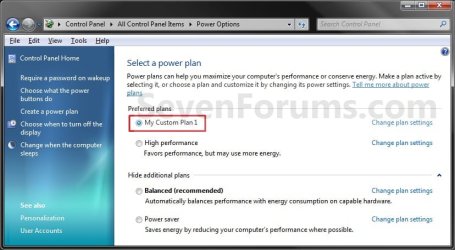
2. To see alll of your available power plans, you will need to click on the drop down arrow to the right of Show additional plans, and do step 3, 4, 5, or 6 below for the power plan you want. (See screenshots below)
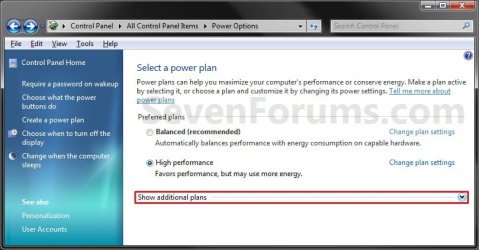
Select1.jpg

Select2.jpg
3. For the Balanced Power Plan Scheme
NOTE: Offers full performance when you need it and saves power during periods of inactivity. This power plan balances energy conservation with performance.
A) Select (dot) Balanced (Recommended), and go to step 7 below. (See screenshots below step 2)
4. For the Power Saver Power Plan Scheme
NOTE: Saves power by reducing system performance. This plan can help mobile PC users get the most from a single battery charge. This power plan conserves energy.
A) Select (dot) Power saver, and go to step 7 below. (See screenshots below step 2)
5. For the High Performance Power Plan Scheme
NOTE: This power plan maximizes system performance and responsiveness. Mobile PC users may notice that their battery doesn't last as long when using this plan.
A) Select (dot) High Performance, and go to step 7 below. (See screenshots below step 2)
6. For a Custom Power Plan Scheme
NOTE: To be able to select a custom power plan, either the OEM will have one listed or you must have created a custom power plan.
A) Select (dot) an available custom power plan, and go to step 7 below. (See screenshots below step 2)
Create-4.jpg
7. Close the Power Options window. (See screenshots below step 2)

8. You can also change the Advanced Power Plan Settings in Windows 7 or Windows 8 for this selected power plan if you like.


OPTION TWO

To Select Power Plan Scheme as Active in Command Prompt


1. Open a command prompt in Vista/Windows 7 or Windows 8/8.1.

2. In the command prompt, copy and paste the command below, and press Enter to see a list of existing power plan schemes.
powercfg /List
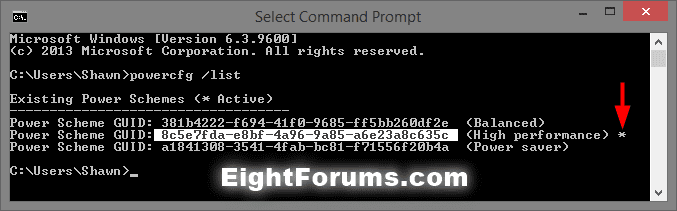

powercfg_List.png

   Note
The power scheme that has an asterisk * to the right of it is the current active power plan scheme.


3. In the command prompt, type the command below, press Enter to set a power scheme as active. (see screenshot below)
powercfg /S SCHEME_GUID


powercfg_set_active.jpg

   Note
Substitute SCHEME_GUID in the command with the actual GUID number of the power plan scheme you want from step 2 above.

For example, I would type this below to make the High performance power plan scheme the active power scheme.

powercfg /S 8c5e7fda-e8bf-4a96-9a85-a6e23a8c635c


4. You can now close the command prompt if you like.
That's it,
Shawn


Last edited:
Is it possible to set it to automatically change from High Power plan to the Power Saver plan when you use the battery on Windows 7 like you could with 3rd Party programs on Vista?
 

My Computer

OS
Windows 7 7264 64-bit
Hello Mushu,

No, but since you have separate On Battery and Plugged In settings, you can set how you want it be in the Advanced Power Plan Settings for that power plan for when you are on battery instead to basically run that way.

Hope this helps,
Shawn
 

My Computer

Computer type
PC/Desktop
Computer Manufacturer/Model Number
Self built custom
OS
64-bit Windows 11 Pro for Workstations
CPU
Intel i7-8700K OC'd to 5 GHz
Motherboard
ASUS ROG Maximus XI Formula Z390
Memory
64 GB (4x16GB) G.SKILL TridentZ RGB DDR4 3600 MHz
Graphics Card(s)
ASUS ROG-STRIX-GTX1080TI-O11G-GAMING
Sound Card
Integrated
Monitor(s) Displays
2 x Samsung Odyssey G7 27"
Screen Resolution
2560x1440
Hard Drives
1TB Samsung 990 PRO M.2,
4TB Samsung 990 PRO PRO M.2,
TerraMaster F8 SSD Plus NAS
PSU
Seasonic Prime Titanium 850W
Case
Thermaltake Core P3
Cooling
Corsair Hydro H115i
Keyboard
Logitech wireless K800
Mouse
Logitech MX Master 4
Internet Speed
2 Gb/s Download and 100 Mb/s Upload
Antivirus
Malwarebyte Anti-Malware Premium
Browser
Google Chrome
Other Info
Logitech Z625 speaker system,
Logitech BRIO 4K Pro webcam,
HP Color LaserJet Pro MFP M477fdn,
APC SMART-UPS RT 1000 XL - SURT1000XLI,
Galaxy S23 Plus phone
Thanks Brink :) Im not really noticing a big difference in speed, but im sure its their :)
 

My Computer

Computer Manufacturer/Model Number
HP dv6000t CTO Entertainment Lappy |My Desktop @ Bottom
OS
7 x64/ Back-Track 4
CPU
Intel Core 2 Duo CPU 8300@ 2.4 Ghz
Motherboard
HP's Own
Memory
4096 MB DDR2
Graphics Card(s)
Nvidia 8400M GS
Sound Card
Altec Lansing (The usual on Laptops )
Monitor(s) Displays
Laptop Screen. 17' Wide.
Screen Resolution
1280 x 800
Hard Drives
150 GB HDD.
Cooling
2 External Fans, Undervolted, Coolant
Keyboard
Norm. Cheap Random Keyboard
Mouse
Norm. Cheap Random Mouse
Other Info
This is my Homemade Desktop :)
HDD: Western Digital Caviar Blue 320GB 16MB 7200RPM SATA2
And more to come in a bit! :D

My Computer

Computer type
PC/Desktop
Computer Manufacturer/Model Number
Self built custom
OS
64-bit Windows 11 Pro for Workstations
CPU
Intel i7-8700K OC'd to 5 GHz
Motherboard
ASUS ROG Maximus XI Formula Z390
Memory
64 GB (4x16GB) G.SKILL TridentZ RGB DDR4 3600 MHz
Graphics Card(s)
ASUS ROG-STRIX-GTX1080TI-O11G-GAMING
Sound Card
Integrated
Monitor(s) Displays
2 x Samsung Odyssey G7 27"
Screen Resolution
2560x1440
Hard Drives
1TB Samsung 990 PRO M.2,
4TB Samsung 990 PRO PRO M.2,
TerraMaster F8 SSD Plus NAS
PSU
Seasonic Prime Titanium 850W
Case
Thermaltake Core P3
Cooling
Corsair Hydro H115i
Keyboard
Logitech wireless K800
Mouse
Logitech MX Master 4
Internet Speed
2 Gb/s Download and 100 Mb/s Upload
Antivirus
Malwarebyte Anti-Malware Premium
Browser
Google Chrome
Other Info
Logitech Z625 speaker system,
Logitech BRIO 4K Pro webcam,
HP Color LaserJet Pro MFP M477fdn,
APC SMART-UPS RT 1000 XL - SURT1000XLI,
Galaxy S23 Plus phone
Using High performance on all desktops and balanced/power saver
on my laptop.
Sure can feel the difference between HP and Balanced(especially
when closing windows(faster responce time)!
the only flaw is that in HP mod power consumption a generation of heat is
bigger!
Luv your tutorials! Very useful!
 

My Computer

Computer type
PC/Desktop
Computer Manufacturer/Model Number
Custom
OS
Windows 7 SP1 x64
CPU
Intel E8400 3.0 GHz
Motherboard
Gigabyte EP45-DS3R
Memory
4x1 Trascend DDR2 800 Mhz
Graphics Card(s)
Gainward 8800GT 512 Mb
Sound Card
Realtek HD Audio 889A
Monitor(s) Displays
LG L204WS
Screen Resolution
1680x1050
Hard Drives
Intel 520 Series 120Gb SSD (System)
Western Digital 6400AAKS 640Gb (Data)
PSU
Cooler Master 650W
Case
Cooler Master Centurion 532
Cooling
2x 12 cm fans
Keyboard
Logitech Wave
Mouse
Logitech G5
Internet Speed
10 Mbit Cable Flat
Antivirus
NOD32 Smart Security
Browser
Google Chrome
I use a modified balanced plan. My rig is old so I am not worried about high performance. My computer runs 24/7 so I have my wireless run all of the time. My HD's turn off after one hour and my monitor after ten minutes. I have sleep disabled.
 

My Computer

Computer Manufacturer/Model Number
Home built
OS
Windows 7 Ultimate 32 bit
CPU
Intel(R) Pentium(R) 4 CPU 3.00GHz
Motherboard
ASUS P4P800-VM Motherboard Chipset: Intel 865G + ICH5
Memory
2.50 GB RAM
Graphics Card(s)
NVIDIA GeForce 7600 GS
Sound Card
SoundMax Integrated Digital Audio (Chip)
Monitor(s) Displays
ViewSonic VX 1962 wm
Screen Resolution
1680 X 1050
Hard Drives
Seagate Barracuda 7200.10 80 GB
ST380215A ATA Device 18.6 GB
Western Digital "My Book" external hard drive 750 GB
Cooling
Fan based
Keyboard
Microsoft Comfort Curve Keyboard 2000 v10 USB
Mouse
Logitec optic USB
Internet Speed
3.01 Mb/s download 0.64 Mb/s upload
changing power plan display

hi, the way i'm seeing my power plans display is always by two, and "balance" is always there, i want to know how i can change that to showing either three or "high" and "power save".

thanks
 

My Computer

OS
windows 7 | Vista
CPU
AMD Turion x2
Memory
4GB | 2GB
Screen Resolution
above 1000 ^2
Hard Drives
6?... about 4TB, all full
Keyboard
external (mac standard wired) | built-in
Mouse
Mighty Mouse | Touch Pad
Internet Speed
DSL 3mbps
Other Info
webcam
microphone
keypad
dvd-rw lightscribe
extended battery
Personal:: Files: 21,953+ Folders: 1829+
Hello Typ, and welcome to Seven Forums.

If you mean the power plans that are displaying on the taskbar notification "Power" icon, then you cannot change the what is displayed. However, you can use the tutorial below to create your own custom shortcut to switch between the power options of your choice, and be able to pin them to the taskbar to make using them easier if you like.

http://www.sevenforums.com/tutorials/21990-power-plan-create-shortcut-change-power-plan.html

If this is not what you meant, then please let me know.

Hope this helps,
Shawn
 

My Computer

Computer type
PC/Desktop
Computer Manufacturer/Model Number
Self built custom
OS
64-bit Windows 11 Pro for Workstations
CPU
Intel i7-8700K OC'd to 5 GHz
Motherboard
ASUS ROG Maximus XI Formula Z390
Memory
64 GB (4x16GB) G.SKILL TridentZ RGB DDR4 3600 MHz
Graphics Card(s)
ASUS ROG-STRIX-GTX1080TI-O11G-GAMING
Sound Card
Integrated
Monitor(s) Displays
2 x Samsung Odyssey G7 27"
Screen Resolution
2560x1440
Hard Drives
1TB Samsung 990 PRO M.2,
4TB Samsung 990 PRO PRO M.2,
TerraMaster F8 SSD Plus NAS
PSU
Seasonic Prime Titanium 850W
Case
Thermaltake Core P3
Cooling
Corsair Hydro H115i
Keyboard
Logitech wireless K800
Mouse
Logitech MX Master 4
Internet Speed
2 Gb/s Download and 100 Mb/s Upload
Antivirus
Malwarebyte Anti-Malware Premium
Browser
Google Chrome
Other Info
Logitech Z625 speaker system,
Logitech BRIO 4K Pro webcam,
HP Color LaserJet Pro MFP M477fdn,
APC SMART-UPS RT 1000 XL - SURT1000XLI,
Galaxy S23 Plus phone
thanks

oh great, this is pretty cool, i'll check it out. thanks.

though it sucks that the display can't be changed, this might be better....
 

My Computer

OS
windows 7 | Vista
CPU
AMD Turion x2
Memory
4GB | 2GB
Screen Resolution
above 1000 ^2
Hard Drives
6?... about 4TB, all full
Keyboard
external (mac standard wired) | built-in
Mouse
Mighty Mouse | Touch Pad
Internet Speed
DSL 3mbps
Other Info
webcam
microphone
keypad
dvd-rw lightscribe
extended battery
Personal:: Files: 21,953+ Folders: 1829+
You're welcome. I hope it will serve your needs. :)
 

My Computer

Computer type
PC/Desktop
Computer Manufacturer/Model Number
Self built custom
OS
64-bit Windows 11 Pro for Workstations
CPU
Intel i7-8700K OC'd to 5 GHz
Motherboard
ASUS ROG Maximus XI Formula Z390
Memory
64 GB (4x16GB) G.SKILL TridentZ RGB DDR4 3600 MHz
Graphics Card(s)
ASUS ROG-STRIX-GTX1080TI-O11G-GAMING
Sound Card
Integrated
Monitor(s) Displays
2 x Samsung Odyssey G7 27"
Screen Resolution
2560x1440
Hard Drives
1TB Samsung 990 PRO M.2,
4TB Samsung 990 PRO PRO M.2,
TerraMaster F8 SSD Plus NAS
PSU
Seasonic Prime Titanium 850W
Case
Thermaltake Core P3
Cooling
Corsair Hydro H115i
Keyboard
Logitech wireless K800
Mouse
Logitech MX Master 4
Internet Speed
2 Gb/s Download and 100 Mb/s Upload
Antivirus
Malwarebyte Anti-Malware Premium
Browser
Google Chrome
Other Info
Logitech Z625 speaker system,
Logitech BRIO 4K Pro webcam,
HP Color LaserJet Pro MFP M477fdn,
APC SMART-UPS RT 1000 XL - SURT1000XLI,
Galaxy S23 Plus phone
now i have another issue, is it possible to link certain actions with a power plan.

for instance, i want to open every program in my system when i use high.
or
i want to close out all my widgets and turn my wallpaper to black when i use low.

something along those lines...

P.S. the shortcuts are pretty good....now if i can just limit the spacing between my icons in my toolbar it would be perfect.
 

My Computer

OS
windows 7 | Vista
CPU
AMD Turion x2
Memory
4GB | 2GB
Screen Resolution
above 1000 ^2
Hard Drives
6?... about 4TB, all full
Keyboard
external (mac standard wired) | built-in
Mouse
Mighty Mouse | Touch Pad
Internet Speed
DSL 3mbps
Other Info
webcam
microphone
keypad
dvd-rw lightscribe
extended battery
Personal:: Files: 21,953+ Folders: 1829+
Sorry, but no you will not be able to combine actions like that with these shorcuts. :(

You might see if using Quick Launch to place whatever shortcuts you like in may be able to help with the spacing issues.
 

My Computer

Computer type
PC/Desktop
Computer Manufacturer/Model Number
Self built custom
OS
64-bit Windows 11 Pro for Workstations
CPU
Intel i7-8700K OC'd to 5 GHz
Motherboard
ASUS ROG Maximus XI Formula Z390
Memory
64 GB (4x16GB) G.SKILL TridentZ RGB DDR4 3600 MHz
Graphics Card(s)
ASUS ROG-STRIX-GTX1080TI-O11G-GAMING
Sound Card
Integrated
Monitor(s) Displays
2 x Samsung Odyssey G7 27"
Screen Resolution
2560x1440
Hard Drives
1TB Samsung 990 PRO M.2,
4TB Samsung 990 PRO PRO M.2,
TerraMaster F8 SSD Plus NAS
PSU
Seasonic Prime Titanium 850W
Case
Thermaltake Core P3
Cooling
Corsair Hydro H115i
Keyboard
Logitech wireless K800
Mouse
Logitech MX Master 4
Internet Speed
2 Gb/s Download and 100 Mb/s Upload
Antivirus
Malwarebyte Anti-Malware Premium
Browser
Google Chrome
Other Info
Logitech Z625 speaker system,
Logitech BRIO 4K Pro webcam,
HP Color LaserJet Pro MFP M477fdn,
APC SMART-UPS RT 1000 XL - SURT1000XLI,
Galaxy S23 Plus phone
yea....no....i already know about that. i need something that offers the feature available in previous versions of windows. the feature of having additional toolbars on the sides of your screen. the feature where you can just drag a folder and let it go at the edge of the screen and a toolbar magically appears....

...but thanks for the suggestion. if you know if windows has hidden that feature, i must know....the future of my hair not turning gray depends on it...(lol)....
 

My Computer

OS
windows 7 | Vista
CPU
AMD Turion x2
Memory
4GB | 2GB
Screen Resolution
above 1000 ^2
Hard Drives
6?... about 4TB, all full
Keyboard
external (mac standard wired) | built-in
Mouse
Mighty Mouse | Touch Pad
Internet Speed
DSL 3mbps
Other Info
webcam
microphone
keypad
dvd-rw lightscribe
extended battery
Personal:: Files: 21,953+ Folders: 1829+
Unfortunately the Desktop Toolbar feature that was in Vista has been removed in Windows 7.

However, the free program Fences (personal use version) may be able to work for this instead.
 

My Computer

Computer type
PC/Desktop
Computer Manufacturer/Model Number
Self built custom
OS
64-bit Windows 11 Pro for Workstations
CPU
Intel i7-8700K OC'd to 5 GHz
Motherboard
ASUS ROG Maximus XI Formula Z390
Memory
64 GB (4x16GB) G.SKILL TridentZ RGB DDR4 3600 MHz
Graphics Card(s)
ASUS ROG-STRIX-GTX1080TI-O11G-GAMING
Sound Card
Integrated
Monitor(s) Displays
2 x Samsung Odyssey G7 27"
Screen Resolution
2560x1440
Hard Drives
1TB Samsung 990 PRO M.2,
4TB Samsung 990 PRO PRO M.2,
TerraMaster F8 SSD Plus NAS
PSU
Seasonic Prime Titanium 850W
Case
Thermaltake Core P3
Cooling
Corsair Hydro H115i
Keyboard
Logitech wireless K800
Mouse
Logitech MX Master 4
Internet Speed
2 Gb/s Download and 100 Mb/s Upload
Antivirus
Malwarebyte Anti-Malware Premium
Browser
Google Chrome
Other Info
Logitech Z625 speaker system,
Logitech BRIO 4K Pro webcam,
HP Color LaserJet Pro MFP M477fdn,
APC SMART-UPS RT 1000 XL - SURT1000XLI,
Galaxy S23 Plus phone
hmmm....not a big fan of adding another program when it should be native, but i'll check that out...thanks. also, not so keen on stardock either, but it might be because i used a cracked version once...ha...
 

My Computer

OS
windows 7 | Vista
CPU
AMD Turion x2
Memory
4GB | 2GB
Screen Resolution
above 1000 ^2
Hard Drives
6?... about 4TB, all full
Keyboard
external (mac standard wired) | built-in
Mouse
Mighty Mouse | Touch Pad
Internet Speed
DSL 3mbps
Other Info
webcam
microphone
keypad
dvd-rw lightscribe
extended battery
Personal:: Files: 21,953+ Folders: 1829+
It's a pretty good program. Please let me know what you thought about it.
 

My Computer

Computer type
PC/Desktop
Computer Manufacturer/Model Number
Self built custom
OS
64-bit Windows 11 Pro for Workstations
CPU
Intel i7-8700K OC'd to 5 GHz
Motherboard
ASUS ROG Maximus XI Formula Z390
Memory
64 GB (4x16GB) G.SKILL TridentZ RGB DDR4 3600 MHz
Graphics Card(s)
ASUS ROG-STRIX-GTX1080TI-O11G-GAMING
Sound Card
Integrated
Monitor(s) Displays
2 x Samsung Odyssey G7 27"
Screen Resolution
2560x1440
Hard Drives
1TB Samsung 990 PRO M.2,
4TB Samsung 990 PRO PRO M.2,
TerraMaster F8 SSD Plus NAS
PSU
Seasonic Prime Titanium 850W
Case
Thermaltake Core P3
Cooling
Corsair Hydro H115i
Keyboard
Logitech wireless K800
Mouse
Logitech MX Master 4
Internet Speed
2 Gb/s Download and 100 Mb/s Upload
Antivirus
Malwarebyte Anti-Malware Premium
Browser
Google Chrome
Other Info
Logitech Z625 speaker system,
Logitech BRIO 4K Pro webcam,
HP Color LaserJet Pro MFP M477fdn,
APC SMART-UPS RT 1000 XL - SURT1000XLI,
Galaxy S23 Plus phone
Never tried it, but you should be able to make a .bat file with the programs you want to start? (And if they support the close options in command line for closing as well).
Regarding the spacing of the icons:
There is a option to have SMALLER icons on the quick launch or start bar, this also solves partially the spacing issue (If I now could just remember where is have set that...let's see....

Go to:
Control Panel\All Control Panel Items\Personalization
Go to (on the bottom) to "Window color"
You will get the old "Classic" personalization screen with all the options there (you might find some others things in there that you want to change)
In the drop down under "item" there are several settings for icons and other things to fine tune. Note that not everything always works as you might expect (since they introduced themes... :-(, especially if you don't use a Classic theme, but it might be worth a shot.
 

My Computer

Computer type
PC/Desktop
Computer Manufacturer/Model Number
Custom
OS
Windows 7 Ultimate x64 (Home)/ Win 7 Enterprise 32 Bit (Work)
CPU
Phenom Black II x4 3.2GHz
Motherboard
Gigabyte 880GA-UD3H
Memory
16GB
Graphics Card(s)
Onboard
Sound Card
Onboard
Monitor(s) Displays
2x 22" Asus
Screen Resolution
1680 x 1050 (16:10)
Hard Drives
1x 120GB Samsung SSD (for C Drive)
1x 55GB Adata SSD (for personal data and mail)
2x 2TB Seagate (after 2 1/2 years one is on the brink of dying!), (Backup, Pictures and Music)
1x 2TB Hitachi (External, 2nd Backup)
1x 2TB Samsung (TV recording)
PSU
Fanless 95+
Cooling
only CPU fan left :-)
Antivirus
Avira
Browser
Opera 12.54 (don't like the new one...but have it also)
Shawn,
Here's how i select/change the active power plan:

WIN + X key combo | Battery status section | choose from drop down box.

Win being the key with the Microsoft flag on top.
 

My Computer

Computer Manufacturer/Model Number
Toshiba Satellite S875D-S7239 laptop
OS
MS Windows 7 Ultimate SP1 64-bit
CPU
AMD A10-4600M
Motherboard
AMD Pumori (Socket FT1)
Memory
6.00 GB Dual-Channel DDR3 @ 798MHz (11-11-12-28)
Graphics Card(s)
AMD Radeon HD 7660G
Sound Card
High Definition Audio Device
Monitor(s) Displays
Generic PnP Monitor (1600x900@60Hz)
Screen Resolution
1600x900@60Hz
Hard Drives
SSD 119GB Corsair CSSD-V128GB2 ATA Device
Keyboard
Standard PS/2 Keyboard
Mouse
HP Wireless Optical Mobile Mouse Model FHA-3410
Internet Speed
What the local pub, local coffee shop offers.
Other Info
Optical Drive:MATSHITA BD-CMB UJ160B ATA Device


Also have an Asus ha1002xp netbook with Win 7 Ultimate installed.
I forgot another option for getting to the power plans:
If you use the master control panel, some call it "god mode" you have direct access to the energy options
(create a folder, type any name and than ad this <.{ED7BA470-8E54-465E-825C-99712043E01C}>
(Only the stuff between the < and >)
Now you get a list of all setting in Windows.

What few people might know:
You can drag and drop any of the settings icons to your desktop or Quick launch area and Windows will create a shortcut for you to exactly that setting :-)

But I really miss the setting which used to be available even for Desktops, that you could simply ask Windows to display the energy icon in the status bar and you could select the power plan with only 1 click.... :-(
I hate it when they dumb down things (what they have done with so many things in Win 7)
 

My Computer

Computer type
PC/Desktop
Computer Manufacturer/Model Number
Custom
OS
Windows 7 Ultimate x64 (Home)/ Win 7 Enterprise 32 Bit (Work)
CPU
Phenom Black II x4 3.2GHz
Motherboard
Gigabyte 880GA-UD3H
Memory
16GB
Graphics Card(s)
Onboard
Sound Card
Onboard
Monitor(s) Displays
2x 22" Asus
Screen Resolution
1680 x 1050 (16:10)
Hard Drives
1x 120GB Samsung SSD (for C Drive)
1x 55GB Adata SSD (for personal data and mail)
2x 2TB Seagate (after 2 1/2 years one is on the brink of dying!), (Backup, Pictures and Music)
1x 2TB Hitachi (External, 2nd Backup)
1x 2TB Samsung (TV recording)
PSU
Fanless 95+
Cooling
only CPU fan left :-)
Antivirus
Avira
Browser
Opera 12.54 (don't like the new one...but have it also)
Back
Top