Print preview doesn't work properly in Excel 2010

Franky

New member
Member
VIP
Local time
6:12 PM
Messages
472
Location
Kurdistan
Hello all,

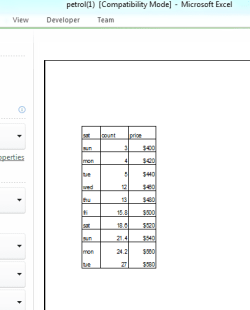
First I made some contents and drew a border from Home > Font > all Borders on an Excel 2010 file. So it became like below image (capture1). After that I wanted to print it so went to File > Print to see its preview. But the problem is that the lines between tue and wed and also between mon and tue are not shown neither in preview nor when printing. The height of row 7 until 17 is 24 (that is 32 pixel) but heights of the rest of the rows are normal (20 pixel).

Any idea about why those lines aren't shown?
 

Attachments

  • Capture1.PNG
    Capture1.PNG
    4.5 KB · Views: 10
  • Capture2.PNG
    Capture2.PNG
    6.4 KB · Views: 10

My Computer My Computer

Computer type
PC/Desktop
OS
windows 7 32-bit
CPU
Intel(R) Core(TM) i3-2120 CPU @ 3.30GHz
Motherboard
Gigabyte Technology Co., Ltd. P61A-D3
Memory
4.00 GB
Graphics Card(s)
NVIDIA GeForce GTS 450
Sound Card
(1) NVIDIA High Definition Audio (2) NVIDIA Virtual Audio
Monitor(s) Displays
Samsung
Hard Drives
ST500DM002-1BC142 ATA Device
Internet Speed
1 Mbps
Antivirus
KIS 2013
Browser
chrome
Isn't there any solution!!? :(
 

My Computer My Computer

Computer type
PC/Desktop
OS
windows 7 32-bit
CPU
Intel(R) Core(TM) i3-2120 CPU @ 3.30GHz
Motherboard
Gigabyte Technology Co., Ltd. P61A-D3
Memory
4.00 GB
Graphics Card(s)
NVIDIA GeForce GTS 450
Sound Card
(1) NVIDIA High Definition Audio (2) NVIDIA Virtual Audio
Monitor(s) Displays
Samsung
Hard Drives
ST500DM002-1BC142 ATA Device
Internet Speed
1 Mbps
Antivirus
KIS 2013
Browser
chrome
A couple of questions:


  1. Do you have any merging in the cells? If so, try removing it.
  2. Is there any reason why you have only changed the height of rows 7 - 14. If not, try formatting the entire spreadsheet. (see below) Apply or remove cell borders on a worksheet - Excel

All cells on a worksheet Click the Select All button.
ZA010048465.gif

To select the entire worksheet, you can also press CTRL+A.
Note If the worksheet contains data, CTRL+A selects the current region. Pressing CTRL+A a second time selects the entire worksheet.
 

My Computer My Computer

Computer type
PC/Desktop
Computer Manufacturer/Model Number
Packard Bell
OS
Windows 7 Home Premium 64bit
CPU
Intel(R) Core(TM) i3-2120 CPU @ 3.30GHz
Motherboard
Packard Bell IPISB-AG
Memory
3.00 GB
Graphics Card(s)
(1) Intel(R) HD Graphics (2) VNC Mirror Driver
Sound Card
Realtek High Definition Audio
Monitor(s) Displays
AIO LCD
Screen Resolution
1920 x 1080
Hard Drives
WDC WD10EADX-22TDHB0 ATA Device
Fixed hard disk media
4 partitions
931.51 GB
Keyboard
Wireless
Mouse
Wireless
Antivirus
Microsoft Security Essentials
Browser
IE; Firefox
Other Info
Also:
Samsung N220 Plus Netbook - Windows 7 Home
HP laptop
iPad 5
No there isn't any merging data.
Look, I copied that form and pasted it into sheet3 (it was in sheet1). And increased the height of rows 7 till 17 from 15 (default) to 25, because reading data from printed paper his way will be more simple and also the amount of data and its format are so much more than this small form (I minimized the form so that finding the solution is simpler). After these works I pressed Ctrl+Z. There isn't any problem with preview!!
So I thought that problem is about something hidden in the background of the range B7 till D17 (the form). Therefore, I returned to sheet1 and selected the entire sheet (from the corner) and clicked on Editing > Clear > clear all. Then I again copied the form from sheet3 (which the preview for it was well) and pasted it to sheet1 (which now is clean apparently!) in range B7 till D17 and then increased rows (7 till 17) to height 25. Then tested it, BUT again I faced that problem, Why please?:mad:
 

My Computer My Computer

Computer type
PC/Desktop
OS
windows 7 32-bit
CPU
Intel(R) Core(TM) i3-2120 CPU @ 3.30GHz
Motherboard
Gigabyte Technology Co., Ltd. P61A-D3
Memory
4.00 GB
Graphics Card(s)
NVIDIA GeForce GTS 450
Sound Card
(1) NVIDIA High Definition Audio (2) NVIDIA Virtual Audio
Monitor(s) Displays
Samsung
Hard Drives
ST500DM002-1BC142 ATA Device
Internet Speed
1 Mbps
Antivirus
KIS 2013
Browser
chrome

My Computer My Computer

Computer type
PC/Desktop
Computer Manufacturer/Model Number
Packard Bell
OS
Windows 7 Home Premium 64bit
CPU
Intel(R) Core(TM) i3-2120 CPU @ 3.30GHz
Motherboard
Packard Bell IPISB-AG
Memory
3.00 GB
Graphics Card(s)
(1) Intel(R) HD Graphics (2) VNC Mirror Driver
Sound Card
Realtek High Definition Audio
Monitor(s) Displays
AIO LCD
Screen Resolution
1920 x 1080
Hard Drives
WDC WD10EADX-22TDHB0 ATA Device
Fixed hard disk media
4 partitions
931.51 GB
Keyboard
Wireless
Mouse
Wireless
Antivirus
Microsoft Security Essentials
Browser
IE; Firefox
Other Info
Also:
Samsung N220 Plus Netbook - Windows 7 Home
HP laptop
iPad 5
Back
Top