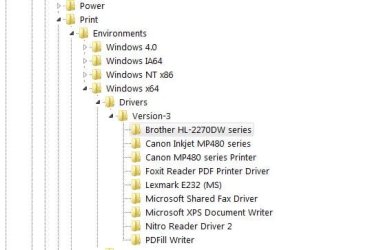
Windows 7 32-bit, Canon MP130 USB printer
Yesterday, suddenly, my printer was greyed out. Here's the sequence of actions I took (each unsuccessful):
1. Checked cable connections at both ends.
2. Replaced cable.
3. Checked device manager; it showed there.
4. Checked drivers.
5. Ran troubleshooting; nothing found.
6. Uninstalled printer using Revo Pro.
7. Downloaded software from Canon; started trying to reinstall but got this message.
9. Ran search on the C drive (a daunting task)
So here I am. The totally unhelpful message continues to appear and I have no idea what to do next. I did find a few references to drivers and I've made them bold but I didn't dare do anything with them.
Sorry if this is too much information; suggestions as to how I might have done it better will be most welcome.
Even more welcome will be some pointers for me to follow.
Thanks much.
-G.
Yesterday, suddenly, my printer was greyed out. Here's the sequence of actions I took (each unsuccessful):
1. Checked cable connections at both ends.
2. Replaced cable.
3. Checked device manager; it showed there.
4. Checked drivers.
5. Ran troubleshooting; nothing found.
6. Uninstalled printer using Revo Pro.
7. Downloaded software from Canon; started trying to reinstall but got this message.
Older MP Drivers Found!
MP Drivers The program has found an older version of the MP Drivers
already installed. Uninstall the older version and then execute the
setup program again.
8. Tried to find the "older drivers" but can't.MP Drivers The program has found an older version of the MP Drivers
already installed. Uninstall the older version and then execute the
setup program again.
9. Ran search on the C drive (a daunting task)
First time through, I got an expanding pyramid of MP130 entries in a loop from AppData\temp and leading to a non-existent file. I got rid of that - I think - but still couldn't install.
Ran the search again; the loop is gone but now there aren't any search results other than the download I'm attempting to install.
10. Searched the registry:Ran the search again; the loop is gone but now there aren't any search results other than the download I'm attempting to install.
HKCU\Printers: (string value) DeviceOld REG_SZ Canon MP130 Series Printer,winspool,Ne03:
HKCU\Printers\Settings: (binary) Canon MP130 Series Printer REG_BINARY 07 00 00 00 0d 00 0b 00 03 00 14 00 15 00 10 00 02 00 and 00s as far as the eye can see
HKCU\Software\.. a series of entries for my graphics program showing the
MP130 as printer
HKCU\Software\Microsoft\Windows\PhotoPrintingWizard\Canon MP130 Series
HKEY_CURRENT_USER\Software\Microsoft\Windows\CurrentVersion\Explorer\PhotoPrintingWizard\Canon MP130 Series Printer DriverName Canon MP130 Series Printer
HKCU\...\Windows\...\Compability Assistant\Persisted... and a reference to my download
HKLM\Software\Canon\Manual_Path\Canon PIXMA MP130 Series but then the string value is (Default) (value not set)
HKLM\Software\Canon\MSetup4\Canon_MP\ a string value showing PIXMA MP130 Series as printer
HKLM\Software\Canon\MsetupLog\ (string value) Name Canon PIXMA MP130 Series
HKLM\Software\Microsoft\Windows\CurrentVersion\Setup\PnpLockdownFiles Name: %SystemPath%\twain_32\MP130\CANOIT32.EXE Type:REG_DWORD Data:0x00000005 (5)
HKLM\Software\Microsoft\Windows\CurrentVersion\Setup\PnpLockdownFiles Name: %SystemPath%\twain_32\MP130\CISDS.DS
.... and a whole list of similar keys, all with the same data value:
HKCU\Printers\Settings: (binary) Canon MP130 Series Printer REG_BINARY 07 00 00 00 0d 00 0b 00 03 00 14 00 15 00 10 00 02 00 and 00s as far as the eye can see
HKCU\Software\.. a series of entries for my graphics program showing the
MP130 as printer
HKCU\Software\Microsoft\Windows\PhotoPrintingWizard\Canon MP130 Series
HKEY_CURRENT_USER\Software\Microsoft\Windows\CurrentVersion\Explorer\PhotoPrintingWizard\Canon MP130 Series Printer DriverName Canon MP130 Series Printer
HKCU\...\Windows\...\Compability Assistant\Persisted... and a reference to my download
HKLM\Software\Canon\Manual_Path\Canon PIXMA MP130 Series but then the string value is (Default) (value not set)
HKLM\Software\Canon\MSetup4\Canon_MP\ a string value showing PIXMA MP130 Series as printer
HKLM\Software\Canon\MsetupLog\ (string value) Name Canon PIXMA MP130 Series
HKLM\Software\Microsoft\Windows\CurrentVersion\Setup\PnpLockdownFiles Name: %SystemPath%\twain_32\MP130\CANOIT32.EXE Type:REG_DWORD Data:0x00000005 (5)
HKLM\Software\Microsoft\Windows\CurrentVersion\Setup\PnpLockdownFiles Name: %SystemPath%\twain_32\MP130\CISDS.DS
.... and a whole list of similar keys, all with the same data value:
CNC130.DAT, CNC130C.DAT, CNC130C.DAT, CNCS130.DAT, CSUI.DLL, DSUI_RES.DLL, IOP.DLL, ITLIB32.DLL, JDA_CIMG.DLL, MC2.TXT, NBS4MB.DLL, RMSLANTC.DLL, RSTCOL.DLL, SCANINTF.DLL, SCRPRMV.dll and TPM.dll
HKLM\ControlSet001\Control\DeviceClasses\{28d78fad-5a12-11d1-ae5b-0000f803a8c2}\##?#USB#VID...(bunch of characters)\#\DeviceParameters PortDescription Canon MP130
HKLM\ControlSet01\Print\Monitors\Canon BJ Language Monitor MP130 Driver CNMLM62.DLL
HKLM\ControlSet01\Enum\USB\VID 04AA9&PIID_170&MI_00\6&159c15e6&0&0000 DeviceDesc MP130
HKLM\ControlSet01\Enum\USBPRINT\CANONMP130 Default (value not set)
HKEY_LOCAL_MACHINE\SYSTEM\ControlSet001\Enum\USBPRINT\CanonMP130\9&108f4615&0&USB001 DeviceDesc CanonMP130
HKEY_LOCAL_MACHINE\SYSTEM\ControlSet001\Enum\USBPRINT\CanonMP130\9&108f4615&0&USB001 HardwareID USBPRINT\CanonPM130423F CanonMP130423F
HKEY_LOCAL_MACHINE\SYSTEM\ControlSet002\Control\DeviceClasses\{28d78fad-5a12-11d1-ae5b-0000f803a8c2}\##?#USB#VID_04A9&PID_1701&MI_01#6&159c15e6&0&0001#{28d78fad-5a12-11d1-ae5b-0000f803a8c2}\#\Device Parameters PortDescription CanonMP130
HKEY_LOCAL_MACHINE\SYSTEM\ControlSet002\Control\Print\Monitors\Canon BJ Language Monitor MP130 Driver CNMLM6S.DLL
HKEY_LOCAL_MACHINE\SYSTEM\ControlSet002\Enum\USB\VID_04A9&PID_1701&MI_00\6&159c15e6&0&0000 DeviceDesc MP130
HKEY_LOCAL_MACHINE\SYSTEM\ControlSet002\Enum\USBPRINT\CanonMP130 (Default) (value not set)
HKEY_LOCAL_MACHINE\SYSTEM\ControlSet002\Enum\USBPRINT\CanonMP130\9&108f4615&0&USB001 DeviceDesc CanonMP130
HKEY_LOCAL_MACHINE\SYSTEM\ControlSet002\Enum\USBPRINT\CanonMP130\9&108f4615&0&USB001 HardwareID USBPRINT\CanonPM130423F CanonMP130423F
HKEY_LOCAL_MACHINE\SYSTEM\CurrentControlSet\Control\DeviceClasses\{28d78fad-5a12-11d1-ae5b-0000f803a8c2}\##?#USB#VID_04A9&PID_1701&MI_01#6&159c15e6&0&0001#{28d78fad-5a12-11d1-ae5b-0000f803a8c2}\#\Device Parameters PortDescription CanonMP130
HKEY_LOCAL_MACHINE\SYSTEM\CurrentControlSet\Control\Print\Monitors\Canon BJ Language Monitor MP130 Driver CNMLM6S.DLL
HKEY_LOCAL_MACHINE\SYSTEM\CurrentControlSet\Enum\USB\VID_04A9&PID_1701&MI_00\6&159c15e6&0&0000 DeviceDesc MP130
HKEY_LOCAL_MACHINE\SYSTEM\CurrentControlSet\Enum\USBPRINT\CanonMP130 (Default) (value not set)
HKEY_LOCAL_MACHINE\SYSTEM\CurrentControlSet\Enum\USBPRINT\CanonMP130\9&108f4615&0&USB001 DeviceDesc CanonMP130
HKEY_LOCAL_MACHINE\SYSTEM\CurrentControlSet\Enum\USBPRINT\CanonMP130\9&108f4615&0&USB001 HardwareID USBPRINT\CanonPM130423F CanonMP130423F
HKEY_USERS\.DEFAULT\Printers\DevModes2 Canon MP130 Series Printer and a long binary
HKEY_USERS\S-1-5-21-1857497657-2102476093-3286847399-1000\Printers DeviceOld Canon MP130 Series Printer,winspool,Ne03:
HKEY_USERS\S-1-5-21-1857497657-2102476093-3286847399-1000\Printers\Settings Canon MP130 Series Printer and a long binary
HKEY_USERS\S-1-5-21-1857497657-2102476093-3286847399-1000\Software\Jasc\Paint Shop Pro 9\General\Miscellaneous PrinterName Canon MP130 Series Printer
HKEY_USERS\S-1-5-21-1857497657-2102476093-3286847399-1000\Software\Jasc\Paint Shop Pro 9\JascCmdPrint\QuickPrint\PrintingOptions PrinterName Canon MP130 Series Printer
HKEY_USERS\S-1-5-21-1857497657-2102476093-3286847399-1000\Software\Microsoft\Windows\CurrentVersion\Explorer\PhotoPrintingWizard DefaultPrinter Canon MP130 Series Printer
HKEY_USERS\S-1-5-21-1857497657-2102476093-3286847399-1000\Software\Microsoft\Windows\CurrentVersion\Explorer\PhotoPrintingWizard\Canon MP130 Series Printer DriverName Canon MP130 Series Printer
HKEY_USERS\S-1-5-21-1857497657-2102476093-3286847399-1000\Software\Microsoft\Windows NT\CurrentVersion\AppCompatFlags\Compatibility Assistant\Persisted reference the download
...aside... Was there a way I could export the registry filtered for my search?HKLM\ControlSet01\Print\Monitors\Canon BJ Language Monitor MP130 Driver CNMLM62.DLL
HKLM\ControlSet01\Enum\USB\VID 04AA9&PIID_170&MI_00\6&159c15e6&0&0000 DeviceDesc MP130
HKLM\ControlSet01\Enum\USBPRINT\CANONMP130 Default (value not set)
HKEY_LOCAL_MACHINE\SYSTEM\ControlSet001\Enum\USBPRINT\CanonMP130\9&108f4615&0&USB001 DeviceDesc CanonMP130
HKEY_LOCAL_MACHINE\SYSTEM\ControlSet001\Enum\USBPRINT\CanonMP130\9&108f4615&0&USB001 HardwareID USBPRINT\CanonPM130423F CanonMP130423F
HKEY_LOCAL_MACHINE\SYSTEM\ControlSet002\Control\DeviceClasses\{28d78fad-5a12-11d1-ae5b-0000f803a8c2}\##?#USB#VID_04A9&PID_1701&MI_01#6&159c15e6&0&0001#{28d78fad-5a12-11d1-ae5b-0000f803a8c2}\#\Device Parameters PortDescription CanonMP130
HKEY_LOCAL_MACHINE\SYSTEM\ControlSet002\Control\Print\Monitors\Canon BJ Language Monitor MP130 Driver CNMLM6S.DLL
HKEY_LOCAL_MACHINE\SYSTEM\ControlSet002\Enum\USB\VID_04A9&PID_1701&MI_00\6&159c15e6&0&0000 DeviceDesc MP130
HKEY_LOCAL_MACHINE\SYSTEM\ControlSet002\Enum\USBPRINT\CanonMP130 (Default) (value not set)
HKEY_LOCAL_MACHINE\SYSTEM\ControlSet002\Enum\USBPRINT\CanonMP130\9&108f4615&0&USB001 DeviceDesc CanonMP130
HKEY_LOCAL_MACHINE\SYSTEM\ControlSet002\Enum\USBPRINT\CanonMP130\9&108f4615&0&USB001 HardwareID USBPRINT\CanonPM130423F CanonMP130423F
HKEY_LOCAL_MACHINE\SYSTEM\CurrentControlSet\Control\DeviceClasses\{28d78fad-5a12-11d1-ae5b-0000f803a8c2}\##?#USB#VID_04A9&PID_1701&MI_01#6&159c15e6&0&0001#{28d78fad-5a12-11d1-ae5b-0000f803a8c2}\#\Device Parameters PortDescription CanonMP130
HKEY_LOCAL_MACHINE\SYSTEM\CurrentControlSet\Control\Print\Monitors\Canon BJ Language Monitor MP130 Driver CNMLM6S.DLL
HKEY_LOCAL_MACHINE\SYSTEM\CurrentControlSet\Enum\USB\VID_04A9&PID_1701&MI_00\6&159c15e6&0&0000 DeviceDesc MP130
HKEY_LOCAL_MACHINE\SYSTEM\CurrentControlSet\Enum\USBPRINT\CanonMP130 (Default) (value not set)
HKEY_LOCAL_MACHINE\SYSTEM\CurrentControlSet\Enum\USBPRINT\CanonMP130\9&108f4615&0&USB001 DeviceDesc CanonMP130
HKEY_LOCAL_MACHINE\SYSTEM\CurrentControlSet\Enum\USBPRINT\CanonMP130\9&108f4615&0&USB001 HardwareID USBPRINT\CanonPM130423F CanonMP130423F
HKEY_USERS\.DEFAULT\Printers\DevModes2 Canon MP130 Series Printer and a long binary
HKEY_USERS\S-1-5-21-1857497657-2102476093-3286847399-1000\Printers DeviceOld Canon MP130 Series Printer,winspool,Ne03:
HKEY_USERS\S-1-5-21-1857497657-2102476093-3286847399-1000\Printers\Settings Canon MP130 Series Printer and a long binary
HKEY_USERS\S-1-5-21-1857497657-2102476093-3286847399-1000\Software\Jasc\Paint Shop Pro 9\General\Miscellaneous PrinterName Canon MP130 Series Printer
HKEY_USERS\S-1-5-21-1857497657-2102476093-3286847399-1000\Software\Jasc\Paint Shop Pro 9\JascCmdPrint\QuickPrint\PrintingOptions PrinterName Canon MP130 Series Printer
HKEY_USERS\S-1-5-21-1857497657-2102476093-3286847399-1000\Software\Microsoft\Windows\CurrentVersion\Explorer\PhotoPrintingWizard DefaultPrinter Canon MP130 Series Printer
HKEY_USERS\S-1-5-21-1857497657-2102476093-3286847399-1000\Software\Microsoft\Windows\CurrentVersion\Explorer\PhotoPrintingWizard\Canon MP130 Series Printer DriverName Canon MP130 Series Printer
HKEY_USERS\S-1-5-21-1857497657-2102476093-3286847399-1000\Software\Microsoft\Windows NT\CurrentVersion\AppCompatFlags\Compatibility Assistant\Persisted reference the download
So here I am. The totally unhelpful message continues to appear and I have no idea what to do next. I did find a few references to drivers and I've made them bold but I didn't dare do anything with them.
Sorry if this is too much information; suggestions as to how I might have done it better will be most welcome.
Even more welcome will be some pointers for me to follow.
Thanks much.
-G.
My Computer
At a glance
Windows 7 Professional 64bitIntel Core i3-2020 @ 3.3GHz3.00 GBIntel HD Graphics Family
- Computer Manufacturer/Model Number
- Dell Optiplex 990
- OS
- Windows 7 Professional 64bit
- CPU
- Intel Core i3-2020 @ 3.3GHz
- Memory
- 3.00 GB
- Graphics Card(s)
- Intel HD Graphics Family
- Sound Card
- Realtek High Definition Audio (integrated)
- Monitor(s) Displays
- Dell P2411H Analog (flat screen)
- Screen Resolution
- 1920 x 1080
- Hard Drives
- 300 GB SATA (Internal)
300 GB SATA (External) x 2
LaCie d2 quadra 500 GB
FreeAgency GoFlex Drive (NTFS) 2 TB
- PSU
- Yup
- Case
- Black
- Cooling
- 2 fans
- Keyboard
- Microsoft ComfortCurve 2000
- Mouse
- Microsoft Optical
- Internet Speed
- Apparently a variable. Supposed to be cable modem speed.