
Problem connecting to iTunes store

nodsirrah

New member
Member
Local time
10:56 PM
Messages
51
After a 3 month absense my wife logged into iTunes, selected "iTunes store" and the following popup came up:

"A problem caused the program to stop working correctly. Windows will close the program and notify you if a solution is available." ***
We closed the pop-up and iTunes shut down. We selected "Run Diagnostics" and everything is OK. We rebooted her Win 7 computer to no avail.

Windows Update is up to date. Security Essentials is up to date. I have run "ipconfig/flushdns and it flushed. I shut off Pop-up blocker during a test. I ran Configure Internet Options and "Secure link to iTunes store passed".

iTunes works fine on my computer about 10' away on the same network.

Dell PC, Windows 7

***My wife said to send an email to Windows to see if you have a solution.
 

My Computer

Computer Manufacturer/Model Number
Dell 530S
OS
Windows 7 Home Premium 64 Bit
CPU
Processor Pentium(R) Dual-Core CPU E5800@ 3.20GHz, 3
Have you tried Repairing Itunes Installation?

Start - Control panel - Programs and features - Right click Itunes - Repair
 

My Computer

Computer type
PC/Desktop
OS
Windows 8.1 ; Windows 7 x86 (Dec2008-Jan2013)
Other Info
"The scale icon at the top right of a post or tutorial is how you can give rep to the member."
I just followed your instructions and still have the problem.
Thanks for trying.
 

My Computer

Computer Manufacturer/Model Number
Dell 530S
OS
Windows 7 Home Premium 64 Bit
CPU
Processor Pentium(R) Dual-Core CPU E5800@ 3.20GHz, 3
Is there any error code or any other reference number in that error window?
We need more info about nature of this problem.

You can try to spot errors with Event Viewer.
Open the Start Menu, and type eventvwr.msc in the search box and press enter.
If prompted by UAC, then click on Yes.
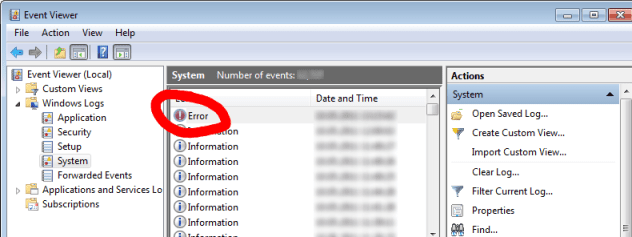
In the left pane of Event Viewer, double click on Windows Logs to expand it, then right click on System and check for errors (see screenshot). If no related errors will be in System, please check Application section.

Please post description of errors occurred within the described time.
 

Attachments

  • 177316d1317333340-explorer-exe-issues-153966d1305130158-any-particular-idea-why-ie9-freezes-when.png
    177316d1317333340-explorer-exe-issues-153966d1305130158-any-particular-idea-why-ie9-freezes-when.png
    66.9 KB · Views: 54

My Computer

Computer type
PC/Desktop
OS
Windows 8.1 ; Windows 7 x86 (Dec2008-Jan2013)
Other Info
"The scale icon at the top right of a post or tutorial is how you can give rep to the member."
Problem connecting to iTunes store.

There is no error code, I could not copy and paste it but here are the words:

A problem caused the program to stop working correctly. Windows will close the program and notify you if a solution is available.

I sent the screen shots of the Event Viewer log as an attachment, let me know if it did not go through and I will paste it in a reply.
Thanks, Don
 

Attachments

My Computer

Computer Manufacturer/Model Number
Dell 530S
OS
Windows 7 Home Premium 64 Bit
CPU
Processor Pentium(R) Dual-Core CPU E5800@ 3.20GHz, 3

My Computer

Computer type
PC/Desktop
OS
Windows 8.1 ; Windows 7 x86 (Dec2008-Jan2013)
Other Info
"The scale icon at the top right of a post or tutorial is how you can give rep to the member."
I have :
Security Update for Microsoft Visual C++ 2005 Service Pack 1 Redistributal Package KB2467175 dated 4/13/11.
Security Update for Microsoft Visual C++ 2008 Service Pack 1 Redistributal Package KB2467174 dated 4/13/11.
Security Update for Microsoft Visual C++ 2005 Service Pack 1 Redistributal Package KB2538242 dated 6/16/11.
Security Update for Microsoft Visual C++ 2008 Service Pack 1 Redistributal Package KB2538243 dated 6/16/11.

Plus hundreds of Definition Updates, Security Updates, Update xxxxx and Cumulative Security Updates.
Are you asking for only C++?
 

My Computer

Computer Manufacturer/Model Number
Dell 530S
OS
Windows 7 Home Premium 64 Bit
CPU
Processor Pentium(R) Dual-Core CPU E5800@ 3.20GHz, 3
Have you tried solution from Apple forum?

Out of these four you might want to install first and third, if issue persists - second and fourth too. But first of all, please try APPLE FORUM SOLUTION.
 

My Computer

Computer type
PC/Desktop
OS
Windows 8.1 ; Windows 7 x86 (Dec2008-Jan2013)
Other Info
"The scale icon at the top right of a post or tutorial is how you can give rep to the member."
I don't know what you mean by installing first and third etc. Did you mean to uninstall the 2005 C++ updates?
I and numerous others have tried Apple Support who offer about 30 different things to troubleshoot, nothing works!
 

My Computer

Computer Manufacturer/Model Number
Dell 530S
OS
Windows 7 Home Premium 64 Bit
CPU
Processor Pentium(R) Dual-Core CPU E5800@ 3.20GHz, 3
By first and third I meant YOUR list in post number 7. But you can install all four of them.
Security Update for Microsoft Visual C++ 2005 Service Pack 1 Redistributal Package KB2467175 dated 4/13/11.
Security Update for Microsoft Visual C++ 2008 Service Pack 1 Redistributal Package KB2467174 dated 4/13/11.
Security Update for Microsoft Visual C++ 2005 Service Pack 1 Redistributal Package KB2538242 dated 6/16/11.
Security Update for Microsoft Visual C++ 2008 Service Pack 1 Redistributal Package KB2538243 dated 6/16/11.


By Apple support I mean the following advice (there was direct link to it):
https://discussions.apple.com/message/16646232#16646232 said:
Make sure you are not connected to the internet and then open itunes. Sync your phone and then enable the internet again. Then stay connected to the internet and close your itunes and reopen it. Bam problem solved.

By WaKaDo
 

My Computer

Computer type
PC/Desktop
OS
Windows 8.1 ; Windows 7 x86 (Dec2008-Jan2013)
Other Info
"The scale icon at the top right of a post or tutorial is how you can give rep to the member."
According to my list they are installed, how do I install them again?
I tried the MaKaDo procedure and it did not work.
 

My Computer

Computer Manufacturer/Model Number
Dell 530S
OS
Windows 7 Home Premium 64 Bit
CPU
Processor Pentium(R) Dual-Core CPU E5800@ 3.20GHz, 3
Free itunes card

this made my day I just got a free iTunes Card Code and it redeemed just fine! If you need a code check out freeitunesforever↔ com
 

My Computer

Computer type
PC/Desktop
OS
XP 32 bit
Back
Top