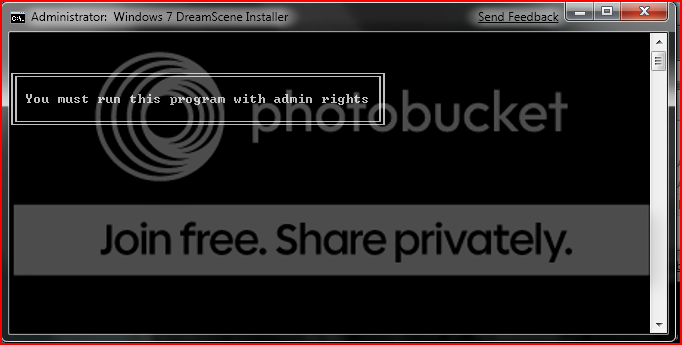
Problem installing DreamScene on 7

deamze

New member
Local time
12:54 PM
Messages
3
Hi There,

I'm trying to install Dream Scene on Windows 7 build 7600. I have Aero enabled.
I run the file which I got from this website: Windows 7 DreamScene | How to Install & Enable DreamScene in Windows 7

But I run it, click ok the to user account window and it says "You must run this progam with admin rights", well I am on the main admin account, have tried right clicking it choosing "run as admin" but still does the same error. Have even tried it in safe mode, but the same error happens.

Any ideas?

Thanks deamze
 

My Computer

OS
Windows 7, build 7600.

My Computer

Computer type
PC/Desktop
Computer Manufacturer/Model Number
Dell XPS 420
OS
Windows 10, Home Clean Install
CPU
Intel Core2 processsor Q8200(2.33Ghz 1333FSB) Quad Core Tech
Motherboard
Dell
Memory
6 gb
Graphics Card(s)
ATI Radeon 256MB HD3650
Sound Card
Intergrated 7.1 Channel Audio
Monitor(s) Displays
Dell SP2009W 20"
Hard Drives
640 GB Serial ATA Hard drive
Cooling
Fan
Keyboard
Dell USB Keyboard
Mouse
Dell Premium Optical USB
Internet Speed
DSL 2.85

1.It is not any system issue only installer issue -wrong done.I also tried a while ago and I had the same problem,the same installer is available on mydigitallife.com.Besides many people report this issue.Please read comments under article:

Reader Comments

I cant run this as administrator. When I clik right button on it and “run as administrator” it starts, next “Press any key” – I press and shows “You must run this program with admin rights” Any ideas?

Written By Dyklu
on January 20th, 2009

Thanks a lot works without a problem. Thanks again.

Written By Monjo
on January 23rd, 2009

Same story here, I even enabled the full administrator account yet it wouldn’t work.

Written By Gareth
on January 23rd, 2009

I’m using build 7000, and this will not work for crap.
Capture.png


Written By Garrett
on January 27th, 2009

Oops, accidentally put the wrong tags in
http://i149.photobucket.com/albums/s72/Spazs_Album/Capture.png

Written By Garrett
on January 27th, 2009

Yep, build 7000 is having some issues with this one. Funny, all other programs has worked without a flaw.

Written By Mika
on February 4th, 2009

… maybe this is only for 32-bit versions, i´ve got a 64-bit for now …


2.I unpacked this installer and it have only one pair dreamscene.dll and dreamscene.dll.mui -this means it work for only one platform: for x32 systems only or for x64 systems only - I suspect it work for only for x64.Somebody report he unpacked installer too,and enabled DreamScene manually
Written By kingdub

Yes, it works on Windows 7, you must unrar the file and run it from command prompt and it installs just fine. Win 7 RC x64
-I'll check it later because I'm tired now.

I suggest rather use my link

Downlodad required files appriopriate for your system-you didn't say what your system architecture x32 or x64.

for x64 http://www.sevenforums.com/attachme...n-7-windows-dreamscenes-windows-7-64-bit-.zip

for x32 http://www.sevenforums.com/attachme...scene-win-7-windows7x86-dreamscene-enable.zip

1: Copy and paste DreamScene.dll to C:\Windows\system32\

2: Copy and paste DreamScene.dll.mui to C:\Windows\system32\en-US\

3: Import Dscene.reg to registry

4: Reboot.

5.To set a dreamscene file as desktop background just right click a dreamscene file and choose set as desktop background


Please note many times DreamScene cause high CPU usage.For these users I suggest buy DeskScapes Stardock.com - Your Edge In Software
-this program rather shouldn't cause high CPU usage
 
Last edited:

My Computer

Computer Manufacturer/Model Number
Custom made
OS
Windows 7 Professional x64 PL
CPU
AMD Athlon 4450e
Motherboard
Giga-Byte GA-MA69G-S3H
Memory
GoodRam DDR2 2x2048MB (FSB 800MHz)
Graphics Card(s)
nVidia GeForce 9600GT (G94-300) 1024 MB
Monitor(s) Displays
SAMSUNG SyncMaster HS2P301688
Hard Drives
Seagate ST3750330AS 750GB
PSU
Corsair 550W
Cooling
AeroCool ExtremeEngine 3T
Ok I quickly read through the comments - This is what I found.

If you're having admin problems with dreamscene do this:

Right click the application/exe and extract using 7 zip or whatever unpacker you have.

Open the extracted folder.

Right click on the file that ends in .cmd (Windows Command Script) and select "run as administrator"

Select "yes" in the window that comes up.

Then follow the prompts on screen and it should work fine.


Remember to always have a good antivirus program installed and up to date when using windows 7. Such as Avast or Kaspersky. Before running the program/application/exe it's also a good idea to scan it with your antivirus, by right clicking and selecting scan with Kaspersky or whatever antivirus you have.


Stay safe Dudes!! [h=3]��[/h]

-------------------------------------------


If you're using x32 (32 bit) and are still having problems then follow Flavius's instructions on how to install the correct application for x32.

Hope this helped!


-------------------------------


1.It is not any system issue only installer issue -wrong done.I also tried a while ago and I had the same problem,the same installer is available on mydigitallife.com.Besides many people report this issue.Please read comments under article:


2.I unpacked this installer and it have only one pair dreamscene.dll and dreamscene.dll.mui -this means it work for only one platform: for x32 systems only or for x64 systems only - I suspect it work for only for x64.Somebody report he unpacked installer too,and enabled DreamScene manually

-I'll check it later because I'm tired now.

I suggest rather use my link

Downlodad required files appriopriate for your system-you didn't say what your system architecture x32 or x64.

for x64 https://www.sevenforums.com/attachm...n-7-windows-dreamscenes-windows-7-64-bit-.zip

for x32 https://www.sevenforums.com/attachm...scene-win-7-windows7x86-dreamscene-enable.zip

1: Copy and paste DreamScene.dll to C:\Windows\system32\

2: Copy and paste DreamScene.dll.mui to C:\Windows\system32\en-US\

3: Import Dscene.reg to registry

4: Reboot.

5.To set a dreamscene file as desktop background just right click a dreamscene file and choose set as desktop background


Please note many times DreamScene cause high CPU usage.For these users I suggest buy DeskScapes Stardock.com - Your Edge In Software
-this program rather shouldn't cause high CPU usage
 

My Computers

System One System Two

  • OS
    Windows 7 Professional x64
  • Computer type
    PC/Desktop
Just run this: Enable DreamScene in Windows 7. Download DreamScene Activator

Check it at VirusTotal... The general consensus is four hits and you toss, but it depends on what you got and your interpretation of the VirusTotal given Relations and Behaviors. See this Wikipedia entry I recently edited to include the U.S. Cyber Command.


Related: Dreamscene launch through cmd how to

Took me a while to figure that all out, but it works. If you play the video I have there, use high resolution in the video options.
 
Last edited:

My Computer

Computer type
PC/Desktop
OS
Windows 7 Ultimate x64
Back
Top