problem installing sony vegas pro 9

pravindabir

New member
iam not able to install sonyvegas pro 9 on my win 7 32 b it..it gives the error make sure administative privileges on lthis system..pls help me..as im very much depended on this software..plllllllllllllllls help needed urgently.thanx in advance
 

My Computer

OS
windows 7 ultimate 32bit
From what you say, it looks like UAC is involved here.

Are you using a standard user account or an administrative one?

If you're using a standard one, your PC may have UAC configured to deny administrative rights to simple users no-matter-what (you may want to read THIS for further information).
If it asks you to authenticate, on the other hand, you'll be asked to provide details (username - password) for an administrative account to proceed.

If it just asks you to confirm to proceed, you'll probably be already running it as administrator, so you'd just hit "Yes" or "Continue" to get past the UAC screen.

By the way, shouldn't this be moved to "software" instead?
 

My Computer

Computer type
PC/Desktop
Computer Manufacturer/Model Number
I've made it myself :)
OS
Windows 10 1703
CPU
intel Core i7 920
Motherboard
ASUS P6T
Memory
12GB DDR3 Corsair XMS3
Graphics Card(s)
Sapphire AMD R9 270X
Sound Card
onboard
Monitor(s) Displays
My living room TV
Screen Resolution
Too high for that card
Hard Drives
If they're that hard, why do they break so often?
PSU
LC Power GP3 650W
Case
CoolerMaster Centurion
Cooling
Still lots of fans :(
Keyboard
Logitech K400r
Mouse
Mice are overrated
Internet Speed
I'd rather use travelling pigeons
+1 on what Julio said.

You may want to install with Higher Administrator Rights. All this means is that you right click on your setup.exe file and click on Run as Admin option and follow the onscreen options.
 

My Computer

Computer type
PC/Desktop
Computer Manufacturer/Model Number
Custom Built... Intel/Nvidia/ASRock
OS
Windows 7 x64 (Ultimate)
CPU
Intel i5-4670K
Motherboard
ASRock Z87 Extreme 6
Memory
8GBs Ripjaws 2133Mhz
Graphics Card(s)
Asus GTX660 (2GBs)
Sound Card
Onboard Realtek HD
Monitor(s) Displays
Acer AL2216W
Screen Resolution
1680 x 1050
Hard Drives
Samsung 840 SSD 120GBs
Samsung 750GB 32MB cache
1.5 TB
PSU
PC Cooling 750w Silencer
Case
Thermaltake Spedo Advance
Cooling
Std Cooler
Keyboard
Logitech G15
Mouse
Logitech G9
Internet Speed
Comcast 20Mbit
Antivirus
Avast
Browser
Firefox
thanx for the reply..i hv tried all possible ways but its giving the same error mssge..
 

My Computer

OS
windows 7 ultimate 32bit
So, assuming that you are using an installer, right-clicking on it and choosing "run as administrator" wouldn't open an UAC prompt asking you for credentials? Just the plain error?

Again, if you're using an administrative account, you may authorize the installer by either clicking on "yes" in the popup that shows when you try to install it (if I don't remember wrong, the popup should have a blue ribbon for being Sony a recognized author), or providing your login password if asked (as an extra layer of security)..
If you are using a simple user account, right-clicking on the executable and selecting "run as administrator" would ask you for the username and the password of an admin (which you would probably have to ask for).
If it doesn't, chances are that the administrator denied you the chance to run elevated processes: so you'd better ask the administrator what to do. He may authorize you to install it, install it for you or maybe just tell you you are not going to have Vegas on that machine.

 

My Computer

Computer type
PC/Desktop
Computer Manufacturer/Model Number
I've made it myself :)
OS
Windows 10 1703
CPU
intel Core i7 920
Motherboard
ASUS P6T
Memory
12GB DDR3 Corsair XMS3
Graphics Card(s)
Sapphire AMD R9 270X
Sound Card
onboard
Monitor(s) Displays
My living room TV
Screen Resolution
Too high for that card
Hard Drives
If they're that hard, why do they break so often?
PSU
LC Power GP3 650W
Case
CoolerMaster Centurion
Cooling
Still lots of fans :(
Keyboard
Logitech K400r
Mouse
Mice are overrated
Internet Speed
I'd rather use travelling pigeons
+1
If you are on Standard User Account, you do not have the ability to install and uninstall programs. Ask your administrator to install Vegas Pro for you. Otherwise, you can't use Vegas without the privileges.

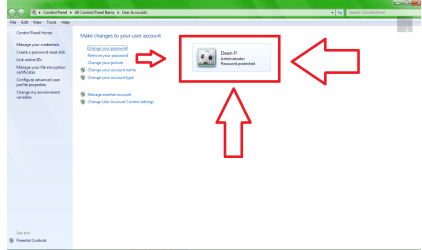
Just like to know if you are on an Administrator Account or Standard User Account.

1. Go to Start
2. Type in User Accounts and hit ENTER

From there, it will say whether you are on an admin or standard user. Like this:
99uj.png
 

My Computer

Computer Manufacturer/Model Number
Macbook Pro 15" (2011) (Matte Version)
OS
Win 7 Pro x64 SP1 OS X Snow Leopard 10.6.7
CPU
Intel Core i7 2820QM 2.3GHz (Quad-Core)
Motherboard
N/A
Memory
8GB 1333 MHz PC3-10600 DDR3 SDRAM
Graphics Card(s)
ATI Radeon HD 6750M (1GB, GDDR5)
Sound Card
N/A
Monitor(s) Displays
1 Display
Screen Resolution
1,680 x 1050 (Matte Screen, Anti-Glare)
Hard Drives
750GB SATA (5400 rpm)
WD My Passport Essential 1TB Portable Hard Drive
PSU
N/A
Case
N/A
Cooling
N/A
Keyboard
Apple Wireless Keyboard
Mouse
Apple Wireless Magic Mouse
Internet Speed
Max - 2.2MB/sec; DSL provided by Telecom NZ
Other Info
MS Office Professional 2010
McAfee Total Protection 2011
On a Laptop Stand (Hand-Built)
Back
Top