Problem on "Home Group" between notebook and desktop

matteogigli

New member
Local time
3:00 PM
Messages
9
Hi to all, I'm new in this forum. :D
My "Home Group" between notebook and desktop don't work correctly.
I'm on seven x64 in every machine and my desktop can see and acces to my notebook, but my notebook can see and don't access to my desktop.
In this image you can see the syntesis of my screenshot:

gruppohome.jpg


From my notebbok I've access to internet connection by my wifi router, but I can't see also the printer of my desktop.
I've just authorized the access to my document and to my printer in "Home Group" configuration.
Could you help me ?
 

My Computer My Computer

At a glance

Windows 7 Ultimate x64
OS
Windows 7 Ultimate x64
First thing to check is to ensure that on your desktop, you have chosen to share your documents etc. so the notbook can access them. Also the other eay around, if you want the desktop to access the notebook - it sounds like this already works?
 

My Computer My Computer

At a glance

Windows 10 Pro x64 ; Xubuntu x64Intel i7 860 @ 2.80 GHz O/C'ed to 4.0GHz16GB Corsair Vengance DDR3 @ 661 MHz Dual Cha...EVGA NVidia GTX 560 1024MB
Computer type
PC/Desktop
Computer Manufacturer/Model Number
Golden Mk. I.4
OS
Windows 10 Pro x64 ; Xubuntu x64
CPU
Intel i7 860 @ 2.80 GHz O/C'ed to 4.0GHz
Motherboard
Gigabyte P55A-UD3R Rev.1. Award BIOS F13
Memory
16GB Corsair Vengance DDR3 @ 661 MHz Dual Channel (9-9-9-24)
Graphics Card(s)
EVGA NVidia GTX 560 1024MB
Sound Card
Realtek Integrated
Monitor(s) Displays
Dual Samsung SyncMaster 2494HS
Screen Resolution
1920*1080 and 1920*1080
Hard Drives
1*Samsung 840 EVO 120GB SSD;
1*OCZ Vertex 2 60GB SSD;
2*Samsung F3 SpinPoint 1TB in RAID0;
1*Samsung F1 SpinPoint 1TB;
2*Western Digital 1TB External USB 3.0
1*Western Digital 500GB External USB 3.0
1*Seagate 500GB External USB 2.0
PSU
Thermaltake ToughPower QFan 750W
Case
Thermaltake Element S VK60001W2Z
Cooling
Corsair H60 Water Cooling, 2*230mm and 2*80mm case fans
Keyboard
Logitech G110
Mouse
Logitech MX518
Thank you Golden, these options were already enabled

senzatitolo1fm.jpg


Any other suggestions ?
 

My Computer My Computer

At a glance

Windows 7 Ultimate x64
OS
Windows 7 Ultimate x64

My Computer My Computer

At a glance

Windows 7 Ult, Windows 8.1 Pro,Q9650-4.275GHz, E8600 4.5GHz, E6750-3.8GHzG.Skill PC2 9600 1200Mhz 5 5 5 15 2TGTX480
Computer type
PC/Desktop
Computer Manufacturer/Model Number
Home built
OS
Windows 7 Ult, Windows 8.1 Pro,
CPU
Q9650-4.275GHz, E8600 4.5GHz, E6750-3.8GHz
Motherboard
Evga 780i FTW
Memory
G.Skill PC2 9600 1200Mhz 5 5 5 15 2T
Graphics Card(s)
GTX480
Sound Card
Asus Xonar D2
Monitor(s) Displays
HannsG
Screen Resolution
1680X1050
Hard Drives
GSkill Phoenix Pro 120GB SSD
PSU
ThermalTake Toughpower 1000Watt modular
Case
ThermalTake XaserV
Cooling
Xigmatek S1283
Keyboard
Logitech G15
Mouse
Logitech G9
Internet Speed
T1
I had the same problem before..but when I shared specific folders, it worked. So try sharing specific folders instead of whole drive.
 

My Computer My Computer

At a glance

windows 7 Professional x64Latitude E42005GBIntegrated 512 (MB) Intel® 4500MHD Graphics M...
Computer Manufacturer/Model Number
Dell
OS
windows 7 Professional x64
CPU
Latitude E4200
Motherboard
Intel Core 2 Duo 1.6 Ghz
Memory
5GB
Graphics Card(s)
Integrated 512 (MB) Intel® 4500MHD Graphics Media Accelerato
Hard Drives
128GB Samsung SSD
Internet Speed
2mbps
Thank you all. I try all of your suggestions but I've always the same problem.
When I try to access from my notebook to my desktop I've a message with Error code: 0x80070035.
I suppose the problem is in the permissions of my network and not in the option of the folders. :cry:
My WiFi router is Negear DG834G.
 

My Computer My Computer

At a glance

Windows 7 Ultimate x64
OS
Windows 7 Ultimate x64
Thank you all. I try all of your suggestions but I've always the same problem.
When I try to access from my notebook to my desktop I've a message with Error code: 0x80070035.
I suppose the problem is in the permissions of my network and not in the option of the folders. :cry:
My WiFi router is Negear DG834G.

In general this error code indicates that something is blocking the connection, usually it's a third party firewall or A/V software.

Do you by any chance have Norton installed on this system? If not which A/V software do you have installed?

If it's Norton, under firewall settings; disable personal firewall.
 

My Computer My Computer

At a glance

Windows 7 Ult, Windows 8.1 Pro,Q9650-4.275GHz, E8600 4.5GHz, E6750-3.8GHzG.Skill PC2 9600 1200Mhz 5 5 5 15 2TGTX480
Computer type
PC/Desktop
Computer Manufacturer/Model Number
Home built
OS
Windows 7 Ult, Windows 8.1 Pro,
CPU
Q9650-4.275GHz, E8600 4.5GHz, E6750-3.8GHz
Motherboard
Evga 780i FTW
Memory
G.Skill PC2 9600 1200Mhz 5 5 5 15 2T
Graphics Card(s)
GTX480
Sound Card
Asus Xonar D2
Monitor(s) Displays
HannsG
Screen Resolution
1680X1050
Hard Drives
GSkill Phoenix Pro 120GB SSD
PSU
ThermalTake Toughpower 1000Watt modular
Case
ThermalTake XaserV
Cooling
Xigmatek S1283
Keyboard
Logitech G15
Mouse
Logitech G9
Internet Speed
T1
I've Avira Antivir free edition in both computers. Norton nerver saw my computers.
I don't know if there is a firewall also in my Netgear DG834G :confused:
 

My Computer My Computer

At a glance

Windows 7 Ultimate x64
OS
Windows 7 Ultimate x64
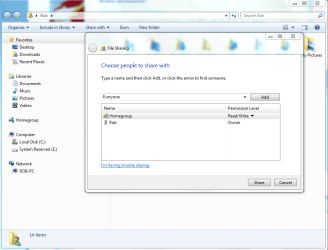
I'd have to uninstall Avira completely because just about any A/V can cause sharing problems. Putting check marks only allows those folders to be shared but you also need to then make sure the permissions are set correctly. It should look like the picture below. :geek:
 

Attachments

  • Share with Everyone.PNG
    Share with Everyone.PNG
    47.4 KB · Views: 29

My Computer My Computer

At a glance

Windows 7 Ult, Windows 8.1 Pro,Q9650-4.275GHz, E8600 4.5GHz, E6750-3.8GHzG.Skill PC2 9600 1200Mhz 5 5 5 15 2TGTX480
Computer type
PC/Desktop
Computer Manufacturer/Model Number
Home built
OS
Windows 7 Ult, Windows 8.1 Pro,
CPU
Q9650-4.275GHz, E8600 4.5GHz, E6750-3.8GHz
Motherboard
Evga 780i FTW
Memory
G.Skill PC2 9600 1200Mhz 5 5 5 15 2T
Graphics Card(s)
GTX480
Sound Card
Asus Xonar D2
Monitor(s) Displays
HannsG
Screen Resolution
1680X1050
Hard Drives
GSkill Phoenix Pro 120GB SSD
PSU
ThermalTake Toughpower 1000Watt modular
Case
ThermalTake XaserV
Cooling
Xigmatek S1283
Keyboard
Logitech G15
Mouse
Logitech G9
Internet Speed
T1
I removed Avira in both computers but no change.
Always Error code: 0x80070035 when I try to acces at my desktop.

Making other test I see that I've the same error code when I try to access at my notebook from my desktop, and notebook is off.

My "Home Group" have permission to read/write in both computers
 

My Computer My Computer

At a glance

Windows 7 Ultimate x64
OS
Windows 7 Ultimate x64
I removed Avira in both computers but no change.
Always Error code: 0x80070035 when I try to acces at my desktop.

Making other test I see that I've the same error code when I try to access at my notebook from my desktop, and notebook is off.

My "Home Group" have permission to read/write in both computers

Try going through this Homegroup trouble shooter, there are quite a few things that can cause this problem.

Ultimate Troubleshooting Guide for Windows 7 HomeGroup Connection Issues
 

My Computer My Computer

At a glance

Windows 7 Ult, Windows 8.1 Pro,Q9650-4.275GHz, E8600 4.5GHz, E6750-3.8GHzG.Skill PC2 9600 1200Mhz 5 5 5 15 2TGTX480
Computer type
PC/Desktop
Computer Manufacturer/Model Number
Home built
OS
Windows 7 Ult, Windows 8.1 Pro,
CPU
Q9650-4.275GHz, E8600 4.5GHz, E6750-3.8GHz
Motherboard
Evga 780i FTW
Memory
G.Skill PC2 9600 1200Mhz 5 5 5 15 2T
Graphics Card(s)
GTX480
Sound Card
Asus Xonar D2
Monitor(s) Displays
HannsG
Screen Resolution
1680X1050
Hard Drives
GSkill Phoenix Pro 120GB SSD
PSU
ThermalTake Toughpower 1000Watt modular
Case
ThermalTake XaserV
Cooling
Xigmatek S1283
Keyboard
Logitech G15
Mouse
Logitech G9
Internet Speed
T1
I checked every parameter of the linked guide.
IPv6 are enabled in both computers, and all of services indicated are runnunig. :cry:
 

My Computer My Computer

At a glance

Windows 7 Ultimate x64
OS
Windows 7 Ultimate x64
I checked every parameter of the linked guide.
IPv6 are enabled in both computers, and all of services indicated are runnunig. :cry:

I've read about this error problem for hours, the only thing I can conclude is that it's caused from A/V software, usually Norton, there are no other consistant resolutions to solve this problem.

Most laptops, in fact all laptops come with tons of bloatware so there is no telling what is left over on your laptop. Most likely something that was installed from the factory is the cause of the problem, look over add-remove programs to make sure there are no trial versions of A/V's on it.

Other than that, I can suggest doing a reinstall with a clean Win7 CD.

If anyone has a better fix for this problem I'd love to hear it. :confused:
 

My Computer My Computer

At a glance

Windows 7 Ult, Windows 8.1 Pro,Q9650-4.275GHz, E8600 4.5GHz, E6750-3.8GHzG.Skill PC2 9600 1200Mhz 5 5 5 15 2TGTX480
Computer type
PC/Desktop
Computer Manufacturer/Model Number
Home built
OS
Windows 7 Ult, Windows 8.1 Pro,
CPU
Q9650-4.275GHz, E8600 4.5GHz, E6750-3.8GHz
Motherboard
Evga 780i FTW
Memory
G.Skill PC2 9600 1200Mhz 5 5 5 15 2T
Graphics Card(s)
GTX480
Sound Card
Asus Xonar D2
Monitor(s) Displays
HannsG
Screen Resolution
1680X1050
Hard Drives
GSkill Phoenix Pro 120GB SSD
PSU
ThermalTake Toughpower 1000Watt modular
Case
ThermalTake XaserV
Cooling
Xigmatek S1283
Keyboard
Logitech G15
Mouse
Logitech G9
Internet Speed
T1
this may work for you..right click on the folder(you want to share)->share with->specific people->add "everyone"-> give read/write permissions to it-> now check.. I think it will surely work..
ps. it has nothing to do with anti virus. I have Norton and it works for me the way i have describe above.
 

My Computer My Computer

At a glance

windows 7 Professional x64Latitude E42005GBIntegrated 512 (MB) Intel® 4500MHD Graphics M...
Computer Manufacturer/Model Number
Dell
OS
windows 7 Professional x64
CPU
Latitude E4200
Motherboard
Intel Core 2 Duo 1.6 Ghz
Memory
5GB
Graphics Card(s)
Integrated 512 (MB) Intel® 4500MHD Graphics Media Accelerato
Hard Drives
128GB Samsung SSD
Internet Speed
2mbps
Thank you again.
I tried with Norton Removal Tool and it said that all Norton product are completly renoved.
I tried also to autorize everyone to read/write in both computers.
Always same problem :mad:

"ipconfig /all" of my notebook are very strange:

Suffisso DNS specifico per connessione:
Descrizione . . . . . . . . . . . . . : Scheda Microsoft 6to4 #518
Indirizzo fisico. . . . . . . . . . . : 00-00-00-00-00-00-00-E0
DHCP abilitato. . . . . . . . . . . . : No
Configurazione automatica abilitata : Sì

Scheda Tunnel Connessione alla rete locale (LAN)* 593:
Stato supporto. . . . . . . . . . . . : Supporto disconnesso
Suffisso DNS specifico per connessione:
Descrizione . . . . . . . . . . . . . : Scheda Microsoft 6to4 #520
Indirizzo fisico. . . . . . . . . . . : 00-00-00-00-00-00-00-E0
DHCP abilitato. . . . . . . . . . . . : No
Configurazione automatica abilitata : Sì
Scheda Tunnel Connessione alla rete locale (LAN)* 598:
Stato supporto. . . . . . . . . . . . : Supporto disconnesso
Suffisso DNS specifico per connessione:
Descrizione . . . . . . . . . . . . . : Scheda Microsoft 6to4 #524
Indirizzo fisico. . . . . . . . . . . : 00-00-00-00-00-00-00-E0
DHCP abilitato. . . . . . . . . . . . : No
Configurazione automatica abilitata : Sì
Scheda Tunnel Connessione alla rete locale (LAN)* 595:
Stato supporto. . . . . . . . . . . . : Supporto disconnesso
Suffisso DNS specifico per connessione:
Descrizione . . . . . . . . . . . . . : Scheda Microsoft 6to4 #521
Indirizzo fisico. . . . . . . . . . . : 00-00-00-00-00-00-00-E0
DHCP abilitato. . . . . . . . . . . . : No
Configurazione automatica abilitata : Sì
Scheda Tunnel Connessione alla rete locale (LAN)* 596:
Stato supporto. . . . . . . . . . . . : Supporto disconnesso
Suffisso DNS specifico per connessione:
Descrizione . . . . . . . . . . . . . : Scheda Microsoft 6to4 #523
Indirizzo fisico. . . . . . . . . . . : 00-00-00-00-00-00-00-E0
DHCP abilitato. . . . . . . . . . . . : No
Configurazione automatica abilitata : Sì
Scheda Tunnel Connessione alla rete locale (LAN)* 597:
Stato supporto. . . . . . . . . . . . : Supporto disconnesso
Suffisso DNS specifico per connessione:
Descrizione . . . . . . . . . . . . . : Scheda Microsoft 6to4 #522
Indirizzo fisico. . . . . . . . . . . : 00-00-00-00-00-00-00-E0
DHCP abilitato. . . . . . . . . . . . : No
Configurazione automatica abilitata : Sì
Scheda Tunnel Connessione alla rete locale (LAN)* 600:
Stato supporto. . . . . . . . . . . . : Supporto disconnesso
Suffisso DNS specifico per connessione:
Descrizione . . . . . . . . . . . . . : Scheda Microsoft 6to4 #525
Indirizzo fisico. . . . . . . . . . . : 00-00-00-00-00-00-00-E0
DHCP abilitato. . . . . . . . . . . . : No
Configurazione automatica abilitata : Sì
Scheda Tunnel Connessione alla rete locale (LAN)* 601:
Stato supporto. . . . . . . . . . . . : Supporto disconnesso
Suffisso DNS specifico per connessione:
Descrizione . . . . . . . . . . . . . : Scheda Microsoft 6to4 #528
Indirizzo fisico. . . . . . . . . . . : 00-00-00-00-00-00-00-E0
DHCP abilitato. . . . . . . . . . . . : No
Configurazione automatica abilitata : Sì
Scheda Tunnel Connessione alla rete locale (LAN)* 602:
Stato supporto. . . . . . . . . . . . : Supporto disconnesso
Suffisso DNS specifico per connessione:
Descrizione . . . . . . . . . . . . . : Scheda Microsoft 6to4 #527
Indirizzo fisico. . . . . . . . . . . : 00-00-00-00-00-00-00-E0
DHCP abilitato. . . . . . . . . . . . : No
Configurazione automatica abilitata : Sì
Scheda Tunnel Connessione alla rete locale (LAN)* 604:
Stato supporto. . . . . . . . . . . . : Supporto disconnesso
Suffisso DNS specifico per connessione:
Descrizione . . . . . . . . . . . . . : Scheda Microsoft 6to4 #530
Indirizzo fisico. . . . . . . . . . . : 00-00-00-00-00-00-00-E0
DHCP abilitato. . . . . . . . . . . . : No
Configurazione automatica abilitata : Sì
Scheda Tunnel Connessione alla rete locale (LAN)* 606:
Stato supporto. . . . . . . . . . . . : Supporto disconnesso
Suffisso DNS specifico per connessione:
Descrizione . . . . . . . . . . . . . : Scheda Microsoft 6to4 #532
Indirizzo fisico. . . . . . . . . . . : 00-00-00-00-00-00-00-E0
DHCP abilitato. . . . . . . . . . . . : No
Configurazione automatica abilitata : Sì
Scheda Tunnel Connessione alla rete locale (LAN)* 605:
Stato supporto. . . . . . . . . . . . : Supporto disconnesso
Suffisso DNS specifico per connessione:
Descrizione . . . . . . . . . . . . . : Scheda Microsoft 6to4 #529
Indirizzo fisico. . . . . . . . . . . : 00-00-00-00-00-00-00-E0
DHCP abilitato. . . . . . . . . . . . : No
Configurazione automatica abilitata : Sì
Scheda Tunnel Connessione alla rete locale (LAN)* 608:
Stato supporto. . . . . . . . . . . . : Supporto disconnesso
Suffisso DNS specifico per connessione:
Descrizione . . . . . . . . . . . . . : Scheda Microsoft 6to4 #533
Indirizzo fisico. . . . . . . . . . . : 00-00-00-00-00-00-00-E0
DHCP abilitato. . . . . . . . . . . . : No
Configurazione automatica abilitata : Sì
Scheda Tunnel Connessione alla rete locale (LAN)* 607:
Stato supporto. . . . . . . . . . . . : Supporto disconnesso
Suffisso DNS specifico per connessione:
Descrizione . . . . . . . . . . . . . : Scheda Microsoft 6to4 #531
Indirizzo fisico. . . . . . . . . . . : 00-00-00-00-00-00-00-E0
DHCP abilitato. . . . . . . . . . . . : No
Configurazione automatica abilitata : Sì
Scheda Tunnel Connessione alla rete locale (LAN)* 610:
Stato supporto. . . . . . . . . . . . : Supporto disconnesso
Suffisso DNS specifico per connessione:
Descrizione . . . . . . . . . . . . . : Scheda Microsoft 6to4 #535
Indirizzo fisico. . . . . . . . . . . : 00-00-00-00-00-00-00-E0
DHCP abilitato. . . . . . . . . . . . : No
Configurazione automatica abilitata : Sì
Scheda Tunnel Connessione alla rete locale (LAN)* 612:
Stato supporto. . . . . . . . . . . . : Supporto disconnesso
Suffisso DNS specifico per connessione:
Descrizione . . . . . . . . . . . . . : Scheda Microsoft 6to4 #536
Indirizzo fisico. . . . . . . . . . . : 00-00-00-00-00-00-00-E0
DHCP abilitato. . . . . . . . . . . . : No
Configurazione automatica abilitata : Sì
Scheda Tunnel Connessione alla rete locale (LAN)* 613:
Stato supporto. . . . . . . . . . . . : Supporto disconnesso
Suffisso DNS specifico per connessione:
Descrizione . . . . . . . . . . . . . : Scheda Microsoft 6to4 #539
Indirizzo fisico. . . . . . . . . . . : 00-00-00-00-00-00-00-E0
DHCP abilitato. . . . . . . . . . . . : No
Configurazione automatica abilitata : Sì
Scheda Tunnel Connessione alla rete locale (LAN)* 609:
Stato supporto. . . . . . . . . . . . : Supporto disconnesso
Suffisso DNS specifico per connessione:
Descrizione . . . . . . . . . . . . . : Scheda Microsoft 6to4 #534
Indirizzo fisico. . . . . . . . . . . : 00-00-00-00-00-00-00-E0
DHCP abilitato. . . . . . . . . . . . : No
Configurazione automatica abilitata : Sì
Scheda Tunnel Connessione alla rete locale (LAN)* 620:
Stato supporto. . . . . . . . . . . . : Supporto disconnesso
Suffisso DNS specifico per connessione:
Descrizione . . . . . . . . . . . . . : Scheda Microsoft 6to4 #542
Indirizzo fisico. . . . . . . . . . . : 00-00-00-00-00-00-00-E0
DHCP abilitato. . . . . . . . . . . . : No
Configurazione automatica abilitata : Sì
Scheda Tunnel Connessione alla rete locale (LAN)* 618:
Stato supporto. . . . . . . . . . . . : Supporto disconnesso
Suffisso DNS specifico per connessione:
Descrizione . . . . . . . . . . . . . : Scheda Microsoft 6to4 #541
Indirizzo fisico. . . . . . . . . . . : 00-00-00-00-00-00-00-E0
DHCP abilitato. . . . . . . . . . . . : No
Configurazione automatica abilitata : Sì
Scheda Tunnel Connessione alla rete locale (LAN)* 615:
Stato supporto. . . . . . . . . . . . : Supporto disconnesso
Suffisso DNS specifico per connessione:
Descrizione . . . . . . . . . . . . . : Scheda Microsoft 6to4 #537
Indirizzo fisico. . . . . . . . . . . : 00-00-00-00-00-00-00-E0
DHCP abilitato. . . . . . . . . . . . : No
Configurazione automatica abilitata : Sì
Scheda Tunnel Connessione alla rete locale (LAN)* 616:
Stato supporto. . . . . . . . . . . . : Supporto disconnesso
Suffisso DNS specifico per connessione:
Descrizione . . . . . . . . . . . . . : Scheda Microsoft 6to4 #538
Indirizzo fisico. . . . . . . . . . . : 00-00-00-00-00-00-00-E0
DHCP abilitato. . . . . . . . . . . . : No
Configurazione automatica abilitata : Sì
Scheda Tunnel Connessione alla rete locale (LAN)* 614:
Stato supporto. . . . . . . . . . . . : Supporto disconnesso
Suffisso DNS specifico per connessione:
Descrizione . . . . . . . . . . . . . : Scheda Microsoft 6to4 #540
Indirizzo fisico. . . . . . . . . . . : 00-00-00-00-00-00-00-E0
DHCP abilitato. . . . . . . . . . . . : No
Configurazione automatica abilitata : Sì
Scheda Tunnel Connessione alla rete locale (LAN)* 621:
Stato supporto. . . . . . . . . . . . : Supporto disconnesso
Suffisso DNS specifico per connessione:
Descrizione . . . . . . . . . . . . . : Scheda Microsoft 6to4 #544
Indirizzo fisico. . . . . . . . . . . : 00-00-00-00-00-00-00-E0
DHCP abilitato. . . . . . . . . . . . : No
Configurazione automatica abilitata : Sì
Scheda Tunnel Connessione alla rete locale (LAN)* 622:
Stato supporto. . . . . . . . . . . . : Supporto disconnesso
Suffisso DNS specifico per connessione:
Descrizione . . . . . . . . . . . . . : Scheda Microsoft 6to4 #543
Indirizzo fisico. . . . . . . . . . . : 00-00-00-00-00-00-00-E0
DHCP abilitato. . . . . . . . . . . . : No
Configurazione automatica abilitata : Sì
Scheda Tunnel Connessione alla rete locale (LAN)* 623:
Stato supporto. . . . . . . . . . . . : Supporto disconnesso
Suffisso DNS specifico per connessione:
Descrizione . . . . . . . . . . . . . : Scheda Microsoft 6to4 #545
Indirizzo fisico. . . . . . . . . . . : 00-00-00-00-00-00-00-E0
DHCP abilitato. . . . . . . . . . . . : No
Configurazione automatica abilitata : Sì
Scheda Tunnel Connessione alla rete locale (LAN)* 624:
Stato supporto. . . . . . . . . . . . : Supporto disconnesso
Suffisso DNS specifico per connessione:
Descrizione . . . . . . . . . . . . . : Scheda Microsoft 6to4 #546
Indirizzo fisico. . . . . . . . . . . : 00-00-00-00-00-00-00-E0
DHCP abilitato. . . . . . . . . . . . : No
Configurazione automatica abilitata : Sì
Scheda Tunnel Connessione alla rete locale (LAN)* 625:
Stato supporto. . . . . . . . . . . . : Supporto disconnesso
Suffisso DNS specifico per connessione:
Descrizione . . . . . . . . . . . . . : Scheda Microsoft 6to4 #548
Indirizzo fisico. . . . . . . . . . . : 00-00-00-00-00-00-00-E0
DHCP abilitato. . . . . . . . . . . . : No
Configurazione automatica abilitata : Sì
Scheda Tunnel Connessione alla rete locale (LAN)* 626:
Stato supporto. . . . . . . . . . . . : Supporto disconnesso
Suffisso DNS specifico per connessione:
Descrizione . . . . . . . . . . . . . : Scheda Microsoft 6to4 #547
Indirizzo fisico. . . . . . . . . . . : 00-00-00-00-00-00-00-E0
DHCP abilitato. . . . . . . . . . . . : No
Configurazione automatica abilitata : Sì
Scheda Tunnel Connessione alla rete locale (LAN)* 628:
Suffisso DNS specifico per connessione:
Descrizione . . . . . . . . . . . . . : Scheda Microsoft Teredo Tunneling
Indirizzo fisico. . . . . . . . . . . : 00-00-00-00-00-00-00-E0
DHCP abilitato. . . . . . . . . . . . : No
Configurazione automatica abilitata : Sì
Indirizzo IPv6 . . . . . . . . . . . . . . . . . : 2001:0:4137:9e76:28ab:3add
:3f57:fffd(Preferenziale)
Indirizzo IPv6 locale rispetto al collegamento . : fe80::28ab:3add:3f57:fffd%
642(Preferenziale)
Gateway predefinito . . . . . . . . . : ::
NetBIOS su TCP/IP . . . . . . . . . . : Disattivato
Scheda Tunnel isatap.{D4523D4B-5B1C-46B0-BCB4-DADC90C2FB42}:
Stato supporto. . . . . . . . . . . . : Supporto disconnesso
Suffisso DNS specifico per connessione:
Descrizione . . . . . . . . . . . . . : Microsoft ISATAP Adapter #6
Indirizzo fisico. . . . . . . . . . . : 00-00-00-00-00-00-00-E0
DHCP abilitato. . . . . . . . . . . . : No
Configurazione automatica abilitata : Sì
Scheda Tunnel Connessione alla rete locale (LAN)* 629:
Stato supporto. . . . . . . . . . . . : Supporto disconnesso
Suffisso DNS specifico per connessione:
Descrizione . . . . . . . . . . . . . : Scheda Microsoft 6to4 #550
Indirizzo fisico. . . . . . . . . . . : 00-00-00-00-00-00-00-E0
DHCP abilitato. . . . . . . . . . . . : No
Configurazione automatica abilitata : Sì
Scheda Tunnel Connessione alla rete locale (LAN)* 630:
Stato supporto. . . . . . . . . . . . : Supporto disconnesso
Suffisso DNS specifico per connessione:
Descrizione . . . . . . . . . . . . . : Scheda Microsoft 6to4 #549
Indirizzo fisico. . . . . . . . . . . : 00-00-00-00-00-00-00-E0
DHCP abilitato. . . . . . . . . . . . : No
Configurazione automatica abilitata : Sì
 

My Computer My Computer

At a glance

Windows 7 Ultimate x64
OS
Windows 7 Ultimate x64
Wow, no wonder it's not working. Your symptoms aren't typical for a tunnel adaptor problem, usually you wouldn't even have a working connection with that many.

Ok now that we know what the problem is, here is how to fix it.

You should run this tunnel adaptor remover first. Too many of these indicates a driver problem and it will also ruin your connection if there are too many of those tunnel adaptors. This problem happens all the time but usually there is no connection at all.

Click and save the zip file, then run the zip file and reboot. This will get rid of all those extra tunnel adaptors.

Reboot all machines after running the zip file then check to see if you can share files.

You will definately need to find a better network driver for your laptop or this problem will come up again and again.

Just use Tunnel Adapter – Microsoft 6to4 adapter Remover
http://www.sordum.com/deneme/6to4/do...to4remover.zip
 

My Computer My Computer

At a glance

Windows 7 Ult, Windows 8.1 Pro,Q9650-4.275GHz, E8600 4.5GHz, E6750-3.8GHzG.Skill PC2 9600 1200Mhz 5 5 5 15 2TGTX480
Computer type
PC/Desktop
Computer Manufacturer/Model Number
Home built
OS
Windows 7 Ult, Windows 8.1 Pro,
CPU
Q9650-4.275GHz, E8600 4.5GHz, E6750-3.8GHz
Motherboard
Evga 780i FTW
Memory
G.Skill PC2 9600 1200Mhz 5 5 5 15 2T
Graphics Card(s)
GTX480
Sound Card
Asus Xonar D2
Monitor(s) Displays
HannsG
Screen Resolution
1680X1050
Hard Drives
GSkill Phoenix Pro 120GB SSD
PSU
ThermalTake Toughpower 1000Watt modular
Case
ThermalTake XaserV
Cooling
Xigmatek S1283
Keyboard
Logitech G15
Mouse
Logitech G9
Internet Speed
T1
Well, I've run 6to4 in both computers and restat it. Now "ipconfig /all" of my notebook and desktop are:

Microsoft Windows [Versione 6.1.7600]
Copyright (c) 2009 Microsoft Corporation. Tutti i diritti riservati.
C:\Users\........>ipconfig /all
Configurazione IP di Windows
Nome host . . . . . . . . . . . . . . : ........-PC
Suffisso DNS primario . . . . . . . . :
Tipo nodo . . . . . . . . . . . . . . : Ibrido
Routing IP abilitato. . . . . . . . . : No
Proxy WINS abilitato . . . . . . . . : No
Scheda LAN wireless Connessione rete wireless:
Suffisso DNS specifico per connessione:
Descrizione . . . . . . . . . . . . . : Atheros AR5B93 Wireless Network Adapt
er
Indirizzo fisico. . . . . . . . . . . : 70-1A-04-A7-32-AA
DHCP abilitato. . . . . . . . . . . . : Sì
Configurazione automatica abilitata : Sì
Indirizzo IPv4. . . . . . . . . . . . : .............(Preferenziale)
Subnet mask . . . . . . . . . . . . . : 255.255.255.0
Lease ottenuto. . . . . . . . . . . . : domenica 26 dicembre 2010 19:01:40
Scadenza lease . . . . . . . . . . . : lunedì 27 dicembre 2010 21:04:08
Gateway predefinito . . . . . . . . . : .........
Server DHCP . . . . . . . . . . . . . : ...........
Server DNS . . . . . . . . . . . . . : ..........0.1
NetBIOS su TCP/IP . . . . . . . . . . : Attivato
Scheda Ethernet Connessione alla rete locale (LAN):
Stato supporto. . . . . . . . . . . . : Supporto disconnesso
Suffisso DNS specifico per connessione:
Descrizione . . . . . . . . . . . . . : Broadcom NetLink (TM) Gigabit Etherne
t
Indirizzo fisico. . . . . . . . . . . : 00-26-2D-78-6B-C0
DHCP abilitato. . . . . . . . . . . . : Sì
Configurazione automatica abilitata : Sì
__________________________________________________________

Microsoft Windows [Versione 6.1.7600]
Copyright (c) 2009 Microsoft Corporation. Tutti i diritti riservati.
C:\Users\.......>ipconfig /all
Configurazione IP di Windows
Nome host . . . . . . . . . . . . . . : .......-PC
Suffisso DNS primario . . . . . . . . :
Tipo nodo . . . . . . . . . . . . . . : Ibrido
Routing IP abilitato. . . . . . . . . : No
Proxy WINS abilitato . . . . . . . . : No
Scheda Ethernet Connessione alla rete locale (LAN):
Suffisso DNS specifico per connessione:
Descrizione . . . . . . . . . . . . . : Realtek PCIe GBE Family Controller
Indirizzo fisico. . . . . . . . . . . : 00-1D-7D-05-60-0B
DHCP abilitato. . . . . . . . . . . . : Sì
Configurazione automatica abilitata : Sì
Indirizzo IPv4. . . . . . . . . . . . : ........0.3(Preferenziale)
Subnet mask . . . . . . . . . . . . . : ..........0
Lease ottenuto. . . . . . . . . . . . : domenica 26 dicembre 2010 20.17.42
Scadenza lease . . . . . . . . . . . : lunedì 27 dicembre 2010 20.17.42
Gateway predefinito . . . . . . . . . : ........0.1
Server DHCP . . . . . . . . . . . . . : ........0.1
Server DNS . . . . . . . . . . . . . : .........0.1
NetBIOS su TCP/IP . . . . . . . . . . : Attivato
_____________________________________________________

My network had always the same problem, and now I've also another problem !!!
My home group don't work, and when I try to create a new home group, I've error on IPv6.
IPv6 isn't able to network connection.

http://img132.imageshack.us/img132/6179/senzatitolo1bqd.jpg
 
Last edited:

My Computer My Computer

At a glance

Windows 7 Ultimate x64
OS
Windows 7 Ultimate x64
SOLVED SOLVED SOLVED !!!!!!!!!!! :D :party: :D

using this method:

Step 1:
Temporarily disable Firewall and third party antivirus program on the computer for a test.
Step 2:
Verify relevant services are turned on.
1. Click "Start", type "services.msc" (without quotation marks) in Search Bar and press Enter.
2. If you are prompted for an administrator password or confirmation, type your password, or click Continue.
3. Right click the "Peer Networking Grouping" service and choose Properties.
4. Please check if the service is started; if not, please click the Start button and see if it works.
5. You may also choose Automatic next to Startup type.
6. Click OK.
7. Please repeat the above steps with another service: PNRP Machine Name Publication Service.
Step 3:
Modify IPv6 registry key to enable IPV6
Important: This section, method, or task contains steps that tell you how to modify the registry. However, serious problems might occur if you modify the registry incorrectly. Therefore, make sure that you follow these steps carefully. For added protection, back up the registry before you modify it. Then, you can restore the registry if a problem occurs. For more information about how to back up and restore the registry, click the following article number to view the article in the Microsoft Knowledge Base: 322756
1. Click Start, type regedit in Search Bar, and then click regedit in the Programs list.
2. If you are prompted for an administrator password or confirmation, type your password or click Continue.
3. Locate and then click the following registry subkey:
HKEY_LOCAL_MACHINE\SYSTEM\CurrentControlSet\services\TCPIP6\Parameters
4. Check whether the "DisabledComponents" registry key exists. If so, let's move on the next steps.
5. Double click the "DisabledComponents" registry key and modify the value to 0.
(If the key doesn't exist, please create the key above and assign the value 0)
6. Exit Registry Editor, and then restart the computer.
 

My Computer My Computer

At a glance

Windows 7 Ultimate x64
OS
Windows 7 Ultimate x64
Back
Top