
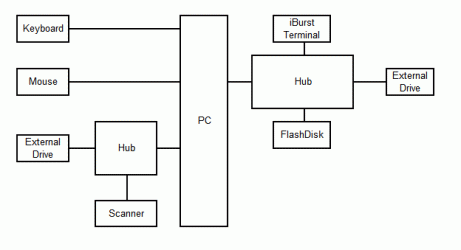
Attachment "Layout" shows how my USB ports are used.
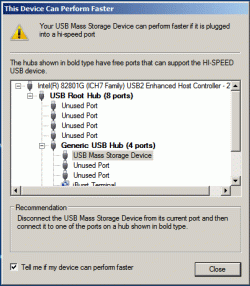
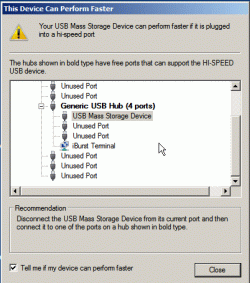
Attachments "A" and "B" show the message I get when I plug in an external drive.
So my external drives are connected to USB1 ports? Read/Write tests seem to verify this.
But the message doesn't seem to relate in any way to the way devices are actually plugged in.
Obviously I want the FlashDrive and the external drives on USB2. The keyboard, mouse, scanner and iBurst Terminal can be USB1 - my internet is 1MB/s.
Any way I can work out what is actually going on?
Attachments "A" and "B" show the message I get when I plug in an external drive.
So my external drives are connected to USB1 ports? Read/Write tests seem to verify this.
But the message doesn't seem to relate in any way to the way devices are actually plugged in.
Obviously I want the FlashDrive and the external drives on USB2. The keyboard, mouse, scanner and iBurst Terminal can be USB1 - my internet is 1MB/s.
Any way I can work out what is actually going on?
Attachments
My Computer
- Computer type
- PC/Desktop
- Computer Manufacturer/Model Number
- Built-up
- OS
- Windows 7 Professional SP1 64-bit
- CPU
- Intel i3-3220 3.3GHz
- Motherboard
- Gigabyte
- Memory
- 4GB
- Graphics Card(s)
- NVIDIA GeForce GTX650 1GB
- Sound Card
- On-board Realtek
- Monitor(s) Displays
- LGL1719S
- Screen Resolution
- 1280 x 1024
- Hard Drives
- Samsung HD321HJ, Samsung HD103SI, Seagate ST2000DL, Seagate ST3100524AS
- PSU
- 450W
- Case
- AOpen
- Cooling
- Case fan, CPU fan, PSU fanf.
- Keyboard
- Microsoft
- Mouse
- AOpen
- Internet Speed
- 1Mb/s
- Antivirus
- MSSE
- Browser
- Firefox

