Solved Problem with installing Windows Virtual PC

mj2000

New member
Member
Local time
12:52 AM
Messages
59
Location
Iran
Hi all

I am running windows 7 sp1 on Dell ispiron 1520

I downloaded Windows Virtual PC and Windows xp mode last week from this page ;

Download Windows XP Mode

I installed them both with no problems and i used even the xp mode.

But due to a matter i had to unistall it.

This time that i want to install ti again, xp mode installs correctly but Windows Virtual PC does not and gives the eror : The update is not applicable to your computer !

I wonder because i had installed it just few days ago with no problem.

pls help, thanks !


My Computer

Computer type
Laptop
Computer Manufacturer/Model Number
Dell Inspiron 1520
OS
Windows 7 Starter SP1 32bit
Antivirus
Eser Smart Security
Browser
Firefox
And by the way, when i install windows xp mode for the first time, it runs automatically and i can use it,

but when i close it, there is no item for it or for Windows Virtual PC i start Menu and i can t run it again.
 

My Computer

Computer type
Laptop
Computer Manufacturer/Model Number
Dell Inspiron 1520
OS
Windows 7 Starter SP1 32bit
Antivirus
Eser Smart Security
Browser
Firefox
You will receive the "Update is not applicable to your computer" warning if you try to install the wrong version of Virtual PC.

You are using a 32-bit version of Windows 7 so you need to install the 32-bit version of Virtual PC, not the 64-bit version.
 

My Computer

Computer Manufacturer/Model Number
HP Pavilion Elite 495UK
OS
Windows 7 Ultimate SP1 64-Bit
CPU
Intel Core i7 870 @ 2.93GHz
Motherboard
MSI 2A9C (CPU1)
Memory
8Gb Dual-Channel DDR3 @ 664MHz
Graphics Card(s)
nVidia GeForce GTX 460 1024MB dedicated RAM
Sound Card
Realtek HD Audio
Monitor(s) Displays
HP2310i
Screen Resolution
1920 x 1080
Hard Drives
1x1954GB Hitachi HDS22020ALA 330 (RAID), 1x1954GB Hitachi External for backup and storage
PSU
460W
Case
HP Elite
Cooling
Air cooled
Keyboard
Logitech K750 solar-powered keyboard
Mouse
Logitech Wireless M180 mouse
Internet Speed
2Mb
Other Info
Pure Avanti Flow Internet Radio with iPod Dock, 64Gb iPod, HP USB Speakers, Sony MDR-V500 Headphones, Sony Vaio F-Series Laptop
You will receive the "Update is not applicable to your computer" warning if you try to install the wrong version of Virtual PC.

You are using a 32-bit version of Windows 7 so you need to install the 32-bit version of Virtual PC, not the 64-bit version.

Yes,i installed the 32-bit version and as i said, i had installed it with no problems last week, but this time only it gives this eror.

And also i downloaded it again from another site, and this time it says, that the update is already installed on your copmputer.

As i said, xp mode program was installed corectly and i used it for the first time but after closing it, there is no items for it in start menu to run it again.
 

My Computer

Computer type
Laptop
Computer Manufacturer/Model Number
Dell Inspiron 1520
OS
Windows 7 Starter SP1 32bit
Antivirus
Eser Smart Security
Browser
Firefox
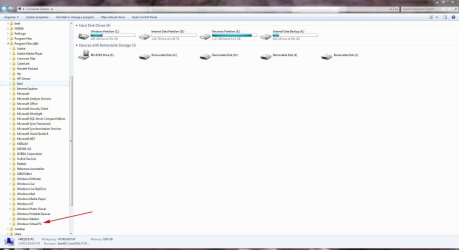
OK, in that case, Virtual PC is still installed. Just the Start folder shortcut is missing.

Have a look under C:\Program Files (x86).

VirtualPC.JPG
 

My Computer

Computer Manufacturer/Model Number
HP Pavilion Elite 495UK
OS
Windows 7 Ultimate SP1 64-Bit
CPU
Intel Core i7 870 @ 2.93GHz
Motherboard
MSI 2A9C (CPU1)
Memory
8Gb Dual-Channel DDR3 @ 664MHz
Graphics Card(s)
nVidia GeForce GTX 460 1024MB dedicated RAM
Sound Card
Realtek HD Audio
Monitor(s) Displays
HP2310i
Screen Resolution
1920 x 1080
Hard Drives
1x1954GB Hitachi HDS22020ALA 330 (RAID), 1x1954GB Hitachi External for backup and storage
PSU
460W
Case
HP Elite
Cooling
Air cooled
Keyboard
Logitech K750 solar-powered keyboard
Mouse
Logitech Wireless M180 mouse
Internet Speed
2Mb
Other Info
Pure Avanti Flow Internet Radio with iPod Dock, 64Gb iPod, HP USB Speakers, Sony MDR-V500 Headphones, Sony Vaio F-Series Laptop
OK, in that case, Virtual PC is still installed. Just the Start folder shortcut is missing.

Have a look under C:\Program Files (x86).

View attachment 183595

In that folder there is just a folder named " Integration Components " and in that folder there are just two image files named " IntegrationComponents " and " Precompact ".

How should i run it in this case ?
 

My Computer

Computer type
Laptop
Computer Manufacturer/Model Number
Dell Inspiron 1520
OS
Windows 7 Starter SP1 32bit
Antivirus
Eser Smart Security
Browser
Firefox
My computer shows the same.

You say you uninstalled Virtual PC. How did you uninstall it? I checked in the list of installed programs in Control Panel and only see XP Mode listed.

If Virtual PC won't install again, I can only suggest a system restore to a point before you installed it the first time.
 

My Computer

Computer Manufacturer/Model Number
HP Pavilion Elite 495UK
OS
Windows 7 Ultimate SP1 64-Bit
CPU
Intel Core i7 870 @ 2.93GHz
Motherboard
MSI 2A9C (CPU1)
Memory
8Gb Dual-Channel DDR3 @ 664MHz
Graphics Card(s)
nVidia GeForce GTX 460 1024MB dedicated RAM
Sound Card
Realtek HD Audio
Monitor(s) Displays
HP2310i
Screen Resolution
1920 x 1080
Hard Drives
1x1954GB Hitachi HDS22020ALA 330 (RAID), 1x1954GB Hitachi External for backup and storage
PSU
460W
Case
HP Elite
Cooling
Air cooled
Keyboard
Logitech K750 solar-powered keyboard
Mouse
Logitech Wireless M180 mouse
Internet Speed
2Mb
Other Info
Pure Avanti Flow Internet Radio with iPod Dock, 64Gb iPod, HP USB Speakers, Sony MDR-V500 Headphones, Sony Vaio F-Series Laptop
My computer shows the same.

You say you uninstalled Virtual PC. How did you uninstall it? I checked in the list of installed programs in Control Panel and only see XP Mode listed.

If Virtual PC won't install again, I can only suggest a system restore to a point before you installed it the first time.

I only unistalled XP Mode because as you said there was no Virtual PC listed.

sorry, i have turned off system store !
 

My Computer

Computer type
Laptop
Computer Manufacturer/Model Number
Dell Inspiron 1520
OS
Windows 7 Starter SP1 32bit
Antivirus
Eser Smart Security
Browser
Firefox
Sorry about the delay.

I should have realised earlier, but Virtual PC is classed as a Windows Update.

If you go to Uninstall a Program in your Control Panel and click View Installed Updates you'll find it there.

It'll be shown as Windows Virtual PC KB958559, just select it and uninstall it.

Reboot your computer and you should then be able to reinstall it if you want to.
 

My Computer

Computer Manufacturer/Model Number
HP Pavilion Elite 495UK
OS
Windows 7 Ultimate SP1 64-Bit
CPU
Intel Core i7 870 @ 2.93GHz
Motherboard
MSI 2A9C (CPU1)
Memory
8Gb Dual-Channel DDR3 @ 664MHz
Graphics Card(s)
nVidia GeForce GTX 460 1024MB dedicated RAM
Sound Card
Realtek HD Audio
Monitor(s) Displays
HP2310i
Screen Resolution
1920 x 1080
Hard Drives
1x1954GB Hitachi HDS22020ALA 330 (RAID), 1x1954GB Hitachi External for backup and storage
PSU
460W
Case
HP Elite
Cooling
Air cooled
Keyboard
Logitech K750 solar-powered keyboard
Mouse
Logitech Wireless M180 mouse
Internet Speed
2Mb
Other Info
Pure Avanti Flow Internet Radio with iPod Dock, 64Gb iPod, HP USB Speakers, Sony MDR-V500 Headphones, Sony Vaio F-Series Laptop
Thank you very much ! Problem solved.
 

My Computer

Computer type
Laptop
Computer Manufacturer/Model Number
Dell Inspiron 1520
OS
Windows 7 Starter SP1 32bit
Antivirus
Eser Smart Security
Browser
Firefox
You're very welcome, pleased to have been of help.

Thanks for the update.
 

My Computer

Computer Manufacturer/Model Number
HP Pavilion Elite 495UK
OS
Windows 7 Ultimate SP1 64-Bit
CPU
Intel Core i7 870 @ 2.93GHz
Motherboard
MSI 2A9C (CPU1)
Memory
8Gb Dual-Channel DDR3 @ 664MHz
Graphics Card(s)
nVidia GeForce GTX 460 1024MB dedicated RAM
Sound Card
Realtek HD Audio
Monitor(s) Displays
HP2310i
Screen Resolution
1920 x 1080
Hard Drives
1x1954GB Hitachi HDS22020ALA 330 (RAID), 1x1954GB Hitachi External for backup and storage
PSU
460W
Case
HP Elite
Cooling
Air cooled
Keyboard
Logitech K750 solar-powered keyboard
Mouse
Logitech Wireless M180 mouse
Internet Speed
2Mb
Other Info
Pure Avanti Flow Internet Radio with iPod Dock, 64Gb iPod, HP USB Speakers, Sony MDR-V500 Headphones, Sony Vaio F-Series Laptop
Back
Top